
Yen Symbol (¥): How to Type, Copy, and Use the Yen Sign
The yen sign, ¥, is a letter Y with two strokes through it, and it does something no other currency symbol does: it stands for two currencies at once, the Japanese yen and the Chinese yuan. It also has a strange habit of showing up where a backslash should be.
If you just need the symbol, copy ¥ from the grid below, along with the full-width ¥ used in Japanese and Chinese text, its HTML entity, or its URL code.
Below you’ll find how to type ¥ on every device, how to tell yen from yuan, why it replaces the backslash on some computers, how the half-width and full-width versions differ, and how it behaves in links and code.
In a hurry?
- Copy it: click ¥ in the grid below.
- On Windows: hold Alt and type 0165 on the numeric keypad.
- On a Mac: press Option + Y.
- On a phone: on the numbers-and-symbols keyboard, long-press the $ or currency key and pick ¥.
- In HTML the yen sign is ¥; in a URL it’s %C2%A5.
Click to copy: the yen sign
Grab ¥, the full-width ¥, the HTML entity, or the URL code
Table of Contents
Copy and paste the yen sign
The yen sign with every code you’re likely to need in one row. Use the grid above to copy with a click; this table is the reference.
| Symbol | Name | Unicode | Windows | Mac | HTML |
|---|---|---|---|---|---|
| ¥ | yen sign | U+00A5 | Alt + 0165 | Option + Y | ¥ |
| ¥ | full-width yen | U+FFE5 | Word FFE5 + Alt + X | Character Viewer | ¥ |
The ordinary ¥ has a fixed Alt code and a short HTML entity. The wider ¥ is a separate character for Japanese and Chinese text; more on the difference below.
How to type the yen sign on any device
The yen sign isn’t on most Western keyboards, so it takes a code or a menu. Here’s the quickest route on each system.
Type the yen sign on Windows
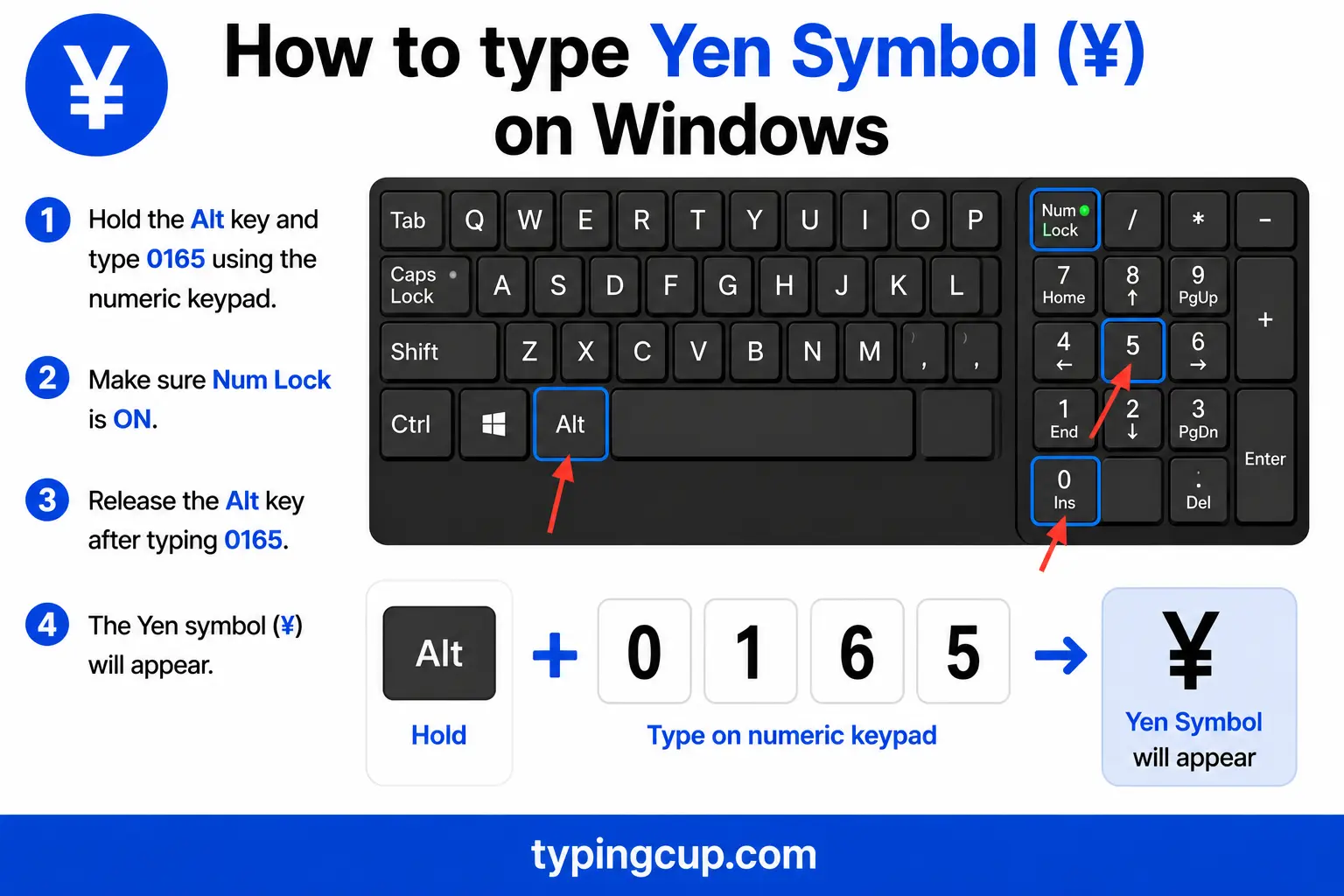
The reliable method is the Alt code: turn on Num Lock, hold Alt, and type 0165 on the numeric keypad. If that’s not convenient, press Windows + . for the symbol panel, or open Character Map. A Japanese keyboard layout has the ¥ on its own key.
Type the yen sign on Mac
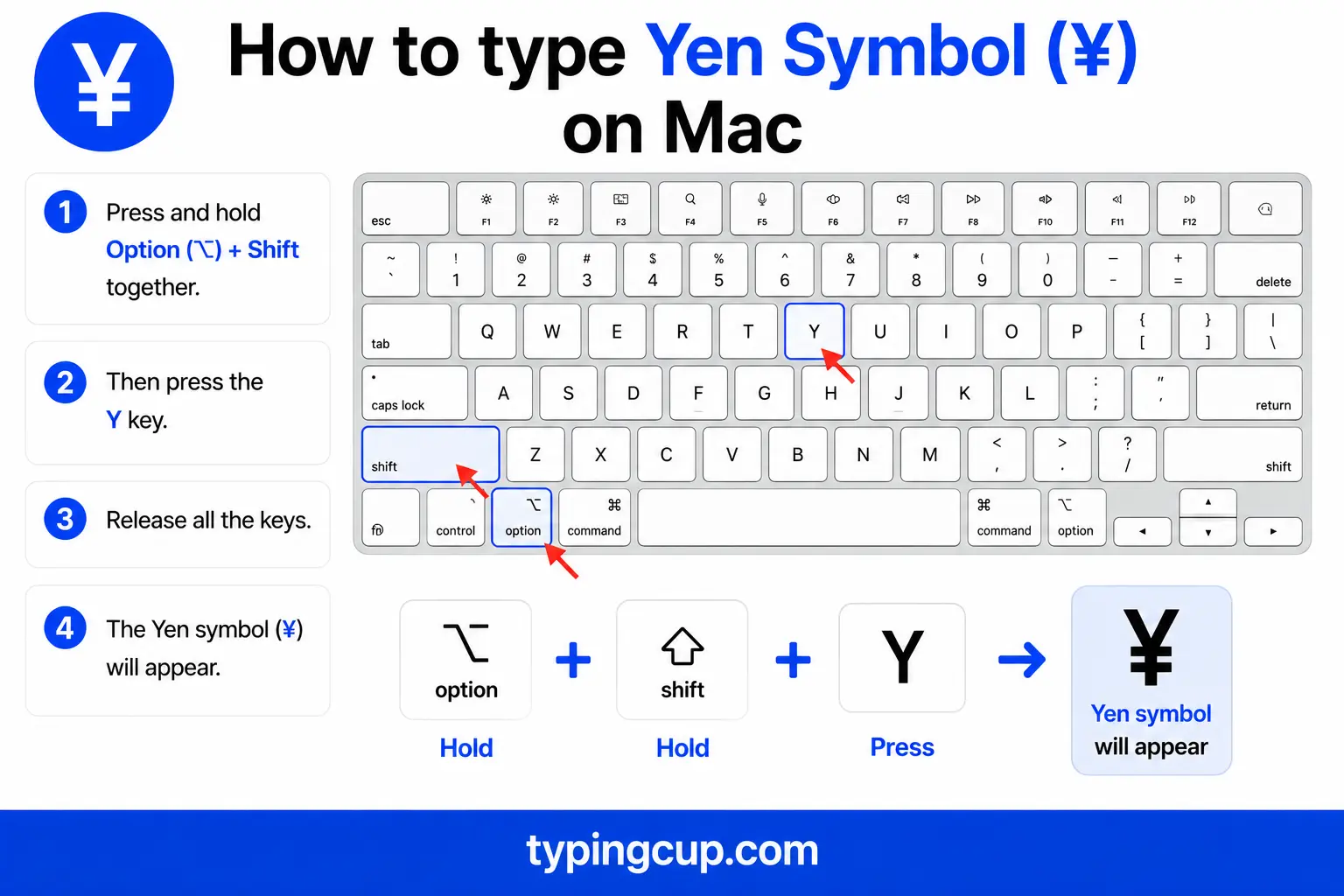
On a Mac, press Option + Y for ¥. That’s the whole shortcut, no dead-key step. If Option + Y gives you something else, open the Character Viewer with Control + Command + Space and search “yen.”
Type the yen sign on iPhone and Android
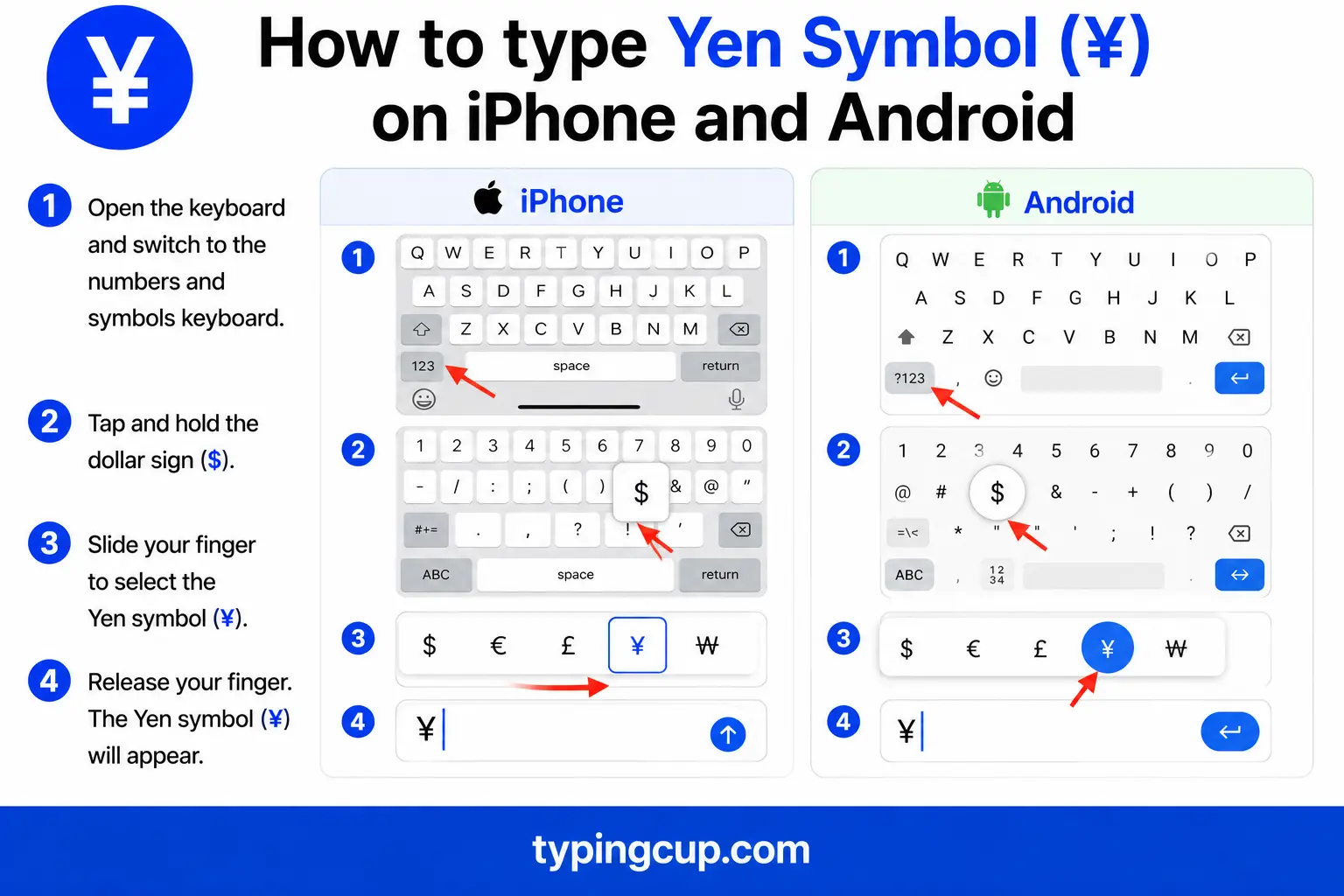
Open the numbers-and-symbols keyboard (the 123 key), then press and hold the $ key. A little menu of currency symbols appears with ¥ among them. Slide onto it and lift your finger.
Type the yen sign in Microsoft Word
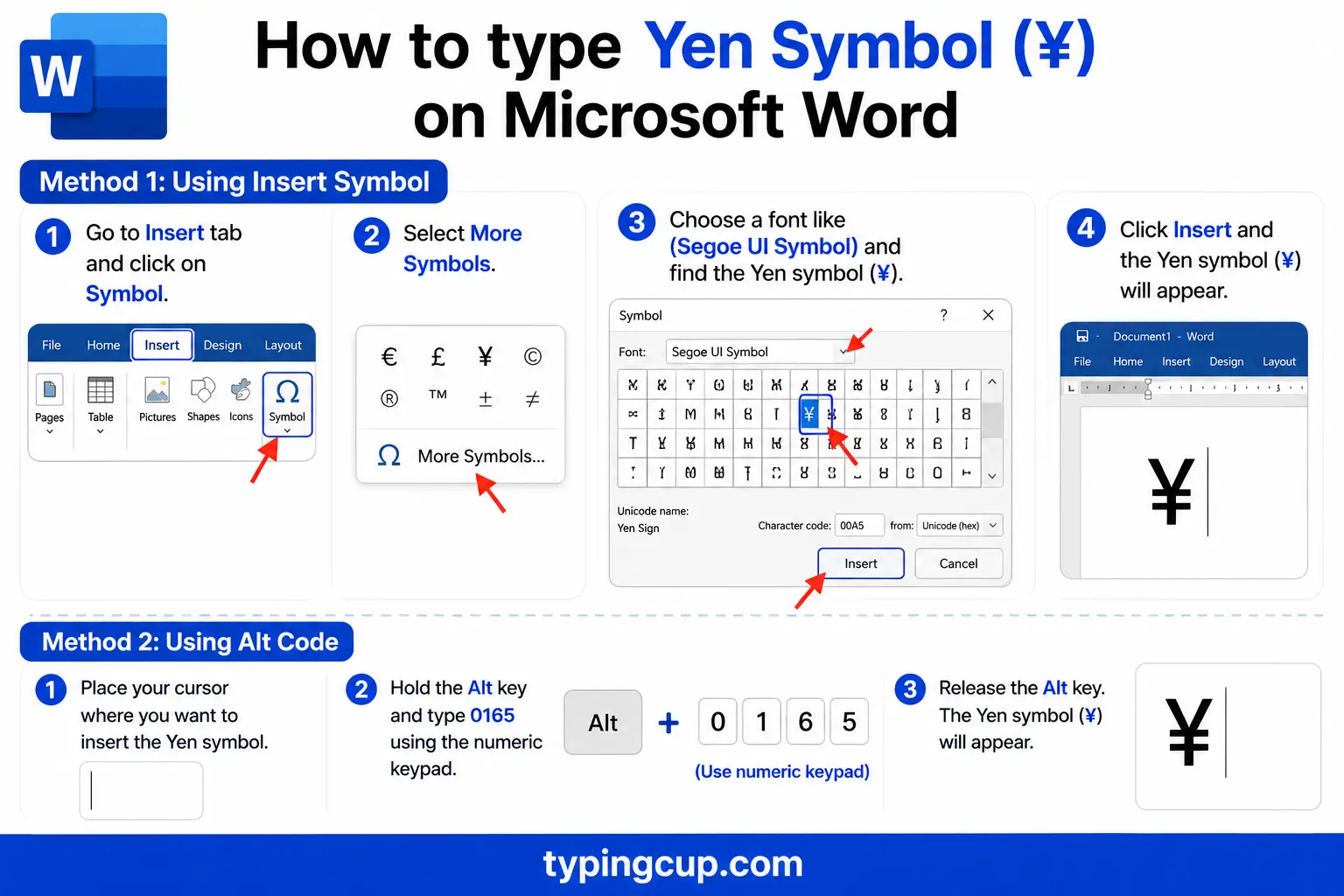
Use the Windows Alt code (0165), or the hex method: type 00A5 and press Alt + X. On a Mac, Option + Y works directly inside Word.
Type the yen sign on Linux
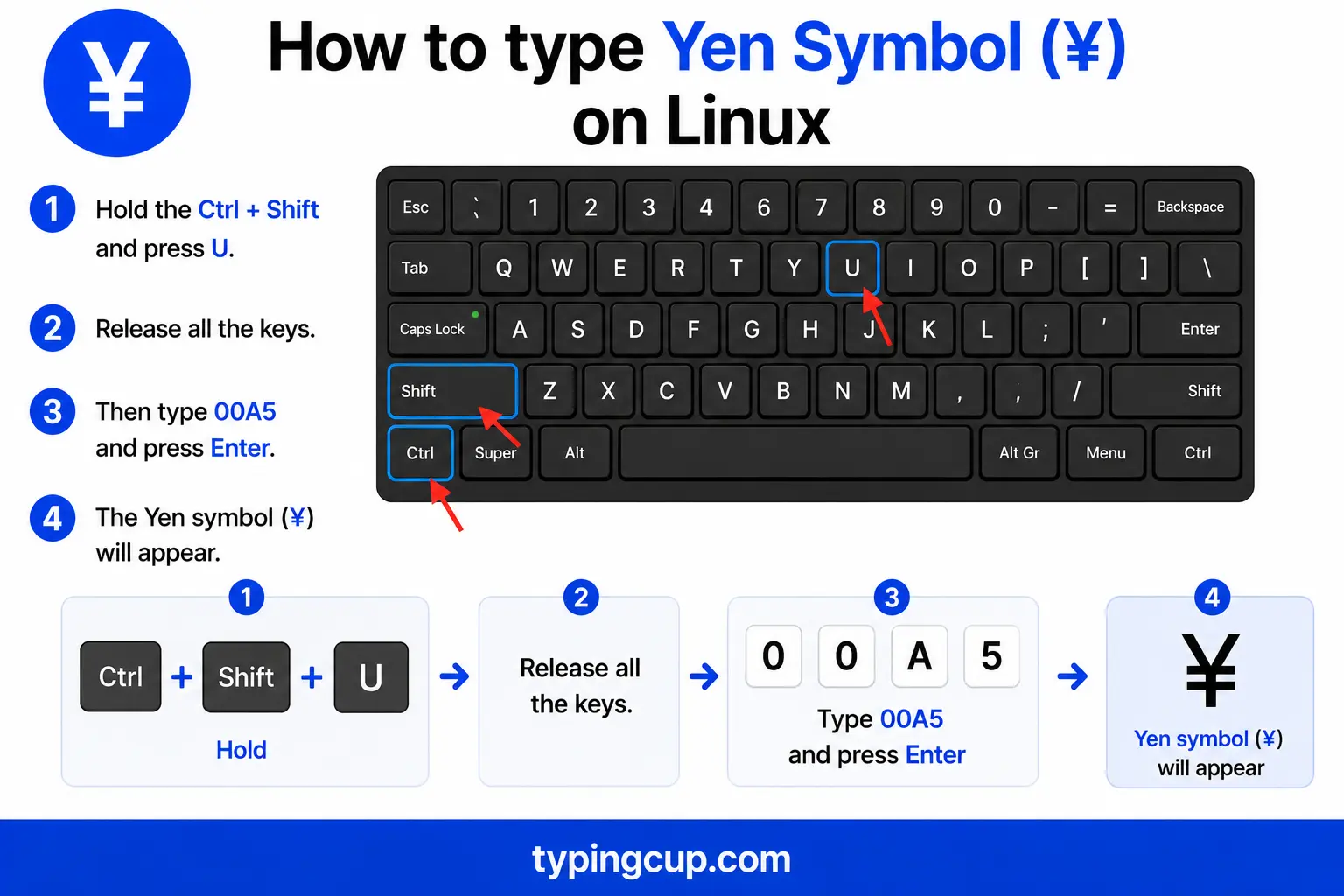
Press Ctrl + Shift + U, type 00a5, then press Enter. With a Compose key, the sequence is Compose, then y, then =.
Type the yen sign in Excel and Google Sheets
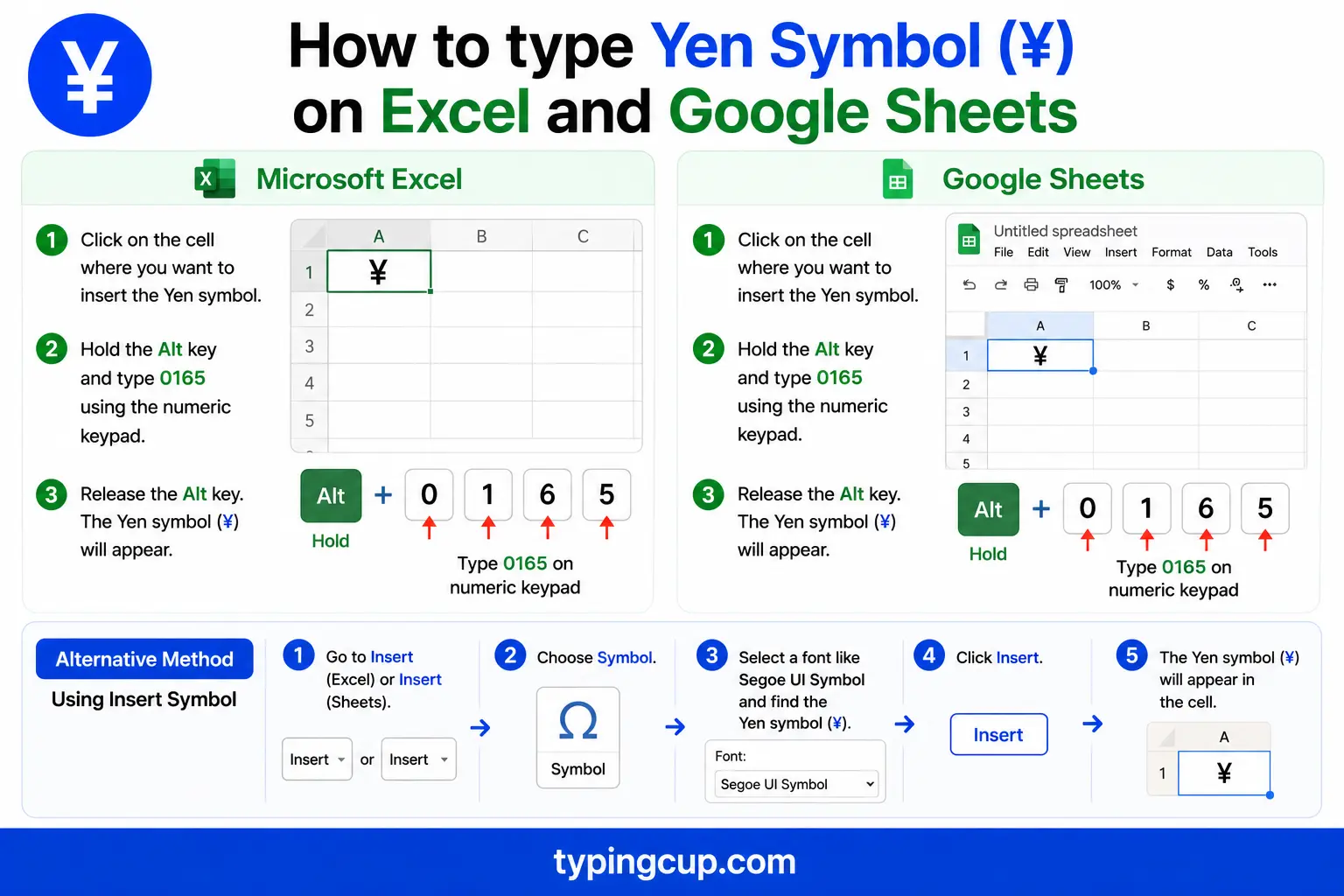
You can type ¥ with the Alt code, or use the =UNICHAR(165) formula. For figures, format the cell as Currency with the Japanese yen or Chinese yuan selected. The full-width ¥ is =UNICHAR(65509). It works the same in Google Sheets.
Type the yen sign in HTML and CSS
In HTML, the yen sign has a short named entity, ¥, plus the numeric ¥ and ¥. The full-width ¥ is ¥. In CSS, use \00A5 in a content value, and serve the page as UTF-8.
One symbol, two currencies: yen and yuan
The ¥ sign does double duty. It’s the symbol for the Japanese yen and, at the same time, for the Chinese yuan, the everyday unit of China’s currency. One character, two of Asia’s biggest currencies.
That overlap causes real confusion, because ¥100 might be worth well under a US dollar as yen, or many times that as yuan. When it matters, people disambiguate with the ISO codes, JPY for the yen and CNY for the yuan, or by writing JP¥ and CN¥, or by using RMB or the character 元 for the Chinese side. If a price in ¥ isn’t labelled, it’s worth checking which country it belongs to.
Why the yen sign appears instead of the backslash
Here’s a quirk that baffles programmers the first time they meet it: on many Japanese computers, the ¥ sign shows up where the backslash should be. A Windows path that reads C:\Users on an American machine can read C:¥Users on a Japanese one, and pressing the backslash key types a ¥.
The reason is historical. In the old Japanese encoding, Shift-JIS, the byte that means backslash in ASCII was assigned to the yen sign instead. So the same code draws a backslash in the US and a ¥ in Japan, and decades of software and fonts inherited the swap. Korea has the same story with its won sign ₩, which replaces the backslash on Korean systems.
For everyday writing it’s harmless, but in code it can confuse: a Japanese developer’s ¥ and an American developer’s backslash may be the exact same byte underneath. If a path or an escape character shows up as ¥, that’s what’s happening.
¥ vs ¥: half-width and full-width
There are two yen signs. The ordinary one, ¥ (U+00A5), is the half-width sign you’ll use in English text. There’s also a full-width version, ¥ (U+FFE5), which is wider and built to line up with Chinese, Japanese, and Korean characters, where every glyph fills a full square.
They mean the same thing but are different characters. In CJK typography the full-width ¥ sits neatly beside the local script; in English text the half-width ¥ looks right. If a yen sign looks oddly wide or cramped, you probably have the other one. Both are in the copy grid above.
Yuan, renminbi, or RMB? Naming China’s currency
China’s money has three names that get used interchangeably, which adds to the ¥ confusion. Renminbi (RMB) is the official name of the currency, meaning “people’s currency.” The yuan is the basic unit you count in, and ¥ or the character 元 is its symbol.
The relationship is like sterling and the pound: the renminbi is the currency, the yuan is the unit. So a price is “100 yuan,” “¥100,” or “RMB 100,” all the same amount. In finance, the ISO code CNY covers it.
Where the ¥ comes from
The ¥ is a letter Y, the first letter of yen and yuan in the Latin alphabet, with two horizontal strokes added, the same stroke-through style used for the dollar and the cent. Both words come from characters meaning “round,” a nod to the round shape of coins.
The yen sign in web addresses, URLs, and code
You’ll rarely put a ¥ in a domain name, but it appears in URL paths and constantly in code on Japanese and Chinese sites.
In a URL, ¥ is percent-encoded as %C2%A5; the full-width ¥ is %EF%BF%A5. In code, the escapes are \u00a5 in JavaScript, Java, JSON, and Python, and ¥ or ¥ in HTML. Watch the backslash trap above: on a Japanese font or encoding, a ¥ and a backslash can look identical, which matters in string escapes and file paths.
The yen sign vs other currency symbols
Here’s the yen alongside its currency neighbours, with their Unicode points.
| Symbol | Currency | Unicode | HTML |
|---|---|---|---|
| ¥ | Yen / Yuan | U+00A5 | ¥ |
| $ | Dollar | U+0024 | $ |
| € | Euro | U+20AC | € |
| £ | Pound sterling | U+00A3 | £ |
| ₩ | Korean won | U+20A9 | ₩ |
| ₹ | Indian rupee | U+20B9 | ₹ |
| ¢ | Cent | U+00A2 | ¢ |
The yen, dollar, euro, pound, and cent all have short named entities. The euro sign, pound sign, and cent sign guides cover those in the same detail.
Copy-paste HTML codes
Every code for the yen sign, half-width and full-width, in one place. Click a cell and copy.
| Symbol | Named entity | Numeric entity | URL (percent) code |
|---|---|---|---|
| ¥ | ¥ | ¥ | %C2%A5 |
| ¥ | — (none) | ¥ | %EF%BF%A5 |
In a CSS content value, use \00A5. For other symbols, the arrow symbols guide has the same treatment, and for accented letters see the full letters-with-accents list.
Troubleshooting
“My yen sign shows up as Â¥ or a box.”
That’s an encoding mismatch: the UTF-8 bytes for ¥ are being read as an older encoding, which adds a stray Â. Set the file, database, and page charset to UTF-8 and the ¥ returns clean.
“My backslash key types ¥.”
You’re on a Japanese keyboard or font where the backslash byte is drawn as the yen sign. It’s the same underlying character; for code, it still behaves as a backslash. Switch the font or layout if you want the backslash glyph.
“Alt + 0165 just beeps or types nothing.”
Num Lock is off, you’re using the top-row numbers, or the laptop has no keypad. Turn Num Lock on and use the keypad. No keypad? Use the copy grid above or Windows + .
“My yen sign looks too wide or too narrow.”
You’ve got the other width. The half-width ¥ (U+00A5) suits English text; the full-width ¥ (U+FFE5) suits Japanese and Chinese text. Copy whichever fits from the tables above.
FAQ
How do I type the yen sign?
On Windows, Alt + 0165. On a Mac, Option + Y. On a phone, long-press the $ key. In Word, Alt + 0165 or 00A5 then Alt + X. Or click ¥ in the grid above.
Is ¥ the yen or the yuan?
Both. ¥ is the symbol for the Japanese yen and the Chinese yuan. To be clear which you mean, use the ISO codes JPY or CNY, or write RMB or 元 for the Chinese currency.
Why does my backslash show up as ¥?
On Japanese systems, the backslash byte is displayed as the yen sign, a leftover from the Shift-JIS encoding. It’s the same character underneath, so it still works as a backslash in code even when it looks like ¥.
What’s the difference between ¥ and ¥?
¥ (U+00A5) is the half-width yen sign for English text; ¥ (U+FFE5) is the full-width version sized to match Chinese and Japanese characters. They mean the same thing but are different characters.
How do I write the yen sign in HTML?
Use the named entity ¥, or the numeric ¥ or ¥. The full-width ¥ is ¥. In a URL, ¥ is %C2%A5, and in CSS content it’s \00A5.
