
Cent Symbol (¢): How to Type, Copy, and Use the Cent Sign
The cent sign, ¢, marks a hundredth of a dollar, so fifty cents is 50¢. It’s a letter c with a stroke through it, it goes after the number rather than before, and it used to be a standard key before computer keyboards quietly dropped it. This page covers all of it.
If you just need the symbol, copy ¢ from the grid below, along with its HTML entity, its numeric code, or its URL code.
Below you’ll find how to type ¢ on every device, where it goes in a price, why American gas costs end in nine-tenths of a cent, why it vanished from keyboards, and how it differs from the look-alike cedi ₵.
In a hurry?
- Copy it: click ¢ in the grid below.
- On Windows: hold Alt and type 0162 on the numeric keypad.
- On a Mac: press Option + 4.
- On a phone: on the numbers-and-symbols keyboard, long-press the $ or currency key and pick ¢.
- In HTML the cent sign is ¢; in a URL it’s %C2%A2.
Click to copy: the cent sign
Grab ¢, its HTML entity, the numeric code, or the URL code
Table of Contents
Copy and paste the cent sign
The cent sign with every code you’re likely to need in one row. Use the grid above to copy with a click; this table is the reference for typing or coding it yourself.
| Symbol | Name | Unicode | Windows | Mac | HTML |
|---|---|---|---|---|---|
| ¢ | cent sign | U+00A2 | Alt + 0162 | Option + 4 | ¢ |
The cent sign has a fixed Alt code and a short HTML entity, so it’s easy to reach once you know where it hides. The sections below cover each device.
How to type the cent sign on any device
The cent sign isn’t printed on most modern keyboards, so it takes a code or a menu on most systems. Here’s the quickest route on each.
Type the cent sign on Windows
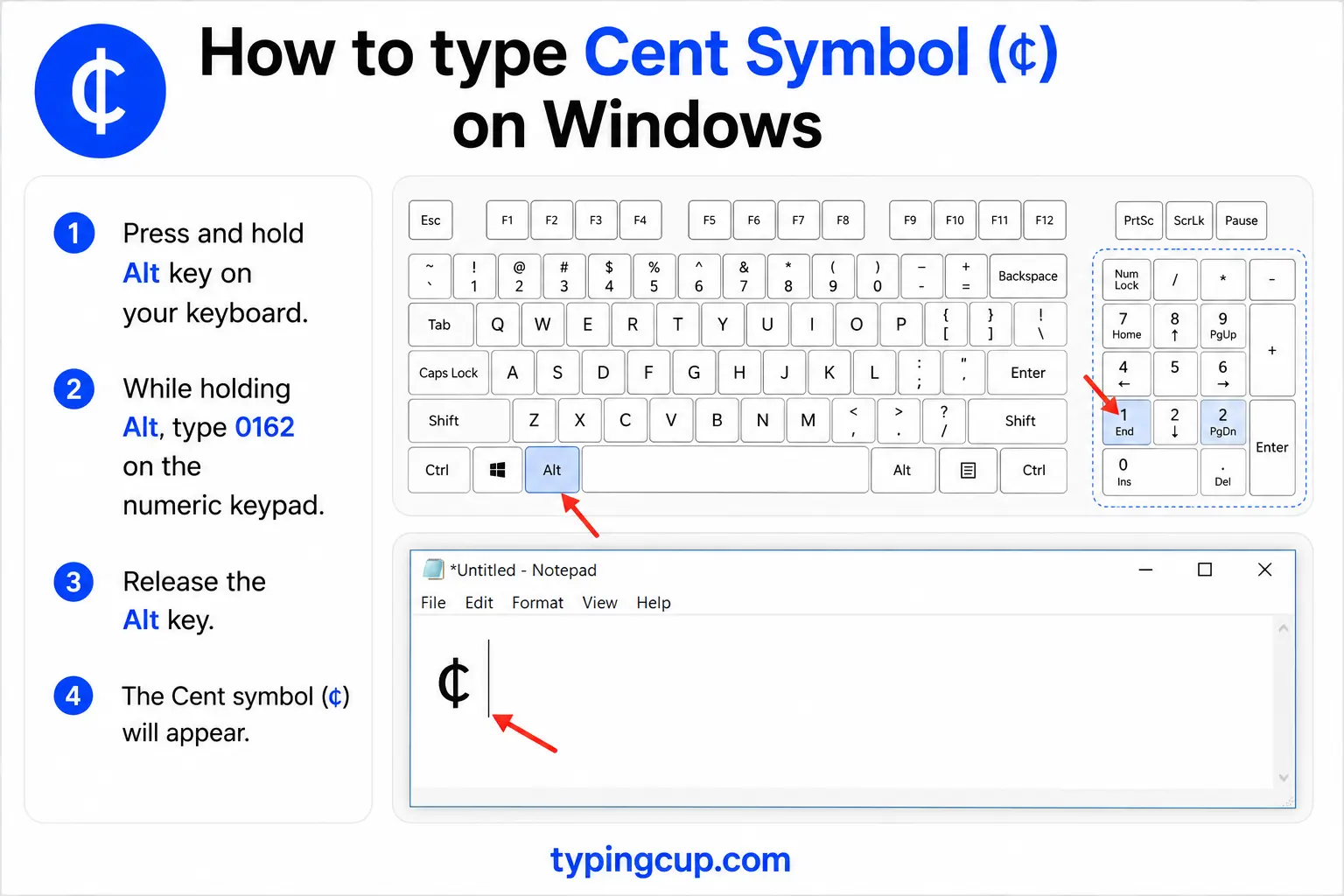
The reliable method is the Alt code: turn on Num Lock, hold Alt, and type 0162 on the numeric keypad. On the US-International layout, the right Alt (AltGr) plus c also gives ¢. If neither is handy, press Windows + . for the symbol panel, or open Character Map.
Type the cent sign on Mac
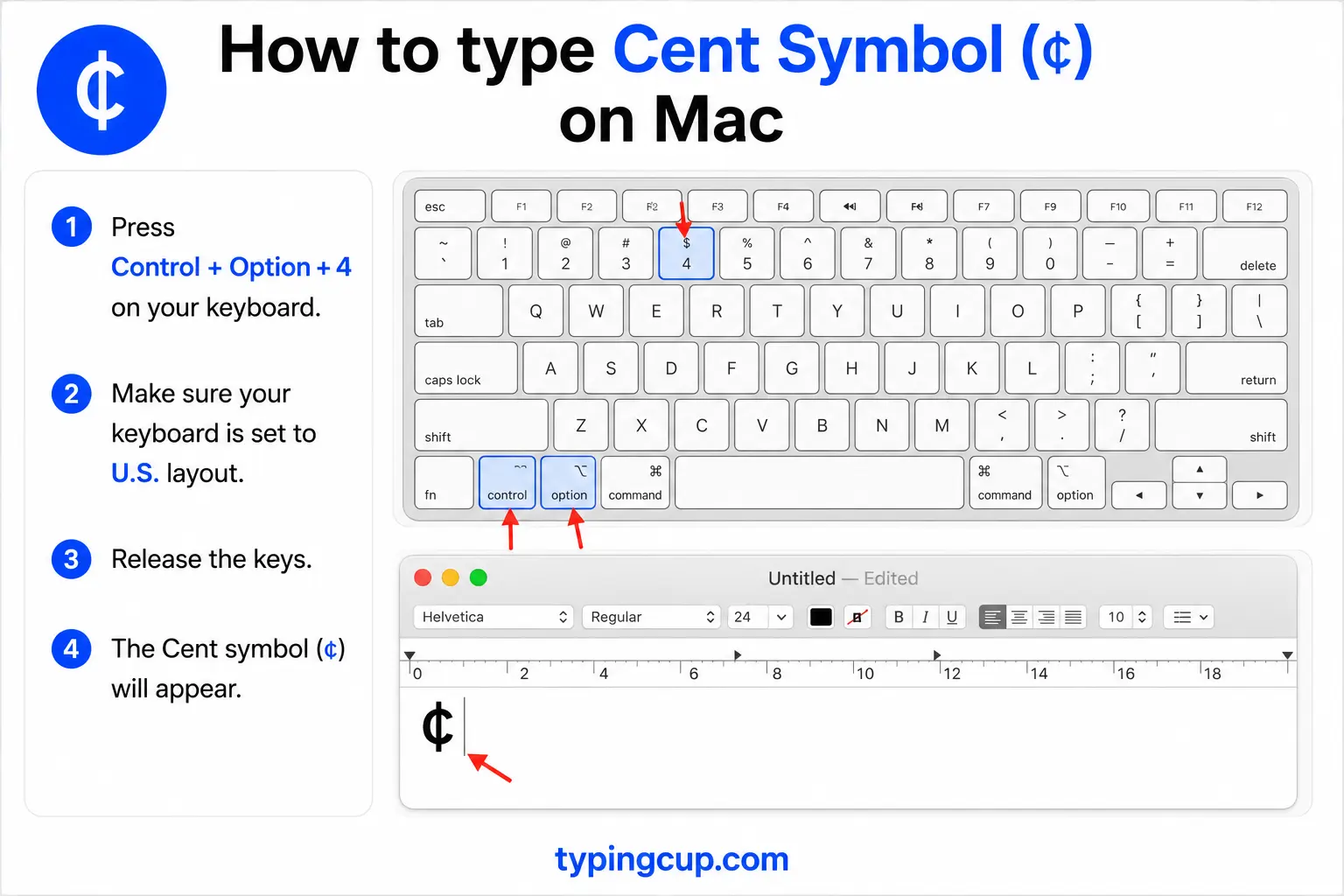
On a Mac, press Option + 4 for ¢. That’s it, no dead-key step. If Option + 4 gives you something else, you may be on a non-US layout, in which case open the Character Viewer with Control + Command + Space and search “cent.”
Type the cent sign on iPhone and Android
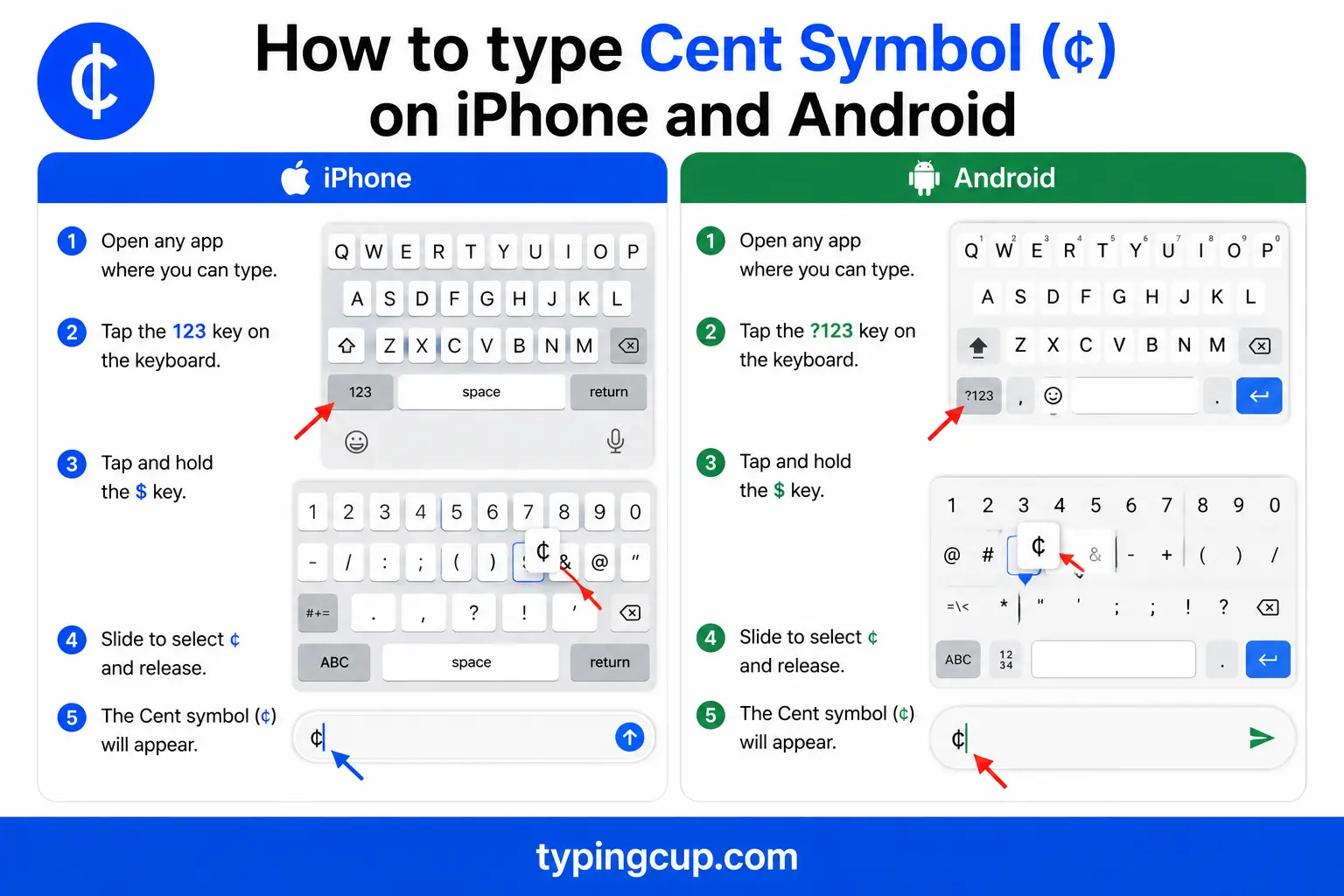
Open the numbers-and-symbols keyboard (the 123 key), then press and hold the $ key. A little menu of currency symbols appears with ¢ among them. Slide onto it and lift your finger.
Type the cent sign in Microsoft Word
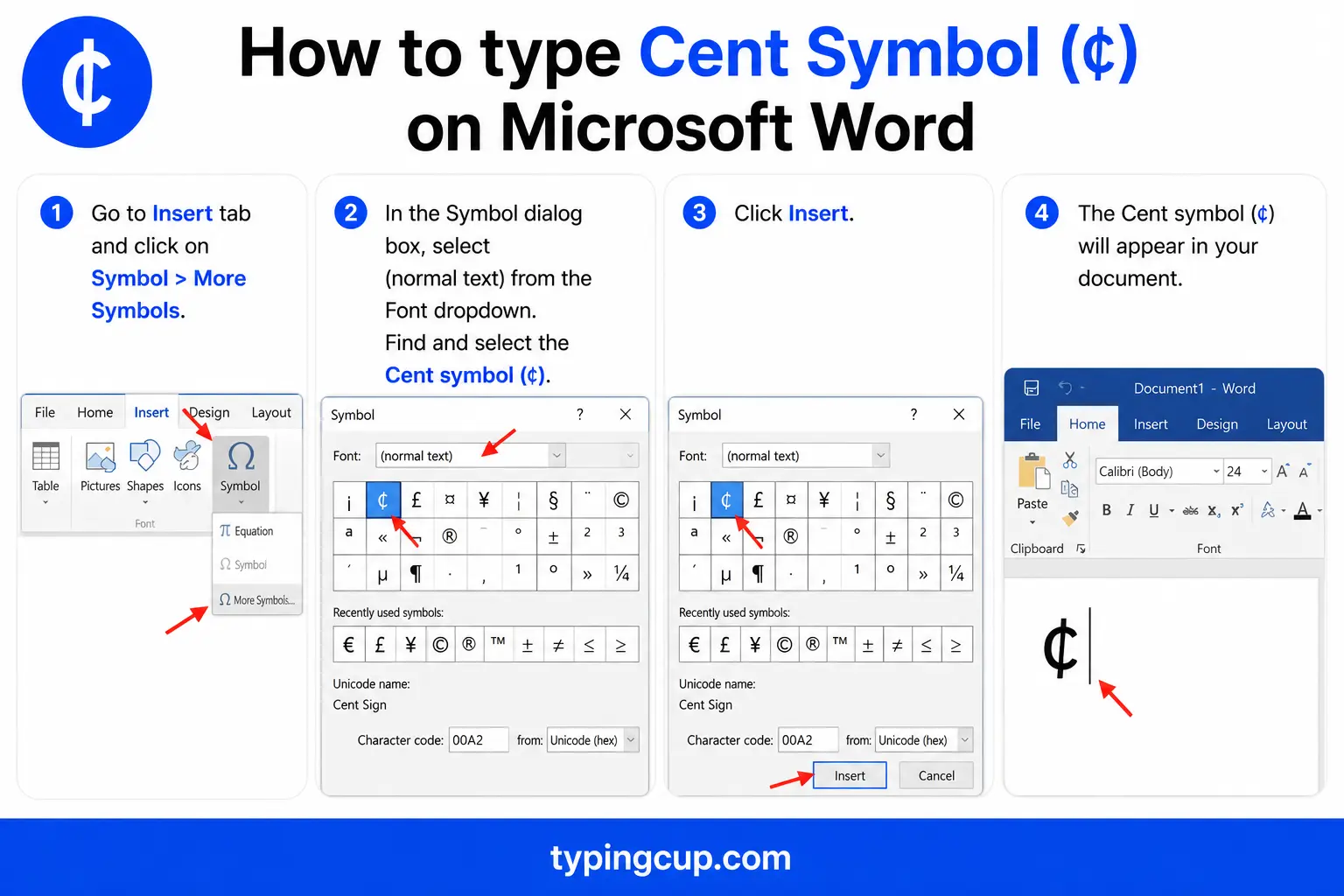
Use the Windows Alt code (0162), or the hex method: type 00A2 and press Alt + X. On a Mac, Option + 4 works directly inside Word.
Type the cent sign on Linux
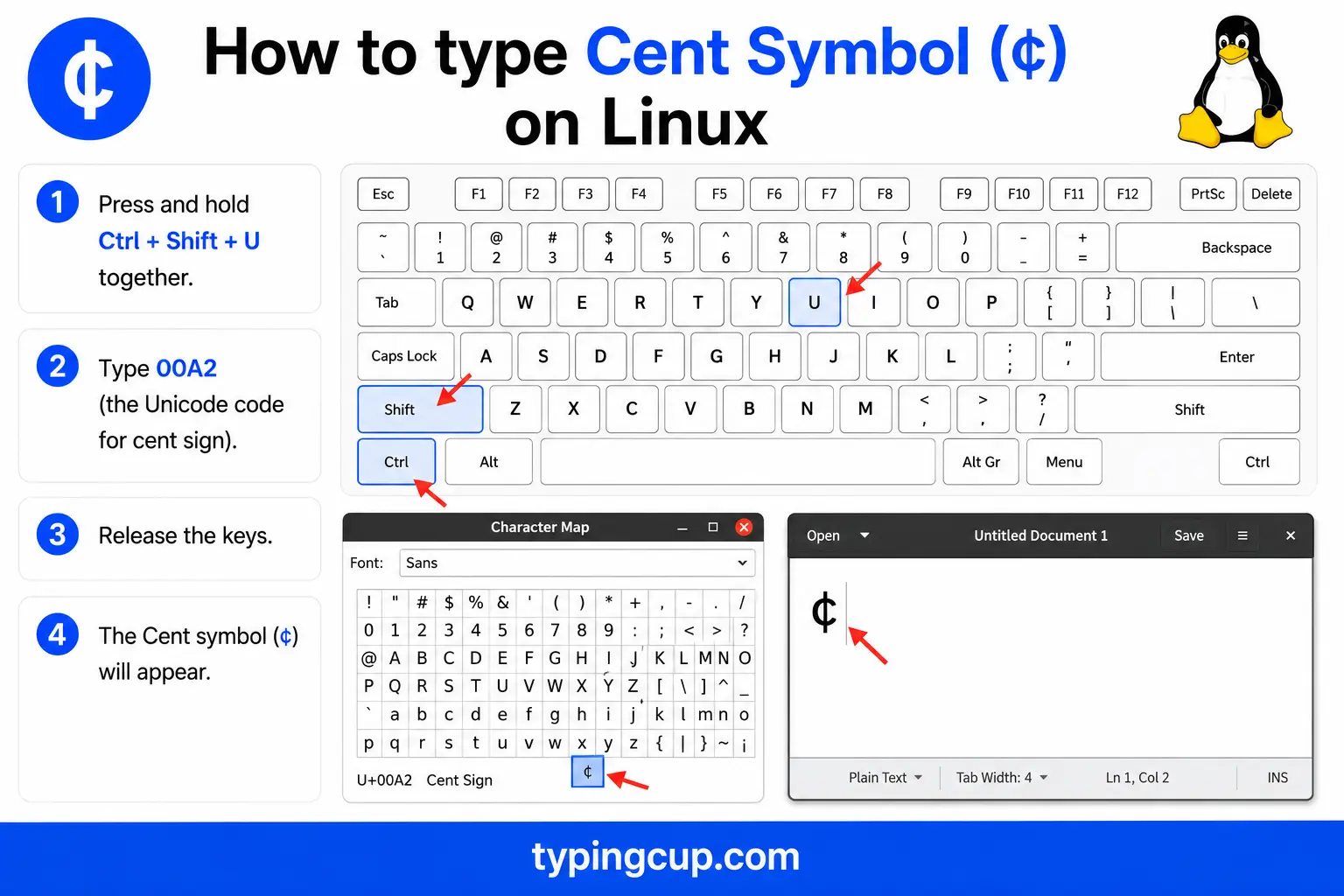
Press Ctrl + Shift + U, type 00a2, then press Enter. With a Compose key, the sequence is Compose, then c, then / (a slash), which draws the c with its stroke.
Type the cent sign in Excel and Google Sheets
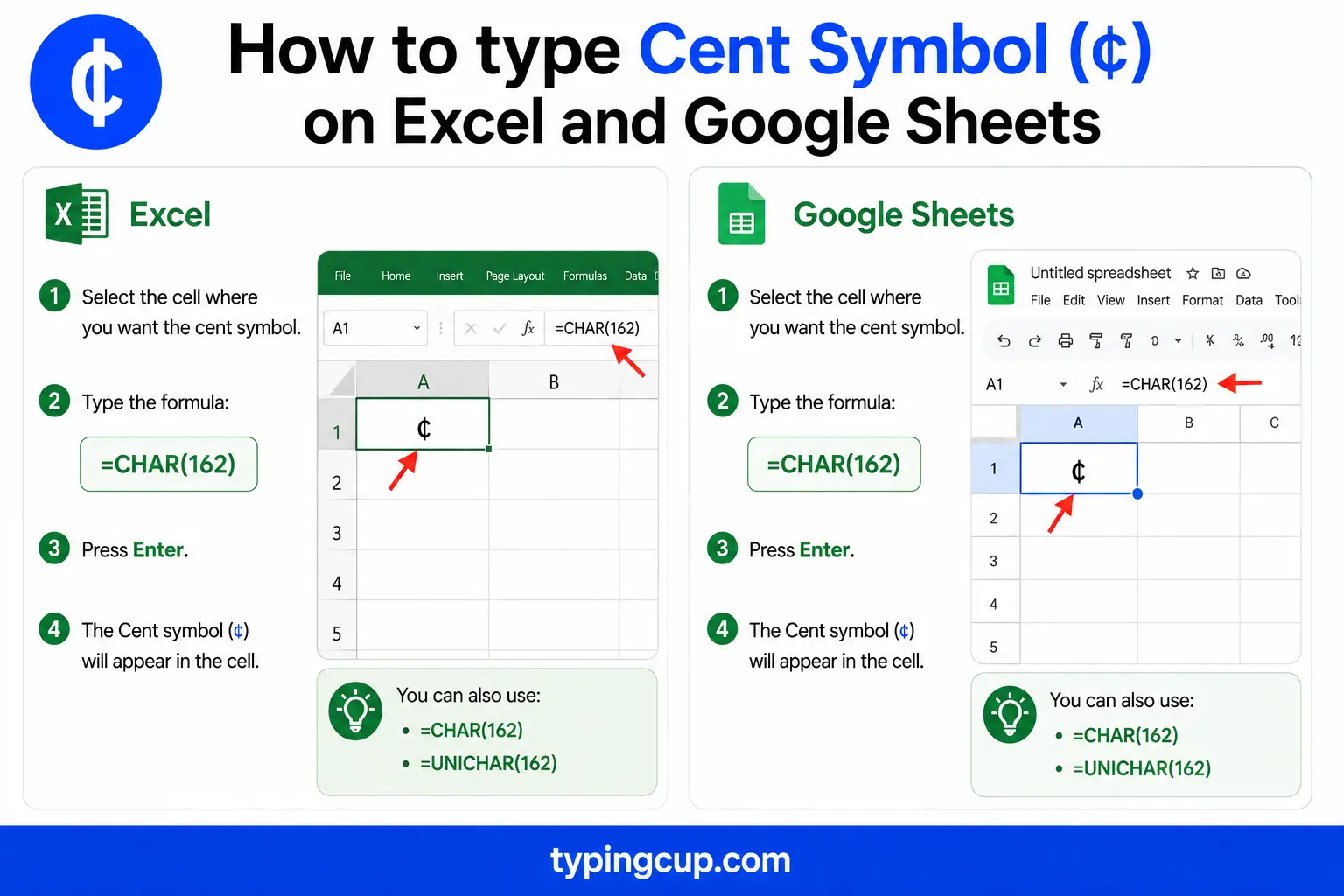
You can type ¢ with the Alt code, or use the =UNICHAR(162) formula, which returns ¢ inside a text string. For amounts, most people format the cell in dollars with a decimal (0.50) rather than using the cent sign; the sign is mainly for labels and prose. The formula works the same in Google Sheets.
Type the cent sign in HTML and CSS
In HTML, the cent sign has a short named entity, ¢, plus the numeric ¢ and ¢. In CSS, use \00A2 in a content value, and serve the page as UTF-8 so it renders everywhere.
Before or after the number? 50¢ vs ¢50
Unlike the dollar sign, the cent sign goes after the number, not before. Fifty cents is written 50¢, never ¢50. It’s the mirror image of the dollar, where the symbol leads: $5, but 5¢.
There’s a second rule that trips people up: don’t use both. An amount is either dollars or cents, so fifty cents is $0.50 or 50¢, but not $0.50¢, which says “fifty cents” twice over. Use the dollar sign with a decimal for anything a dollar or more, and save ¢ for amounts under a dollar.
Why American gas prices end in 9/10 of a cent
Here’s a piece of everyday trivia the cent sign is tangled up in: American gas prices almost always end in 9/10 of a cent. A sign reading $3.99 is really charging $3.999 a gallon, with that tiny nine-tenths of a cent tacked on the end.
The habit goes back to the 1930s, when fuel was cheap and a fraction of a cent per gallon was a genuine competitive edge, and when fuel taxes were themselves set in fractions of a cent. It stuck around as psychological pricing: $3.99 9/10 reads as “three-something” rather than four dollars, even though it’s a hair away from it.
The unit hiding in there, a tenth of a cent, has a name: a mill, one thousandth of a dollar. It’s the same unit used in property-tax “millage” rates, and it almost never appears anywhere else in daily life except on that spinning gas-station sign.
Why the ¢ vanished from keyboards
The cent sign used to be a standard key. Typewriters and adding machines had a dedicated ¢, right next to the dollar sign, because prices under a dollar were everywhere and worth a keystroke of their own.
Computer keyboards quietly dropped it. As US layouts standardised, the $ kept its spot but the ¢ didn’t make the cut, and prices increasingly used the dollar-and-decimal form ($0.50) instead. That’s why the symbol now hides behind an Alt code or an Option key, even though it was once as easy to type as the dollar. It hasn’t left Unicode, just the keys under your fingers.
¢ vs ₵: the cent sign and the cedi
The cent sign has a look-alike that catches people out. ₵ is the sign for the Ghanaian cedi, a completely separate currency, and it closely resembles the cent sign, a C with a stroke. ¢ (U+00A2) is the cent; ₵ (U+20B5) is the cedi.
They’re different characters with different codes, so if you mean cents, use ¢. It’s also worth not confusing ¢ with a plain lowercase c: informal prices sometimes write 50c, but the proper symbol is ¢.
Where the ¢ comes from
Like most currency symbols, the ¢ is a letter with a line through it. It’s a c, for cent, from the Latin centum meaning “hundred,” struck through with a stroke to mark it as a symbol. A cent is a hundredth of the main unit, which is exactly what the word says.
The cent sign in web addresses, URLs, and code
You’ll rarely put a ¢ in a domain name, but it turns up in URL paths and in code.
In a URL, ¢ is percent-encoded as %C2%A2, its two UTF-8 bytes written out. In code, the escapes are \u00a2 in JavaScript, Java, JSON, and Python, and ¢ or ¢ in HTML. Like other non-ASCII symbols, it can garble across encodings, showing up as ¢ when UTF-8 is read as Latin-1, which is fixed by keeping everything UTF-8.
The cent sign vs other currency symbols
Here’s the cent alongside its currency neighbours, with their Unicode points.
| Symbol | Currency | Unicode | HTML |
|---|---|---|---|
| ¢ | Cent | U+00A2 | ¢ |
| $ | Dollar | U+0024 | $ |
| € | Euro | U+20AC | € |
| £ | Pound sterling | U+00A3 | £ |
| ₵ | Ghanaian cedi | U+20B5 | ₵ |
| ¥ | Yen / Yuan | U+00A5 | ¥ |
The cent, dollar, euro, pound, and yen all have short named entities. The euro sign and pound sign guides cover those in the same detail.
Copy-paste HTML codes
Every code for the cent sign in one place. Click a cell and copy.
| Symbol | Named entity | Numeric entity | URL (percent) code |
|---|---|---|---|
| ¢ | ¢ | ¢ | %C2%A2 |
In a CSS content value, use \00A2. For other symbols, the arrow symbols guide has the same copy-and-code treatment, and for accented letters see the full letters-with-accents list.
Troubleshooting
“My cent sign shows up as ¢ or a box.”
That’s an encoding mismatch: the UTF-8 bytes for ¢ are being read as an older encoding, which adds a stray Â. Set the file, database, and page charset to UTF-8 and the ¢ returns clean.
“Alt + 0162 just beeps or types nothing.”
Num Lock is off, you’re using the top-row numbers, or the laptop has no keypad. Turn Num Lock on and use the keypad. No keypad? Use the copy grid above, AltGr + c on US-International, or Windows + .
“I can’t find the cent sign on my keyboard.”
It isn’t there. Modern keyboards dropped the ¢ key, so use Alt + 0162 on Windows, Option + 4 on a Mac, or the copy grid at the top of this page.
“Is this ¢ or ₵?”
If it’s a currency other than a cent, it may be the Ghanaian cedi ₵ (U+20B5), which looks similar. The cent sign is ¢ (U+00A2). Copy the one you actually mean from the tables above.
FAQ
How do I type the cent sign?
On Windows, Alt + 0162. On a Mac, Option + 4. On a phone, long-press the $ key. In Word, Alt + 0162 or 00A2 then Alt + X. Or click ¢ in the grid above.
Does the cent sign go before or after the number?
After: fifty cents is 50¢, not ¢50. That’s the opposite of the dollar sign, which goes before ($5). Don’t combine them, so write $0.50 or 50¢, not $0.50¢.
Why do gas prices end in 9/10 of a cent?
It’s a mix of history and psychology. Fractions of a cent mattered when fuel and fuel taxes were tiny in the 1930s, and $3.99 9/10 still reads as cheaper than $4.00. The fraction, a tenth of a cent, is called a mill.
Why isn’t the cent sign on my keyboard?
It used to be, on typewriters, but computer keyboards dropped it as prices moved to the dollar-and-decimal form. The character still exists; it’s just reached with an Alt code, Option + 4, or a copy.
How do I write the cent sign in HTML?
Use the named entity ¢, or the numeric ¢ or ¢. In a URL it’s %C2%A2, and in CSS content it’s \00A2.
