
Plus-Minus Symbol (±): How to Type, Copy, and Use It
The plus-minus symbol, ±, means “plus or minus” — both at once. You’ll see it in a measurement like 5 ± 0.2, meaning the true value sits somewhere between 4.8 and 5.2, and in algebra like x = ±3, meaning x is either 3 or −3. It’s not on any keyboard, so most people copy it or use a shortcut. This page has both, plus what ± actually means in each situation.
If you just need the character, copy ± from the grid below, along with its opposite the minus-plus ∓, the HTML entity, or the URL code.
Below you’ll find how to type ± on every device, its three different jobs, why there’s a second minus-plus sign, and how to keep it from breaking the numbers in a spreadsheet.
In a hurry?
- Copy it: click ± in the grid below.
- On Windows: hold Alt and type 0177 on the numeric keypad.
- On a Mac: press Shift + Option + = (the equals key).
- In Word: type 00B1 then press Alt + X.
- In HTML: write ± (or ±).
Click to copy: the plus-minus symbol
Grab the ± symbol, the minus-plus ∓, the HTML entity, or the URL code
Table of Contents
Copy and paste the plus-minus symbol
The plus-minus symbol with every code you’re likely to need, plus its opposite the minus-plus. Use the grid above to copy with one click; this table is the reference.
| Symbol | Name | Unicode | Windows | Mac | HTML |
|---|---|---|---|---|---|
| ± | plus-minus sign | U+00B1 | Alt + 0177 | Shift + Option + = | ± |
| ∓ | minus-plus sign | U+2213 | Alt + 8723 | — | ∓ |
There’s no plus-minus key on any keyboard, so it always takes a shortcut, a code, or a copy. The sections below cover each device, then the part that actually matters: what the symbol is telling you.
How to type the plus-minus symbol on any device
The ± sign isn’t on the keys, so here’s the quickest way to make one on each system.
Type the plus-minus symbol on Windows
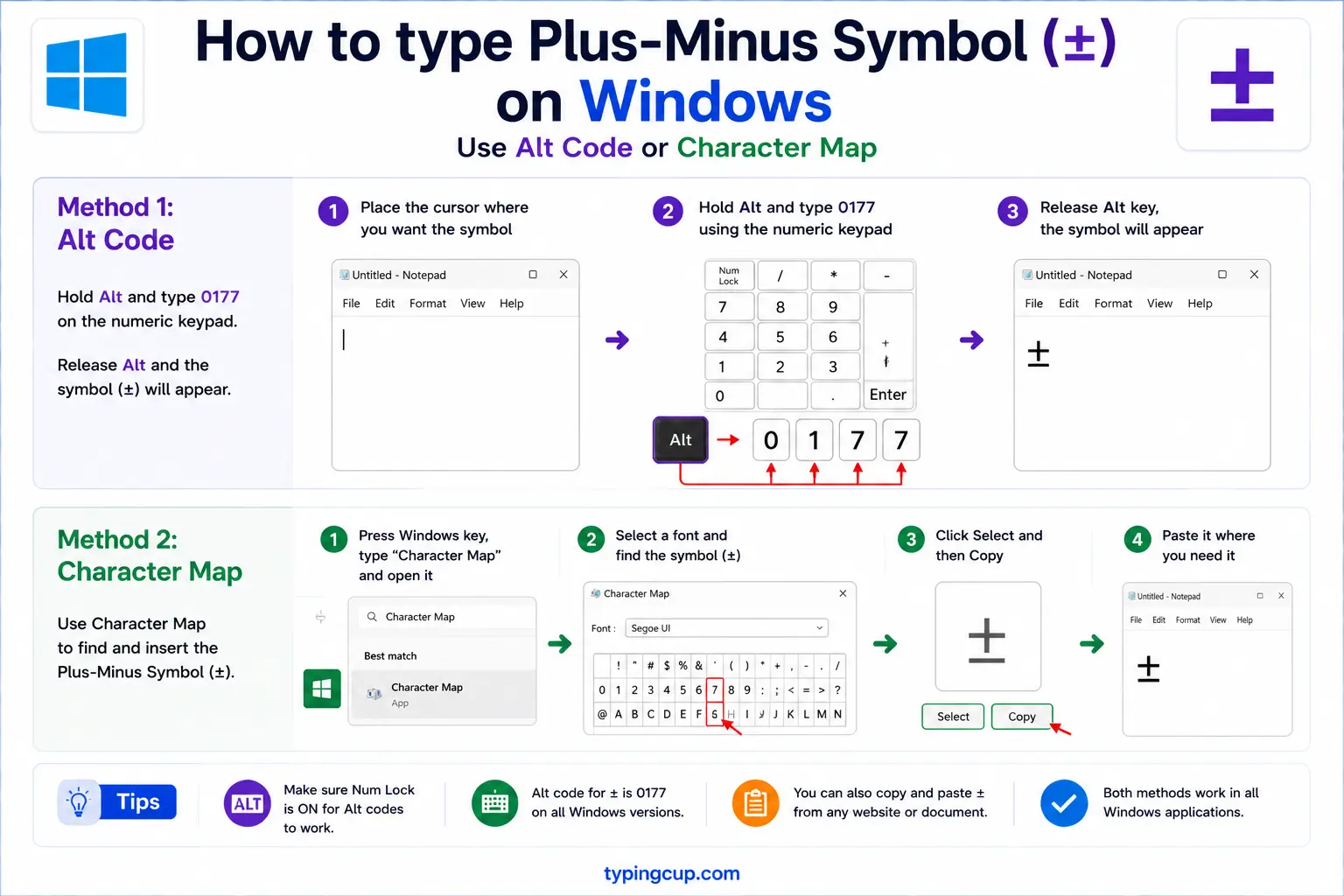
The reliable method is the Alt code: turn on Num Lock, hold Alt, and type 0177 on the numeric keypad for ±. (The shorter Alt + 241 works in many apps too.) On a laptop with no keypad, press Windows + . for the symbol panel and search “plus minus.”
Type the plus-minus symbol on Mac
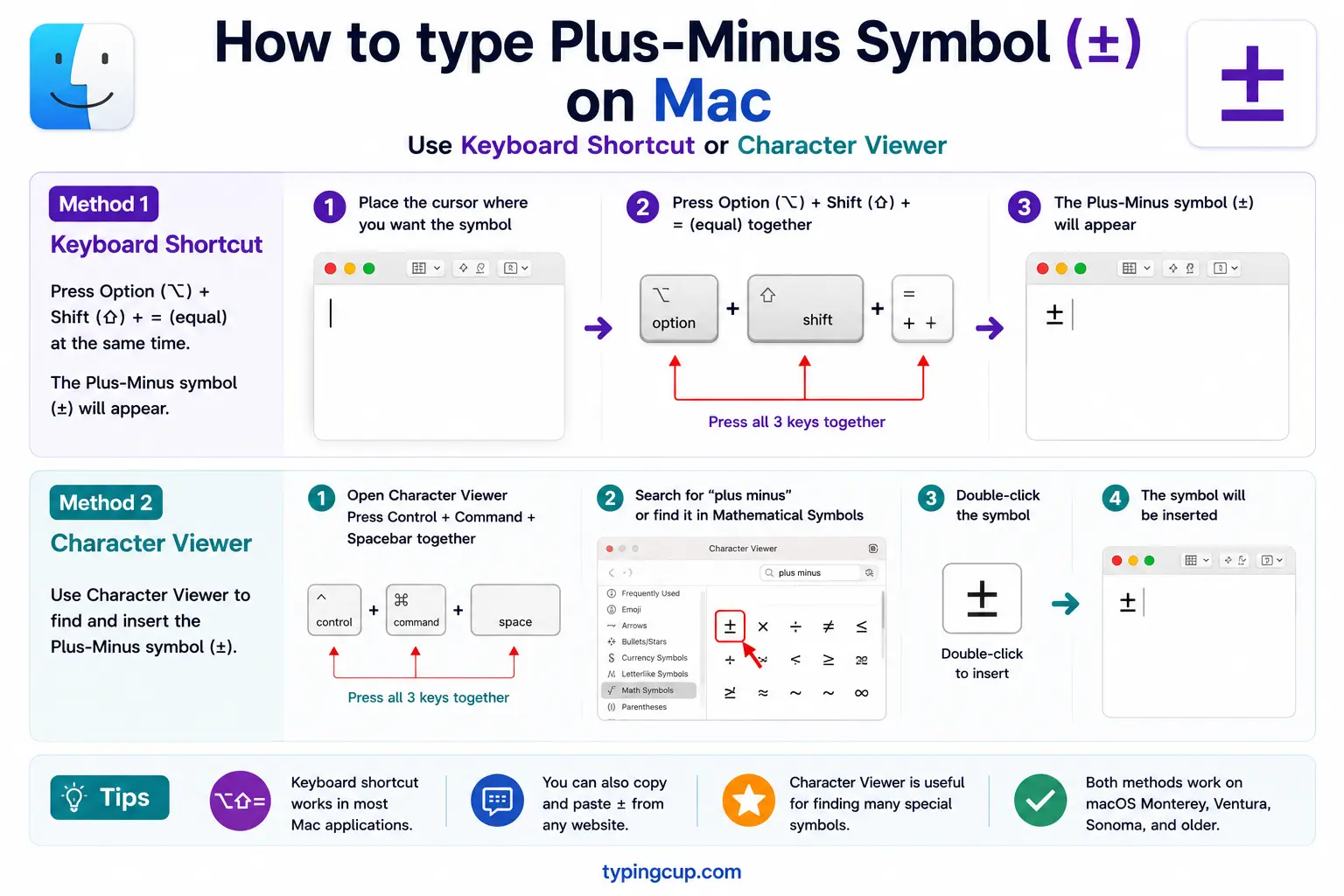
On a Mac, press Shift + Option + = (that’s Shift plus Option plus the equals key) for ±. It’s a single shortcut with no dead-key step. The minus-plus ∓ isn’t on a shortcut, so copy that one from the grid above.
Type the plus-minus symbol on iPhone and Android
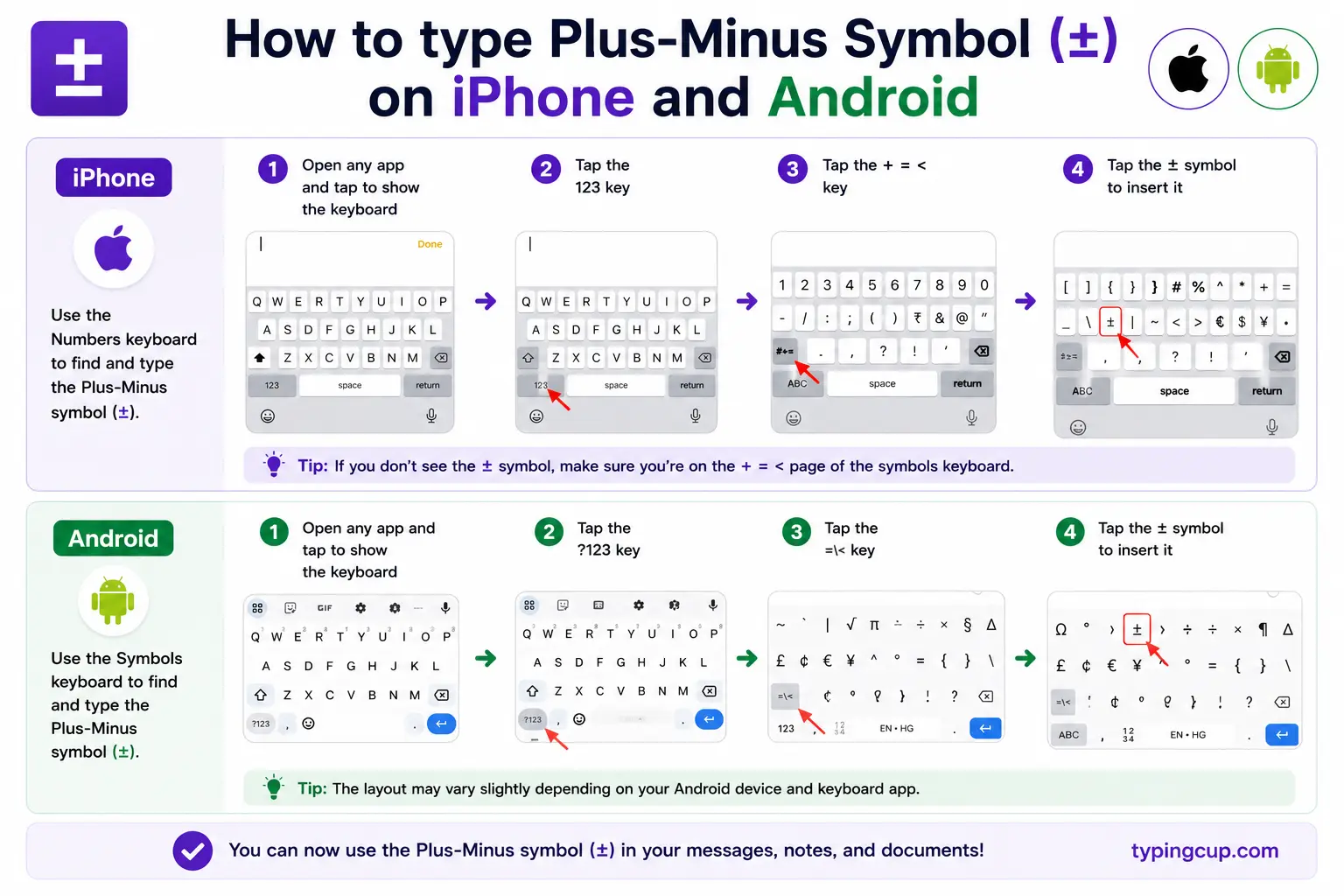
Neither phone keyboard has ± as standard, so copying is usually easiest on mobile. Some third-party keyboards add it on a symbols page, and scientific-calculator apps include it, but there’s no long-press for it on the default keyboards. Tap and hold in the grid above to copy it.
Type the plus-minus symbol in Microsoft Word
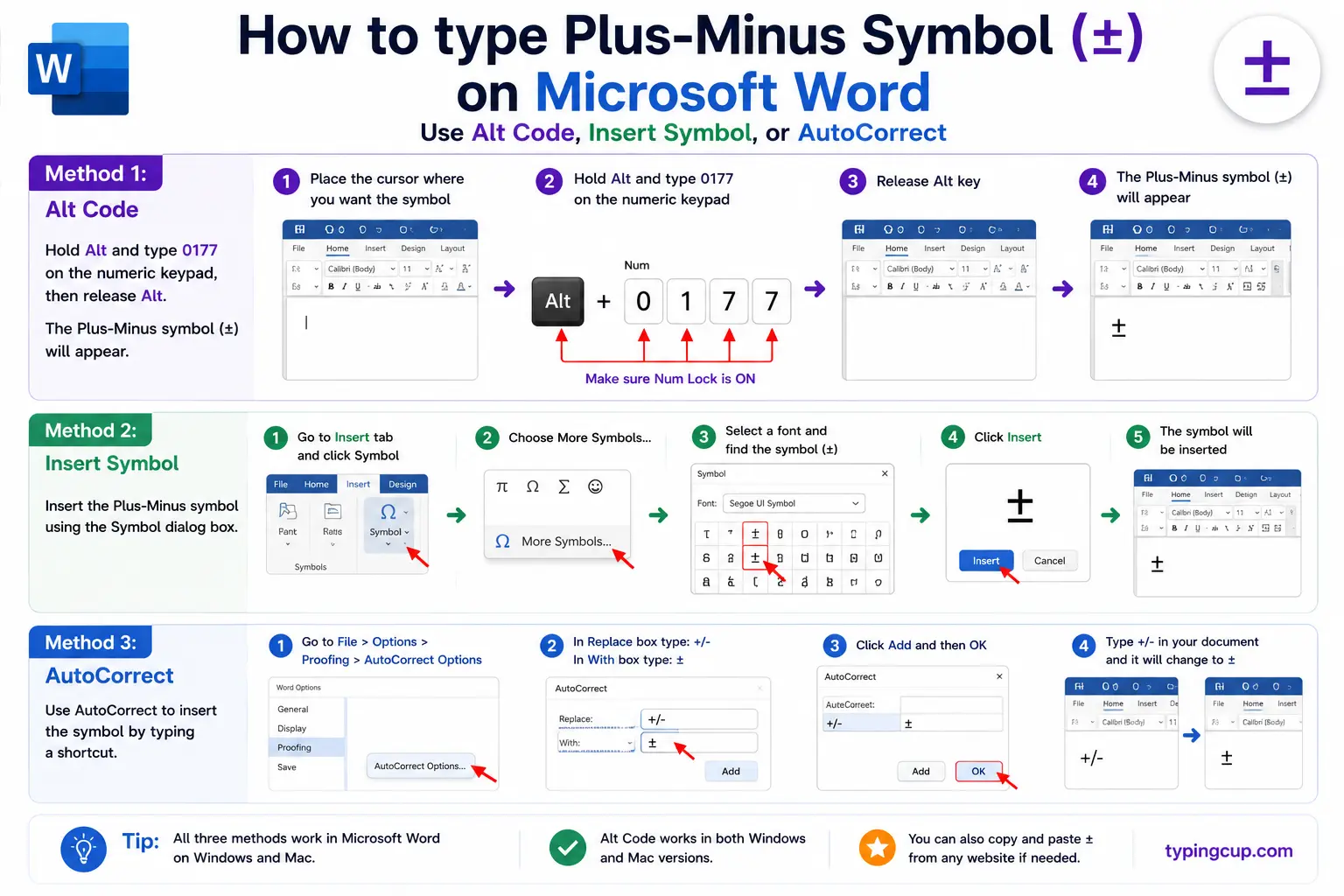
Two easy routes. Type 00B1 and press Alt + X to turn the code into ±. Or use Insert → Symbol, where ± sits among the common Latin-1 characters. The Windows Alt code (Alt + 0177) also works directly.
Type the plus-minus symbol on Linux
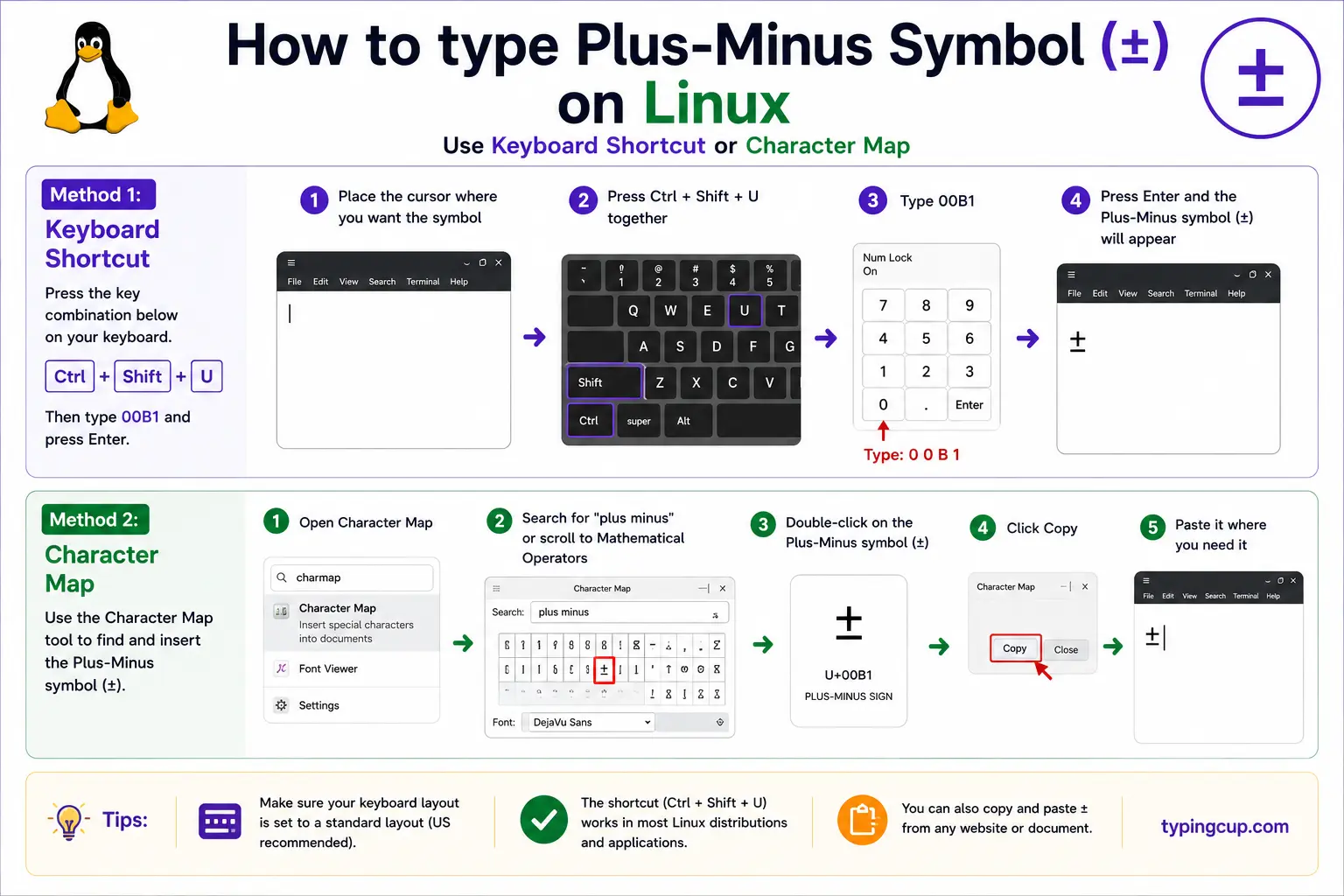
Press Ctrl + Shift + U, type 00b1, then press Enter. With a Compose key set up, Compose then + then – also produces ±.
Type the plus-minus symbol in Excel and Google Sheets
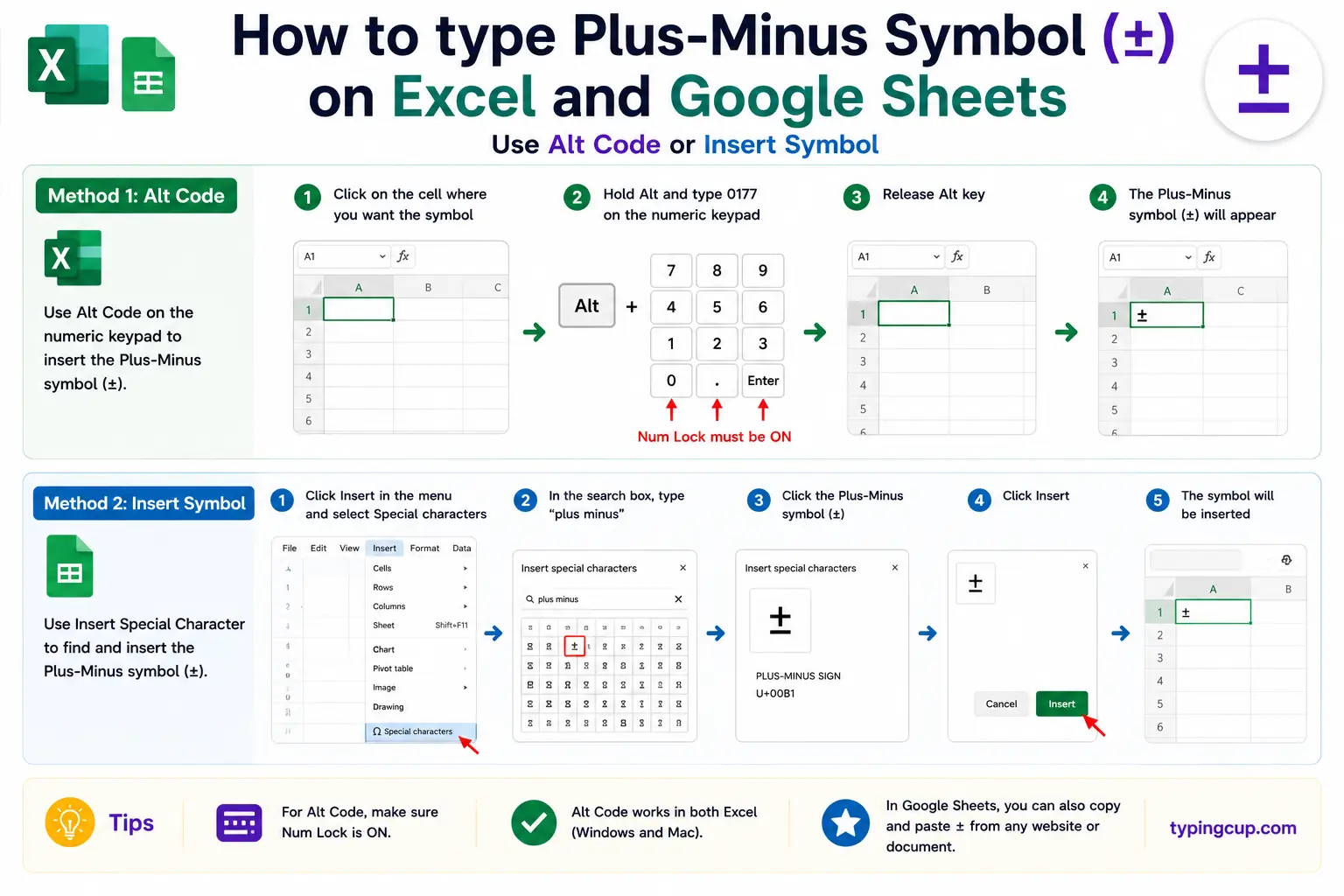
To show the character, use =UNICHAR(177) in Excel or =CHAR(177) in Google Sheets, or paste it in. Just remember a typed ± is plain text; if you want a real tolerance and working numbers, see the spreadsheet section below.
Type the plus-minus symbol in HTML and CSS
In HTML, the sign is ± or the numeric ±. In CSS, a literal ± in a content value is the escaped code point \00B1.
What ± actually means: three different jobs
Most guides tell you how to type ± but not what it’s saying, and it doesn’t say the same thing every time. The symbol does three distinct jobs, and reading it correctly depends on the context.
First, a range or uncertainty. In 5 ± 0.2, the ± means “give or take,” so the value lies anywhere from 4.8 to 5.2. This is how measurements, tolerances, and error bars are written. Second, two separate solutions. In x = ±3, the ± means x is either +3 or −3, two distinct answers, which is how the quadratic formula gives both roots at once. Third, both signs together, mostly in formulas where a term genuinely takes both signs depending on the case.
| Written as | ± means | Reading |
|---|---|---|
| 5 ± 0.2 | give or take | 4.8 to 5.2 |
| x = ±3 | either sign | x = 3 or x = −3 |
The difference matters. A tolerance describes one value with a margin; a ± in an equation describes two values. Same symbol, and the sentence around it tells you which one is meant.
± vs ∓: the minus-plus sign, and why it exists
There’s a mirror-image twin of ± that almost nobody types: the minus-plus sign ∓ (U+2213), which is minus on top, plus below. It exists for one specific reason: to pair with ± when two signs in the same expression must always be opposite.
The classic example is a trig identity: cos(a ± b) = cos a · cos b ∓ sin a · sin b. Here, when you take the top (plus) case on the left, you must take the top (minus) case on the right, and vice versa. The ∓ is a compact way of saying “the opposite sign to the ± above.” Outside that pairing you’ll rarely need it, but when you do, the plain ± won’t carry the meaning.
So: use ± on its own for a margin or a pair of solutions, and reach for ∓ only when it’s linked to a ± elsewhere in the same formula and the signs have to flip together.
The ± in measurements and error bars
In science and engineering, ± is how you write down how sure you are. A result reported as 10.0 ± 0.3 g says the best estimate is 10.0 grams, and the real value is very likely within 0.3 grams either way. The number after the ± is the uncertainty, and it can mean a few slightly different things depending on the field.
It might be the measurement tolerance (how precise the instrument is), a standard deviation (the spread of repeated readings), or a confidence interval (a statistical range). Good writing says which: 21.4 ± 0.5 °C (1 SD) is clearer than the bare number. On spacing, the usual convention is a space on each side when a unit follows, as in 5 ± 0.2 m.
The same idea drives the error bars on a graph: each bar is the ± range drawn around a point. So when you see 5 ± 0.2, picture a little bracket reaching from 4.8 up to 5.2.
± in the quadratic formula
The place most people first meet ± is the quadratic formula, where it does the “two solutions” job. The formula ends in … ± √(b² − 4ac) / 2a, and that single ± is standing in for two full calculations at once.
You take the whole thing once with a plus and once with a minus, giving the two roots of the equation. It’s a neat piece of shorthand: rather than writing the formula out twice, one for each sign, the ± folds both answers into a single line. Whenever you see ± in algebra, that’s usually what it means — solve it twice, once for each sign, and keep both results.
Showing ± in Excel without breaking the numbers
Here’s a practical trap: if you type 5 ± 0.2 into a cell, Excel treats the whole thing as text, and you can no longer do maths with it. There are two better ways, depending on what you need.
If you only need it to look right while keeping the value numeric, use a custom number format: format the cell as 0.0 "± 0.2" so the cell still holds the number 5 but displays 5.0 ± 0.2. If the tolerance itself varies per row, keep the value and the uncertainty in two separate columns and join them for display with a formula like =A2&" ± "&B2. That keeps your real numbers intact for calculations while still printing the ± where you want it.
Copy-paste HTML codes
Every code for the plus-minus and minus-plus signs in one place. Click a cell and copy.
| Symbol | Named entity | Numeric entity | URL (percent) code |
|---|---|---|---|
| ± | ± | ± | %C2%B1 |
| ∓ | — | ∓ | %E2%88%93 |
In a CSS content value, use \00B1 for the plus-minus sign. For related maths and keyboard symbols, the square root guide and the degree symbol guide get the same copy-and-code treatment.
Troubleshooting
My plus-minus sign shows as a box or garbled text
That’s an encoding mismatch: the UTF-8 bytes for ± (C2 B1) are being read as an older encoding. Set the file, database, and page charset to UTF-8 and the sign displays correctly.
Alt + 0177 isn’t working
Make sure Num Lock is on and you’re using the numeric keypad, not the top-row numbers. In apps that prefer the shorter code, try Alt + 241, or copy the symbol from the grid above.
My ± broke the maths in Excel
Typing ± into a cell makes it text. Use a custom number format like 0.0 "± 0.2" to display the tolerance while keeping the cell numeric, or store the value and uncertainty in two columns.
Which way round is the minus-plus?
The minus-plus ∓ has the minus on top and plus below, the reverse of ±. Use it only when it’s paired with a ± elsewhere in the same formula and the signs must be opposite.
FAQ
How do I type the plus-minus symbol?
On Windows, hold Alt and type 0177. On a Mac, press Shift + Option + = (the equals key). In Word, type 00B1 then Alt + X. In HTML, write ±. Or click ± in the grid above.
What does ± mean?
It depends on context. In a measurement like 5 ± 0.2 it means “give or take,” so the value is between 4.8 and 5.2. In algebra like x = ±3 it means two solutions, +3 and −3.
What is the difference between ± and ∓?
± is plus over minus; ∓ (the minus-plus, U+2213) is minus over plus. The ∓ is used alongside ± in a formula when the two signs must always be opposite, as in some trig identities.
Should there be spaces around ±?
For a measurement with a unit, yes: 5 ± 0.2 m. When ± means “either sign” directly in front of a number, it’s usually closed up: ±3. Be consistent within a document.
How do I write the plus-minus symbol in HTML?
Use ± or ±. In a URL it’s percent-encoded as %C2%B1.
