
Degree Symbol (°): How to Type, Copy, and Use It
The degree symbol, °, is the small raised circle you put after a number for temperature (20°C), angles (90°), and map coordinates (40°N). It’s not printed on any keyboard, so most people copy it or reach for a shortcut. This page has both, plus a few things about the degree sign that other guides skip.
If you just need the character, copy ° from the grid below, or grab its HTML entity or URL code.
Below that you’ll find how to type ° on every device, whether it takes a space (20°C or 20 °C), how it works in coordinates, and how to tell it apart from the look-alikes it gets confused with.
In a hurry?
- Copy it: click ° in the grid below.
- On Windows: hold Alt and type 0176 on the numeric keypad.
- On a Mac: press Shift + Option + 8.
- On a phone: long-press the 0 on the number keyboard.
- In HTML: write ° (or °).
Click to copy: the degree symbol
Grab the ° symbol, its HTML entity, or its URL code
Table of Contents
Copy and paste the degree symbol
The degree symbol with every code you’re likely to need. Use the grid above to copy with one click; this table is the reference.
| Symbol | Name | Unicode | Windows | Mac | HTML |
|---|---|---|---|---|---|
| ° | degree sign | U+00B0 | Alt + 0176 | Shift + Option + 8 | ° |
There’s no degree key on any keyboard, so it always takes a shortcut, a code, or a copy. The sections below walk through each device, and then the parts people actually get wrong: spacing and the look-alike characters.
How to type the degree symbol on any device
The degree sign isn’t on the keys, so here’s the quickest way to make one on each system.
Type the degree symbol on Windows
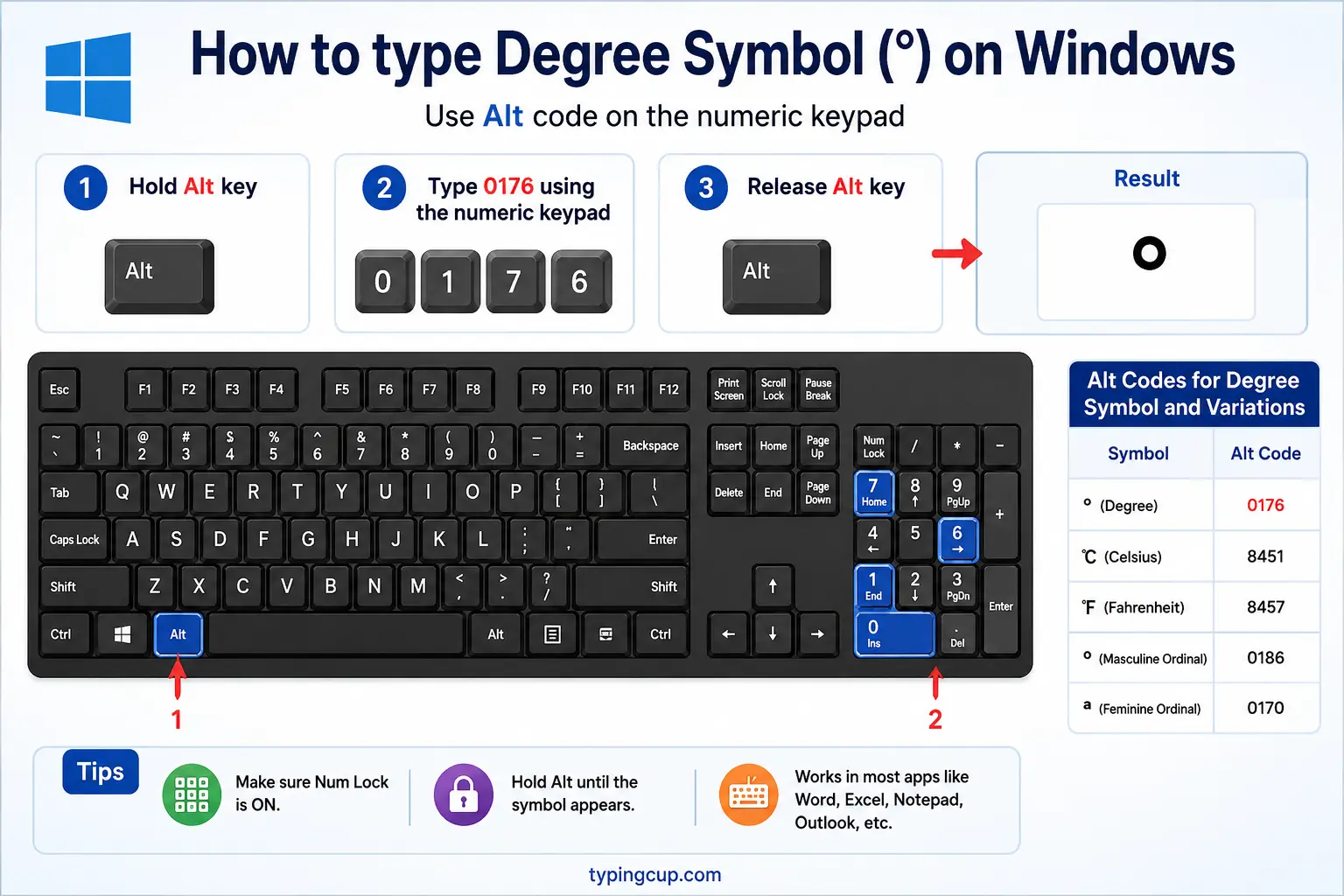
The reliable method is the Alt code: turn on Num Lock, hold Alt, and type 0176 on the numeric keypad for °. (The shorter Alt + 248 also works in many apps.) If you’re on a laptop with no keypad, press Windows + . to open the emoji and symbol panel and search for “degree.”
Type the degree symbol on Mac
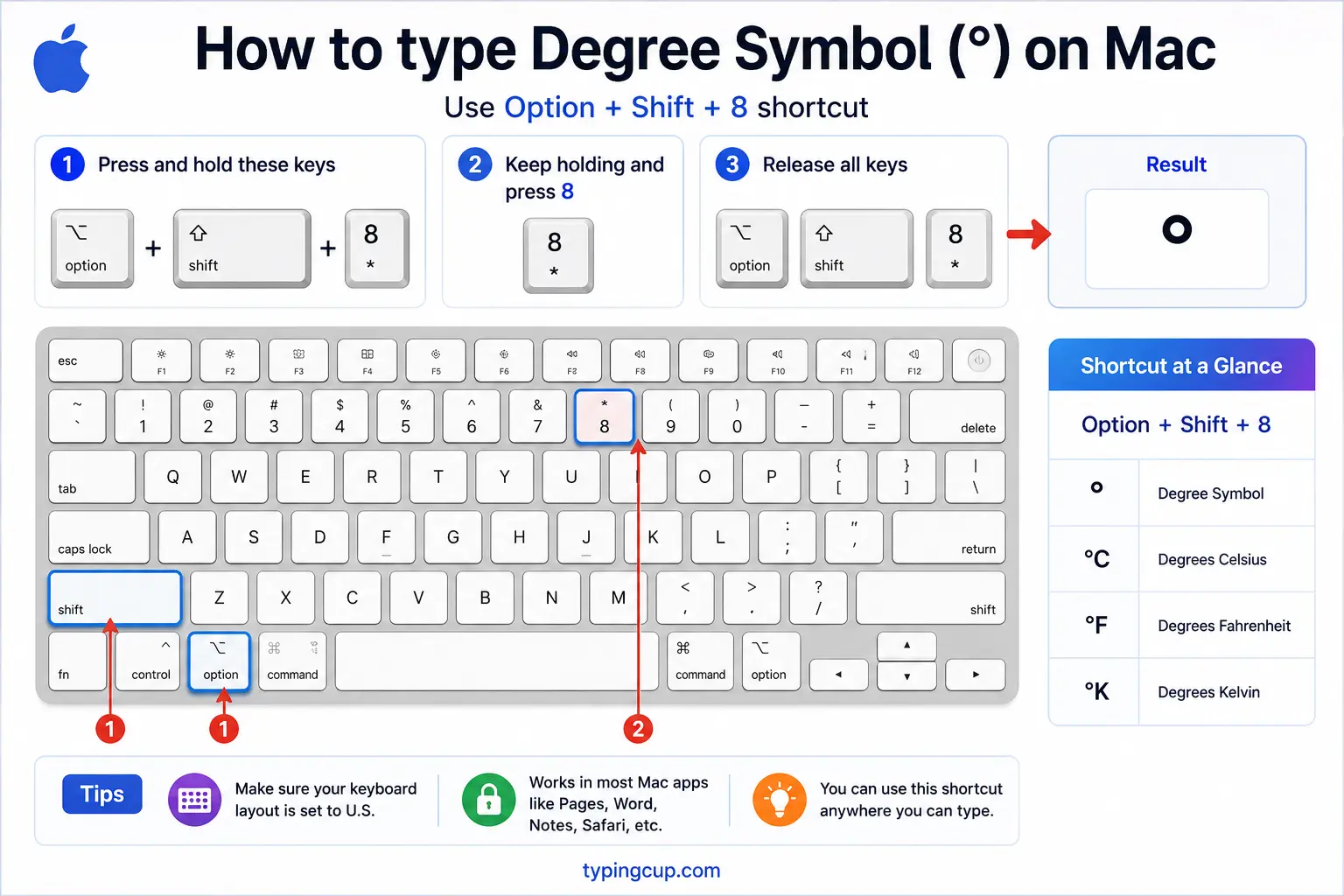
On a Mac, press Shift + Option + 8 for °. It’s a single shortcut with no dead-key step. There’s also a very similar-looking Option + 0, but that produces the masculine ordinal º, not the true degree sign, so stick with Shift + Option + 8.
Type the degree symbol on iPhone and Android
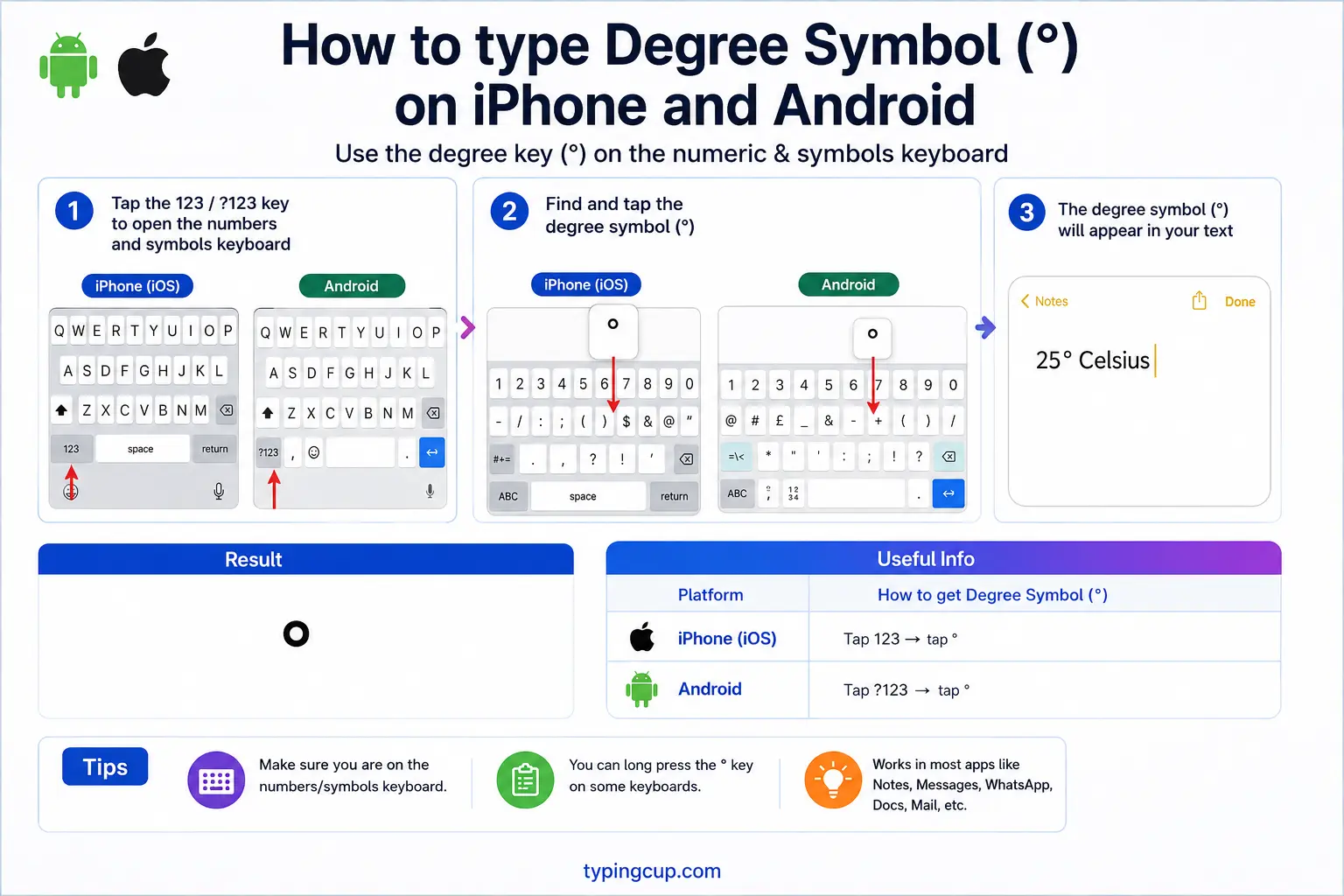
Switch to the number keyboard (the 123 key), then press and hold the 0. A small popup shows the degree sign °; slide onto it and lift your finger. It’s tucked behind the zero on both iPhone and Android.
Type the degree symbol in Microsoft Word
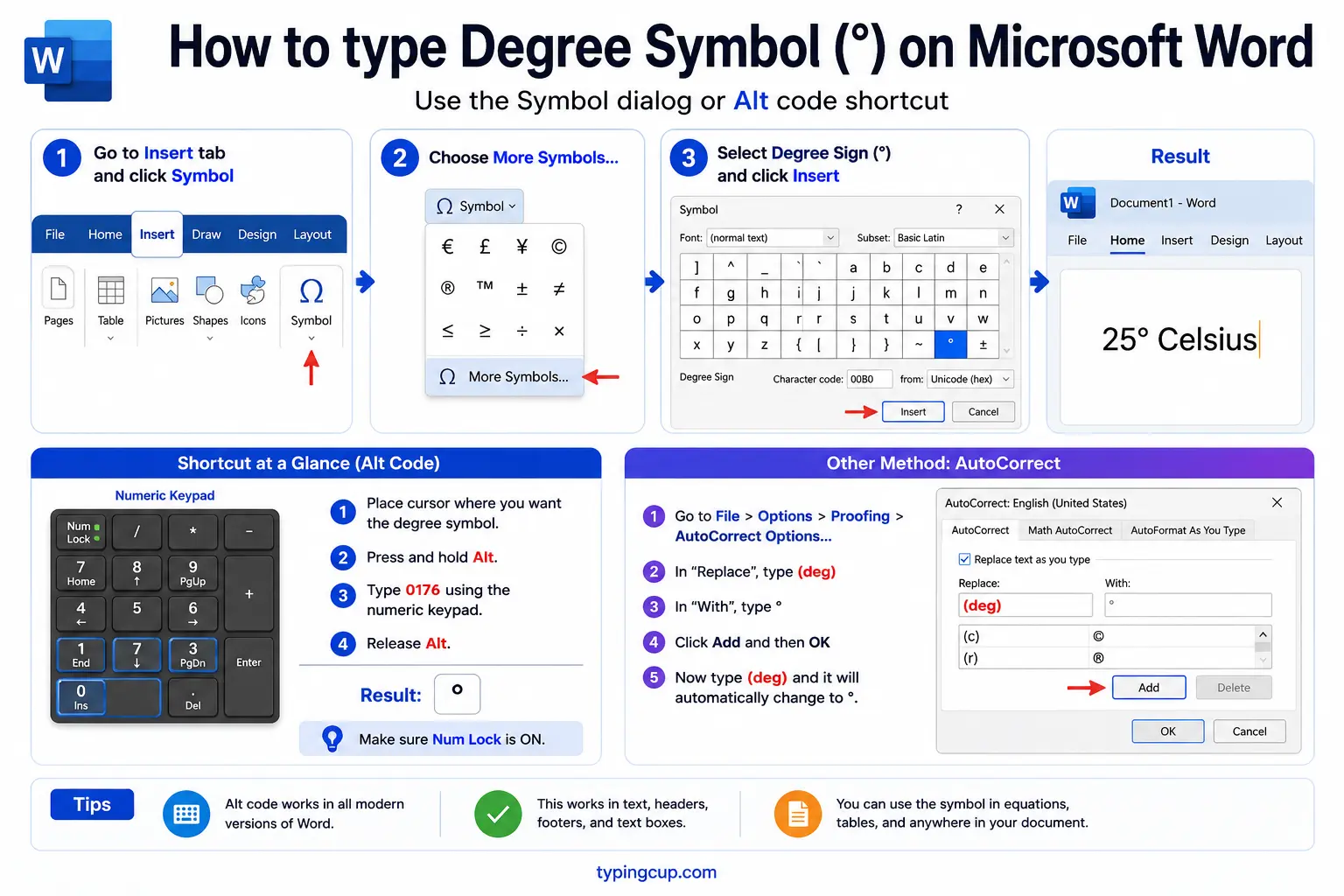
Word has three routes. Use the shortcut Ctrl + Shift + @, then press the spacebar. Or type 00B0 and press Alt + X to convert the code into °. Or the Windows Alt code, Alt + 0176, works anywhere.
Type the degree symbol on Linux
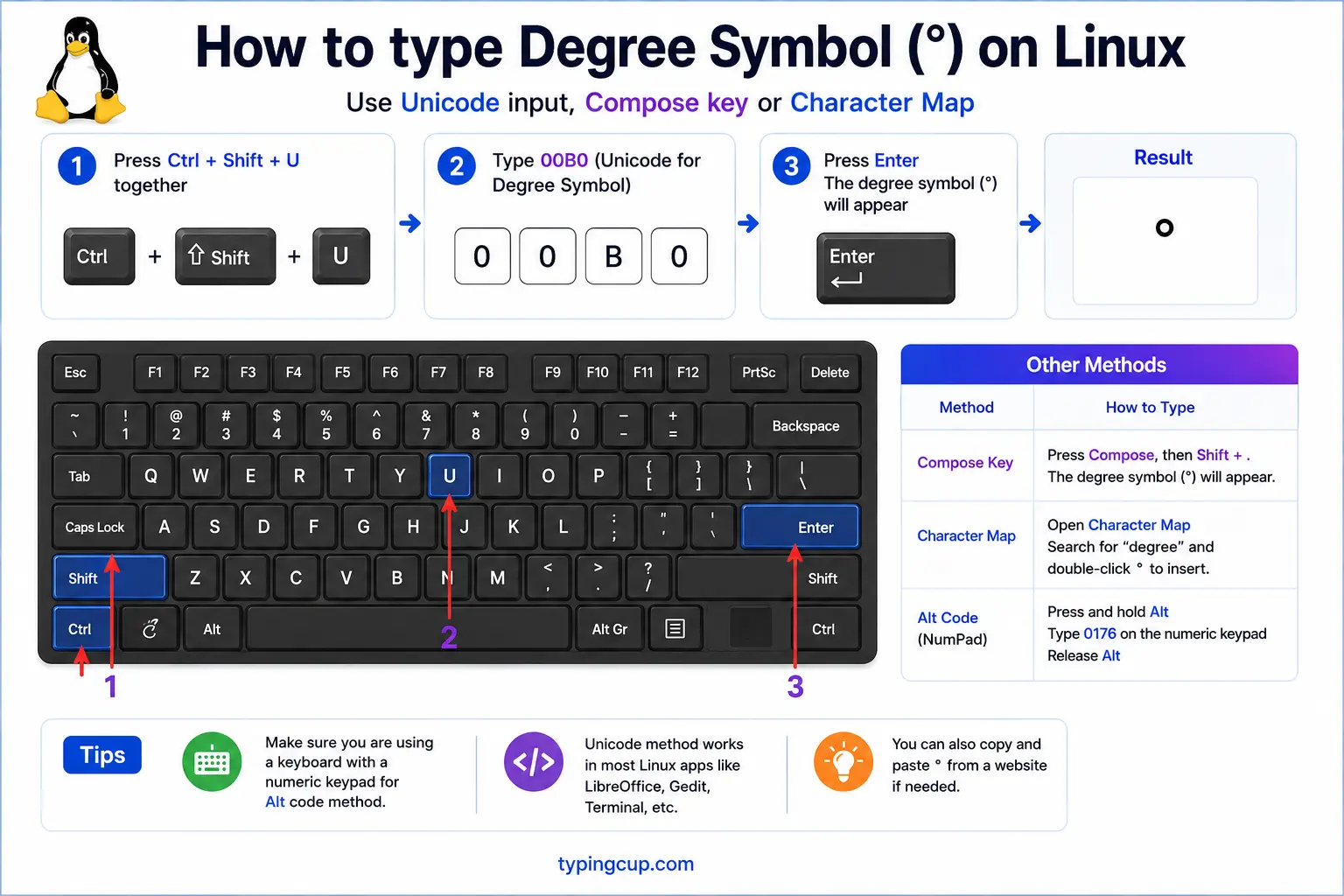
Press Ctrl + Shift + U, type 00b0, then press Enter. With a Compose key set up, Compose then o then o also gives °.
Type the degree symbol in Excel and Google Sheets
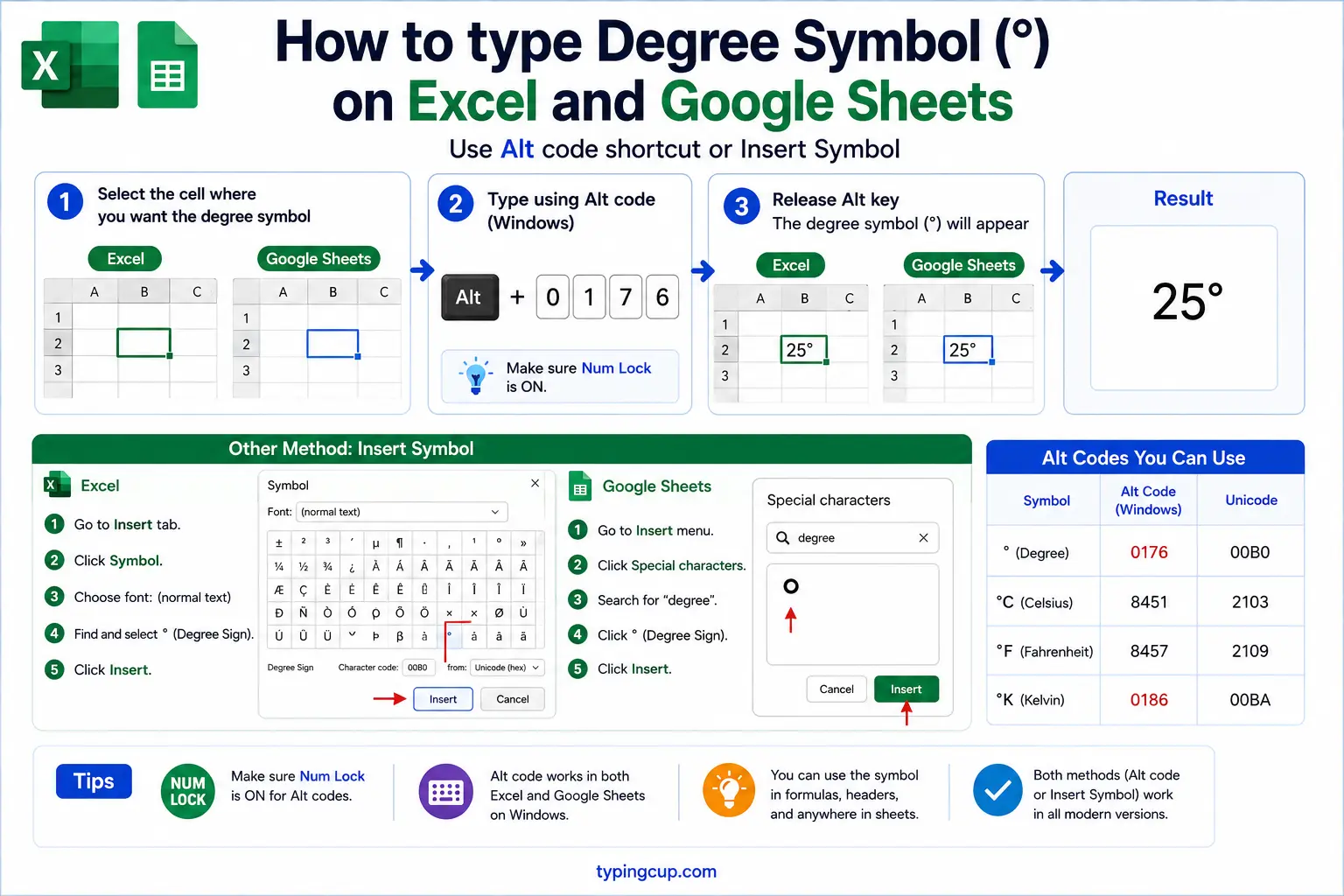
In both, the formula =CHAR(176) returns °, handy for building labels like =A1&CHAR(176)&"C". In Excel you can also use the Alt code (Alt + 0176) directly in a cell.
Type the degree symbol in HTML and CSS
In HTML, the degree sign is ° or the numeric °. In CSS, a literal ° in a content value is the escaped code point \00B0.
Should there be a space before the degree symbol?
This is the question almost no symbol guide answers, and the honest answer is: it depends on what the degree is measuring. Temperature and angles follow opposite rules.
For temperature, the official SI style (from the BIPM, which governs the metric system) puts a space between the number and the unit: 20 °C, with the space and the °C kept together. For angles and coordinates, there is no space: 90°, 45°N.
In everyday writing, though, most publications close the temperature up too, writing 20°C with no space, and major style guides accept it. So both 20 °C and 20°C are defensible; the strict scientific form is spaced, the common form isn’t. Angles are unambiguous: never put a space there.
| What you are writing | Spaced form | Common form |
|---|---|---|
| Temperature | 20 °C | 20°C |
| Angle | — | 90° |
| Coordinate | — | 45°N |
The one rule everyone agrees on: pick a convention and use it consistently through a document.
Degree sign vs the ordinal º vs ℃: the look-alikes
Three characters look almost identical on screen and get swapped constantly, but only one is the real degree sign.
The degree sign ° (U+00B0) is the correct mark for temperature, angles, and coordinates. The masculine ordinal indicator º (U+00BA) is a Spanish and Portuguese character used in 1º, 2º (“first,” “second”); it is often slightly smaller and sometimes underlined, and on a Mac it is what Option + 0 produces, which is why people paste the wrong one. There are also dedicated single characters ℃ (U+2103) and ℉ (U+2109), but these are discouraged; the recommended way is a normal ° followed by a plain C or F.
| Character | Name | Unicode | Use it for |
|---|---|---|---|
| ° | Degree sign | U+00B0 | temperature, angles |
| º | Masculine ordinal | U+00BA | Spanish 1º, 2º |
| ℃ | Degree Celsius | U+2103 | avoid; use °C |
| ª | Feminine ordinal | U+00AA | Spanish 1ª |
If a degree ever looks a little off, or a spell checker flags it, you’ve probably got the ordinal º instead of the degree °. Copy the correct one from the grid above.
The degree symbol in map coordinates
Latitude and longitude are where the degree sign does some of its most precise work, and where two more symbols sneak in that people almost always type wrong.
A full coordinate like 40°26′46″N has three marks: the degree ° for degrees, the prime ′ (U+2032) for minutes, and the double prime ″ (U+2033) for seconds. The catch is that the prime and double prime are not the apostrophe and quotation mark on your keyboard. People type 40°26'46"N with a straight apostrophe and inch mark, which reads fine but isn’t typographically correct.
There is no space anywhere in a coordinate: degrees, minutes, and seconds run straight together, followed by the direction letter (N, S, E, W). If you need the true prime marks, copy them; if you’re just writing casually, the apostrophe and quote are widely understood.
Why kelvin has no degree symbol
Here’s a small piece of trivia that’s also a real writing rule: you write °C and °F, but never °K. Kelvin is just K, with no degree sign.
The reason is historical. Celsius and Fahrenheit are scales with an arbitrary zero, so a temperature on them is measured in “degrees.” Kelvin, by contrast, is an absolute scale that starts at absolute zero, and since 1967 its unit has officially been the plain kelvin, not the “degree Kelvin.” So 300 K is correct; 300°K is not. It’s the kind of detail that quietly marks careful writing in science and engineering.
Copy-paste HTML codes
Every code for the degree symbol in one place. Click a cell and copy.
| Symbol | Named entity | Numeric entity | URL (percent) code |
|---|---|---|---|
| ° | ° | ° | %C2%B0 |
In a CSS content value, use \00B0 for the degree sign. For other symbols, the euro symbol guide and the cent symbol guide give the same copy-and-code treatment.
Troubleshooting
My degree sign shows as a box or à-plus-symbol
That’s an encoding mismatch: the UTF-8 bytes for ° (which are C2 B0) are being read as an older encoding. Set the file, database, and page charset to UTF-8 and the degree sign displays correctly.
Alt + 0176 isn’t working
Make sure Num Lock is on and you’re using the numeric keypad, not the row of numbers above the letters. On laptops without a keypad, use Windows + . and search “degree,” or copy it from the grid above.
My degree looks small or slightly wrong
You’ve probably got the masculine ordinal º (Option + 0 on a Mac) instead of the degree sign ° (Shift + Option + 8). They’re different characters; copy the correct ° from the grid above.
Should I type °K for kelvin?
No. Kelvin uses a plain K with no degree sign, so write 300 K, not 300°K. The degree sign is only for Celsius (°C) and Fahrenheit (°F).
FAQ
How do I type the degree symbol?
On Windows, hold Alt and type 0176. On a Mac, press Shift + Option + 8. On a phone, long-press the 0 on the number keyboard. In HTML, write °. Or click ° in the grid above.
Is there a space before the degree symbol?
For angles and coordinates, no: 90°, 45°N. For temperature, scientific SI style uses a space (20 °C), but most everyday writing closes it up (20°C). Both temperature forms are accepted; just be consistent.
What is the difference between ° and º?
° (U+00B0) is the degree sign for temperature and angles. º (U+00BA) is the masculine ordinal indicator used in Spanish, as in 1º. On a Mac, Option + 0 gives the ordinal by mistake; use Shift + Option + 8 for the real degree.
Why is there no degree symbol for kelvin?
Kelvin is an absolute scale, and since 1967 its unit is the plain kelvin, not the degree kelvin. Write 300 K, never 300°K. Only Celsius and Fahrenheit take the degree sign.
How do I write the degree symbol in HTML?
Use ° or °. In a URL it’s percent-encoded as %C2%B0.
