
Symbol Alt Codes List: Every Alt Code in One Place
An Alt code is the Windows shortcut for a symbol that isn’t on your keyboard: hold Alt, type a number on the numeric keypad, and the character appears. This is the big list — the Alt codes people actually reach for, grouped by kind, from © ™ € £ to ☺ ♥ ♪ and the accented letters — with a click-to-copy grid on top and the details other lists leave out.
If you just need a symbol, copy it from the grid below. If you want to understand the codes — why some are three digits and some four, and why the same number can give two different symbols — the sections after the tables explain it.
In a hurry?
- Copy any symbol: click it in the grid below.
- Type an Alt code: turn on Num Lock, hold Alt, type the number on the numeric keypad, release.
- Short codes (Alt + 1, Alt + 3) come from the old DOS character set; Alt + 0-codes (Alt + 0169) come from the Windows set.
- No numpad? use Windows + . or copy from the grid.
- Not on Windows? Alt codes don’t work on Mac — see the note near the end.
Click to copy: Alt code symbols
Tap any symbol to copy it. The label is its Windows Alt code.
Table of Contents
How Alt codes work in one minute
Every Alt code is a lookup. You hold Alt, type a number on the numeric keypad, and Windows fetches the matching character. The one quirk to know is that there are two lookup tables, and the leading zero decides which one. A plain number like Alt + 3 uses the old DOS set (code page 437), where 3 is ♥. A zero-padded number like Alt + 0169 uses the Windows set (Windows-1252), where 169 is ©. That’s why some codes here are short and some start with a 0 — and why you should type them exactly as written.
Fun Alt codes: smileys, hearts, and shapes
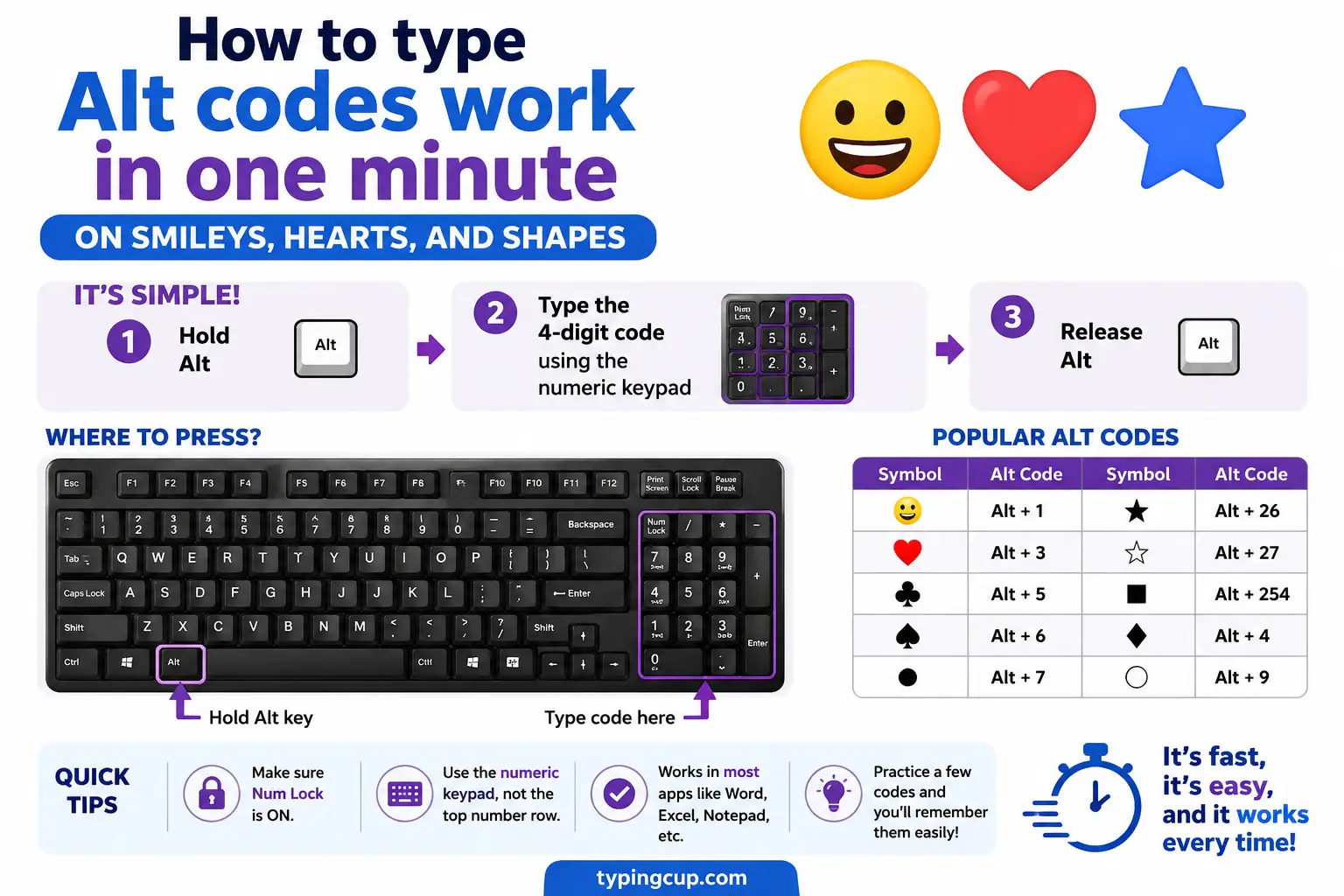
The low numbers, Alt + 1 to Alt + 15, hold the symbols people love: smiley faces, card suits, music notes, and a little sun. They’re a leftover from the original PC character set, and they still work today.
| Symbol | Name | Alt code |
|---|---|---|
| ☺ | white smiley | Alt + 1 |
| ☻ | black smiley | Alt + 2 |
| ♥ | heart | Alt + 3 |
| ♦ | diamond | Alt + 4 |
| ♣ | club | Alt + 5 |
| ♠ | spade | Alt + 6 |
| ♪ | music note | Alt + 13 |
| ♫ | beamed notes | Alt + 14 |
| ☼ | sun | Alt + 15 |
Alt codes for currency symbols
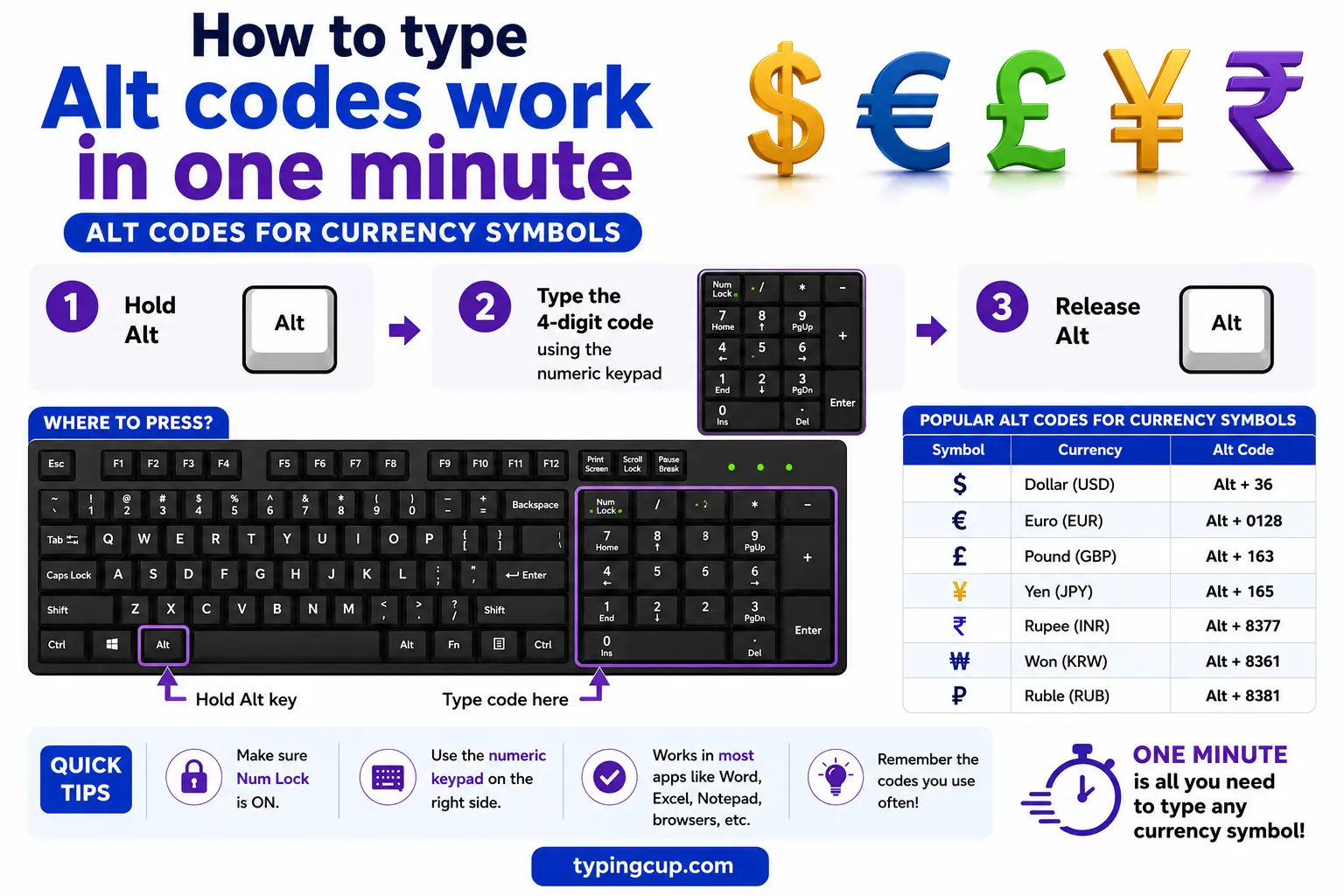
The money signs, with the Windows Alt code for each.
| Symbol | Name | Alt code | HTML |
|---|---|---|---|
| € | euro | Alt + 0128 | € |
| £ | pound | Alt + 0163 | £ |
| ¥ | yen | Alt + 0165 | ¥ |
| ¢ | cent | Alt + 0162 | ¢ |
| ₹ | rupee | Alt + 8377 | ₹ |
Alt codes for punctuation and typography
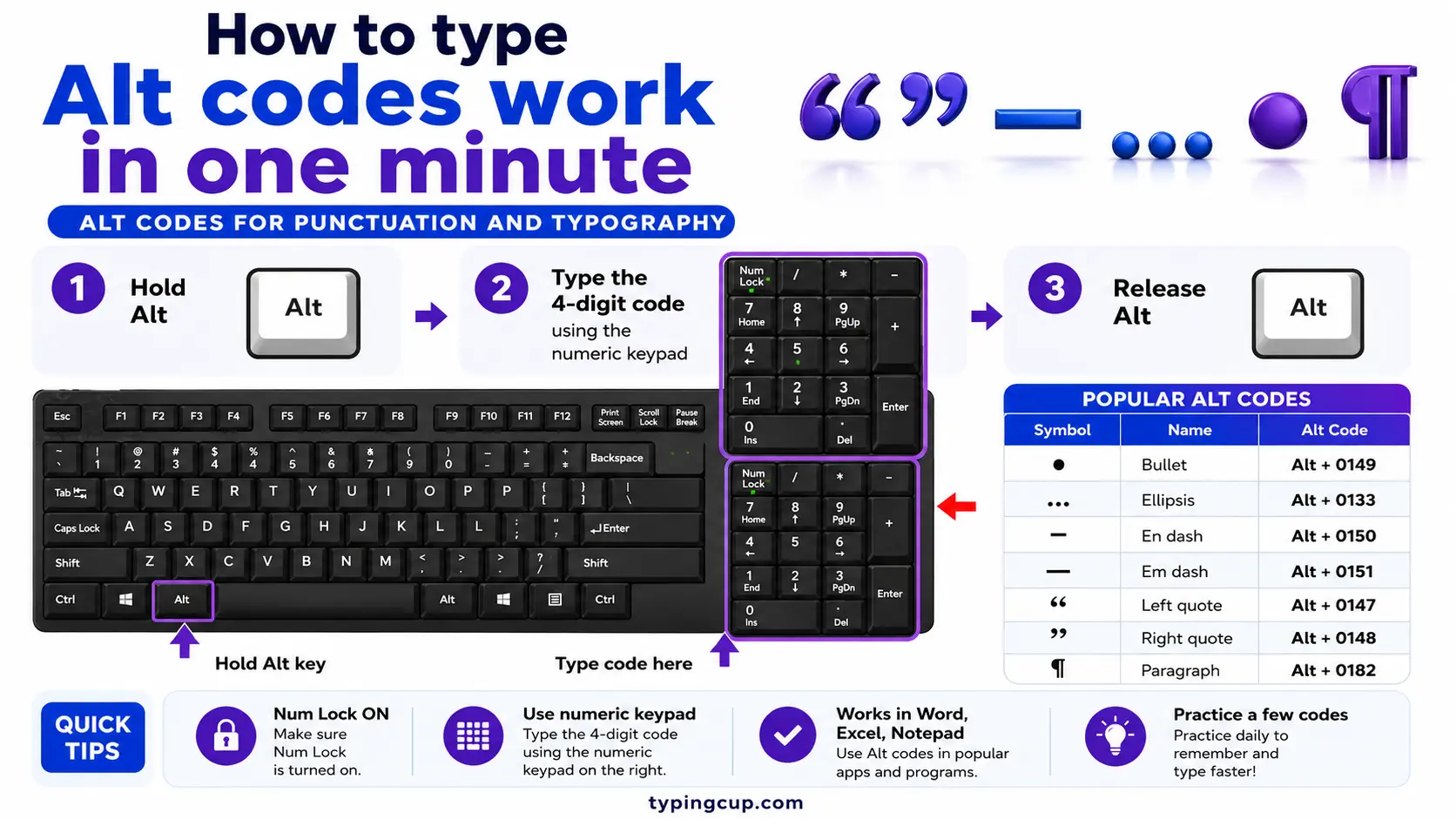
The marks that make writing look finished: proper dashes, the ellipsis, and section and paragraph signs.
| Symbol | Name | Alt code | HTML |
|---|---|---|---|
| — | em dash | Alt + 0151 | — |
| – | en dash | Alt + 0150 | – |
| … | ellipsis | Alt + 0133 | … |
| • | bullet | Alt + 0149 | • |
| § | section | Alt + 0167 | § |
| ¶ | pilcrow | Alt + 0182 | ¶ |
| · | middle dot | Alt + 0183 | · |
Alt codes for math and fractions
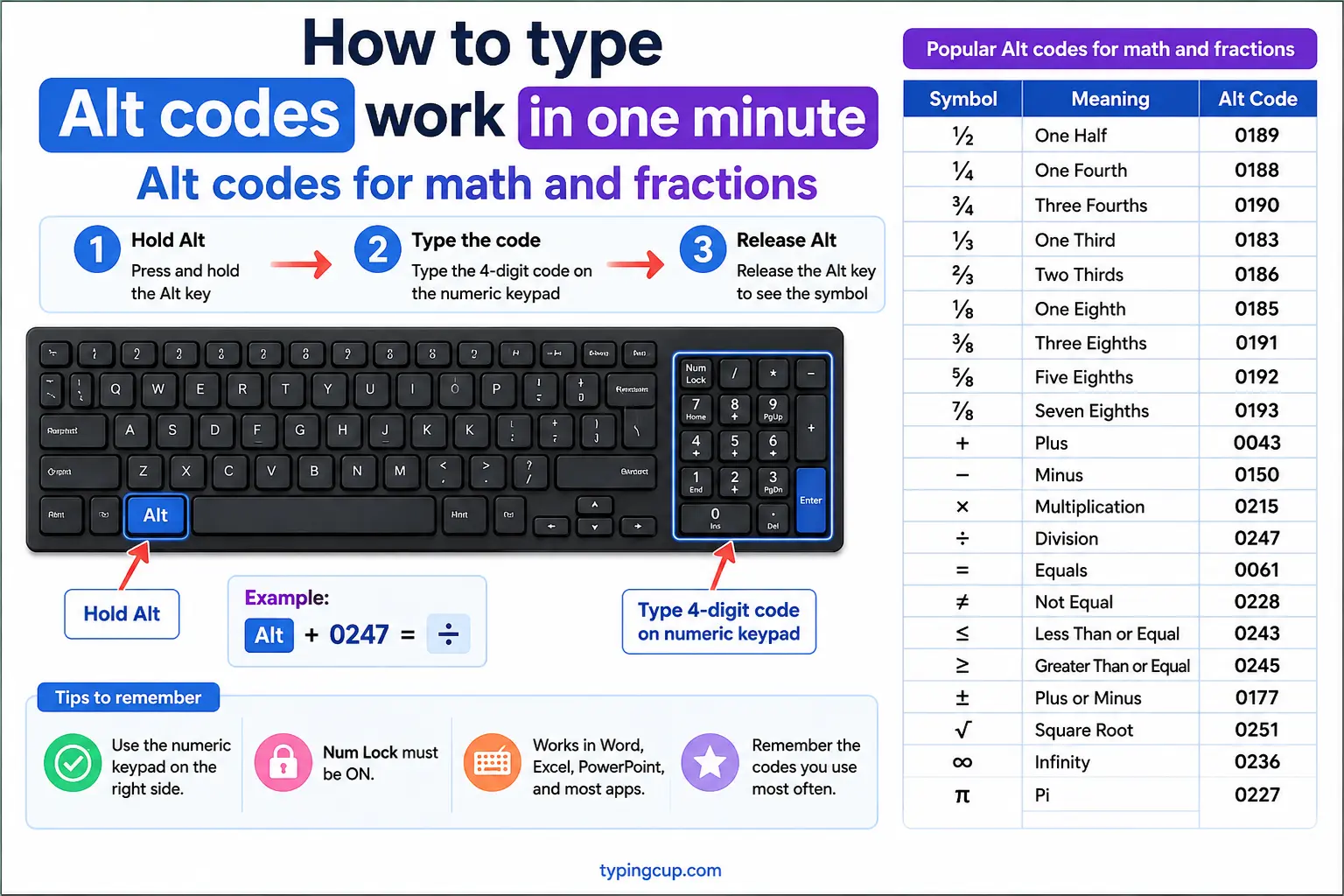
The most-used maths signs, powers, and common fractions. The full set is in the math symbols Alt codes reference.
| Symbol | Name | Alt code | HTML |
|---|---|---|---|
| ± | plus-minus | Alt + 0177 | ± |
| × | multiply | Alt + 0215 | × |
| ÷ | divide | Alt + 0247 | ÷ |
| √ | square root | Alt + 251 | √ |
| π | pi | Alt + 227 | π |
| ° | degree | Alt + 0176 | ° |
| ² | squared | Alt + 0178 | ² |
| ½ | one half | Alt + 0189 | ½ |
Alt codes for arrows and legal marks
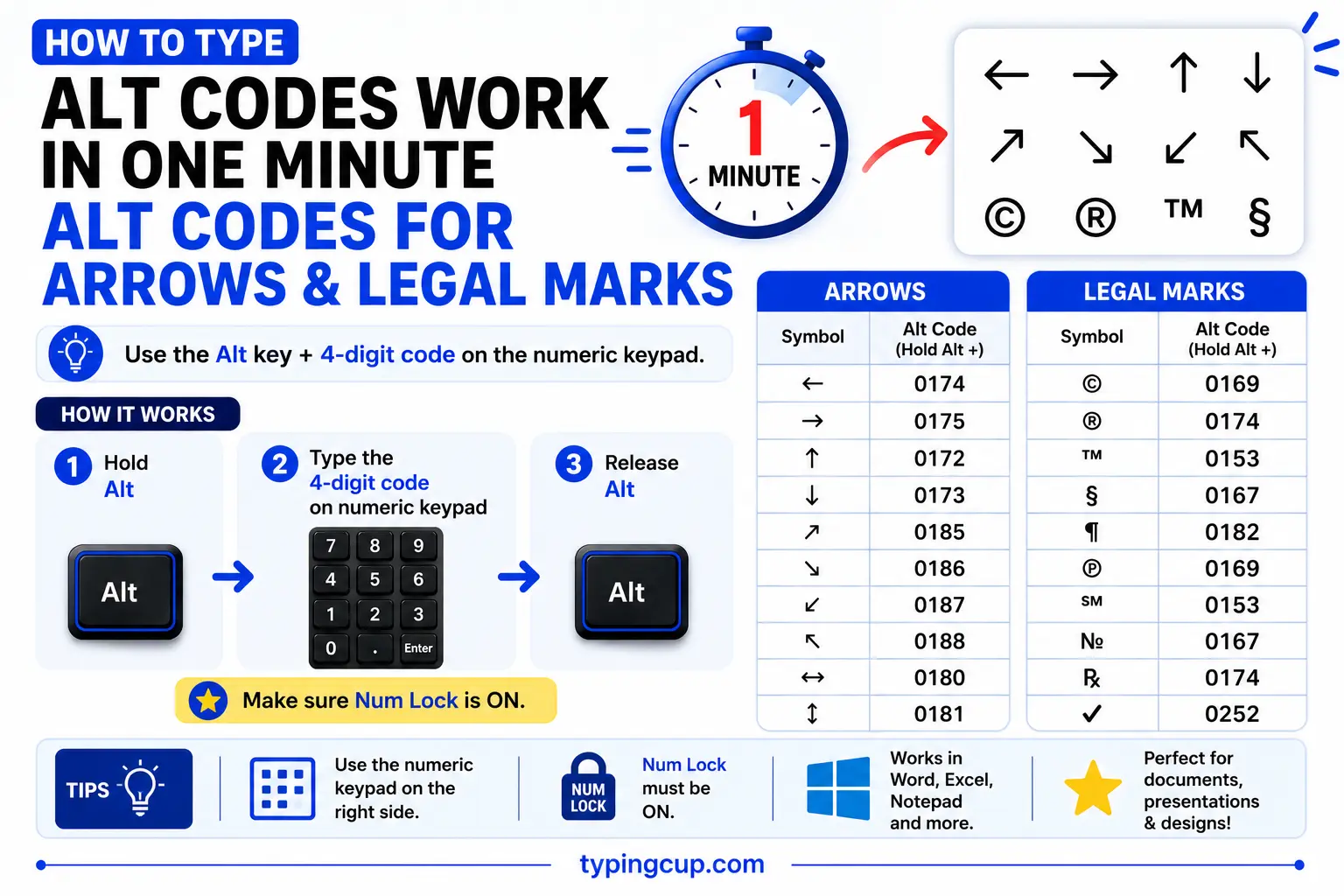
Arrows come from the low DOS codes; the copyright family uses the Windows set.
| Symbol | Name | Alt code | HTML |
|---|---|---|---|
| → | right arrow | Alt + 26 | → |
| ← | left arrow | Alt + 27 | ← |
| ↑ | up arrow | Alt + 24 | ↑ |
| ↓ | down arrow | Alt + 25 | ↓ |
| © | copyright | Alt + 0169 | © |
| ® | registered | Alt + 0174 | ® |
| ™ | trademark | Alt + 0153 | ™ |
Alt codes for accented letters
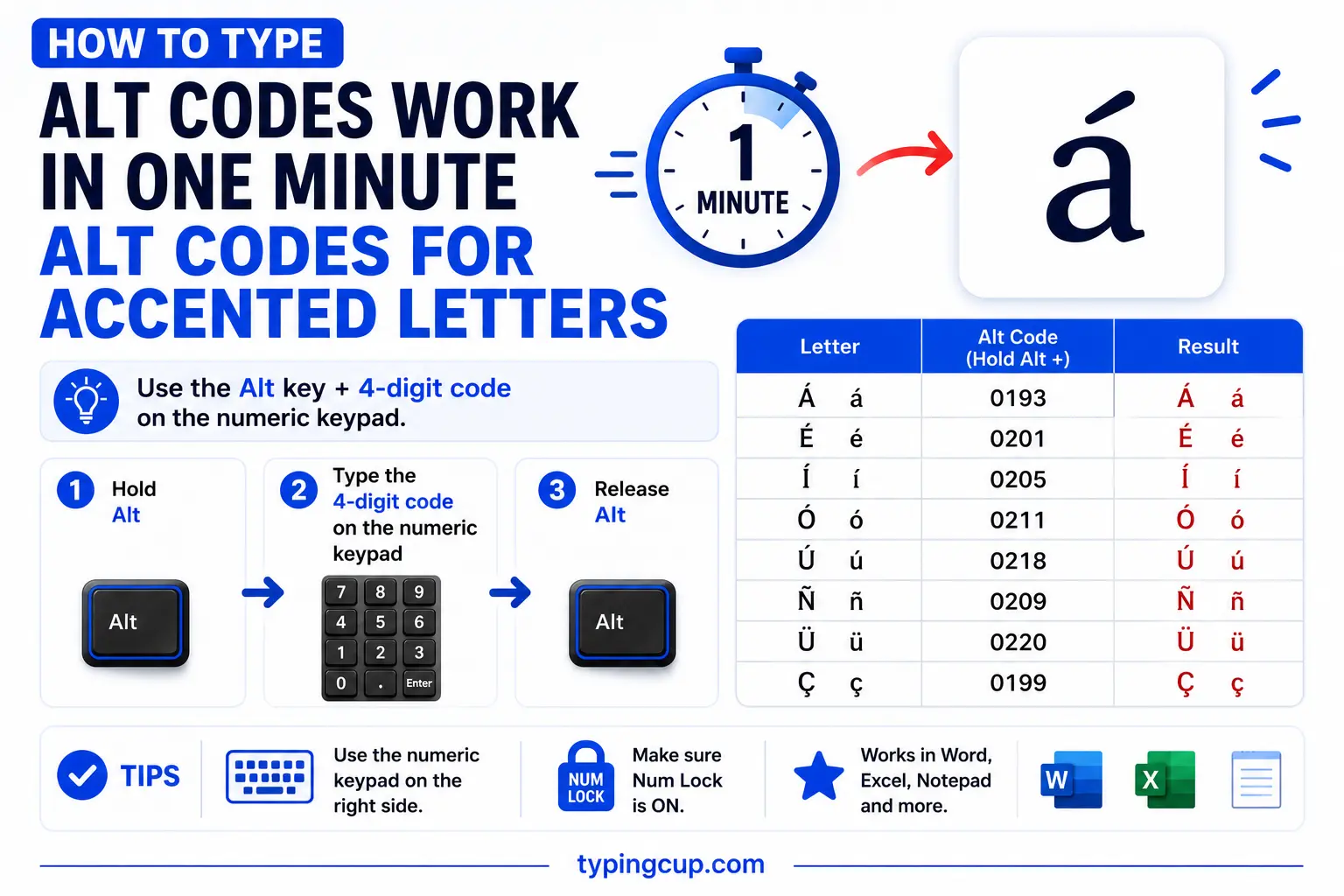
The accented vowels used in Spanish, French, and other languages. Both lower and upper case have codes; here are the most common.
| Letter | Alt code | Letter | Alt code |
|---|---|---|---|
| á | Alt + 0225 | é | Alt + 0233 |
| í | Alt + 0237 | ó | Alt + 0243 |
| ú | Alt + 0250 | ñ | Alt + 0241 |
| ü | Alt + 0252 | ç | Alt + 0231 |
For the full treatment of any one letter, see guides like í with acute and the letters with accents hub.
Alt codes for Greek letters
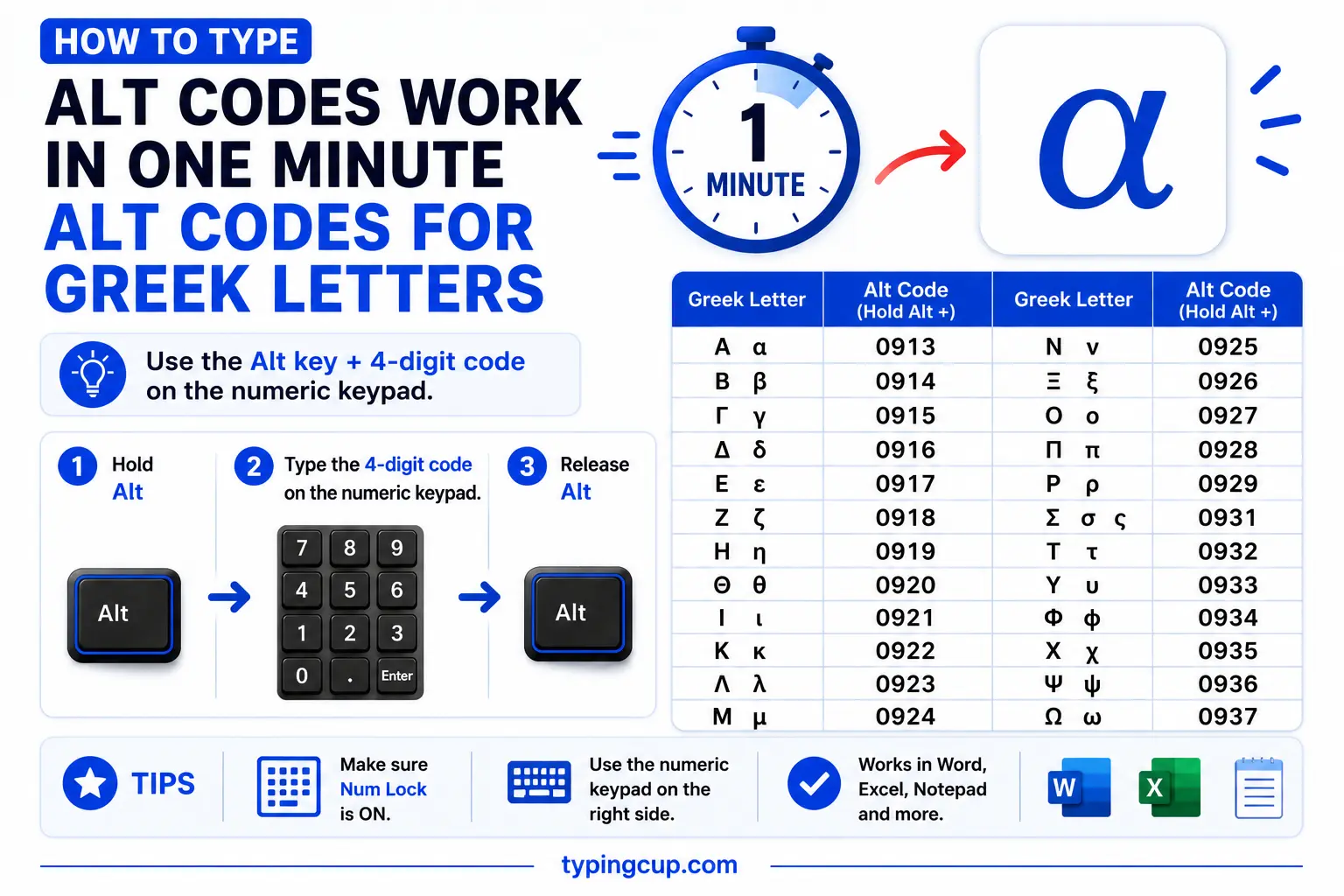
Greek letters used in maths, science, and fraternities. These mostly use the DOS-set short codes.
| Symbol | Name | Alt code |
|---|---|---|
| α | alpha | Alt + 224 |
| β | beta | Alt + 225 |
| π | pi | Alt + 227 |
| Σ | sigma | Alt + 228 |
| µ | mu | Alt + 230 |
| Ω | omega | Alt + 234 |
| φ | phi | Alt + 237 |
Alt + 65 vs Alt + 0065: the two-system trap
This is the part that confuses everyone and that most lists skip. The leading zero changes the character set. Type Alt + 65 and Windows reads the old DOS set (code page 437); type Alt + 0065 and it reads the Windows set (Windows-1252). For plain letters they happen to match — both give A — but for symbols they diverge, so Alt + 3 is a heart ♥ while Alt + 0003 is nothing useful.
The rule of thumb: the short codes (no leading zero) are for the fun DOS symbols and Greek letters, and the zero-padded codes are for currency, punctuation, and accented letters. If a code gives you the wrong character, the first thing to try is adding or removing the leading zero. And neither set is Unicode, which is why really obscure symbols need the decimal-Unicode codes (like Alt + 8377 for ₹) instead.
The hidden low codes are the best-kept secret
Most Alt-code lists start at the currency signs and skip the treasure at the bottom. The numbers Alt + 1 through Alt + 31 map to a set of pictic symbols baked into the very first IBM PC font — smileys (☺ ☻), the four card suits (♥ ♦ ♣ ♠), music notes (♪ ♫), a sun (☼), arrows (↑ ↓ → ←), and more. They predate emoji by decades and still work in any Windows program.
They’re genuinely useful: Alt + 3 is the fastest heart on Windows, Alt + 13 and Alt + 14 give music notes, and the card suits are one keypress each. The catch is that a few of the very lowest codes clash with control keys in some apps (Alt + 8 can behave like Backspace, Alt + 9 like Tab), so if a low code misbehaves, that app is intercepting it — try it in a plain text box, or copy the symbol from the grid above instead.
No numeric keypad? Here’s the fix
Alt codes need the separate numeric keypad, and most laptops don’t have one — the number row above the letters does not work. That single fact explains most “Alt codes aren’t working” complaints.
On a laptop, you have options: switch on the hidden numpad under the right-hand letters with Fn (then hold Fn + Alt and type the code), open the on-screen keyboard which has a clickable numpad, or skip codes entirely with Windows + . to open the emoji and symbol picker. For most laptop users, the copy grid at the top of this page or the picker is faster than fighting the Fn key.
Alt code, Alt + X, or copy: which to use
Three methods, three sweet spots. An Alt code is best for a symbol you use often on a desktop with a numpad. In Microsoft Word, the Alt + X trick is better — type the hex Unicode value and press Alt + X, and it works for any character, not just the few hundred with Alt codes. And plain copy and paste from the grid above wins for a one-off symbol or on a laptop or phone.
| Method | Best for |
|---|---|
| Alt code | desktop with a numpad, frequent symbols |
| Alt + X (Word) | any Unicode character in Word |
| Copy & paste | one-off symbols, laptops, phones |
Alt codes are also Windows-only. On a Mac, symbols use the Option key instead, and there’s a full cross-platform rundown in the keyboard shortcuts for symbols guide.
Troubleshooting
My Alt code does nothing
Usually Num Lock is off, or you’re using the top number row instead of the numeric keypad, which is the only part that works. On a laptop without a keypad, use Windows + . or copy from the grid above.
I get the wrong symbol
You’ve likely crossed the two systems. A plain number uses the DOS set; a zero-padded number uses the Windows set. Add or remove the leading zero and try again.
A low code like Alt + 8 acts like a key
Some apps intercept the lowest codes as control keys (Backspace, Tab). Try the code in a plain text field, or just copy the symbol from the grid above.
The symbol shows as a box
The character came through but the current font has no glyph for it. Switch to a broad font like Segoe UI Symbol or Arial, and save the file as UTF-8 if it’s going online.
FAQ
What is an Alt code?
A Windows shortcut for a symbol: hold Alt, type a number on the numeric keypad with Num Lock on, and the character appears. For example, Alt + 0169 gives ©.
Why do some Alt codes have a leading zero?
The leading zero switches character sets. Alt + number (no zero) uses the DOS set (code page 437); Alt + 0number uses the Windows set (Windows-1252). That’s why the same number can give two different symbols.
What’s the Alt code for a heart?
Alt + 3 gives ♥, one of the low DOS-set codes. Alt + 4, 5, and 6 give the other card suits, and Alt + 13 and 14 give music notes.
Do Alt codes work on a Mac?
No, Alt codes are Windows-only. On a Mac, use the Option key or the Character Viewer; see the [keyboard shortcuts for symbols](/keyboard-shortcuts-for-symbols/) guide for the Mac equivalents.
How do I type an Alt code on a laptop?
Turn on the hidden numpad with Fn (then Fn + Alt + code), use the on-screen keyboard’s numpad, or skip codes with Windows + . and copy the symbol instead.
