Upside-Down Exclamation Mark (¡): How to Type, Use, and Copy It
The upside-down exclamation mark ¡ opens an exclamation in Spanish. Just as ¿ starts a question, ¡ starts an exclamatory sentence, paired with an ordinary ! at the end, as in ¡Hola!. It is the emphatic half of Spanish’s two inverted marks. Here is how to type ¡, when to use it, how it compares to the regular exclamation mark, and plenty of examples.
In a hurry?
- Copy it: click ¡ in the grid below.
- Windows: hold Alt and type 0161 for ¡ (Alt + 173 also works).
- Mac: press Option + 1 for ¡ (Option + Shift + ? for ¿).
- On a phone: press and hold the ! key and slide to ¡.
- In HTML the inverted exclamation mark is
¡; in a URL it is%C2%A1.
Table of Contents
In short: ¡ opens a Spanish exclamation and the ordinary ! closes it. Its question partner ¿ works the same way. The sections below cover exactly when and how to use it.
Upside-down exclamation mark: every code in one table
The inverted exclamation mark next to its question partner, with the code for each. Copy from the grid above, or use whichever method fits the app you are in.
| Method | ¡ (inverted !) | ¿ (inverted ?) |
| Name | Inverted exclamation mark | Inverted question mark |
| Unicode | U+00A1 | U+00BF |
| Windows Alt code | Alt + 0161 | Alt + 0191 |
| Mac | Option + 1 | Option + Shift + ? |
| Word (code + Alt+X) | 00A1 | 00BF |
| HTML | ¡ | ¿ |
| URL / percent | %C2%A1 | %C2%BF |
The inverted exclamation mark has two working Windows Alt codes: Alt + 0161 (with the leading zero) and the shorter Alt + 173 from the old code page. Both give ¡. On a Mac, Option + 1 is the one to remember — the easiest of the pair.
How to type the upside-down exclamation mark on any device
On Windows
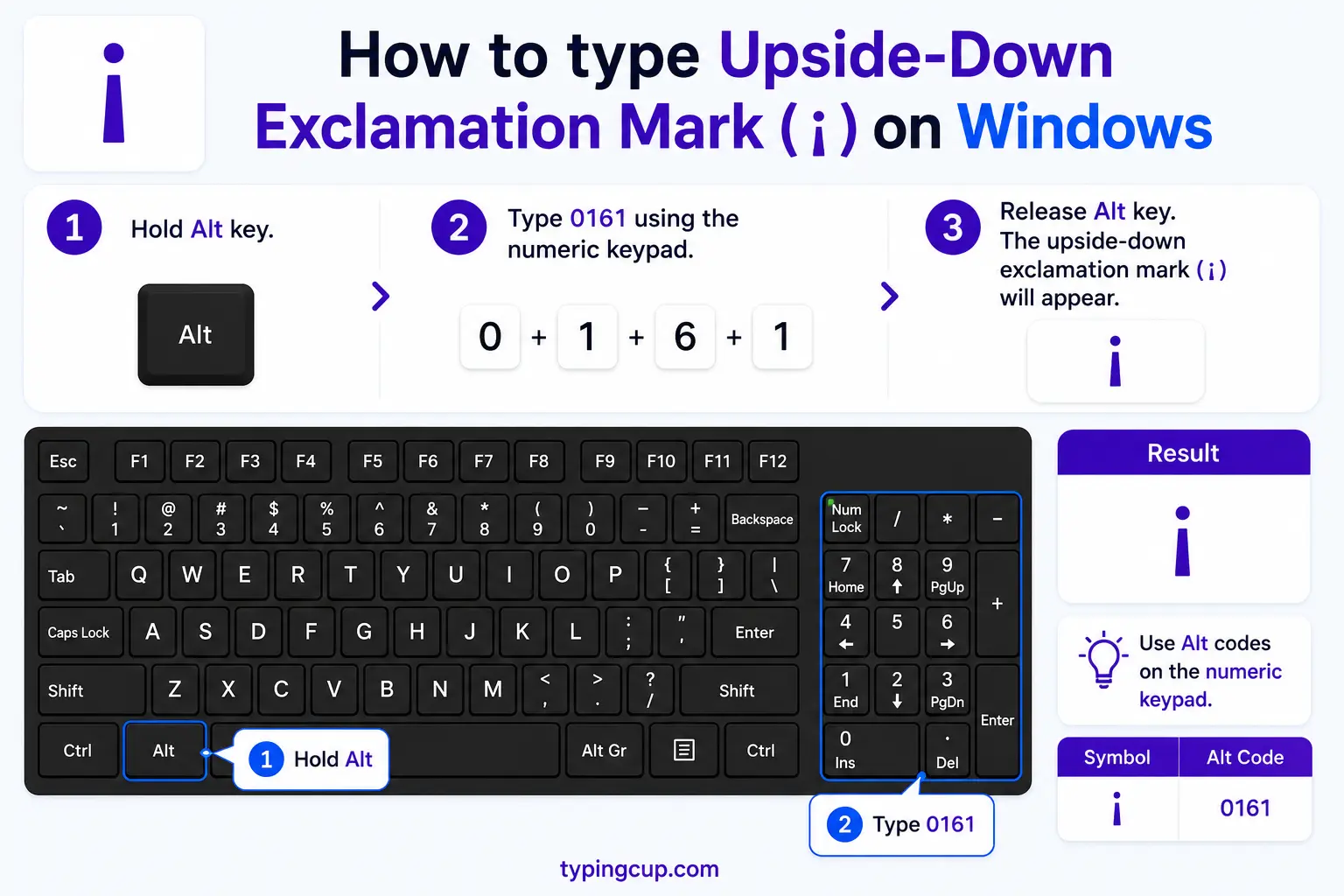
Hold Alt and type 0161 on the numeric keypad for ¡ (keep the leading zero; Num Lock on). The shorter Alt + 173 works too. In Word, 00A1 then Alt + X gives ¡. No keypad? Copy it from the grid or open Character Map.
On Mac
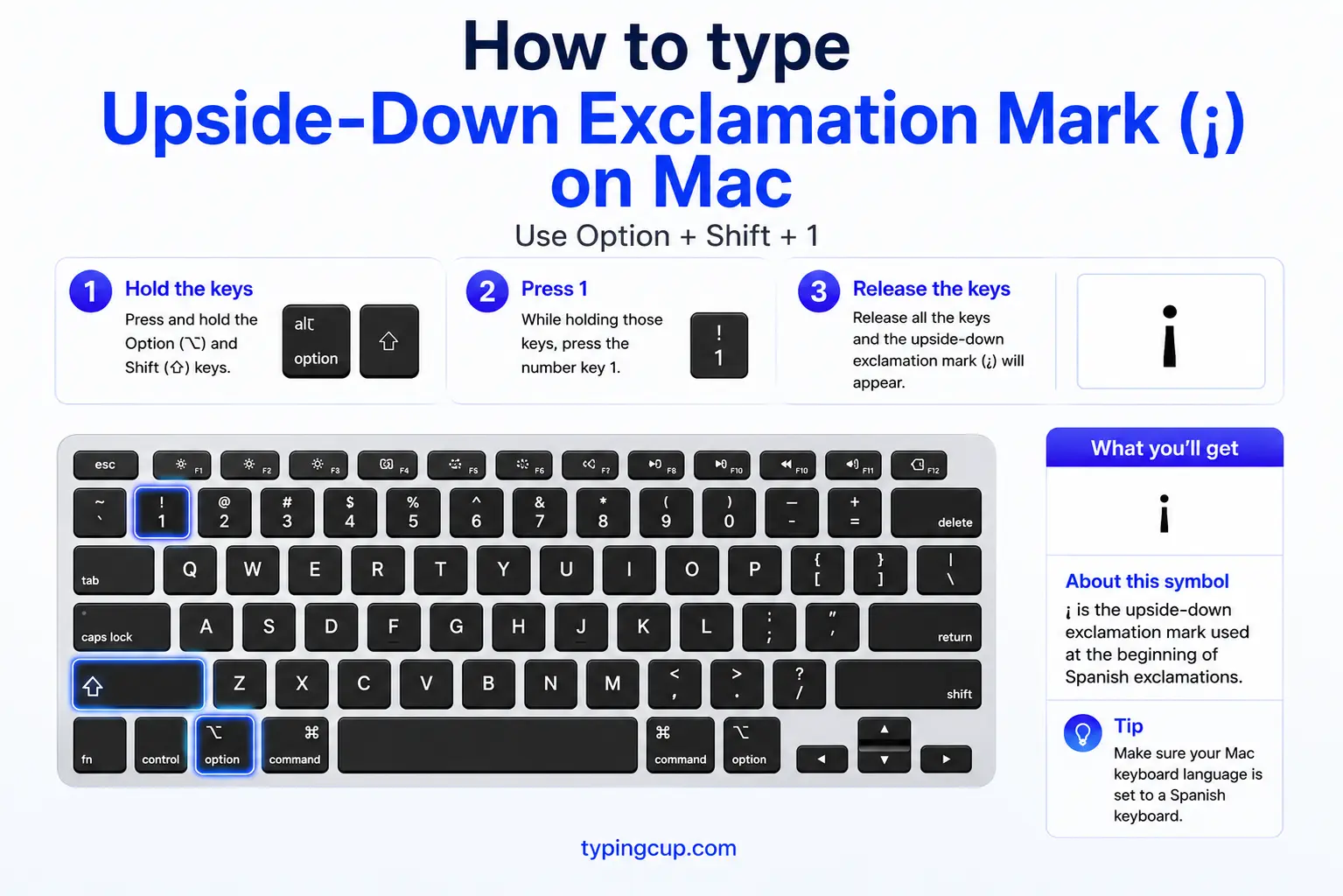
Press Option + 1 and you get ¡ straight away — the fastest inverted mark to type on a Mac. Its question partner is Option + Shift + ? for ¿. Both work in any app.
On iPhone and Android
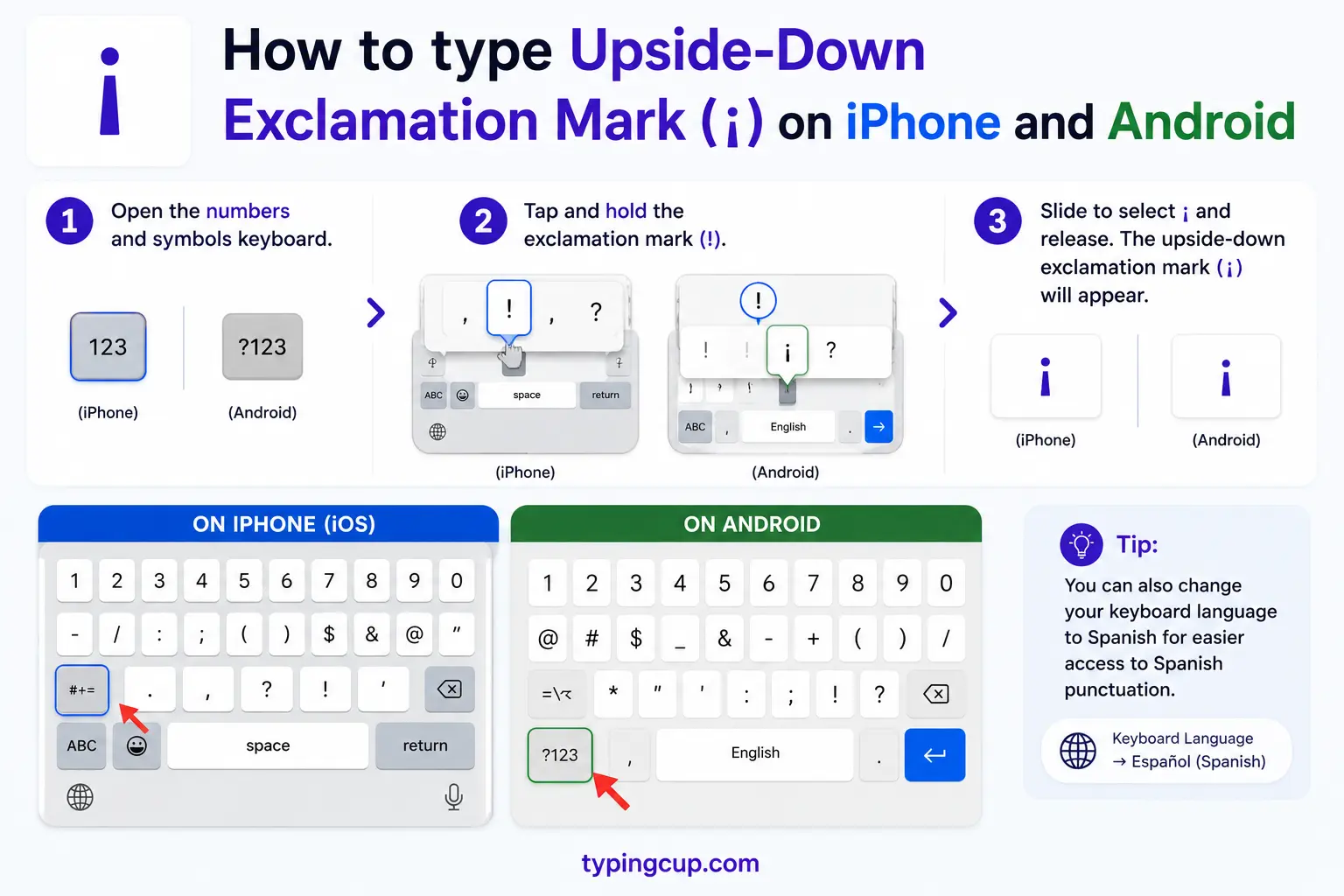
Press and hold the ! key on the on-screen keyboard, and a popup offers ¡; slide to it and lift your finger. Holding the ? key does the same for ¿. A Spanish keyboard puts both within easy reach.
On a Spanish keyboard
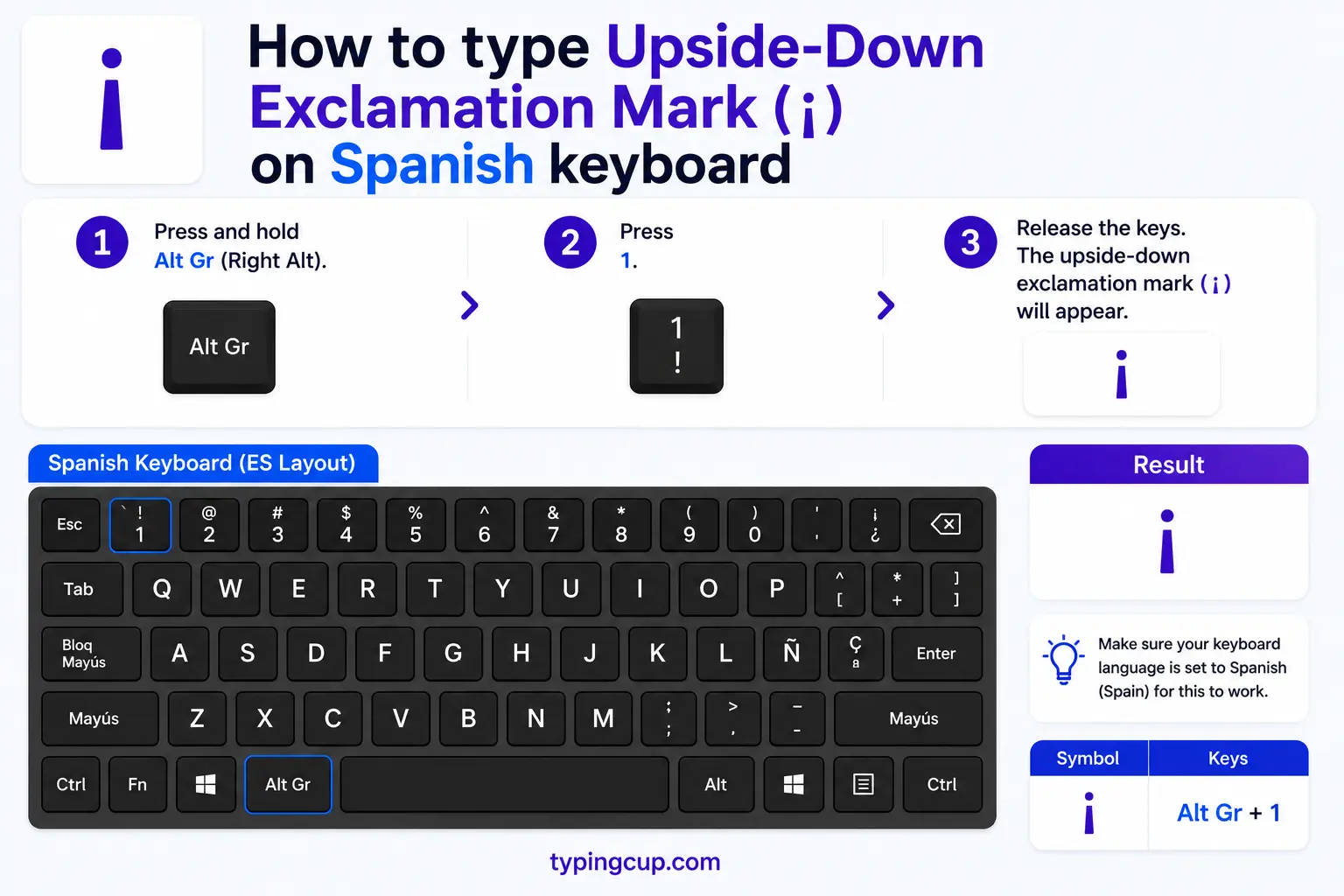
A physical Spanish (QWERTY) keyboard has a dedicated ¡ key, usually near the Enter key alongside ¿. Switching your layout to Spanish is the most comfortable option if you write in Spanish regularly.
In Microsoft Word
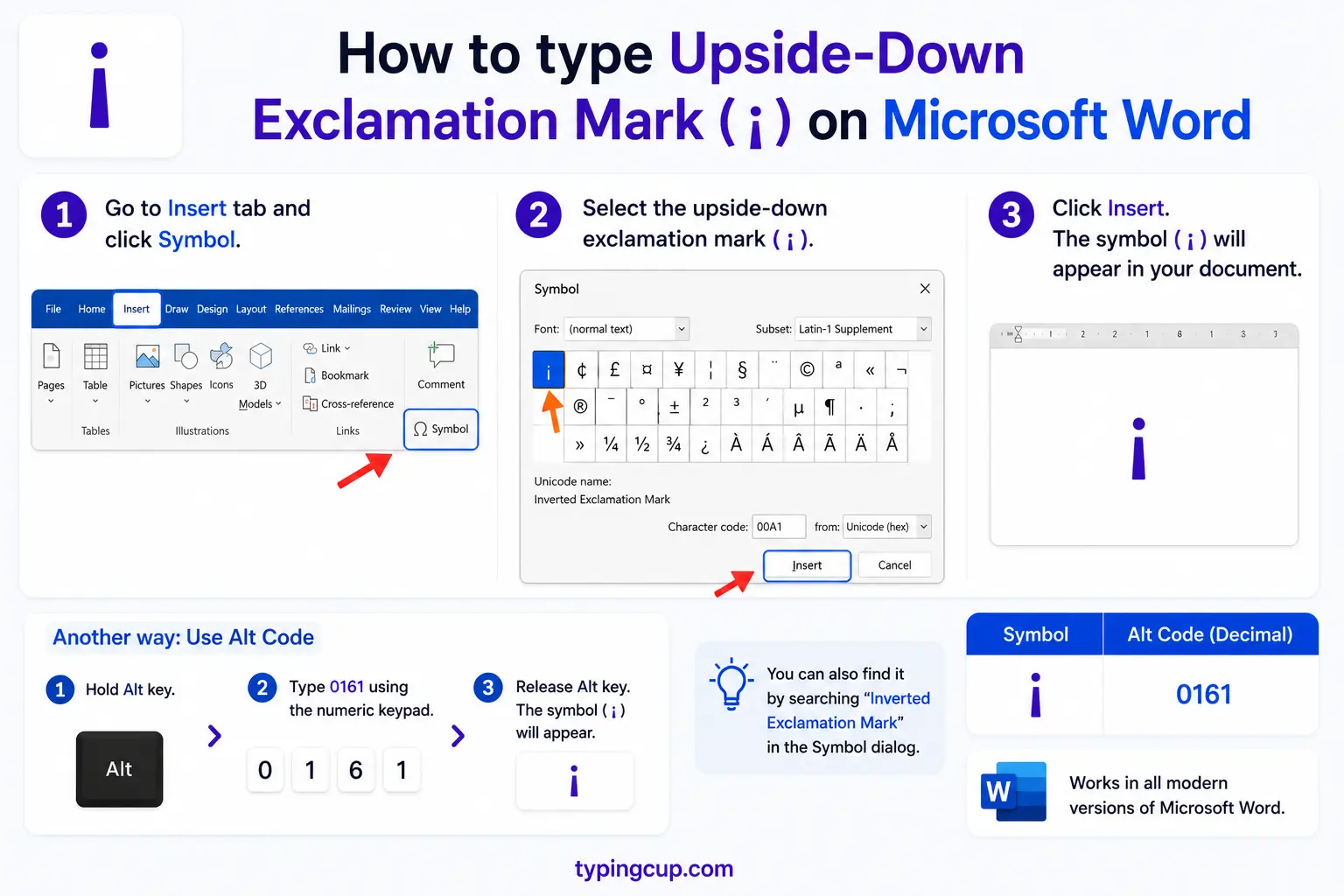
Type 00A1 then press Alt + X for ¡, or use Insert → Symbol. With the document language set to Spanish, Word’s proofing will also flag an exclamation that is missing its opening ¡.
On Linux
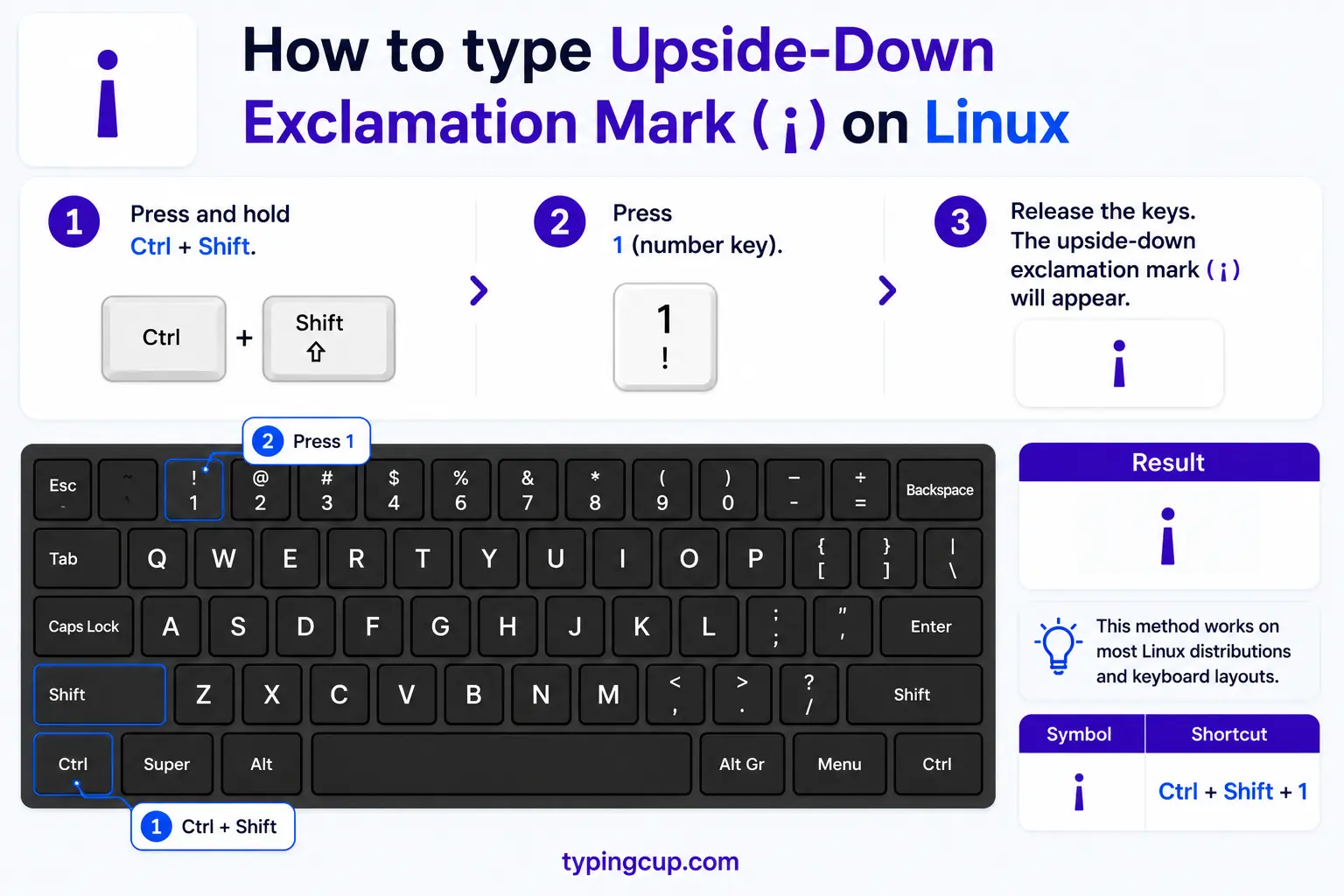
Press Ctrl + Shift + U, type 00a1, then Enter for ¡. With a Compose key, Compose ! ! also produces the inverted exclamation, and Compose ? ? the inverted question mark.
In HTML and CSS
In HTML, use the named entity ¡ or the numeric ¡ for ¡ (the question mark is ¿). In a CSS content value, use \00A1. Set the page to UTF-8 (or at least Latin-1) so the mark holds.
When to use the upside-down exclamation mark
The rule mirrors the question mark: in Spanish, every exclamation gets an inverted ¡ at its start and a normal ! at its end. Here is when it applies.
- To open any exclamation: ¡Qué alegría! (“What joy!”). The ¡ and ! always come as a pair.
- For interjections and short bursts: single words of surprise or feeling take it too — ¡Ay!, ¡Uf!, ¡Bravo!
- For commands and emphasis: orders and strong statements — ¡Para! (“Stop!”), ¡No lo hagas! (“Don’t do it!”).
- At the start of the exclamatory part: if the exclamation follows a lead-in, the ¡ goes right where it begins — Bueno, ¡por fin llegaste!
- In standard written Spanish, both marks are required — the opening one is not optional in formal writing.
Upside-down exclamation mark vs regular exclamation mark
They are two halves of one job in Spanish. The difference is position and which languages use them.
| Inverted ¡ | Regular ! | |
| Unicode | U+00A1 | U+0021 |
| Position | opens the exclamation | closes the exclamation |
| Direction | upside-down / reversed | upright / normal |
| Used in English | no | yes |
| Used in Spanish | yes (to open) | yes (to close) |
| Example | ¡Qué… | …sorpresa! |
So English uses only the closing !, while Spanish frames the exclamation with both: ¡ to open and ! to close. They are different characters (U+00A1 and U+0021), not one mark flipped by the app.
Upside-down exclamation mark examples
A few real sentences, showing where the marks fall.
| Spanish | English |
| ¡Hola! | Hi! |
| ¡Feliz cumpleaños! | Happy birthday! |
| ¡Qué rico! | How delicious! |
| ¡Cuidado! | Watch out! |
| ¡Ay, qué susto! | Oh, what a fright! |
| ¡Vaya! ¿En serio? | Wow! Really? |
Notice the last one: an exclamation and a question sit side by side, each with its own opening mark. The inverted mark always hugs the start of its own clause.
Interjections: ¡Ay!, ¡Oh!, and one-word exclamations
This is where the exclamation mark earns its keep. Spanish is full of short interjections — bursts of feeling that are a word or two long — and every one takes the inverted mark: ¡Ay! (ouch/oh), ¡Uf! (phew), ¡Oh!, ¡Bravo!, ¡Vaya! (wow), ¡Ojalá! (hopefully). Even a single word gets the full frame, opening and closing: ¡Genial!, ¡Basta!, ¡Socorro!. Because these appear so often in dialogue and chat, the ¡ is one of the most-typed characters in casual Spanish.
The inverted question mark ¿: the question partner
The exclamation mark has a twin. The inverted question mark ¿ (U+00BF) opens questions exactly the way ¡ opens exclamations, and the two were introduced together. If you are learning one, learn both, since Spanish sentences often stack them — a surprised question like ¡Vaya! ¿De verdad? uses each in turn. For the full rules on the question mark, see the guide to the upside-down question mark.
Do you need the opening ¡? The rule versus real life
In standard Spanish, yes — the Real Academia Española treats the opening ¡ as required, and leaving it out is an error in formal writing. In casual Spanish online, though, many native speakers drop it and write just Hola! in texts and social posts, since the closing ! already carries the emphasis and it is quicker. So the honest guidance: keep both marks in anything formal, and know that dropping the opener is common but non-standard in casual messaging.
Where the ¡ came from: the Real Academia Española, 1754
The inverted marks were introduced deliberately. The Real Academia Española added them in the second edition of its orthography in 1754, reasoning that in a long sentence a mark only at the end came too late to guide the reader’s tone. An inverted mark at the front fixes that: you see an exclamation (or a question) coming from the first word. The exclamation and question marks got the treatment at the same time, which is why they always travel as a set.
Which languages use the upside-down exclamation mark?
Mostly just Spanish. It is standard wherever Spanish is written, and appears in a few closely tied languages such as Galician and Asturian. It is not part of Portuguese, Italian, or French, which open exclamations with no special mark. So a ¡ at the start of a line is a quick giveaway that the text is Spanish.
Which mark? Inverted exclamation, exclamation, inverted question, question
The four punctuation marks in the family, with what each one does.
| Mark | Name | Unicode | Where it fits |
| ¡ | Inverted exclamation mark | U+00A1 | opens a Spanish exclamation |
| ! | Exclamation mark | U+0021 | closes an exclamation (all languages) |
| ¿ | Inverted question mark | U+00BF | opens a Spanish question |
| ? | Question mark | U+003F | closes a question |
| ‽ | Interrobang | U+203D | combined ? and ! (informal) |
Upside-down exclamation mark in URLs and encoding
In a link, ¡ is percent-encoded as %C2%A1 — two UTF-8 bytes, since it lives in the Latin-1 range. If it shows up as ¡ or a box, the bytes are being read in the wrong encoding. Because ¡ is a Latin-1 character it survives more old systems than higher symbols do, but UTF-8 is still the safe choice; set the file, database, and page to UTF-8 and it displays correctly.
Copy-paste HTML codes
The inverted marks and their partners with web codes, in one place. Copy the code you need.
| Mark | Named entity | Numeric entity | URL (percent) code |
| ¡ | ¡ | ¡ | %C2%A1 |
| ¿ | ¿ | ¿ | %C2%BF |
| ! | (none) | ! | %21 |
| ? | (none) | ? | %3F |
In a CSS content value, use \00A1 for the inverted exclamation mark. For every other symbol and its codes, see the copy and paste symbols tool and the how to type Spanish letters guide.
Troubleshooting
My ¡ shows as ¡ or a box
That is an encoding mismatch — the UTF-8 bytes for ¡ are being read as an older encoding. Set the file, database, and page charset to UTF-8 and ¡ displays correctly.
Alt + 0161 gives the wrong character
Usually a missing leading zero or Num Lock being off. Use 0161 (with the zero) on the numeric keypad, or the shorter Alt + 173. In Word, type 00A1 then Alt + X.
Only the closing ! appears, not the opening ¡
Some apps and phone keyboards add only the closing mark. Type or copy the opening ¡ yourself at the start of the exclamation, or add a Spanish keyboard so both are available.
Frequently asked questions
How do I type the upside-down exclamation mark ¡?
On Windows, hold Alt and type 0161 (or 173) on the numeric keypad. On a Mac, press Option + 1. On a phone, press and hold the ! key. In HTML it is ¡. Or copy it from the grid above.
When do you use the upside-down exclamation mark?
In Spanish, at the start of every exclamation, paired with a normal ! at the end: ¡Hola!. It also opens interjections like ¡Ay! and commands like ¡Para!.
What is the difference between ¡ and !?
¡ (U+00A1) opens an exclamation in Spanish; ! (U+0021) closes it. English uses only the closing !, while Spanish uses both. They are separate characters, not one mark flipped.
Do I have to use the opening ¡ in Spanish?
In formal, standard Spanish, yes — it is required. In casual texting and social media, many people drop it and rely on the closing !, but that is considered non-standard in careful writing.
How do I write the upside-down exclamation mark in HTML?
Use the named entity ¡ or the numeric ¡. In a CSS content value it is \00A1, and in a URL it is %C2%A1.
