En Dash Symbol (–): How to Type, Use, and Copy It
The en dash – is the middle-length dash: longer than a hyphen (-), shorter than an em dash (—). Its main job is one you reach for constantly — showing a range, like 1–10 or Monday–Friday — plus a few connecting uses. It is easy to type once you know the code, and easy to confuse with its two neighbors. Here is how to type –, when to use it, how it differs from the hyphen and the em dash, and plenty of examples.
In a hurry?
- Copy it: click – in the grid below.
- Windows: hold Alt and type 0150 for – (0151 for the em dash —).
- Mac: press Option + Hyphen for – (Option + Shift + Hyphen for —).
- In Word: type number-hyphen-number and it often auto-corrects, or press Ctrl + Numpad minus.
- In HTML the en dash is
–; in a URL it is%E2%80%93.
Table of Contents
Quick orientation: the en dash – is for ranges and connections, the em dash — marks a break in a sentence, and the hyphen – joins words. The rest of this guide sorts out exactly which to use when.
En dash symbol: every code in one table
The en dash next to the em dash, with the code for each. Copy from the grid above, or use whichever method fits the app you are in.
| Method | – (en dash) | — (em dash) |
| Name | En dash | Em dash |
| Unicode | U+2013 | U+2014 |
| Windows Alt code | Alt + 0150 | Alt + 0151 |
| Mac | Option + Hyphen | Option + Shift + Hyphen |
| Word (code + Alt+X) | 2013 | 2014 |
| HTML | – | — |
| URL / percent | %E2%80%93 | %E2%80%94 |
Good news for the en dash: it has a real, reliable Alt code, Alt + 0150 (keep the leading zero), and a clean Mac shortcut, Option + Hyphen. You rarely need a workaround, though the Word tricks below are handy when you are typing a lot of ranges.
How to type the en dash on any device
On Windows
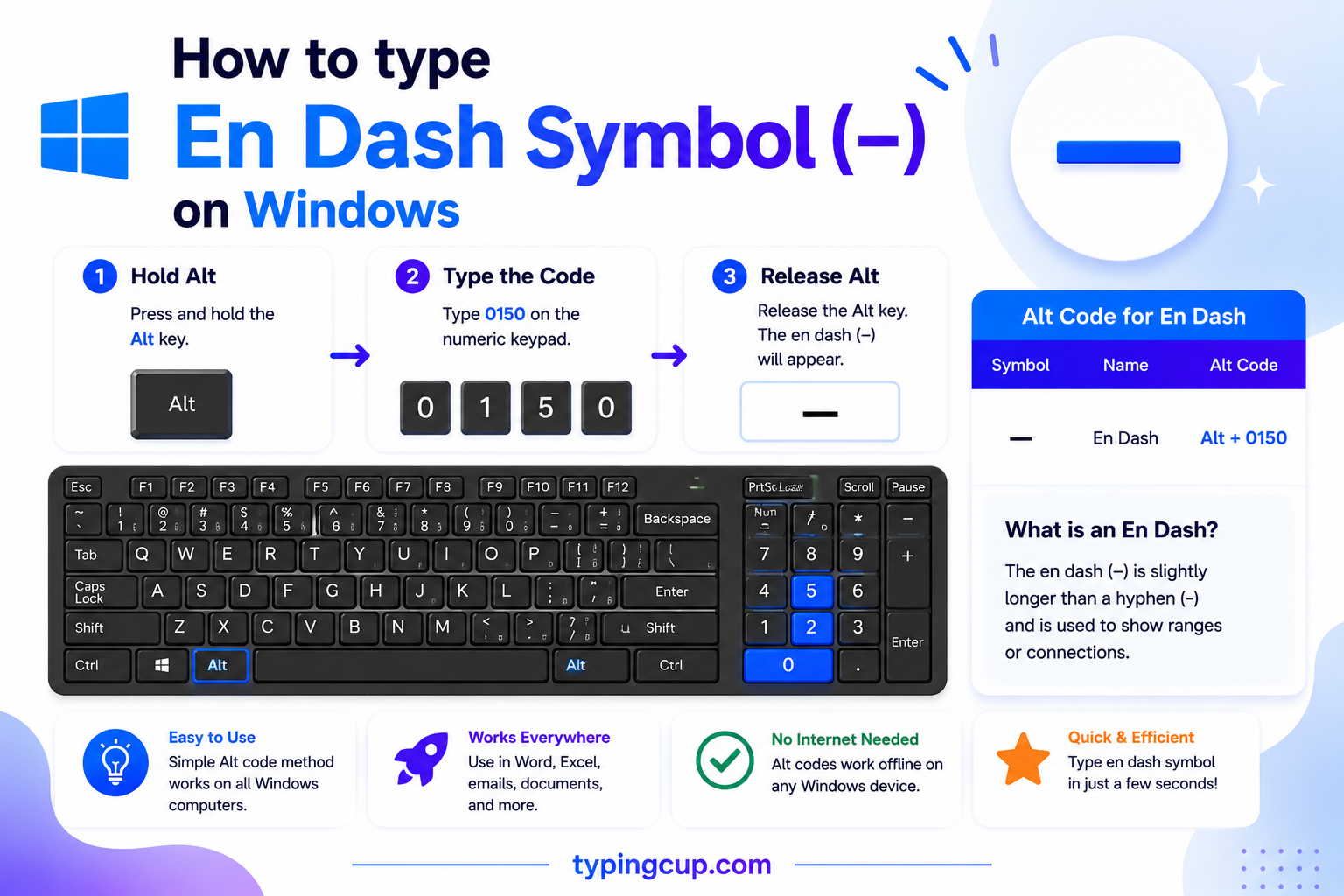
Hold Alt and type 0150 on the numeric keypad for – (keep the leading zero; Num Lock on). In Word, 2013 then Alt + X also works, as does Ctrl + Numpad minus. No numeric keypad? Copy it from the grid or open Character Map.
On Mac
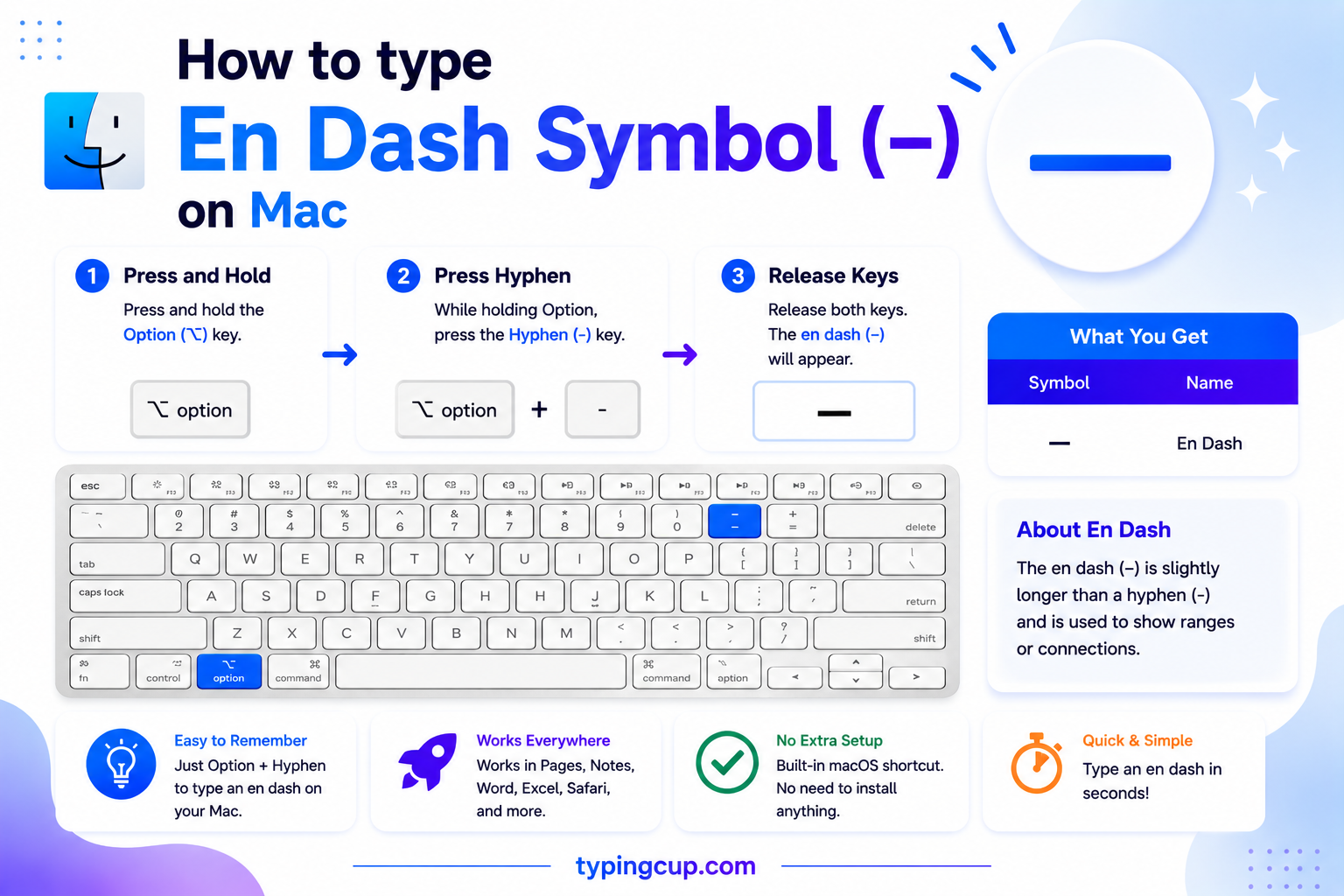
Press Option + Hyphen and you get – straight away — the fastest route anywhere on a Mac. For the em dash, add Shift: Option + Shift + Hyphen gives —.
On iPhone and Android
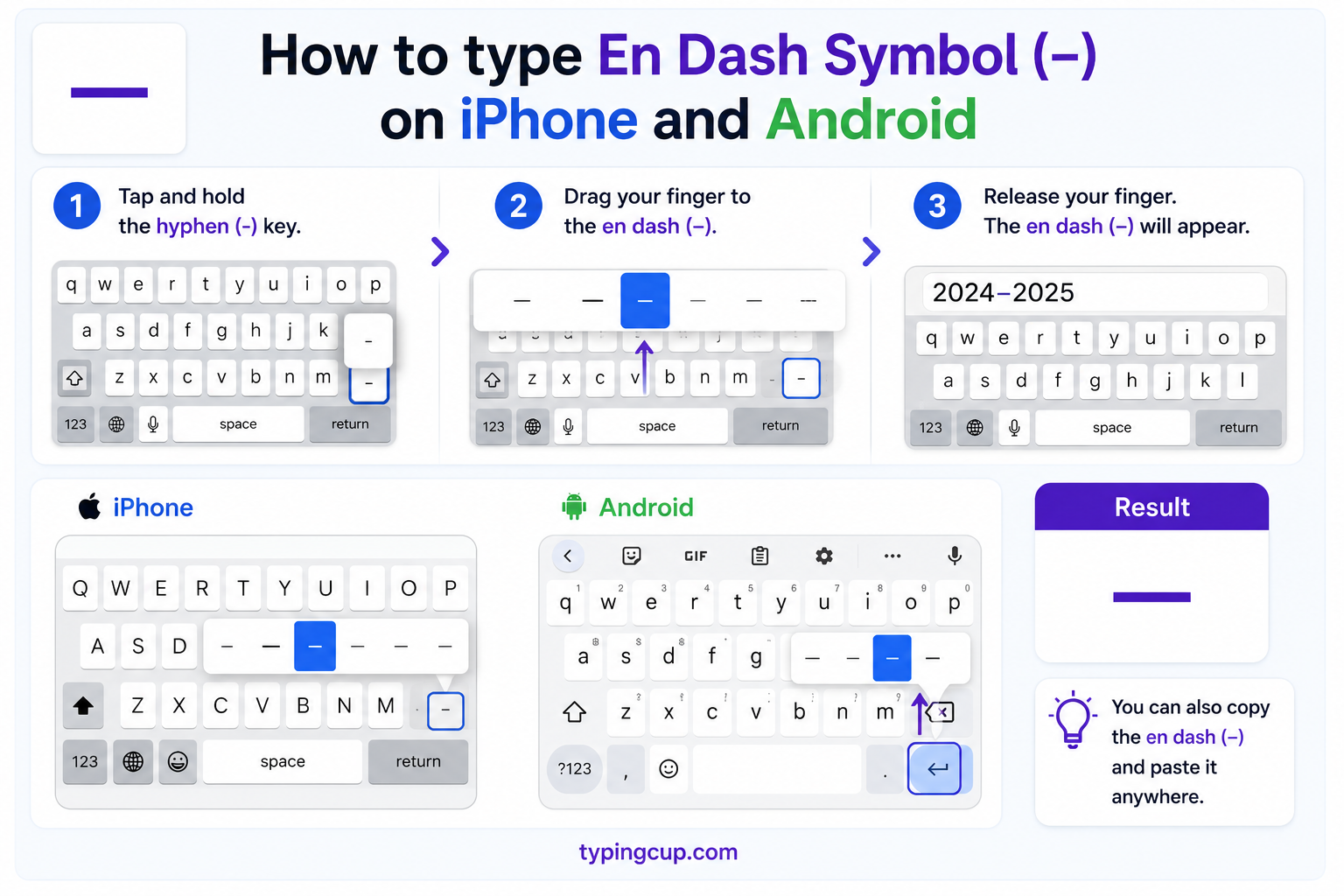
Press and hold the hyphen (-) key on the keyboard’s numbers-and-symbols layer. A small popup shows the en dash – and em dash —; slide to the one you want and let go.
In Microsoft Word
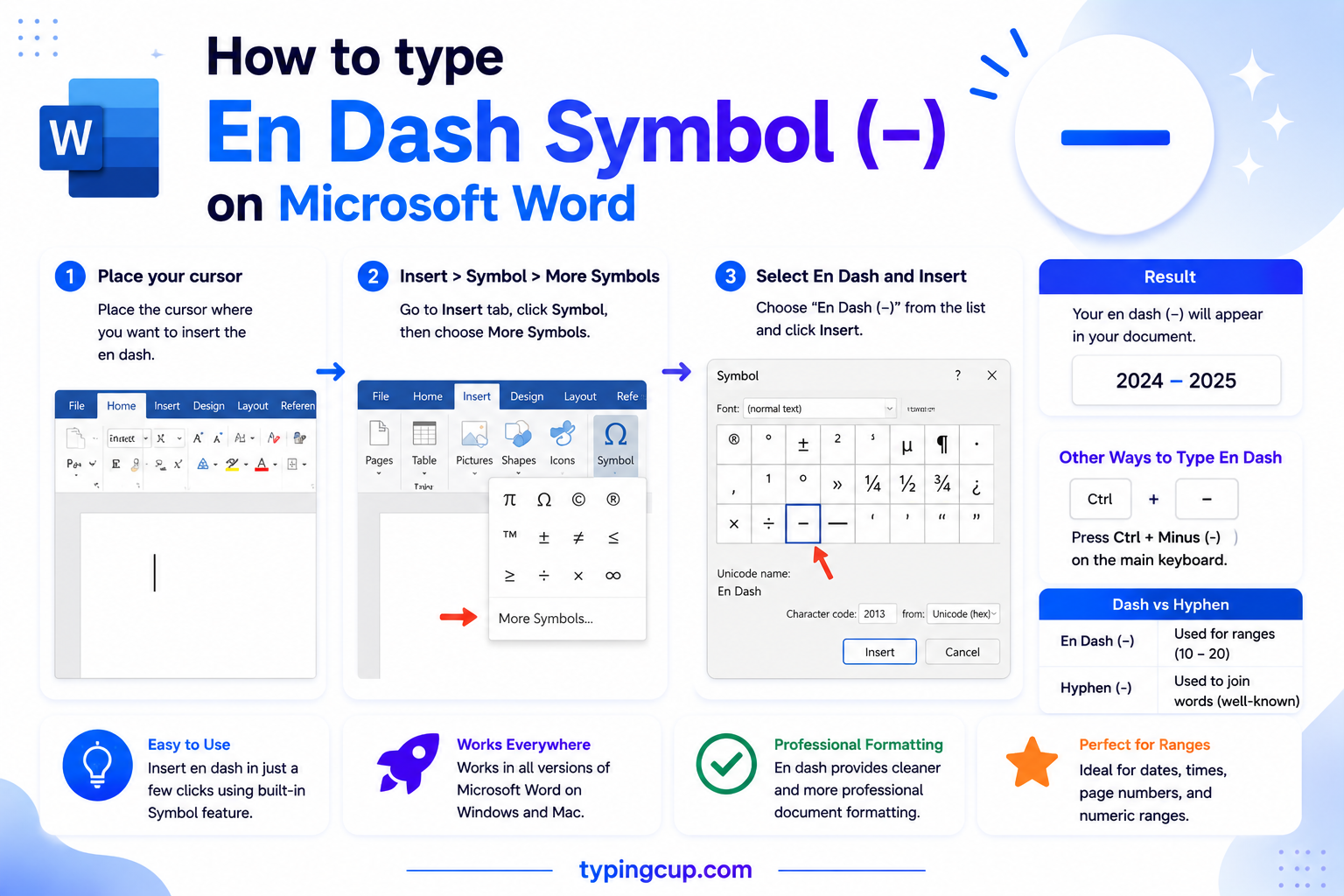
Word makes en dashes for you: type word – word with spaces around a hyphen, or number-hyphen-number, and AutoCorrect converts it. You can also press Ctrl + Numpad minus for – and Ctrl + Alt + Numpad minus for —, or type 2013 then Alt + X.
On Linux
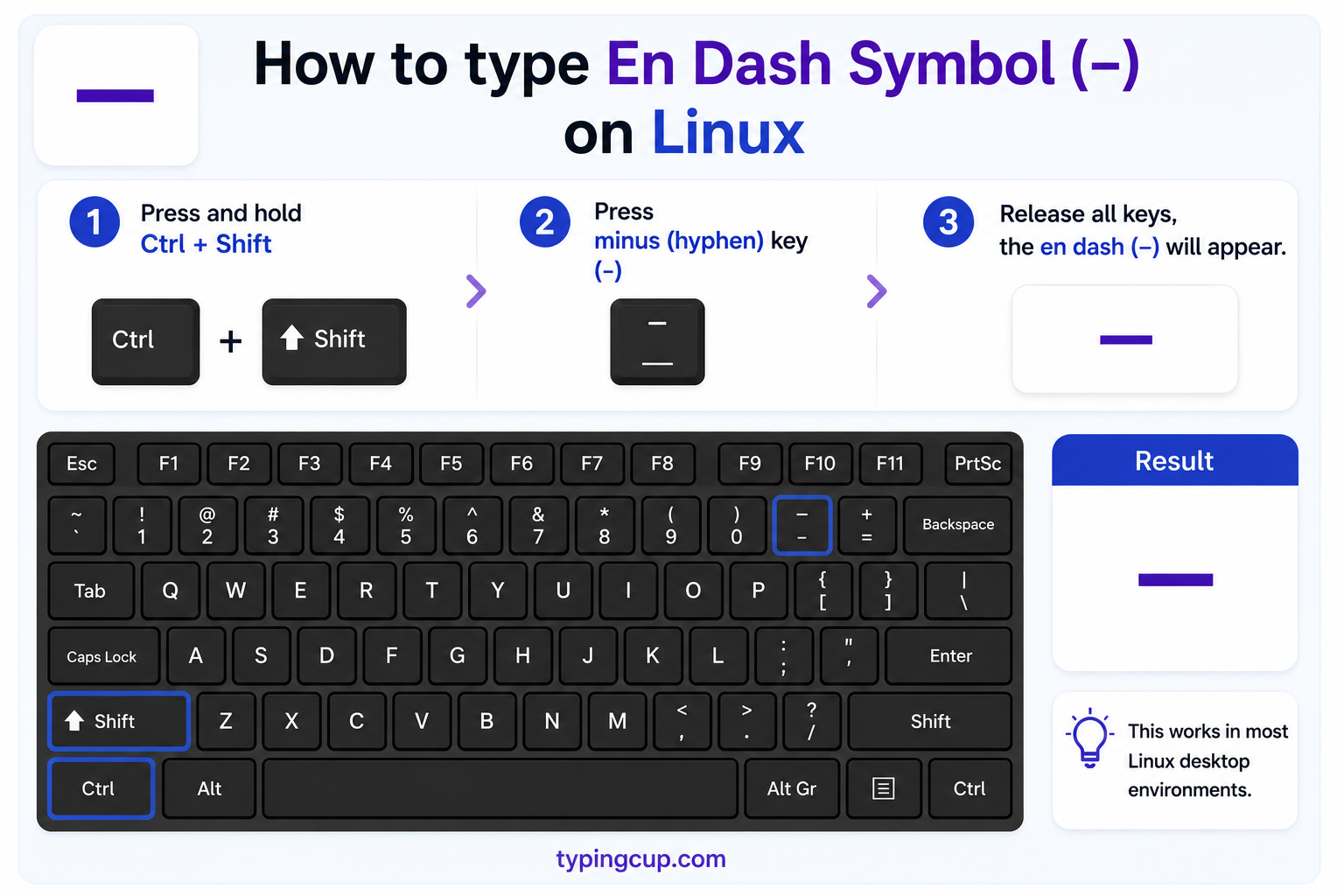
Press Ctrl + Shift + U, type 2013, then Enter for –. With a Compose key, Compose – – . (hyphen, hyphen, period) also gives an en dash, and Compose – – – gives an em dash.
In HTML and CSS
In HTML, use the named entity – or the numeric – for – (the em dash is —). In a CSS content value, use \2013. Serve the page as UTF-8 so the dash holds.
When to use the en dash
The en dash has a small, clear set of jobs. Once you know them, it stops feeling mysterious.
- Ranges of numbers, dates, and times: pages 20–45, the years 1939–1945, 9–5, a Monday–Friday schedule. Read it as “to” or “through.”
- Connections and relationships between two things: the US–China talks, the mind–body problem, the New York–London flight, a risk–reward trade-off.
- Scores and votes: the team won 4–2; the bill passed 51–49.
- As a spaced break (some styles): a parenthetical aside set off with a spaced en dash – like this – where American style would use an em dash.
The through-line: the en dash links two endpoints or two related things. If you are joining parts of a single word, that is a hyphen; if you are breaking a sentence mid-thought in American style, that is an em dash.
En dash vs hyphen vs em dash: the three dashes
They differ in length and in job. The hyphen is shortest, the em dash longest, and the en dash sits in between — hence the names, roughly the width of a lowercase “n” and a capital “M.”
| Mark | Length | Main job | Example |
| – hyphen | shortest | joins words | well-known, twenty-one |
| – en dash | medium | ranges & connections | pages 3–9, US–China |
| — em dash | longest | breaks in a sentence | She paused—then left. |
| − minus | digit-height | arithmetic | 7 − 3 = 4 |
A quick memory aid: hyphen joins, en dash spans, em dash interrupts. When in doubt about a range, it is the en dash; when in doubt about a compound word, it is the hyphen.
En dash examples
Correct uses on the left, with the mistake people often make on the right.
| Use | Correct (en dash) | Common mistake |
| Page range | pp. 120–135 | pp. 120-135 (hyphen) |
| Year span | 2015–2020 | 2015—2020 (em dash) |
| Time | the 9–5 shift | the 9 to 5 shift is fine too |
| Relationship | the mother–child bond | the mother-child bond (hyphen) |
| Route | the Tokyo–Osaka train | the Tokyo-Osaka train (hyphen) |
| Score | Spain won 3–1 | Spain won 3-1 (hyphen) |
Notice the en dash usually goes tight against the words or numbers on both sides — no spaces — except in the spaced-break style covered below.
En dash vs minus sign
Here is a distinction almost no one makes. The minus sign − (U+2212) is its own character, a math operator sized and positioned to line up with digits and the plus sign. The en dash – is punctuation. They look similar, and typesetters have long borrowed the en dash for minus, but in real math or code the true minus reads better: 7 − 3 aligns cleanly, while 7 – 3 sits a touch high and short. If you are writing an equation, reach for − (Alt + 8722 in supporting apps, or − in HTML); for a range or a break, the en dash is right.
The spaced en dash: the British and news alternative to the em dash
American style breaks a sentence with a tight em dash—like that. Much of British publishing, and many news outlets, do the same job with a spaced en dash – a dash with a space on each side – instead. Both are correct; they are just house styles. So if you see ” – ” floating with spaces around it mid-sentence, that is not a mistake, it is the en-dash-as-em-dash convention. Pick one style and use it consistently through a document.
How Word makes en dashes automatically
Microsoft Word and Google Docs quietly convert dashes as you type, which is why one sometimes appears without your asking. Type a word, a space, a hyphen, a space, and another word, then keep going, and Word turns the hyphen into an en dash. Type two hyphens between words with no spaces and it becomes an em dash. If you want to keep a plain hyphen, press Ctrl + Z right after it converts, or switch the rule off under AutoCorrect (or Google Docs’ Tools → Preferences).
When not to use an en dash
Two mistakes are common. First, do not pair an en dash with the word “from” or “between”: write “from 1990 to 1995” or “between 5 and 10,” not “from 1990–1995” or “between 5–10.” Use the en dash only when the words are absent (the 1990–1995 recession). Second, do not use an en dash to join a compound word — “well–known” is wrong; that is a hyphen’s job (well-known). Keep the en dash for spans and connections, and the little errors disappear.
Which dash? Hyphen vs en dash vs em dash vs minus sign
Four marks that look alike but are different characters with different jobs.
| Mark | Name | Unicode | Where it fits |
| – | Hyphen-minus | U+002D | joining words, the keyboard key |
| – | En dash | U+2013 | ranges and connections |
| — | Em dash | U+2014 | breaks in a sentence |
| − | Minus sign | U+2212 | arithmetic |
| ‒ | Figure dash | U+2012 | phone numbers, aligns with digits |
| ― | Horizontal bar | U+2015 | quotation dashes |
En dash in URLs and encoding
In a link, – is percent-encoded as %E2%80%93 — three UTF-8 bytes. If it shows up as – or a box, the text is being read in the wrong encoding. The en dash is not in plain ASCII, so a page or file stuck on an old charset cannot show it; set everything to UTF-8. A related tip: in URLs and file names, use a plain hyphen, not an en dash, since the dash can be mangled or mistyped.
Copy-paste HTML codes
The dashes with their web codes, in one place. Copy the code you need.
| Mark | Named entity | Numeric entity | URL (percent) code |
| – | – | – | %E2%80%93 |
| — | — | — | %E2%80%94 |
| − | − | − | %E2%88%92 |
| ‒ | (none) | ‒ | %E2%80%92 |
In a CSS content value, use \2013 for the en dash. For every other symbol and its codes, see the copy and paste symbols tool and the symbol Alt codes list.
Troubleshooting
My en dash shows as – or a box
That is an encoding mismatch — the UTF-8 bytes for the en dash are being read as an older encoding. Set the file, database, and page charset to UTF-8 and – displays correctly.
Alt + 0150 gives the wrong character
Two usual causes: a missing leading zero (it is 0150, not 150) or Num Lock being off. Alt + 150 without the zero produces a different character from the old code page. Keep the zero and use the numeric keypad, or type 2013 then Alt + X in Word.
My hyphen keeps turning into a dash
That is Word or Google Docs AutoCorrect converting it. Press Ctrl + Z immediately after it changes to keep the hyphen, or switch the dash rule off in AutoCorrect settings.
Frequently asked questions
How do I type an en dash –?
On Windows, hold Alt and type 0150 on the numeric keypad. On a Mac, press Option + Hyphen. In Word, type 2013 then Alt + X, or Ctrl + Numpad minus. In HTML it is –. Or copy it from the grid above.
What is the difference between an en dash and a hyphen?
A hyphen (-) joins words, like “well-known.” An en dash (–) is longer and shows a range or connection, like “pages 3–9” or “US–China.” They are different characters with different jobs.
What is the difference between an en dash and an em dash?
The en dash (–) is medium-length and marks ranges and links. The em dash (—) is longer and marks a break in a sentence, like an aside. Use – for “1–10” and — for “I paused—then spoke.”
When should I use an en dash?
For ranges (dates, times, page and number spans), for connections between two things (mother–child, US–China), for scores (4–2), and, in some styles, as a spaced break in place of an em dash.
How do I write an en dash in HTML?
Use the named entity – or the numeric –. In a CSS content value it is \2013, and in a URL it is %E2%80%93.
