
Heart Symbol (♥): How to Type, Copy, and Use It
The heart symbol, ♥, is the little love shape you drop into a message, a name, or a bio. It comes as a plain black ♥, an outline ♡, and a whole rainbow of emoji hearts, each with its own meaning. None of them are on a standard keyboard, so most people copy one or use a shortcut. This page has all of them, plus the parts other guides skip — what each colour means, and why the same heart is sometimes black and sometimes red.
If you just need a heart, copy one from the grid below: the solid ♥, the outline ♡, or the red ❤.
Below you’ll find how to type a heart on every device, what every heart colour means, the difference between the text heart and the emoji, the classic Alt+3 and <3 shortcuts, and where the heart shape actually came from.
In a hurry?
- Copy it: click a heart in the grid below.
- On Windows: hold Alt and type 3 on the numeric keypad for ♥.
- On a phone: open the emoji keyboard and pick any heart colour.
- In chat: type <3 and many apps turn it into a heart.
- In HTML: write ♥ (or ♥).
Click to copy: heart symbols
Grab the solid ♥, the outline ♡, the red ❤, or the URL code
Table of Contents
Copy and paste the heart symbol
The common hearts with the codes you’re likely to need. Use the grid above to copy with one click; this table is the reference.
| Symbol | Name | Unicode | Windows | HTML |
|---|---|---|---|---|
| ♥ | black heart suit | U+2665 | Alt + 3 | ♥ |
| ♡ | white heart suit | U+2661 | Alt + 9825 | ♡ |
| ❤ | red heart | U+2764 | Alt + 10084 | ❤ |
None of these sit on a standard keyboard, so each takes a shortcut, a code, or a copy. The sections below cover every device, then the parts people really search for: what each colour means and why one heart shows up black and another red.
How to type a heart symbol on any device
The heart isn’t on the keys, so here’s the quickest way to make one on each system.
Type a heart on Windows
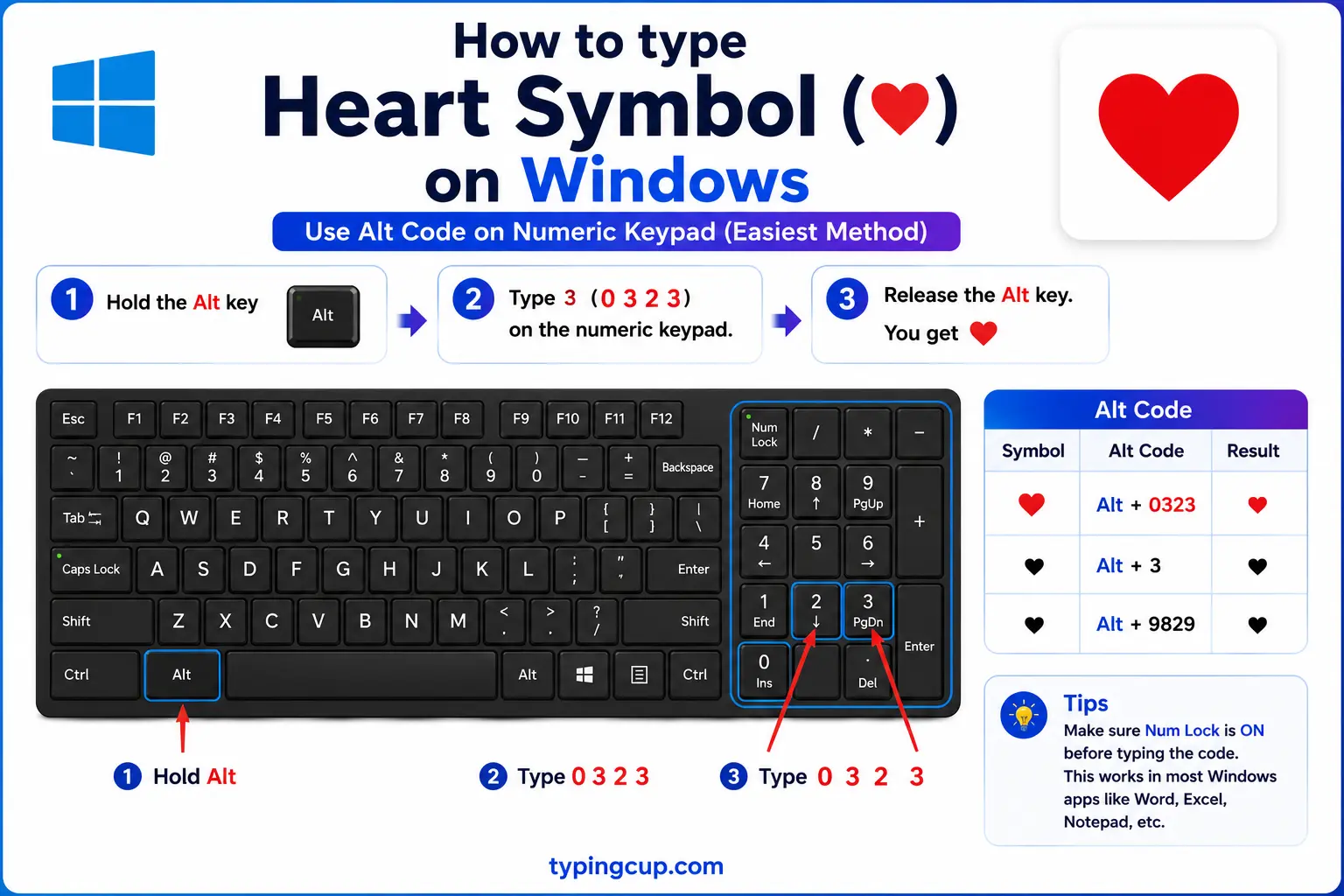
The classic trick is short and worth memorising: turn on Num Lock, hold Alt, and press 3 on the numeric keypad for ♥. For the colourful emoji hearts, press Windows + . to open the emoji panel and search “heart,” where you’ll find every colour.
Type a heart on Mac
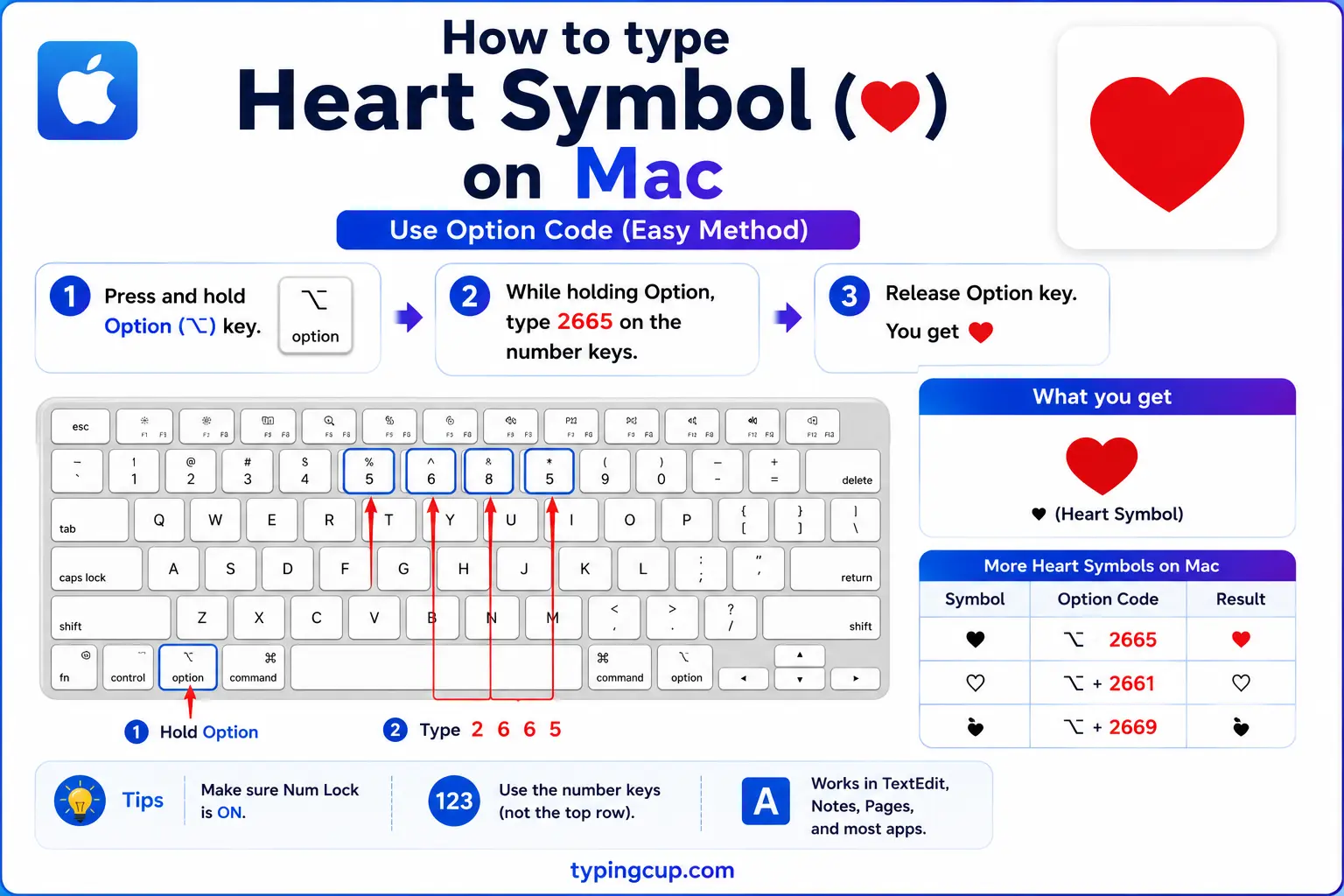
The Mac has no dedicated heart key. Press Control + Command + Space to open the emoji and symbol picker, search “heart,” and click the one you want — the plain ♥, the outline ♡, or any coloured emoji heart.
Type a heart on iPhone and Android
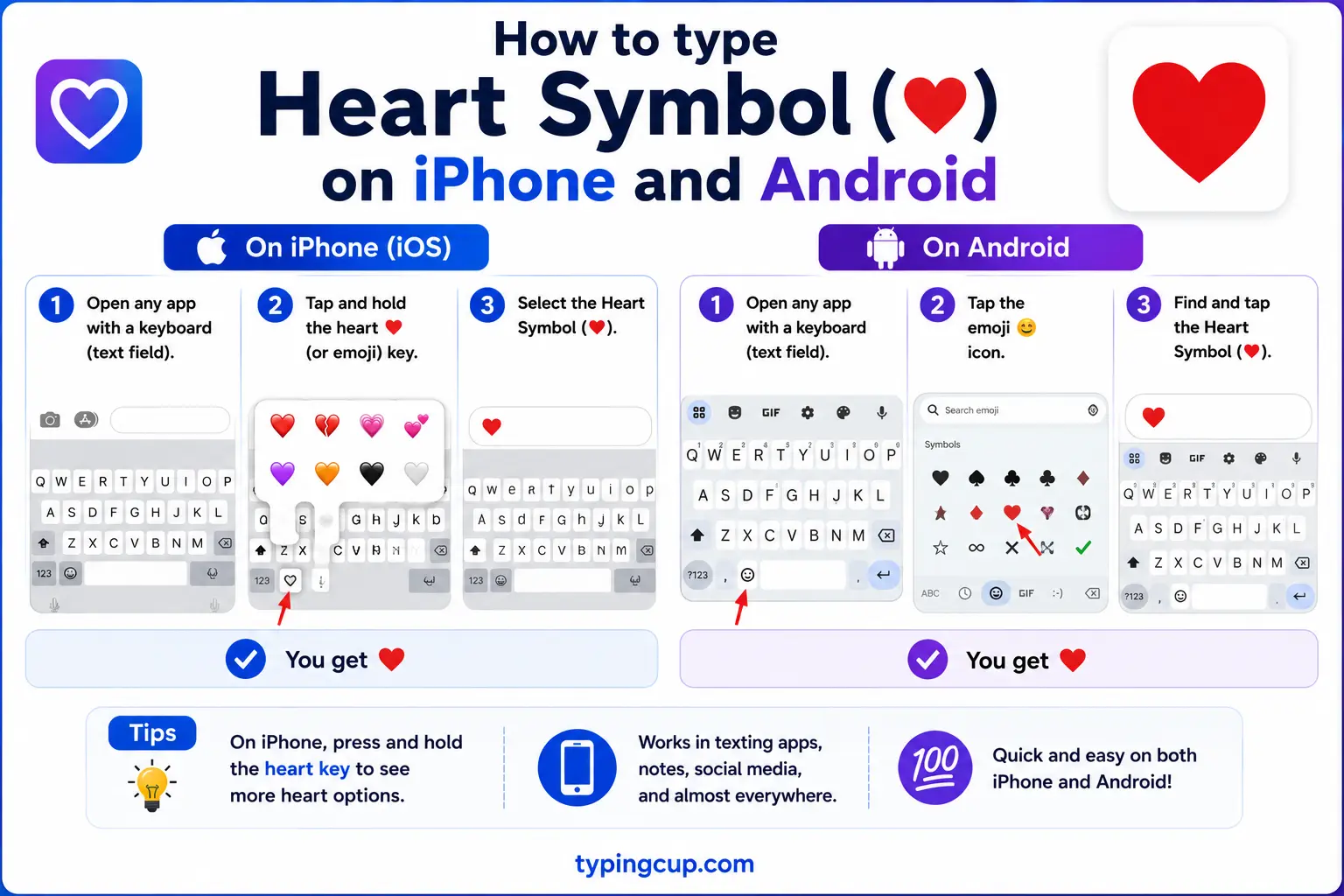
Open the emoji keyboard and you’ll find a full palette of hearts: red, orange, yellow, green, blue, purple, black, white, plus broken and sparkling ones. Search “heart” to jump straight to them. This is where the coloured hearts are easiest to reach.
Type a heart in Microsoft Word
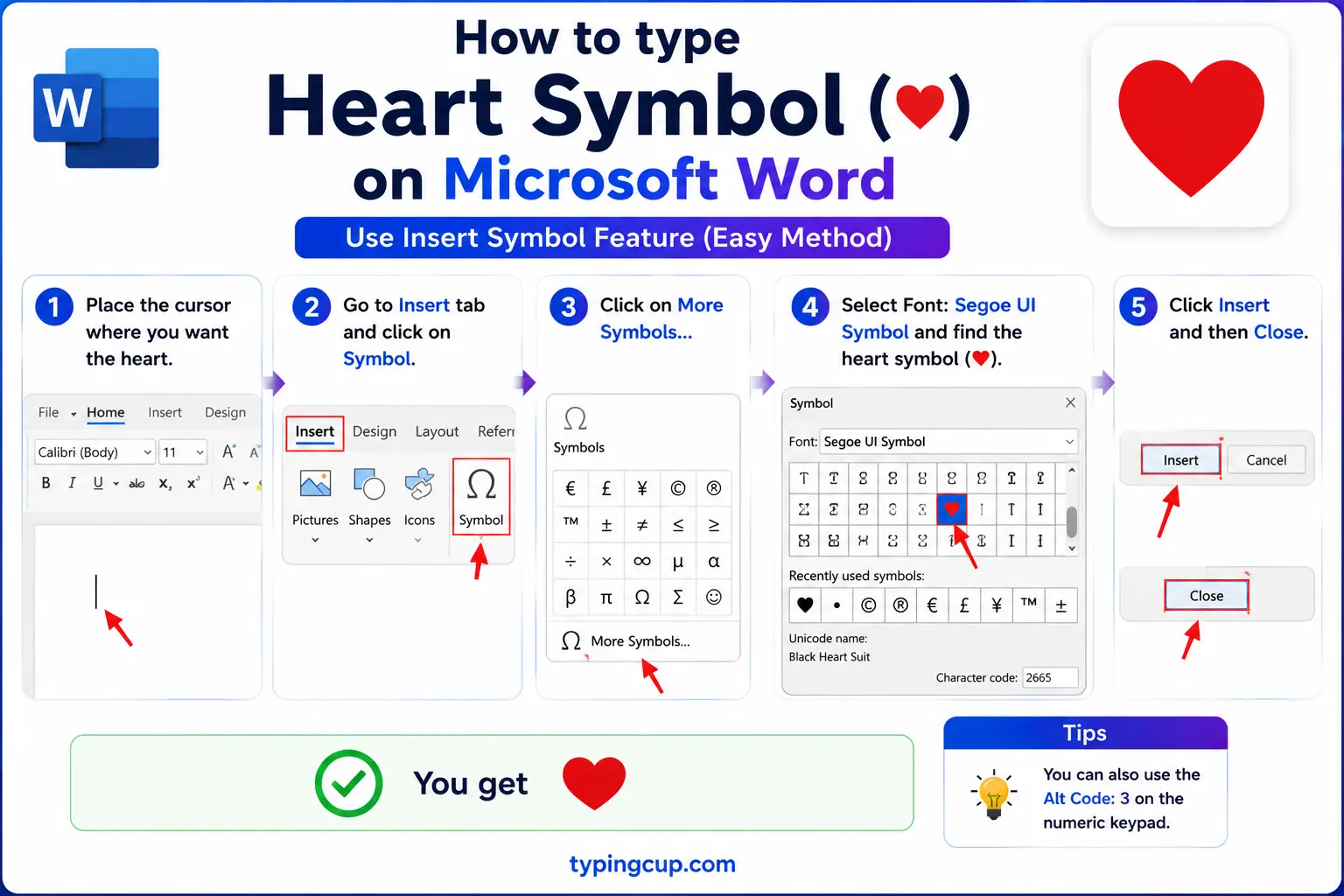
Three routes. The Windows Alt code Alt + 3 gives ♥. Type 2665 and press Alt + X for the same heart. Or use Insert → Symbol; the Wingdings font also has heart shapes among its symbols.
Type a heart in Excel and Google Sheets
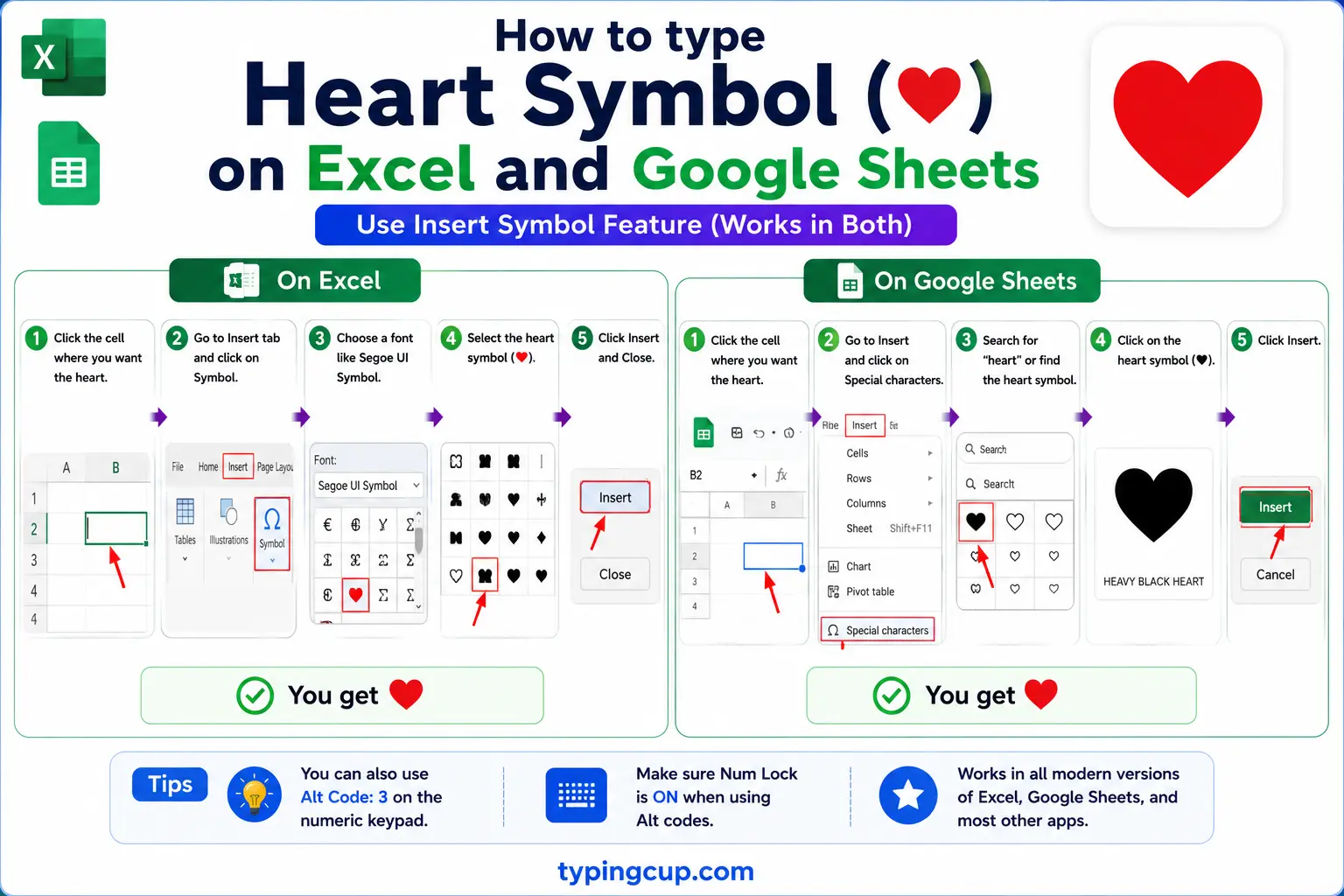
In both, =UNICHAR(9829) (Excel) or =CHAR(9829) (Google Sheets) prints a ♥. In Excel you can also just type Alt + 3 in a cell. Handy for rating columns or simple charts made of hearts.
Type a heart on Linux
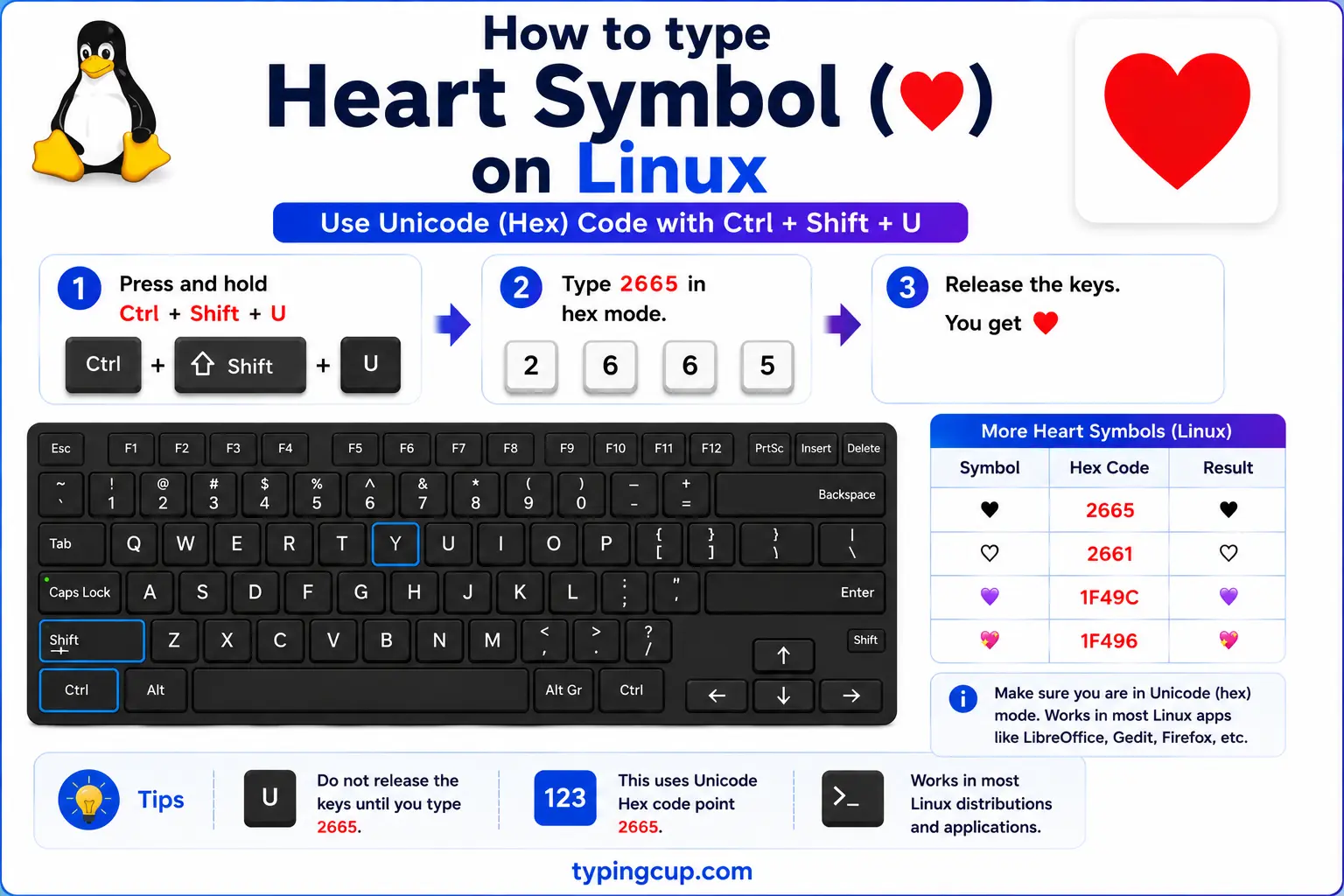
Press Ctrl + Shift + U, type 2665, then Enter for ♥. The emoji picker (often Ctrl + . or via the system tools) covers the coloured hearts.
Add a heart in HTML and CSS
In HTML, ♥ is ♥ or numeric ♥, and the red ❤ is ❤. In CSS, a heart in a content value is the escaped code point \2665.
Every heart colour and what it means
This is the question people actually search for, and few symbol guides answer it: the coloured heart emoji aren’t interchangeable. Over time each colour has picked up its own meaning, and sending the “wrong” one can quietly change the message.
The red ❤️ is the classic: romantic love, deep affection. Orange 🧡 is warm but a step back from romance — care, comfort, half-hearted “I like you.” Yellow 💛 is friendship and happiness. Green 💚 leans toward jealousy, or simply nature and health. Blue 💙 is trust and loyalty (and a favourite for platonic or team love). Purple 💜 suggests glamour, or admiration, and is widely used in fan communities. Black 🖤 can mean grief and dark humour, or just an edgy aesthetic. White 🤍 reads as pure, and is often used for weddings or sympathy.
| Heart | Colour | Common meaning |
|---|---|---|
| ❤️ | Red | romantic love |
| 🧡 | Orange | care, warmth, friendship |
| 💛 | Yellow | friendship, happiness |
| 💚 | Green | nature, or jealousy |
| 💙 | Blue | trust, loyalty |
| 💜 | Purple | admiration, glamour |
| 🖤 | Black | grief, dark humour |
| 🤍 | White | purity, sympathy |
| 💔 | Broken | heartbreak, sadness |
There are shades within shades: the pink hearts (💗 growing, 💓 beating, 💕 two hearts) all soften things toward sweet, cute, or budding affection, while the broken heart 💔 is unmistakable. None of this is official — meanings shift by age group and community — but the conventions above are widely enough shared that they’re worth knowing before you hit send.
The text heart ♥ vs the emoji ❤️
Here’s a technical detail that explains a lot of confusion: the same heart can show up as a plain black-and-white glyph ♥ or as a full-colour emoji ❤️, and the thing that flips between them is an invisible character called a variation selector.
The red heart is the character U+2764. On its own, ❤ often renders as a simple black heart, the “text” presentation. Add an invisible variation selector (U+FE0F) right after it and the system switches to the “emoji” presentation, the glossy red ❤️. That hidden character is why the exact same heart looks monochrome in a code editor and bright red in a chat app — and why pasting a heart sometimes loses its colour, because the invisible selector got stripped.
The suit heart ♥ (U+2665) is different again: it’s designed as a text symbol, so it usually stays black and takes the colour of the surrounding text (which is how you get a red heart in a coloured heading with plain CSS). If you want a heart that’s reliably one flat colour you can style, use ♥; if you want the emoji look, use ❤️ with its selector, or just copy the emoji whole.
The Alt+3 shortcut and the <3 heart
Two of the oldest heart shortcuts are still the fastest. On Windows, Alt + 3 (hold Alt, press 3 on the numeric keypad) has produced ♥ since the DOS days, because ♥ sits at position 3 in the original character set — a genuinely handy thing to have memorised.
The other is <3. Turn your head to the left and the less-than sign plus a 3 looks like a heart on its side, and it became the standard way to send love in early text chat and instant messaging. Many apps now auto-convert <3 into a ♥ or ❤️ as you type. Its broken-heart cousin is </3. They’re informal, but instantly understood, and they work anywhere you can type two characters.
Why the heart shape looks nothing like a real heart
It’s worth noticing: the ♥ symbol doesn’t resemble an actual human heart, which is a lumpy, asymmetric organ. The neat, symmetrical shape with two round tops and a point below is a stylised heart, and nobody is quite sure where it came from — there are several competing theories.
One popular idea links it to silphium, a plant used as a contraceptive in the ancient city of Cyrene, whose seed pod was shaped like the modern heart and appeared on the city’s coins — tying the shape to love and sex from the start. Others trace it to medieval artists trying to draw the heart from vague anatomical descriptions, or to the shape of ivy leaves (a symbol of fidelity) and swans’ necks curving together. By the late Middle Ages the symbol was firmly linked with romantic love, and it has meant that ever since.
So the heart you type is less a picture of an organ than a centuries-old piece of visual shorthand for love — which is exactly why it works so well as a symbol.
Hearts in the card suits
The heart is also one of the four French playing-card suits, alongside spades ♠, diamonds ♦, and clubs ♣. In cards, hearts are one of the two red suits, and Unicode actually provides two versions of each suit — a solid one and an outline — so you can write ♥ or ♡, ♠ or ♤, depending on the look you want.
| Suit | Solid | Outline |
|---|---|---|
| Hearts | ♥ | ♡ |
| Spades | ♠ | ♤ |
| Diamonds | ♦ | ♢ |
| Clubs | ♣ | ♧ |
It’s a small detail, but it’s why the heart has both a filled and a hollow form in the first place: they started as card suits, and the outline ♡ later took on its own life as a lighter, softer heart for names and captions.
Copy-paste HTML codes
Every code for the common hearts in one place. Click a cell and copy.
| Symbol | Named entity | Numeric entity | URL (percent) code |
|---|---|---|---|
| ♥ | ♥ | ♥ | %E2%99%A5 |
| ♡ | — | ♡ | %E2%99%A1 |
| ❤ | — | ❤ | %E2%9D%A4 |
In a CSS content value, use \2665 for a heart, and because ♥ takes the text colour you can style it with color:red. For related symbols, the check mark guide and the degree symbol guide get the same copy-and-code treatment.
Troubleshooting
My heart shows as a box or a plain outline
Either an encoding mismatch (set everything to UTF-8) or a font without that glyph. The suit heart ♥ is very widely supported; the coloured emoji hearts need an emoji-capable font, so on older systems they may appear as an empty box.
My red heart lost its colour when I pasted it
The colour comes from an invisible variation selector (U+FE0F) after the heart, and some plain-text fields strip it, leaving the black text heart. Re-copy the emoji ❤️ whole from an emoji keyboard, or use ♥ and colour it with CSS.
Alt + 3 isn’t giving me a heart
Make sure Num Lock is on and you’re pressing 3 on the numeric keypad, not the top-row 3. On a laptop without a keypad, use Windows + . and search “heart,” or copy one from the grid above.
The heart looks different on another phone
Emoji are drawn by each platform, so a heart can look slightly different on iPhone, Android, and Windows. For a consistent look everywhere, use the plain ♥ instead of a coloured emoji.
FAQ
How do I type a heart symbol?
On Windows, hold Alt and press 3 on the numeric keypad for ♥, or press Windows + . and search “heart.” On a Mac, use Control + Command + Space. On a phone, use the emoji keyboard. Or click a heart in the grid above.
What do the different heart colours mean?
Broadly: red ❤️ is romantic love, orange 🧡 and yellow 💛 lean toward friendship, blue 💙 is trust and loyalty, purple 💜 is admiration, green 💚 can mean jealousy, black 🖤 grief or dark humour, and white 🤍 purity. Meanings vary by community, so they’re conventions, not rules.
Why is the same heart sometimes black and sometimes red?
An invisible variation selector (U+FE0F) after the character switches the red heart between a plain black “text” look and the colourful emoji. The suit heart ♥ instead just takes the surrounding text colour.
What does <3 mean?
It’s a heart on its side: the less-than sign plus 3 looks like a heart tilted left, used to send love in chat. Many apps auto-convert <3 into ♥, and </3 means a broken heart.
How do I write a heart in HTML?
Use ♥ or ♥ for ♥, and ❤ for the red ❤. In a URL, ♥ is %E2%99%A5.
