
Indian Rupee Symbol (₹): How to Type, Copy, and Use It
The Indian rupee sign, ₹, is the symbol for the rupee, India’s currency. It’s one of the newest currency symbols in the world, adopted in 2010, and because it arrived so recently, it has no old-style Alt code and can be a little harder to type than the euro or the pound. This page covers all of it.
If you just need the symbol, copy ₹ from the grid below, along with its HTML code, its URL code, or the three-letter currency code INR.
Below you’ll find how to type ₹ on every device, how to write amounts in lakhs and crores the Indian way, the story behind the symbol, how it differs from the older rupee sign ₨, and how it behaves in links and code.
In a hurry?
- Copy it: click ₹ in the grid below.
- On Windows: add an Indian keyboard and press AltGr (right Alt) + 4, or in Word type 20B9 then Alt + X.
- On a Mac: open the Character Viewer (Control + Command + Space) and search “rupee,” or add an Indian input source.
- On a phone: on the numbers-and-symbols keyboard, find or long-press the currency key and pick ₹.
- In HTML the rupee sign is ₹; in a URL it’s %E2%82%B9.
Click to copy: the rupee sign
Grab ₹, its HTML code, its URL code, or the INR currency code
Table of Contents
Copy and paste the rupee sign
The rupee sign with every code you’re likely to need in one row. Use the grid above to copy with a click; this table is the reference for typing or coding it yourself.
| Symbol | Name | Unicode | Windows | Mac | HTML |
|---|---|---|---|---|---|
| ₹ | Indian rupee sign | U+20B9 | 20B9 then Alt + X (Word) | Character Viewer | ₹ |
Note the Windows column: there’s no Alt + 0xxx code for ₹, because it sits well beyond the old 255-character range. The device sections below show the routes that do work.
How to type the rupee sign on any device
Because ₹ is so new, it isn’t printed on most keyboards, and the method varies more than for older symbols. Here’s the quickest route on each system.
Type the rupee sign on Windows
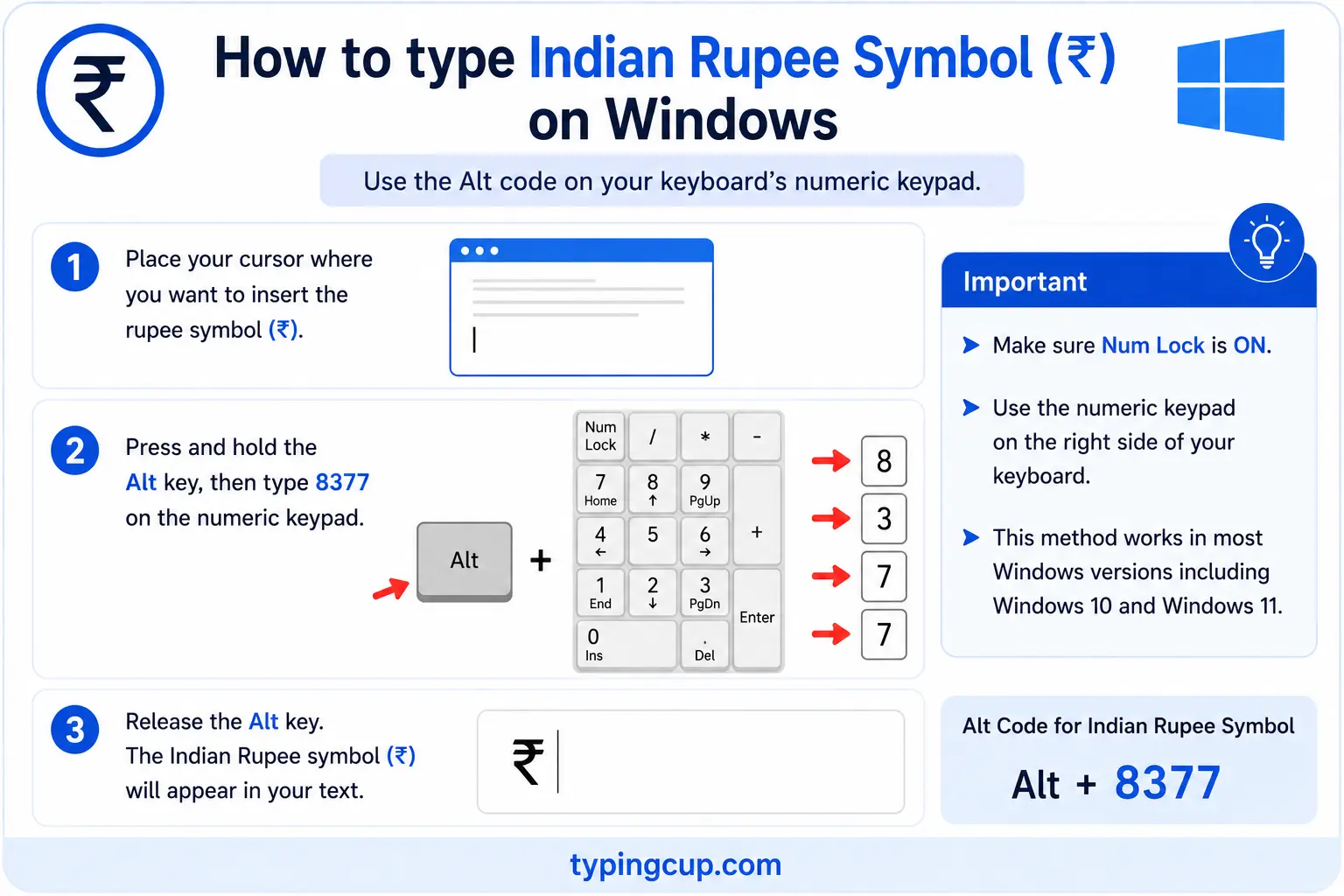
There’s no classic Alt code for ₹. The cleanest fix is to add an Indian keyboard layout (Settings, then Time & Language, then Language) and press the right Alt (AltGr) + 4, where recent Windows layouts place the rupee. In Word, you can also type 20B9 and press Alt + X. Failing that, press Windows + . for the symbol panel, or copy ₹ from the grid above.
Type the rupee sign on Mac
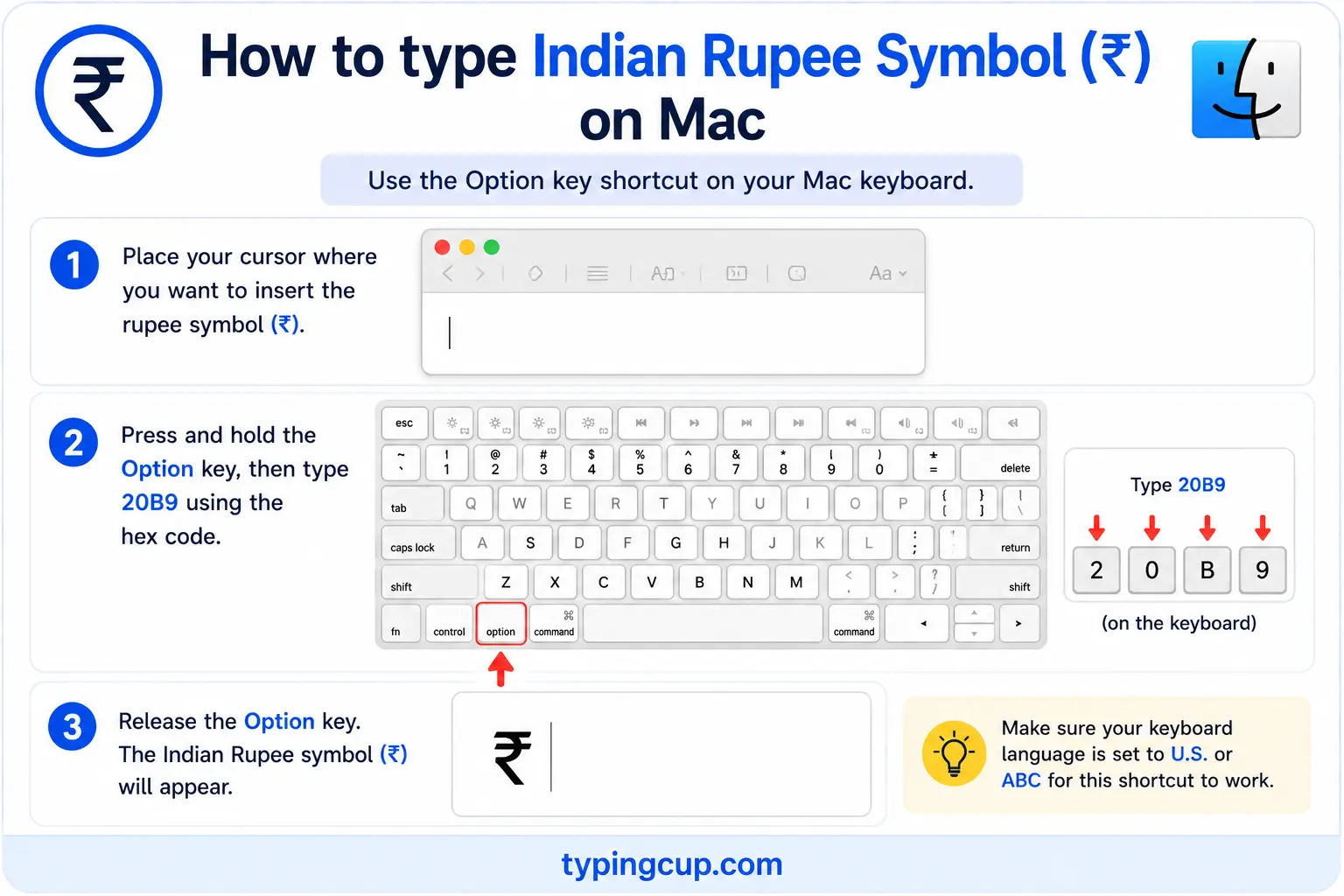
macOS has no default keyboard shortcut for ₹. Open the Character Viewer with Control + Command + Space, search “rupee,” and double-click the symbol. If you type it often, add an Indian input source under System Settings, then Keyboard, where it gets a key of its own.
Type the rupee sign on iPhone and Android
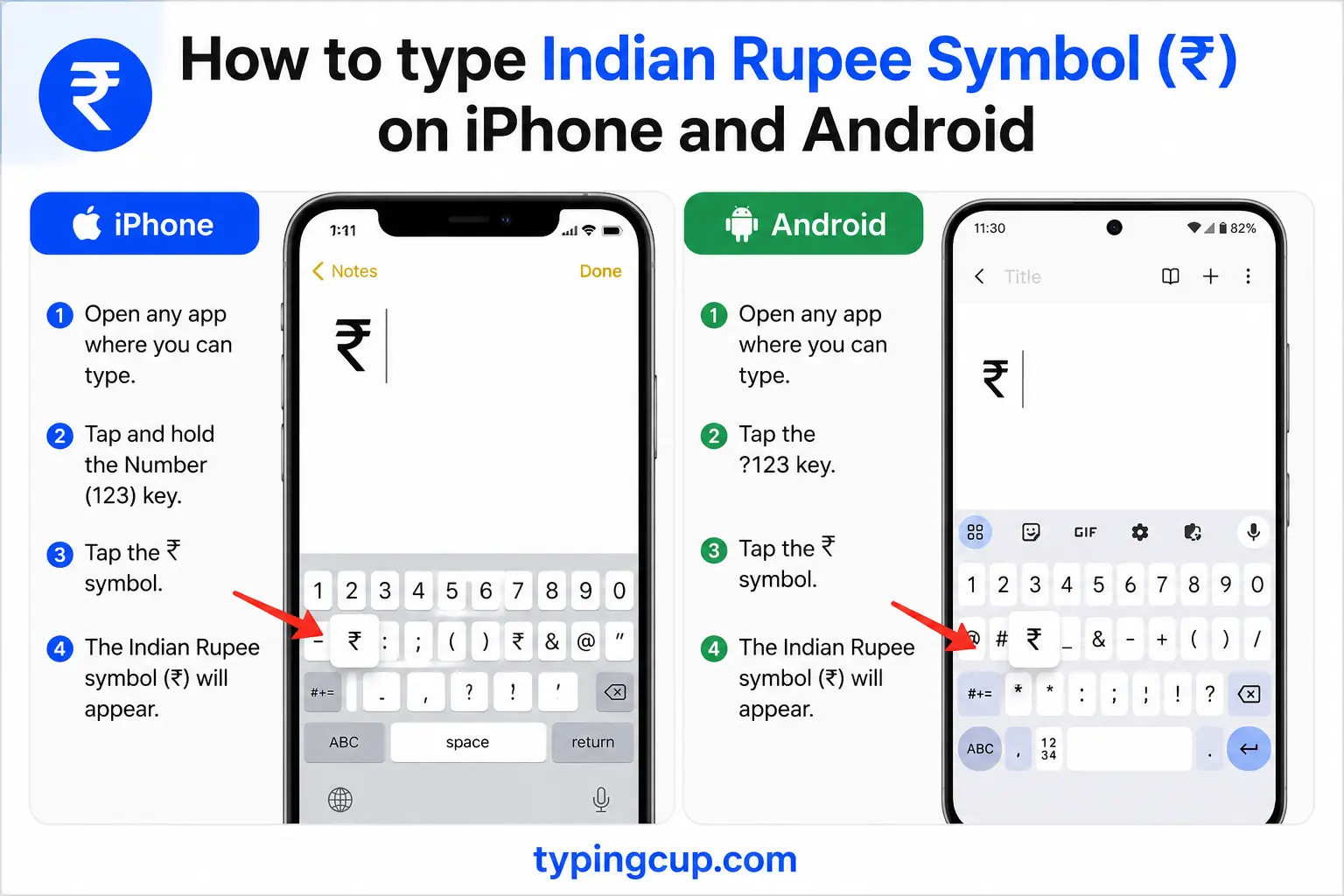
Open the numbers-and-symbols keyboard (the 123 key) and look under the currency symbols, or press and hold the $ key. On Indian keyboards and Gboard set to an Indian language, ₹ often appears directly. Slide onto it and lift your finger.
Type the rupee sign in Microsoft Word
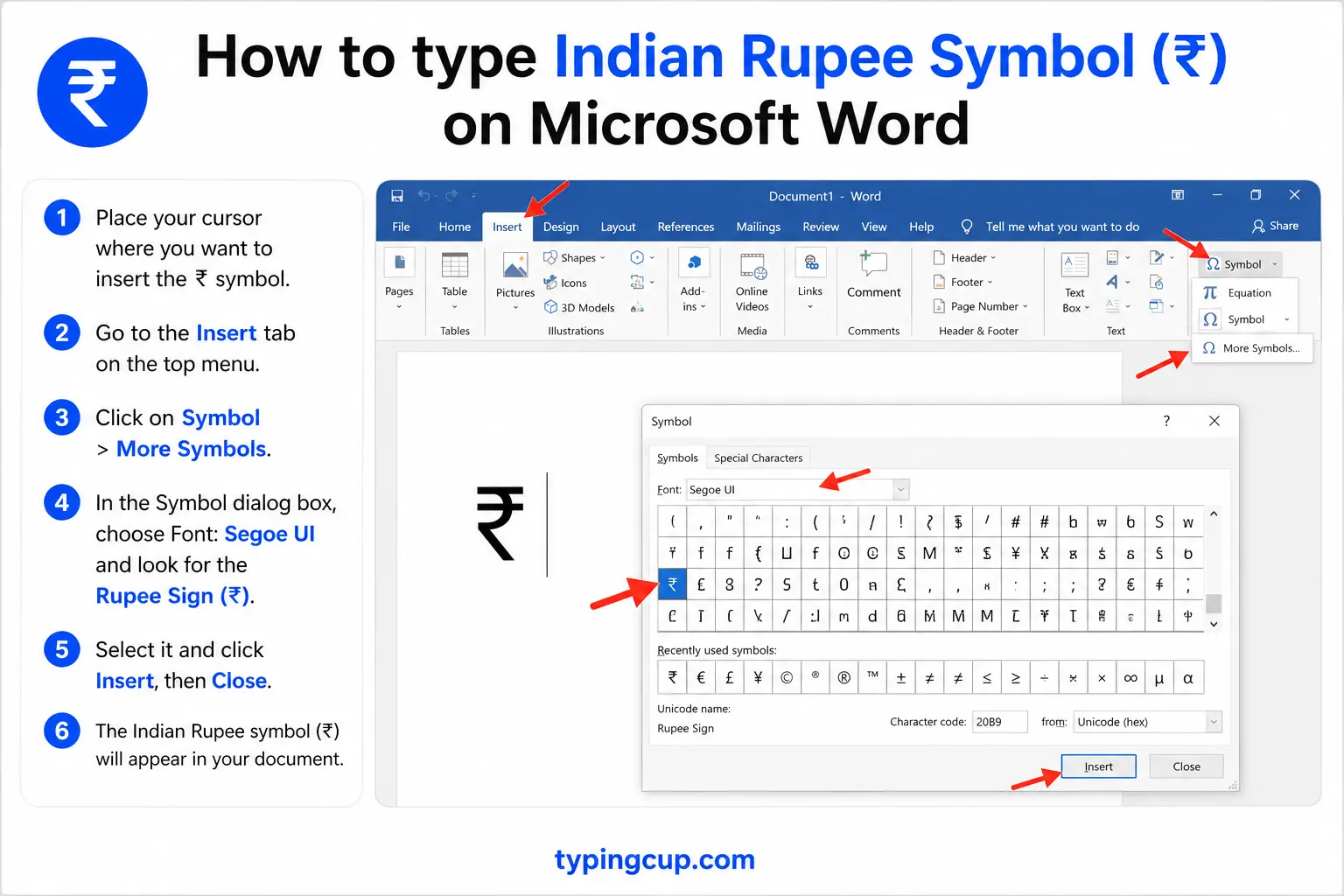
Word reaches ₹ with the hex method even when Windows can’t on its own: type 20B9 and press Alt + X, and the code turns into the symbol. If you use it constantly, save it as an AutoCorrect entry under File, then Options, then Proofing.
Type the rupee sign on Linux
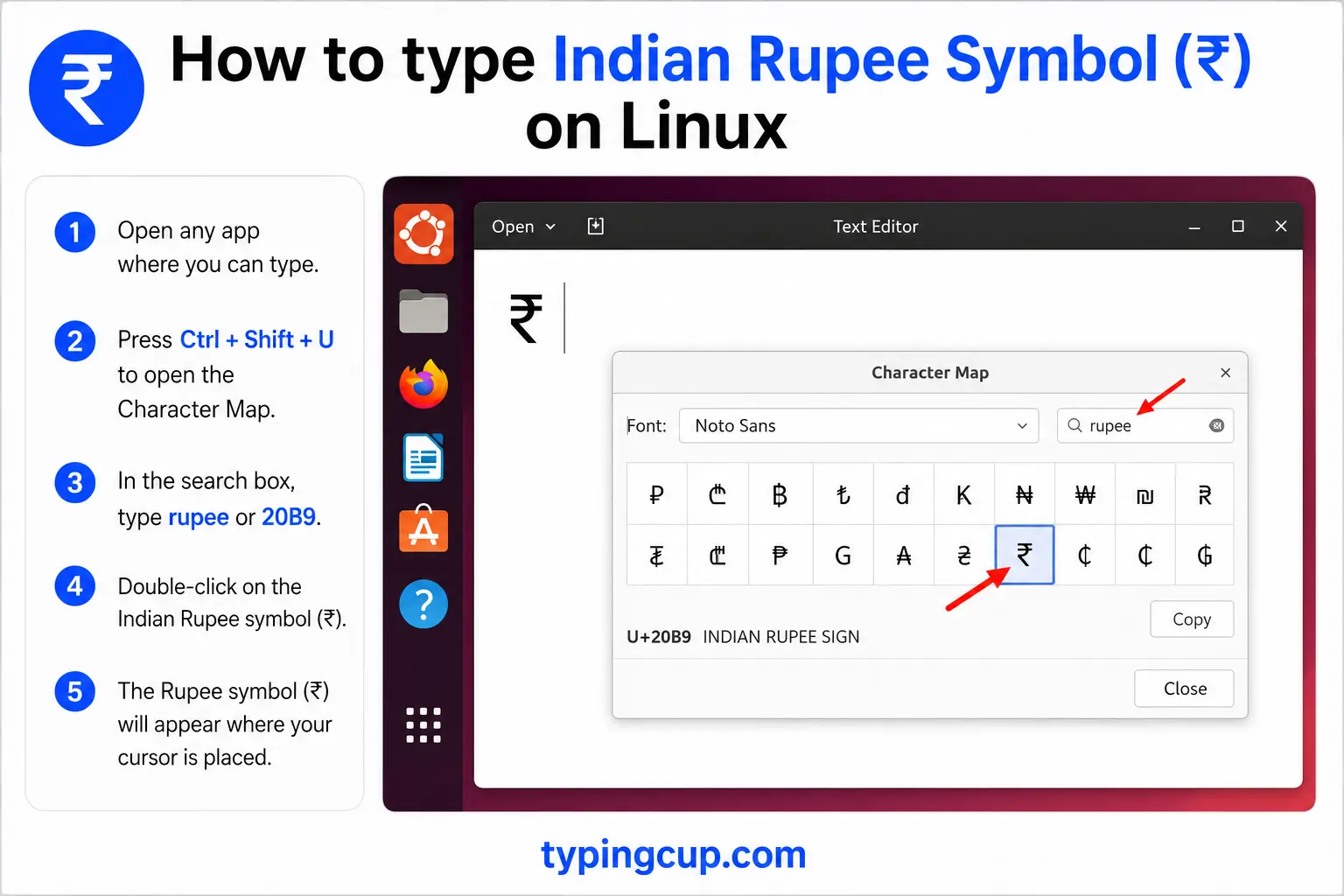
Press Ctrl + Shift + U, type 20b9, then press Enter. On an Indian keyboard layout, the right Alt (AltGr) plus 4 also produces it.
Type the rupee sign in Excel and Google Sheets
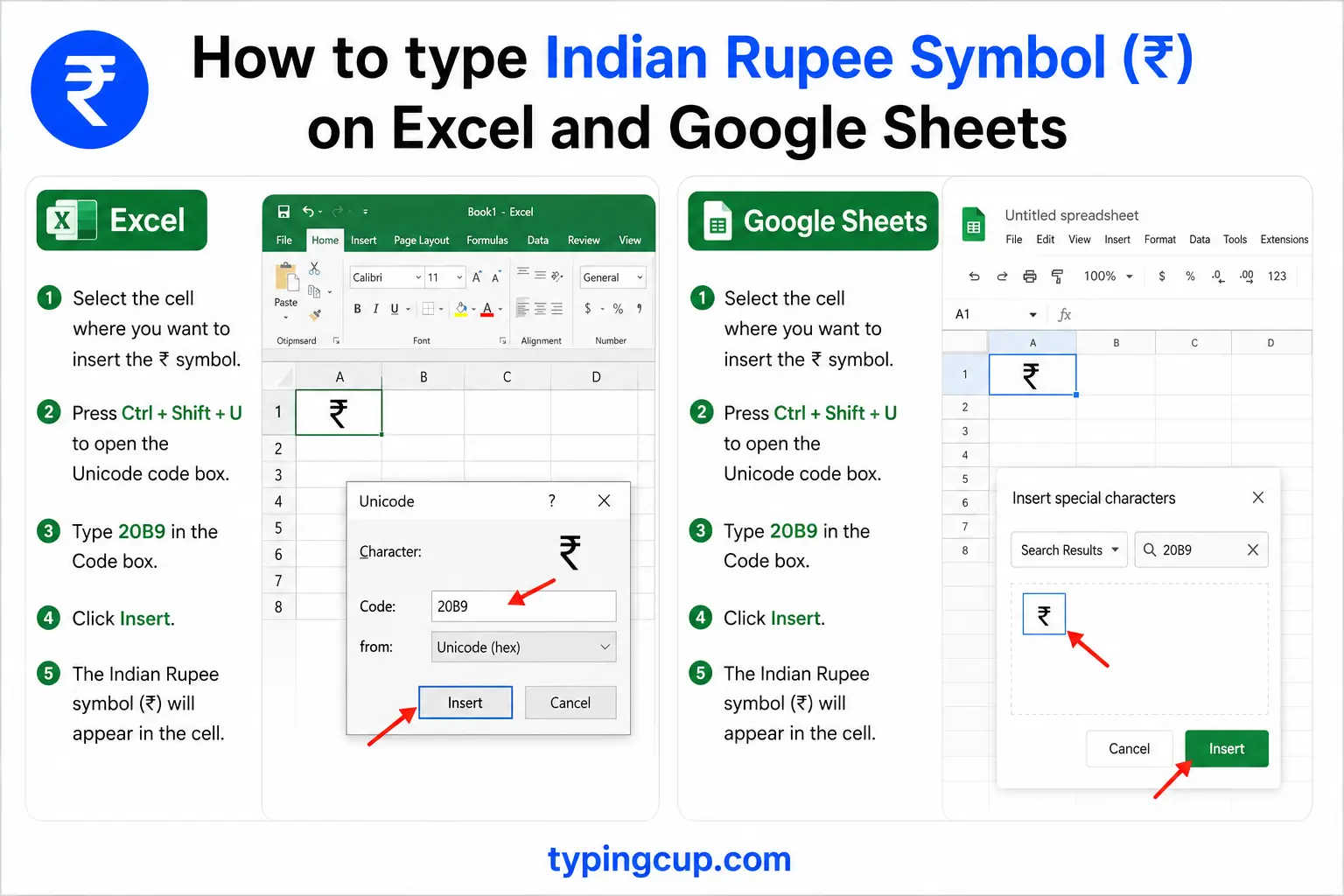
There’s no Alt code, so format the cells as Currency with the Indian rupee selected, or use the =UNICHAR(8377) formula, which returns ₹ inside a text string. The same formula works in Google Sheets.
Type the rupee sign in HTML and CSS
The rupee sign has no short named entity, so use the numeric forms: ₹ or ₹. In CSS, use \20B9 in a content value, and serve the page as UTF-8 so it renders everywhere.
Writing rupee amounts: lakhs, crores, and the Indian comma
Typing ₹ is the easy part. Writing the number after it the Indian way is where people, and software, often slip up, because India groups digits differently from the rest of the world.
Indian English counts in lakhs (one lakh is 1,00,000, a hundred thousand) and crores (one crore is 1,00,00,000, ten million). The commas follow the same pattern: after the first three digits from the right, they fall every two digits. So a hundred thousand rupees is written ₹1,00,000, not ₹100,000, and one crore is ₹1,00,00,000.
A figure a Western system would format as ₹1,234,567 is written ₹12,34,567 in India, and read as “twelve lakh, thirty-four thousand, five hundred sixty-seven.” If you’re building a website or a spreadsheet for an Indian audience, this grouping matters, because many tools default to the Western three-digit comma and quietly get it wrong.
The story and design of the ₹ symbol
The rupee sign is young. India adopted it on 15 July 2010; before that, people wrote Rs or, for a single rupee, Re. The symbol came out of a public competition with thousands of entries, and the winning design was by D. Udaya Kumar, then at the Indian Institute of Technology.
The shape carries meaning. It blends the Devanagari letter र (“ra”) with a Latin capital R that has dropped its vertical stroke, so it reads as a rupee in both scripts. The two horizontal lines across the top stand for the tricolour of the Indian flag, and also echo an equals sign, meant to signal the country’s aim of reducing economic inequality.
Because the symbol is so new, it wasn’t on older keyboards or in older fonts, which is why typing it can still be fiddlier than typing the euro or the pound, and why very old software may show a blank box in its place.
₹ vs ₨: the Indian rupee and the generic rupee
There are two rupee symbols, and they’re easy to confuse. ₹ (U+20B9) is the modern Indian rupee sign introduced in 2010. ₨ (U+20A8) is the older, generic rupee sign, an Rs ligature, still used for the Pakistani, Sri Lankan, Nepalese, and other rupees.
So a price in India should use ₹, while a Pakistani or Sri Lankan price often uses ₨ or a plain Rs. If you specifically mean Indian rupees, ₹ is the correct character; the generic ₨ says “rupees” without naming the country.
From “Rs” to ₹: which to use when
Before 2010, Indian prices were written with Rs (or Re for a single rupee), and you’ll still see that everywhere, especially in older documents and casual writing. The symbol ₹ is now standard for prices and signage.
For anything financial or international, the ISO code INR is clearest, as in INR 500 or exchange rates like USD/INR. So it’s ₹ for everyday prices, Rs in casual or legacy contexts, and INR when the currency has to be unambiguous across borders.
Why ₹ has no simple Windows Alt code
If you’ve tried an Alt code for the rupee and got nothing, that’s expected. The classic Windows Alt codes only reach characters up to 255, and ₹ sits far beyond that, at code point 8377, so there’s no Alt + 0xxx for it.
The practical ways in are the ones in the device sections above: on Windows, add an Indian keyboard and use AltGr + 4, or in Word type 20B9 then Alt + X. On any system, the copy grid at the top is the fastest route.
The rupee sign in web addresses, URLs, and code
You’ll rarely put a ₹ in a domain name, but it appears in URL paths and constantly in code, especially on Indian shopping and finance sites.
In a URL, ₹ is percent-encoded as %E2%82%B9, its three UTF-8 bytes (0xE2, 0x82, 0xB9) written out. In code, the escapes are \u20B9 in JavaScript, Java, JSON, and Python, and ₹ or ₹ in HTML. Since it renders as a blank box in older fonts, it’s worth testing your site’s font stack includes a face that has the glyph.
The rupee sign vs other currency symbols
If you work across currencies, here are the common symbols alongside the rupee, with their Unicode points.
| Symbol | Currency | Unicode | HTML |
|---|---|---|---|
| ₹ | Indian rupee | U+20B9 | ₹ |
| ₨ | Rupee (generic) | U+20A8 | ₨ |
| € | Euro | U+20AC | € |
| £ | Pound sterling | U+00A3 | £ |
| $ | Dollar | U+0024 | $ |
| ¥ | Yen / Yuan | U+00A5 | ¥ |
The euro, pound, and yen have short named entities; the rupee signs use the numeric form. The euro sign and pound sign guides cover those in the same detail.
Copy-paste HTML codes
Every code for the rupee sign in one place. Click a cell and copy.
| Symbol | Named entity | Numeric entity | URL (percent) code |
|---|---|---|---|
| ₹ | — (none) | ₹ | %E2%82%B9 |
In a CSS content value, use \20B9. For other symbols, the arrow symbols guide has the same copy-and-code treatment, and for accented letters see the full letters-with-accents list.
Troubleshooting
“The rupee sign shows up as a box or a question mark.”
The font you’re using doesn’t include the ₹ glyph, which is common with older fonts because the symbol is only from 2010. Switch to a recent system font like Segoe UI, Noto, or Arial, and make sure the page is served as UTF-8.
“There’s no Alt code that gives me ₹.”
Correct, there isn’t. It sits above the Alt-code limit of 255. Use the copy grid above, Word’s 20B9 then Alt + X, or add an Indian keyboard and press AltGr + 4.
“My ₹ looks like the old Rs symbol.”
That’s the generic rupee sign ₨ (U+20A8), not the Indian ₹ (U+20B9). Copy the Indian one from the grid above if you specifically mean Indian rupees.
“My rupee amounts have commas in the wrong place.”
Your software is using the Western three-digit grouping. For Indian formatting, set the number format or locale to Indian, which groups as 1,00,000 rather than 100,000.
FAQ
How do I type the rupee sign?
There’s no simple Alt code. On Windows, add an Indian keyboard and press AltGr + 4, or type 20B9 then Alt + X in Word. On a Mac, use the Character Viewer. On a phone, find ₹ on the symbols keyboard. Or click it in the grid above.
Is there an Alt code for the Indian rupee?
No. The rupee sign is code point 8377, well beyond the Alt-code range of 255, so Alt + 0xxx won’t produce it. Use the Word hex method, an Indian keyboard, or the copy grid.
What’s the difference between ₹ and ₨?
₹ (U+20B9) is the modern Indian rupee sign from 2010. ₨ (U+20A8) is the older generic rupee sign, still used for the Pakistani, Sri Lankan, and Nepalese rupees. For Indian rupees, use ₹.
How do I write lakhs and crores?
Group the digits Indian-style: three from the right, then in twos. A lakh is ₹1,00,000 and a crore is ₹1,00,00,000. So ₹12,34,567 is twelve lakh, thirty-four thousand, five hundred sixty-seven.
Who designed the rupee symbol?
D. Udaya Kumar, whose design won a national competition and was adopted by India in 2010. It combines the Devanagari र and a Latin R, with two lines evoking the flag and an equals sign.
How do I write the rupee sign in HTML?
Use the numeric entity ₹ or ₹; there’s no short named entity. In a URL it’s %E2%82%B9, and in CSS content it’s \20B9.
