
Squared Symbol (²): How to Type, Copy, and Use It
The squared symbol, ², is the small raised two you put after something to mean “to the power of 2”: 5² is 25, and m² is square metres. It’s a single character called superscript two, and it isn’t printed on any keyboard, so most people copy it or use a shortcut. This page has both, plus the difference between the real ² character and a formatted superscript, which matters more than you’d think.
If you just need the character, copy ² from the grid below, along with the cubed ³, the HTML entity, or the URL code.
Below you’ll find how to type ² on every device, why the ² character and a superscript-formatted 2 aren’t the same thing, why m² and m2 look identical but aren’t, and how to write squares in code.
In a hurry?
- Copy it: click ² in the grid below.
- On Windows: hold Alt and type 0178 on the numeric keypad.
- On Windows/Linux UK/EU layouts: try Alt Gr + 2.
- In Word: type 00B2 then press Alt + X.
- In HTML: write ² (or ²).
Click to copy: the squared symbol
Grab the ² symbol, the cubed ³, the HTML entity, or the URL code
Table of Contents
Copy and paste the squared symbol
The squared symbol with every code you’re likely to need, plus the cubed symbol for good measure. Use the grid above to copy with one click; this table is the reference.
| Symbol | Name | Unicode | Windows | HTML | URL |
|---|---|---|---|---|---|
| ² | superscript two | U+00B2 | Alt + 0178 | ² | %C2%B2 |
| ³ | superscript three | U+00B3 | Alt + 0179 | ³ | %C2%B3 |
There’s no squared key on any keyboard, so it takes a shortcut, a code, or a copy. The sections below cover each device, then the part almost no guide explains: why this character behaves differently from a superscript you make yourself.
How to type the squared symbol on any device
The ² sign isn’t on the keys, so here’s the quickest way to make one on each system.
Type the squared symbol on Windows
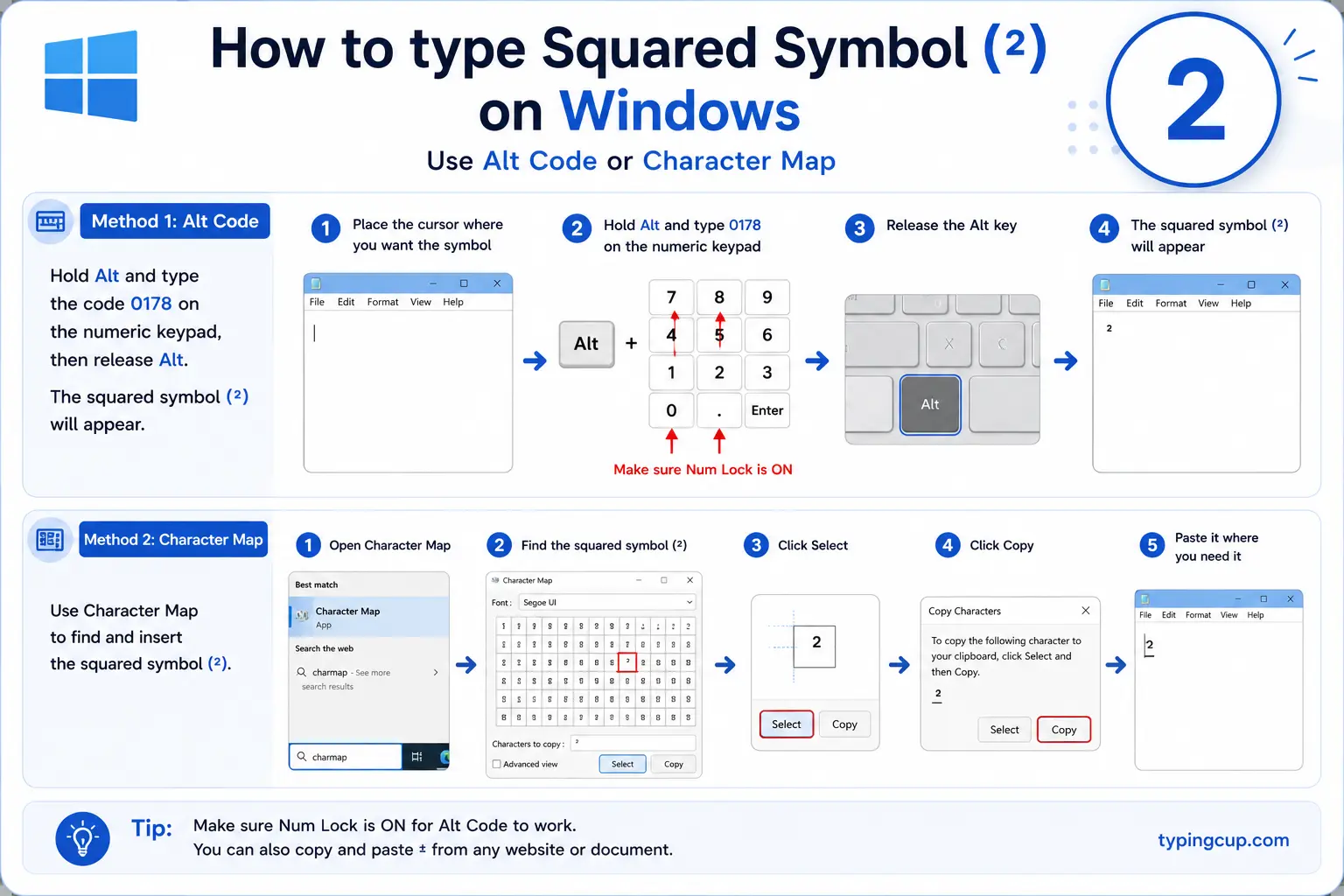
The reliable method is the Alt code: turn on Num Lock, hold Alt, and type 0178 on the numeric keypad for ². On many UK and European layouts there’s an even faster route, Alt Gr + 2. On a laptop with no keypad, press Windows + . for the symbol panel and search “superscript two.”
Type the squared symbol on Mac
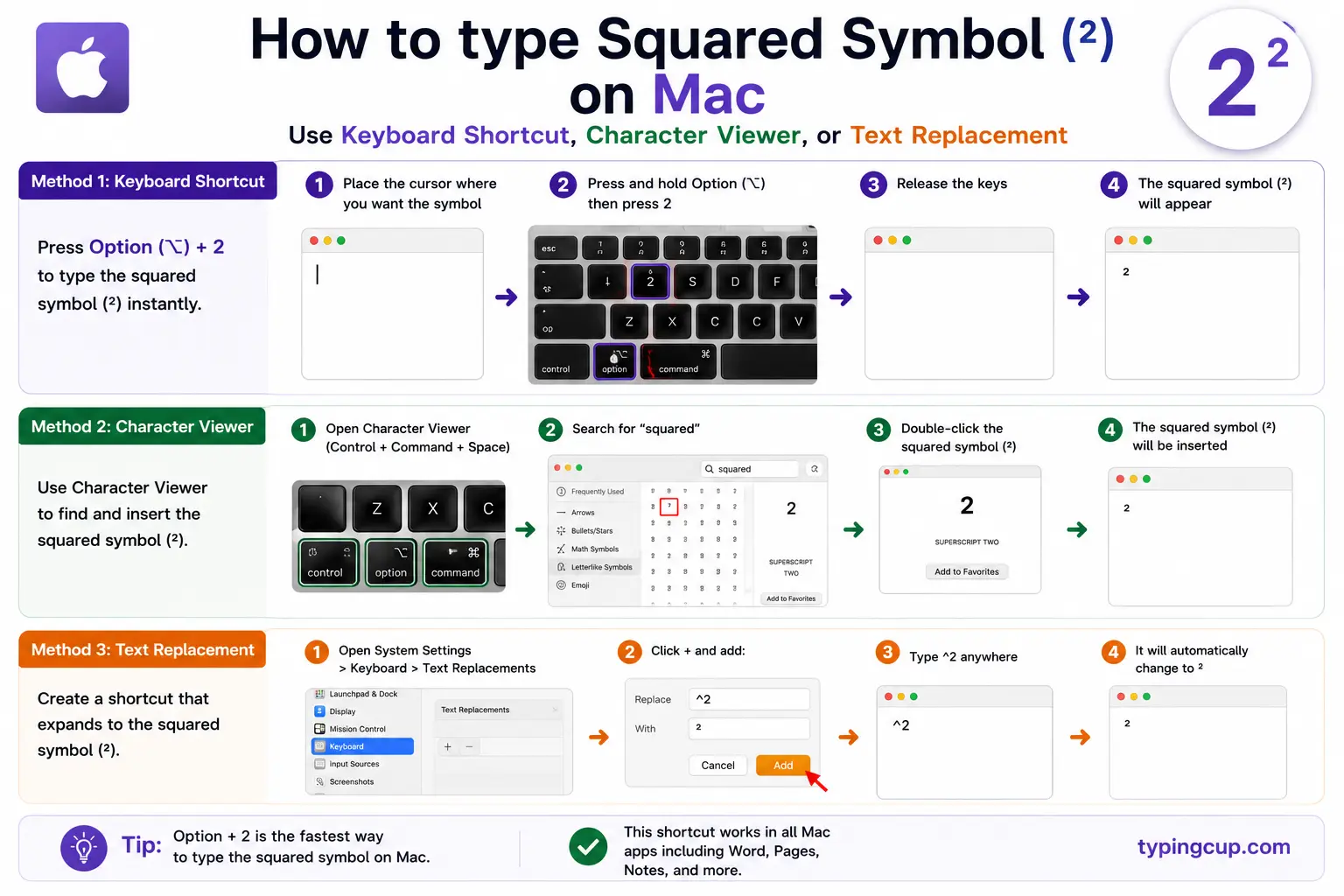
The Mac has no dedicated ² key. The cleanest way is Edit → Emoji & Symbols (or Control + Command + Space) and a search for “superscript two.” Alternatively, type a normal 2 and apply superscript formatting with Control + Command + +, though that makes a styled 2 rather than the ² character — a distinction the next section explains.
Type the squared symbol on iPhone and Android
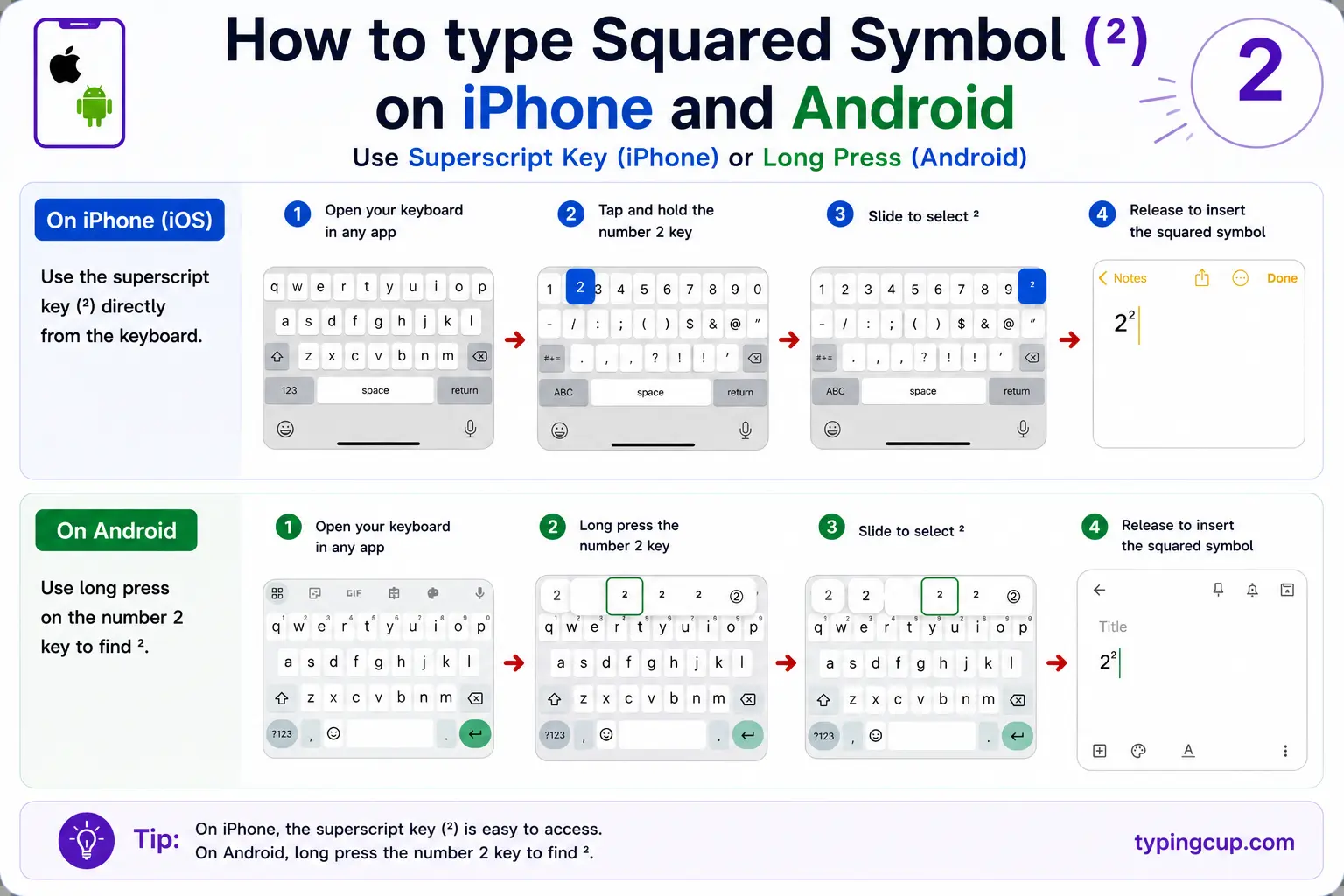
Neither phone keyboard has ² built in, so copying is easiest on mobile. Tap and hold in the grid above to copy it, then paste. A few third-party keyboards add a superscript row, but there’s no long-press for it on the default keyboards.
Type the squared symbol in Microsoft Word
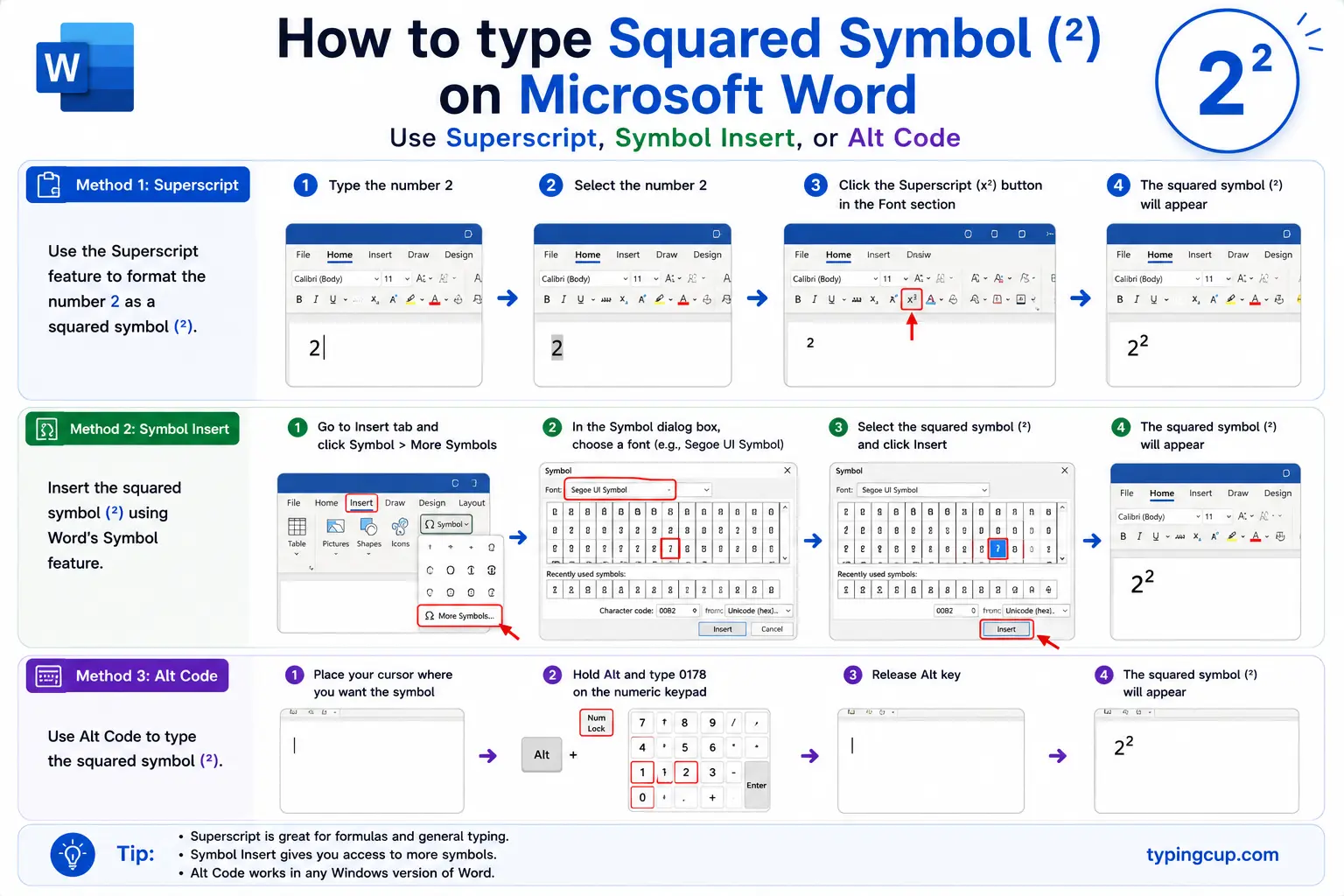
Two good options. Type 00B2 and press Alt + X to turn the code into the ² character. Or type a 2, select it, and press Ctrl + Shift + = to superscript it. The first gives the real character; the second gives formatted text, which matters if the document will be searched or read aloud.
Type the squared symbol on Linux
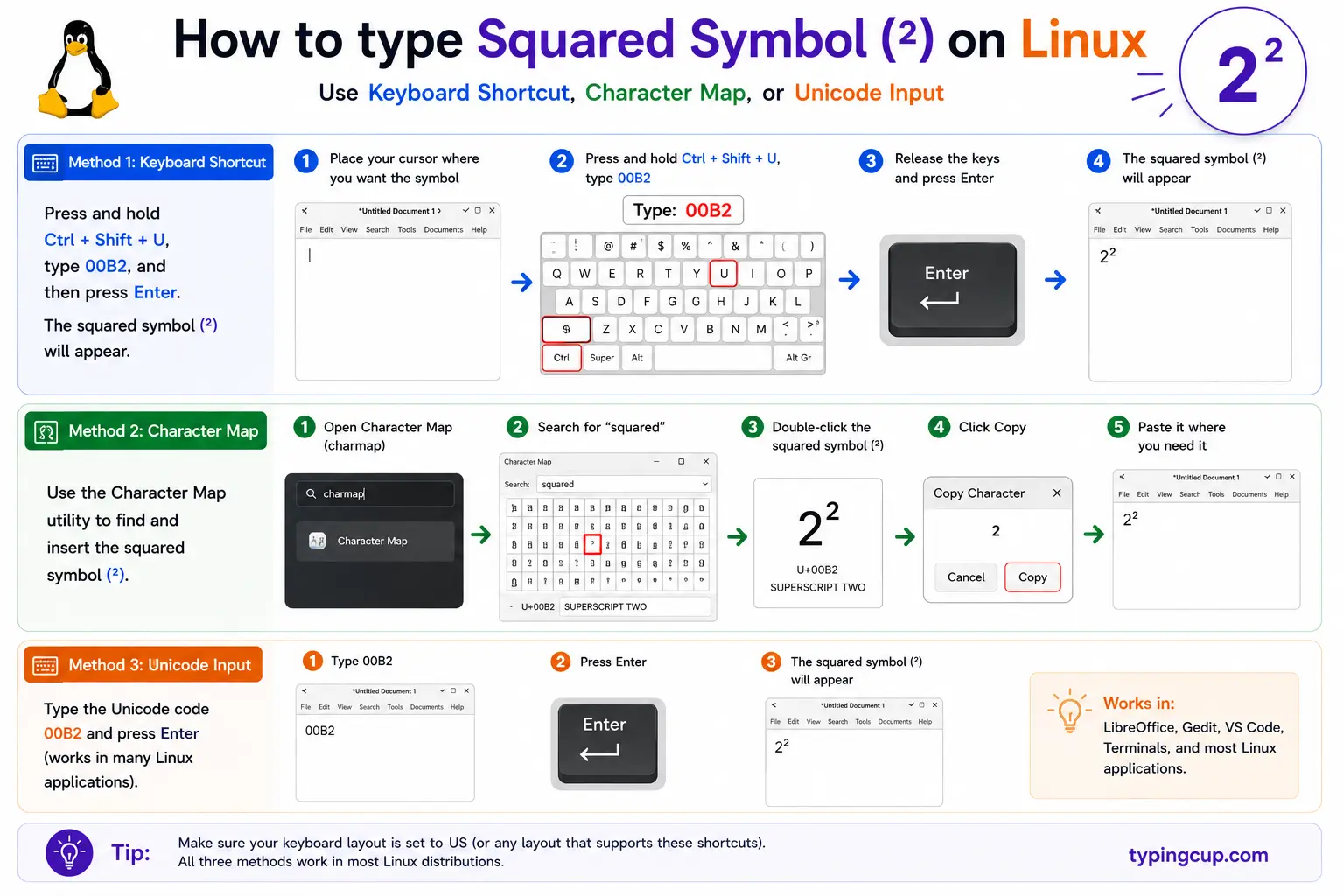
Press Ctrl + Shift + U, type 00b2, then Enter. On most UK and European layouts, Alt Gr + 2 types ² directly.
Type the squared symbol in Excel and Google Sheets
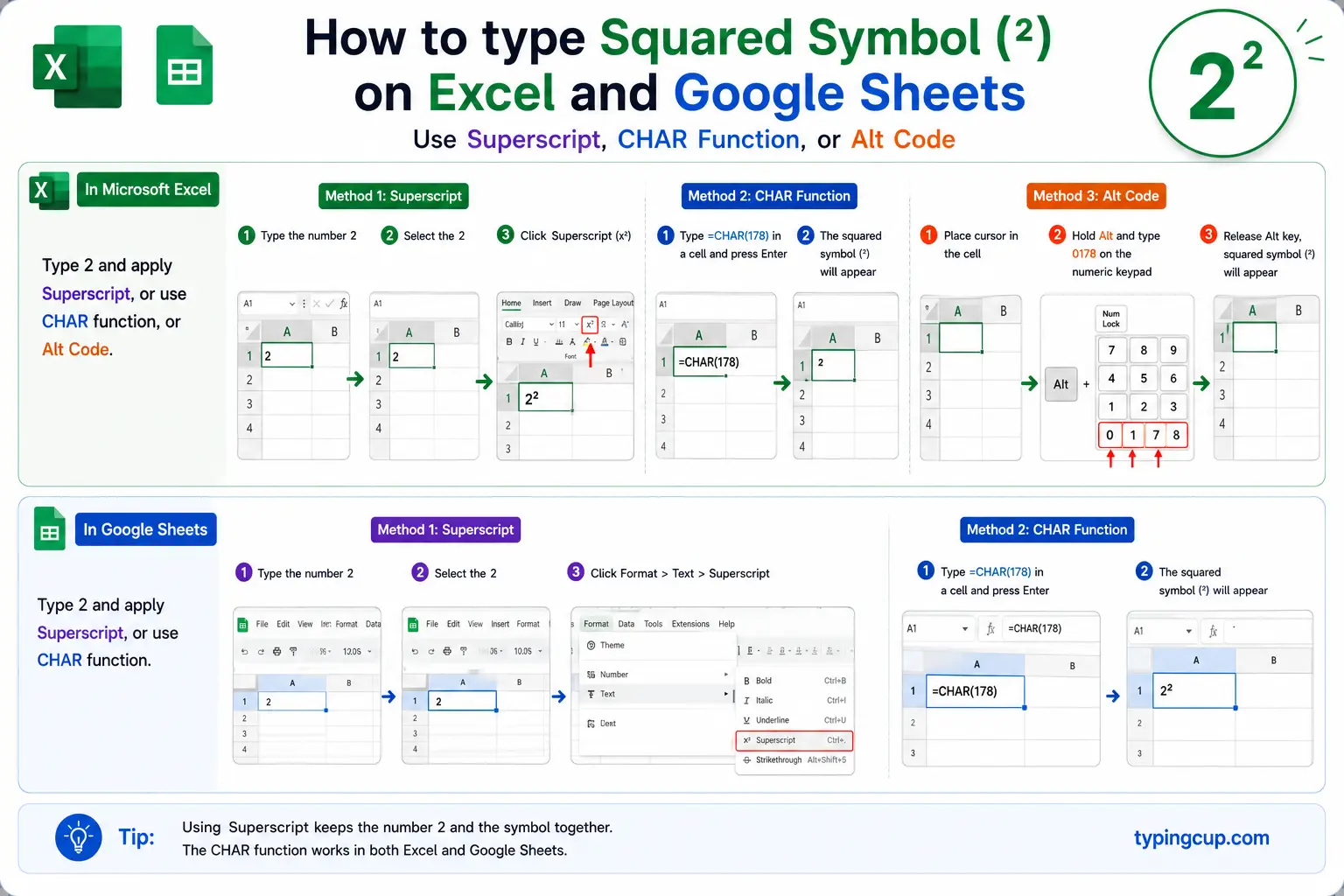
To show the character, use =UNICHAR(178) in Excel or =CHAR(178) in Google Sheets. In Excel you can also type a 2 in a cell, select just that character in the formula bar, and tick Superscript in Format Cells. Remember a squared symbol in a cell is only text; it won’t square anything.
Type the squared symbol in HTML and CSS
In HTML, use the character entity ² (or numeric ²). For a true, scalable exponent, wrap the digit in <sup>2</sup> instead. In CSS content, the escaped code point is \00B2.
The ² character vs a formatted superscript
Here’s the thing no other squared guide explains: there are two completely different ways to get a small raised 2, and they behave differently. One is the character ² (U+00B2), a single fixed glyph. The other is a normal digit 2 with superscript formatting applied, the kind you make with a superscript button in Word or <sup> in HTML.
They can look identical on the page, but underneath they’re not. The ² character is one character that always renders small and raised, no matter the font size or where it’s pasted, but it’s a fixed size and can look slightly small next to large text. A formatted superscript is a real 2 that’s been styled, so it scales with the font and lines up properly in big headings or proper equations, but it loses its raised look the moment the formatting is stripped, such as pasting into a plain-text box.
| ² character | Formatted 2 | |
|---|---|---|
| What it is | one glyph (U+00B2) | a styled normal 2 |
| Survives plain text | yes | no |
| Scales with font | no | yes |
| Best for | quick text, units | equations, headings |
The rule of thumb: for a quick m² in an email or a chat, the ² character is easiest and travels well. For a document with real maths, or anywhere the exponent needs to scale cleanly, use proper superscript formatting.
Why m² and m2 aren’t the same to a computer
To your eye, m² and m2 are almost the same, and “square metres” written either way is understandable. To a computer they’re completely different strings, and that difference quietly causes problems.
m² is the letter m and the single character ². m2 is the letter m and the ordinary digit 2. So a search for “m2” won’t match “m²”, a spreadsheet sorting units will treat them as different, and a database can end up with both forms scattered through it. Screen readers handle them differently too: many read ² as “squared,” so m² becomes “m squared,” while m2 is just “m two.”
None of this matters for a one-off note. It matters a lot for data, product specs, and anything searchable, where picking one form and using it consistently saves a surprising amount of grief later.
The whole superscript family (and why some render oddly)
The ² has a full set of siblings, one for every digit: ¹ ² ³ ⁴ ⁵ ⁶ ⁷ ⁸ ⁹ (that’s superscript 1 through 9), plus a superscript zero, and even a superscript n (ⁿ) for writing xⁿ. You can copy any of them and build exponents like x⁵ or 10⁶.
Here’s the quirk worth knowing: the first three, ¹ ² ³, are old. They were baked into the Latin-1 character set decades before the rest, which live in a later Unicode block. Because of that history, in some fonts ¹ ² ³ look slightly different from ⁴ ⁵ ⁶ — a touch bolder, or set at a different height — so a string like x²³⁴ can render with mismatched digits. If your exponents look uneven, that’s why, and switching to real superscript formatting fixes it.
| Superscript | Character | Numeric entity |
|---|---|---|
| ⁰ | ⁰ | ⁰ |
| ¹ | ¹ | ¹ |
| ² | ² | ² |
| ³ | ³ | ³ |
| ⁴ | ⁴ | ⁴ |
| ⁿ | ⁿ | ⁿ |
Squared in code: don’t type ²
In programming you almost never use the ² character; you raise to a power. The operator differs by language: x ** 2 in Python and JavaScript, Math.pow(x, 2) in JavaScript and Java, x * x anywhere, and x^2 in some maths tools (though in C-family languages ^ means something else entirely, a bitwise XOR, so it won’t square).
The key point is that a ² in your source code is just a character in a string; it does no maths. If you paste x² into most languages you’ll get a syntax error, not a square. Reserve the ² symbol for text and labels, and use the power operator or a multiplication for the actual calculation.
Copy-paste HTML codes
Every code for the squared and cubed symbols in one place. Click a cell and copy.
| Symbol | Named entity | Numeric entity | URL (percent) code |
|---|---|---|---|
| ² | ² | ² | %C2%B2 |
| ³ | ³ | ³ | %C2%B3 |
For a scalable exponent, use <sup>2</sup> instead of the character. In a CSS content value, the escaped code point is \00B2. For related symbols, the square root guide and the degree symbol guide get the same copy-and-code treatment.
Troubleshooting
My squared symbol shows as a box or garbled text
That’s an encoding mismatch: the UTF-8 bytes for ² (C2 B2) are being read as an older encoding. Set the file, database, and page charset to UTF-8 and it displays correctly.
Alt + 0178 isn’t working
Make sure Num Lock is on and you’re using the numeric keypad, not the top-row numbers. On a UK or European layout, try Alt Gr + 2 instead, or copy the symbol from the grid above.
My exponents look uneven, like x²³⁴
That’s the Latin-1 quirk: ¹ ² ³ come from an older character block than ⁴ and up, so some fonts render them at slightly different sizes. Use real superscript formatting (<sup> or a superscript button) for a consistent look.
My ² pasted as a plain 2
You copied a formatted superscript, not the ² character, and the formatting was stripped on paste. Copy the actual ² character from the grid above, which survives plain text.
FAQ
How do I type the squared symbol?
On Windows, hold Alt and type 0178 (or try Alt Gr + 2). In Word, type 00B2 then Alt + X. On a Mac, use Emoji & Symbols. On a phone, copy it. Or click ² in the grid above.
What is the difference between ² and a superscript 2?
² (U+00B2) is a single fixed character that survives plain text but doesn’t scale with font size. A superscript-formatted 2 is a normal digit that’s been styled: it scales and lines up in equations, but loses its raised look if the formatting is stripped.
Are m² and m2 the same?
To a person, yes. To a computer, no: ² is one character and 2 is a different one, so searches, sorting, and screen readers treat m² and m2 differently. Pick one form and stay consistent in data.
How do I square a number in code?
Use the power operator or multiplication, not the ² character: x ** 2 in Python or JavaScript, Math.pow(x, 2), or x * x. A ² in code is just text and does no maths.
How do I write the squared symbol in HTML?
Use ² or ² for the character, or <sup>2</sup> for a scalable exponent. In a URL it’s %C2%B2.
