
Ç / ç (C With a Cedilla): How to Type, Copy, and Use It
ç is a lowercase c with a cedilla, the little hook or tail that hangs beneath it. Its capital is Ç. In French, Portuguese, and Catalan it softens a c into an “s” sound; in Turkish it’s a “ch”; and that small tail has a story of its own.
If you just need the character, copy ç or Ç from the grid below, along with its HTML entity or URL code. It’s one of the easier accented letters to type directly, and the shortcuts are further down.
Below you’ll find how to type ç on every device, why the mark exists in the first place, how its sound changes by language, and how it behaves in links and code.
In a hurry?
- Copy it: click ç or Ç in the grid below.
- On Windows: hold Alt and type 0231 for ç (0199 for Ç).
- On a Mac: press Option + c for ç directly (Option + Shift + C for Ç).
- In Word: press Ctrl + , (comma), then c.
- In a URL ç is written %C3%A7; in HTML it’s ç.
Click to copy: ç, and its codes
Grab the letter, the HTML entity, or the URL code
Table of Contents
Copy and paste ç
The two characters, with every code you’re likely to need in one row. Use the grid above to copy with a click; this table is the reference.
| Character | Name | Unicode | Windows | Mac | HTML |
|---|---|---|---|---|---|
| ç | c with cedilla | U+00E7 | Alt + 0231 | Option + c | ç |
| Ç | C with cedilla | U+00C7 | Alt + 0199 | Option + Shift + C | Ç |
How to type ç on any device
ç sits in the old Latin range, so it’s easy to reach almost everywhere, and on a Mac it has a shortcut of its own.
Windows
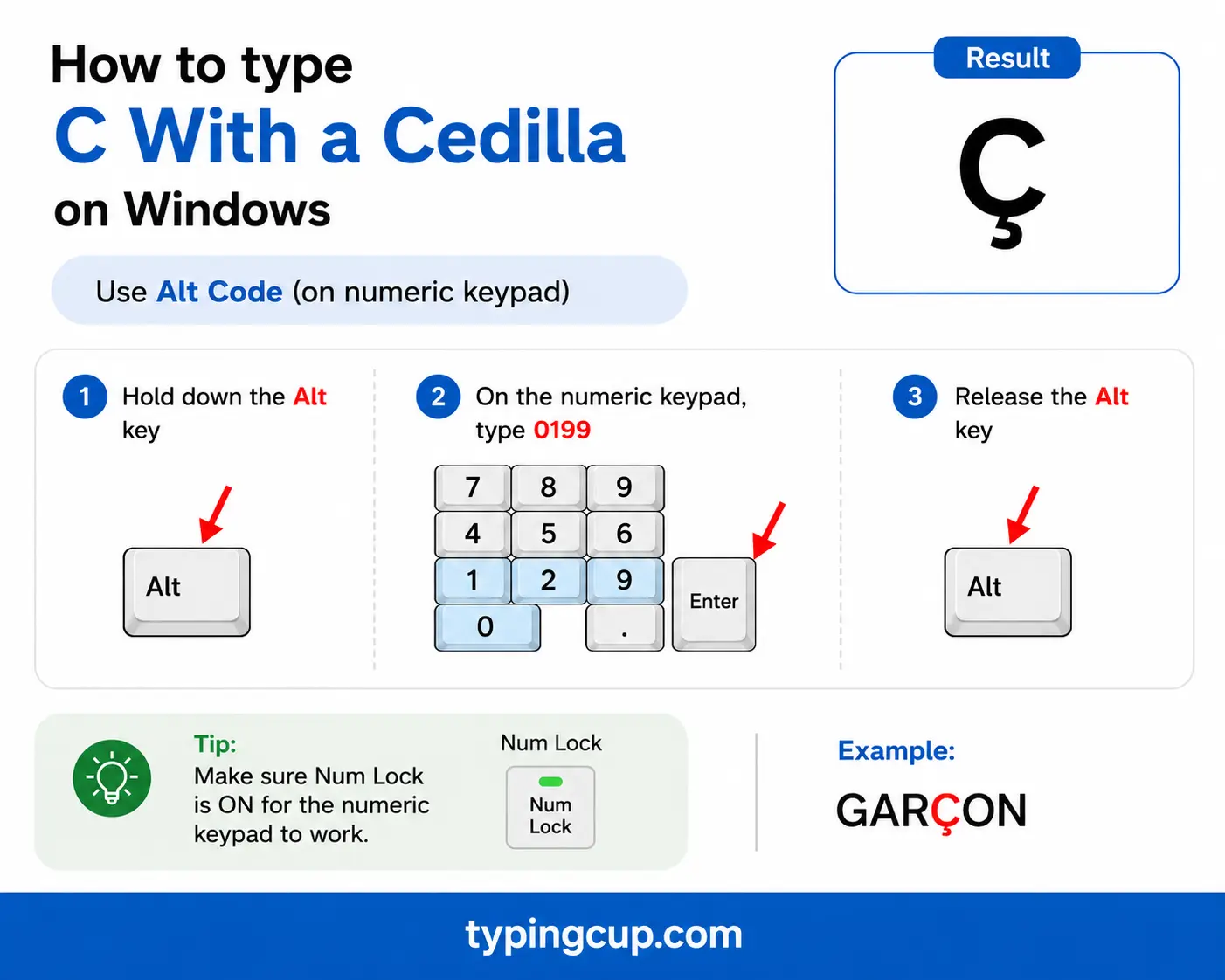
Turn on Num Lock, hold Alt, and type 0231 on the numeric keypad for ç, or 0199 for Ç. On the US-International layout, the right Alt (AltGr) plus c also gives ç directly.
If you’d rather not change layouts, press Windows + . to open the symbol panel and pick ç from the Latin set, or copy it from the grid above.
Mac
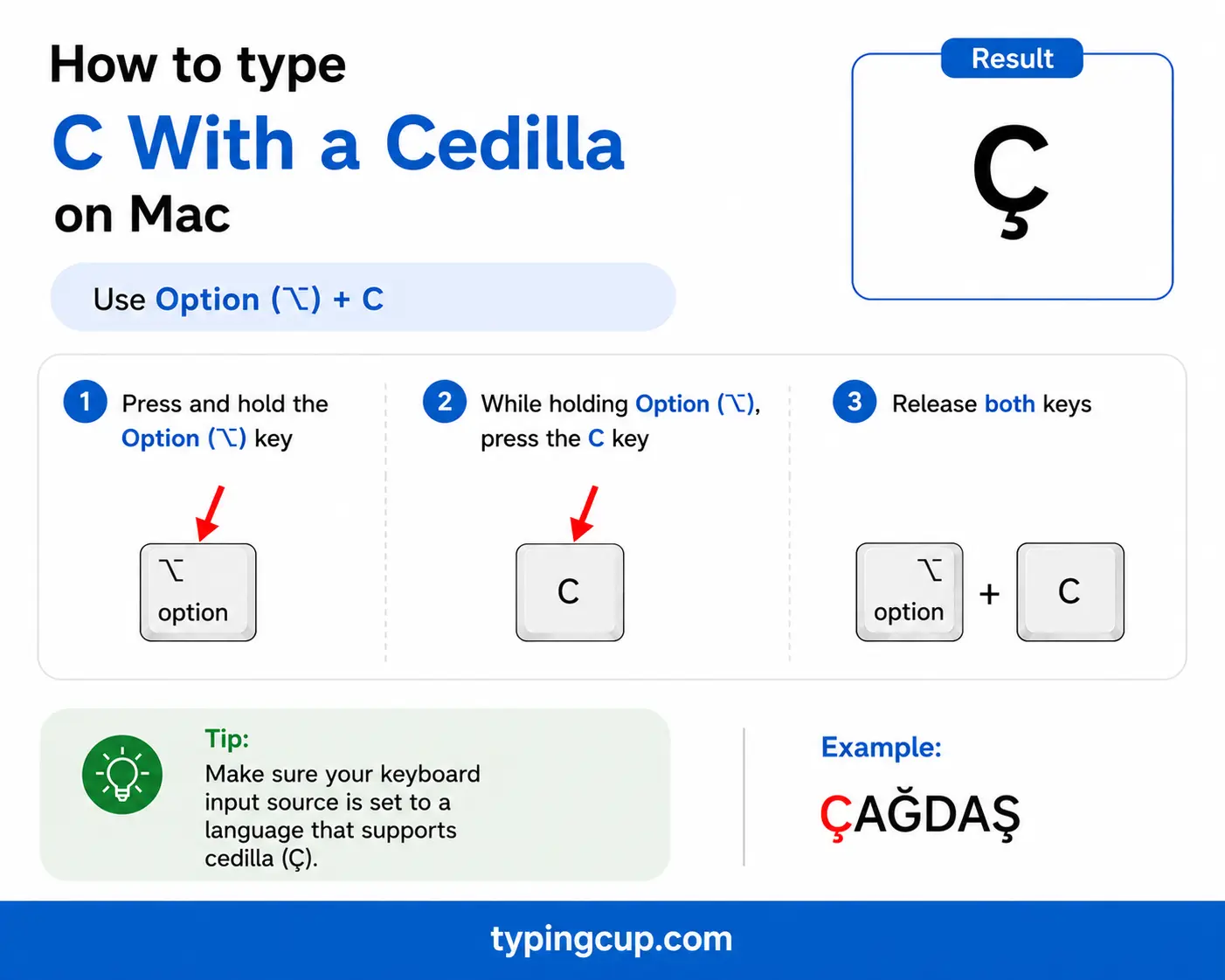
The Mac gives ç its own shortcut: press Option + c for ç, and Option + Shift + C for Ç. There’s no two-step dead-key dance for this one.
iPhone and Android
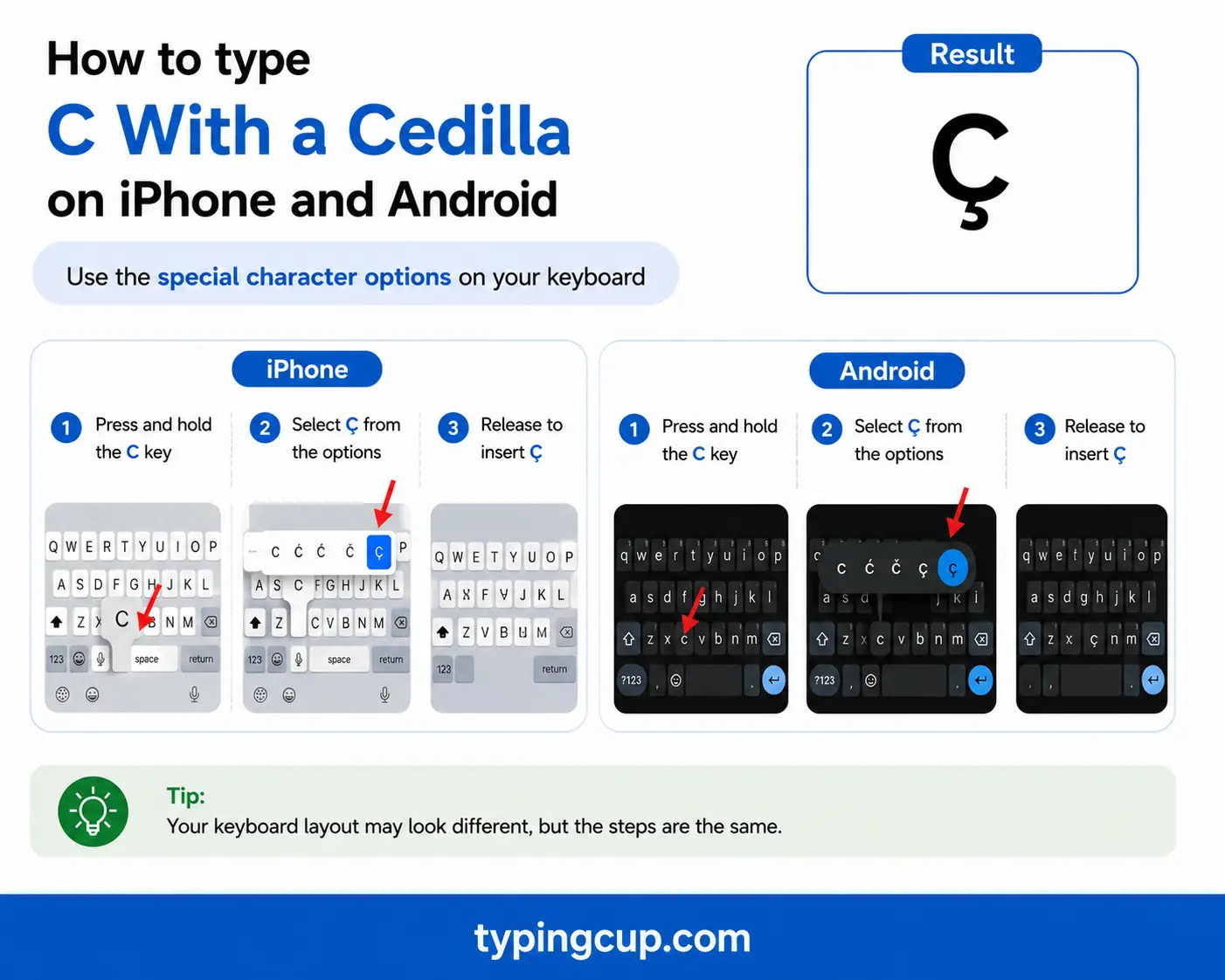
Press and hold the c key on the on-screen keyboard, then slide onto ç and lift your finger. Nothing to set up, and it works the same in nearly every app.
Microsoft Word
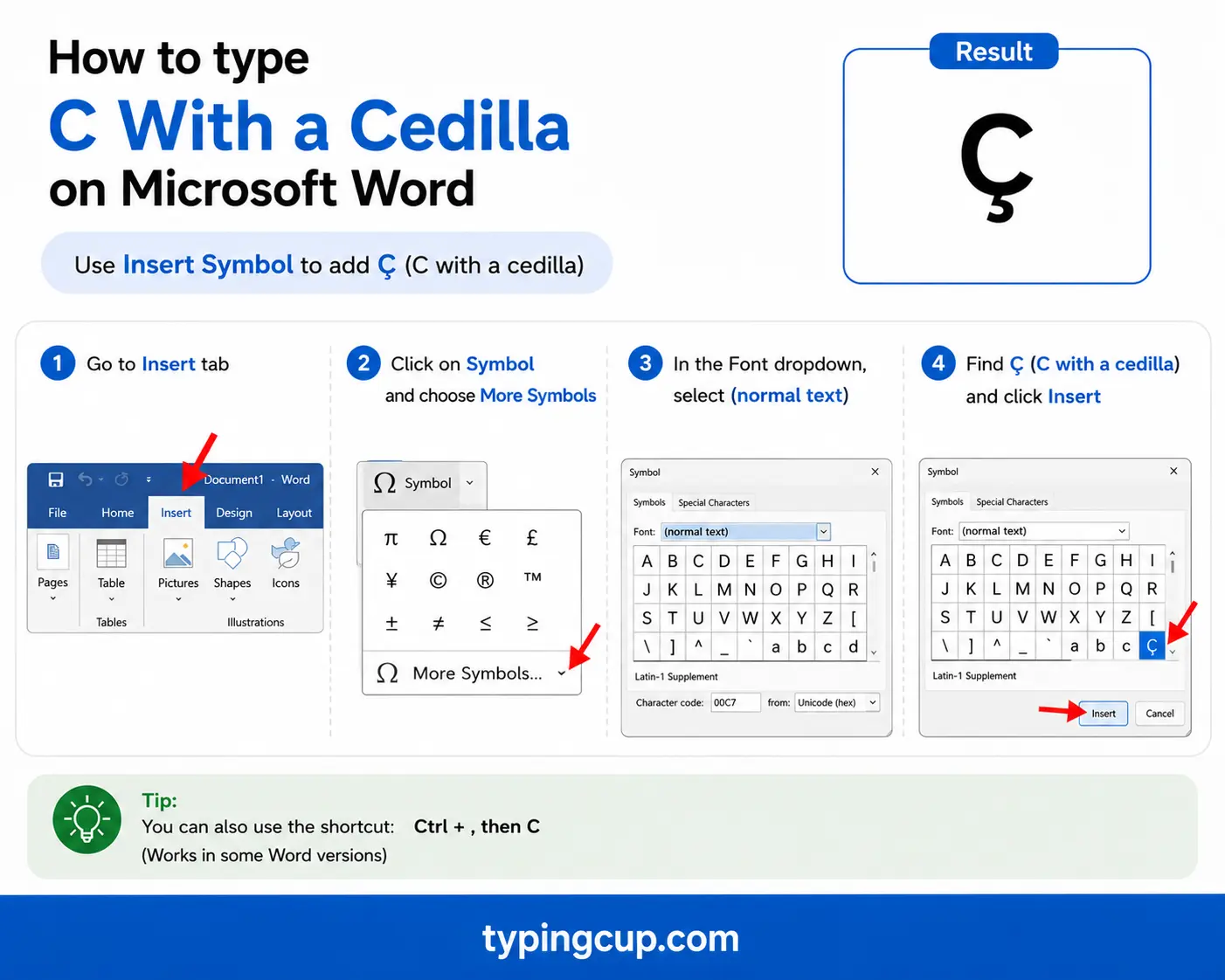
Word has a dedicated cedilla shortcut: press Ctrl + , (comma), let go, then press c for ç. Add Shift on the c for Ç. The Windows Alt code works here too.
Linux
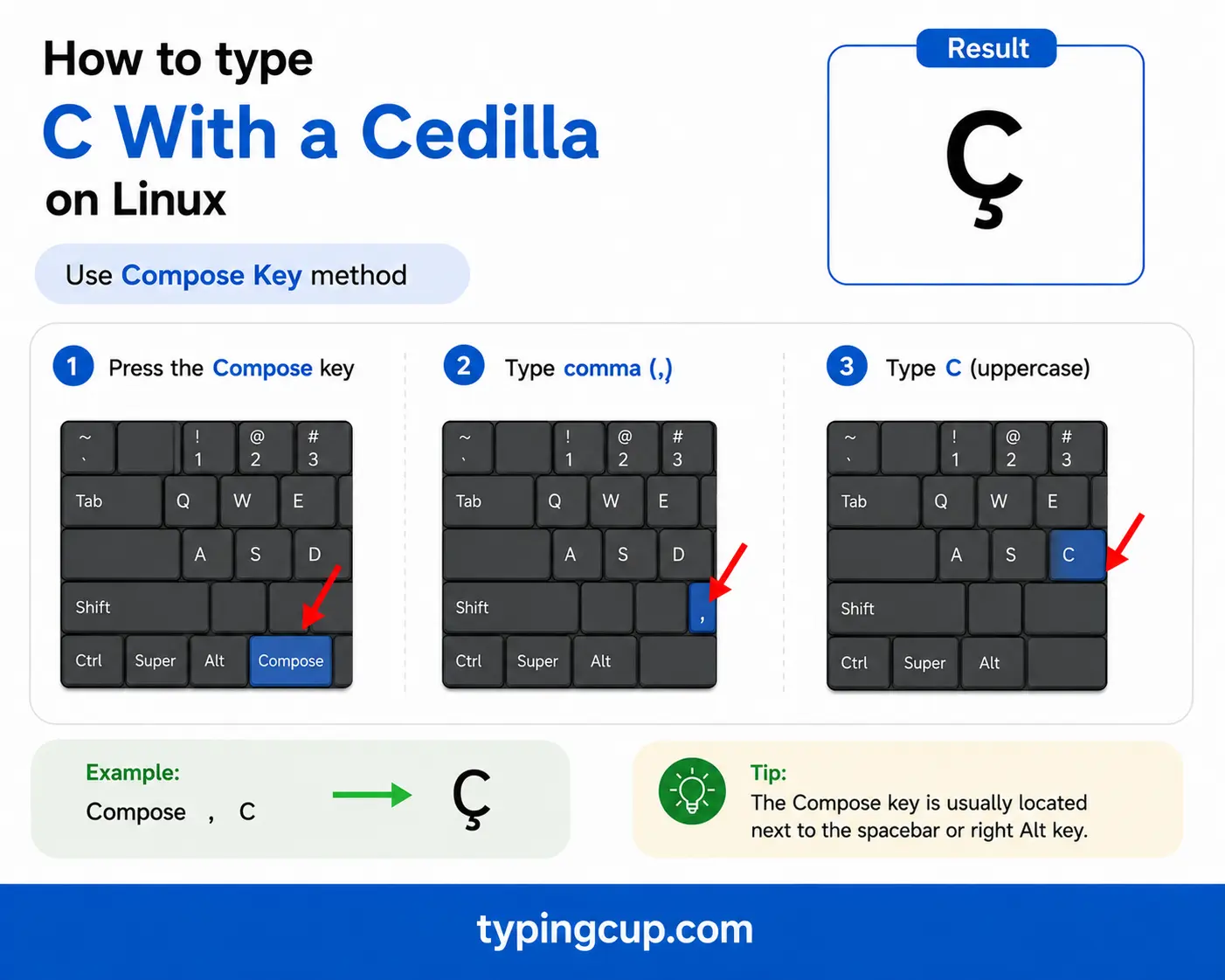
Press Ctrl + Shift + U, type 00e7, then press Enter. With a Compose key, it’s Compose, then , (comma), then c.
Excel and Google Sheets
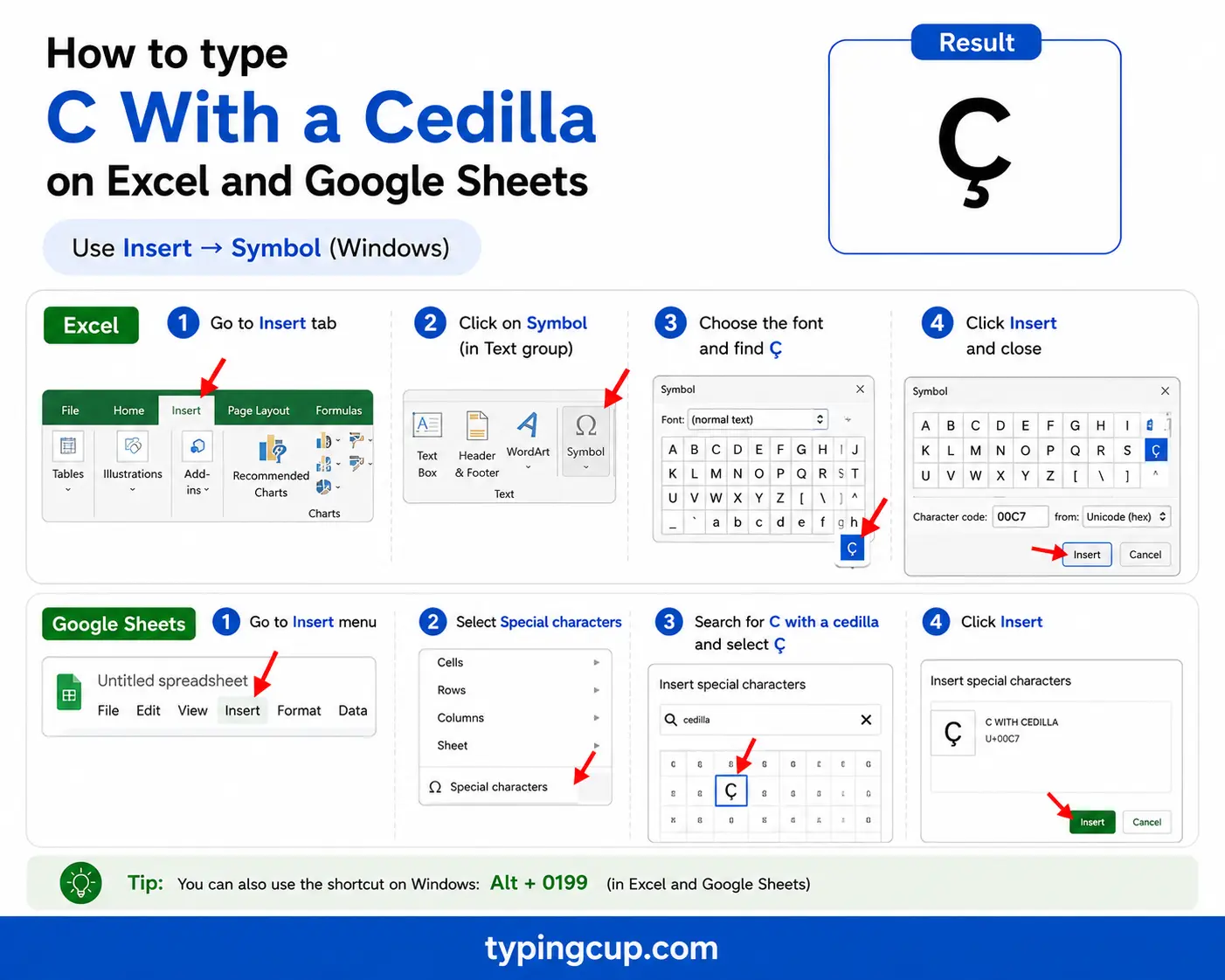
Use the Alt code on the keypad, or the UNICHAR formula: =UNICHAR(231) returns ç and =UNICHAR(199) returns Ç. The same works in Google Sheets.
Why ç exists: the soft-c rule
In French and Portuguese, the letter c is soft, an “s” sound, before e and i, but hard, a “k” sound, before a, o, and u. The cedilla exists to break that pattern when you need to. Add the tail and the c stays soft even in front of a, o, or u.
That’s why French writes français, garçon, and reçu: the ç keeps the “s” sound before a, o, and u. You’ll never see ç before e or i, because there the c is already soft and the mark would do nothing. Portuguese follows the same logic in ação and coração.
The cedilla’s story: the “little z”
The name gives the origin away. Cedilla is Spanish for “little z,” because the mark began as a small cursive z tucked under the c. In medieval Spanish and French the combination stood for a “ts” sound, a c and a z fused into a single letter.
Spanish itself later dropped it: Old Spanish coraçon became modern corazón, with the ç split back into z or a plain c. So the word cedilla survives in Spanish even though the letter no longer does, and the ç lives on today mainly in French, Portuguese, Catalan, and Turkish.
ç around the world: “s” or “ch”?
The same letter makes two quite different sounds depending on the language. In French, Portuguese, and Catalan, ç is an “s,” as in façade and the Barcelona nickname Barça. In Turkish, ç is a “ch,” as in çay (“tea”) and çocuk (“child”), and there it’s a separate letter of the alphabet, sorted right after c.
So Barça is “Bar-sa,” but a Turkish word like çok is “chok.” When you’re reading the letter aloud, the language tells you which sound to reach for.
Words and names with ç
A quick tour of where the letter shows up in everyday use.
| Word | Language | Meaning or note |
|---|---|---|
| garçon | French | a boy, or a waiter |
| façade | French | the front of a building |
| français | French | French (the language) |
| ação | Portuguese | action |
| Barça | Catalan | nickname for FC Barcelona |
| Curaçao | place name | the Caribbean island |
| çay | Turkish | tea |
It also runs through names like François and Françoise, and the French region of Provence, whose adjective is Provençal. Dropping the cedilla in these would change the sound, and in a name, the spelling.
ç in web addresses, URLs, and email
You can use ç in a domain name. It’s stored as a Punycode address beginning with xn--, which the browser turns back into ç for display, so a real domain can briefly look like a run of random letters.
Inside a URL path or query, ç is percent-encoded as %C3%A7, the two UTF-8 bytes (0xC3 and 0xA7) for the character. The capital Ç is %C3%87. A link with %C3%A7 in it has a ç inside.
Email is more cautious. An address can carry ç through the same system, but many servers still stumble over non-ASCII addresses, so a site using ç will often register the plain-c spelling as well.
ç in code and passwords
In code, ç is an ordinary Unicode character and works fine in strings and comments. The usual snag is encoding: a file saved as UTF-8 but read as Latin-1 turns ç into ç, the classic sign of a crossed encoding rather than a broken character.
Passwords are the place to be careful. A ç in a password can lock you out on another device, because a different keyboard or login form may encode the character differently and produce different bytes. For a password you’ll type across systems, plain ASCII is safer.
When you want ç in code, the escapes help: \u00e7 in JavaScript, Java, JSON, and Python, and ç or ç in HTML.
Copy-paste HTML codes
Everything you need for the web and for links, in one place. Click a cell and copy.
| Character | Named entity | Numeric entity | URL (percent) code |
|---|---|---|---|
| ç | ç | ç | %C3%A7 |
| Ç | Ç | Ç | %C3%87 |
In a CSS content value, use the escaped code point \00e7. Serve the page as UTF-8 so the character holds. For the other accented c’s like č and ć, see the c with accent guide; the related cedilla and “sh” consonants like ş and š are in the s with accent guide.
Troubleshooting
“My ç shows up as ç or a box.”
The text was saved as UTF-8 but is being read as an older encoding like Latin-1. Set the file or page to UTF-8 and the ç returns. The ç pattern is the classic UTF-8-read-as-Latin-1 mix-up.
“Alt + 0231 just beeps or types nothing.”
Num Lock is off, you’re using the top-row numbers, or the laptop has no keypad. Turn Num Lock on and use the keypad. No keypad? Use the copy grid, US-International (AltGr + c), or Windows + .
“I get ć or č instead of ç.”
Those are different marks: ć has an acute on top and č a small v, while the cedilla is the tail underneath. On a Mac, ç is simply Option + c; don’t use the acute or caron dead keys.
“A password with ç won’t log me in elsewhere.”
Different keyboards and login forms can encode ç differently, so the bytes may not match what you first set. For a password you’ll type on many devices, stick to plain ASCII.
FAQ
How do I type ç?
On Windows, Alt + 0231 (Alt + 0199 for Ç). On a Mac, Option + c. On a phone, long-press the c key. Or click it in the grid above.
Why does français have a ç?
Because c is hard (a “k”) before a, o, and u in French. The cedilla keeps it soft, an “s,” so français, garçon, and reçu all sound their c as an s.
What sound does ç make?
In French, Portuguese, and Catalan it’s an “s,” as in façade and Barça. In Turkish it’s a “ch,” as in çay. Same letter, two different sounds by language.
Is ç used in Spanish?
Not any more. Old Spanish used ç, but modern Spanish replaced it with z or c, so coraçon became corazón. The word cedilla is still Spanish, even though the letter isn’t.
How do I write ç in a URL or HTML?
In a URL, ç is %C3%A7 (Ç is %C3%87), and domains store it as Punycode beginning with xn--. In HTML, use ç or ç.
