
Pi Symbol (π): How to Type, Copy, and Use It
The pi symbol, π, is the Greek letter that stands for the most famous number in maths: about 3.14159, the ratio of a circle’s circumference to its diameter. It’s a lowercase Greek “p,” and it isn’t on an English keyboard, so most people copy it or use a shortcut. This page has both, plus some things about π that go well past how to type it.
If you just need the character, copy π from the grid below, along with the capital Π, the HTML entity, or the URL code.
Below you’ll find how to type π on every device, the difference between the symbol and the number, why capital Π means something else entirely, the argument that we should have used a different constant, and how many digits of pi you actually need.
In a hurry?
- Copy it: click π in the grid below.
- On Windows: hold Alt and type 227 on the numeric keypad.
- On a Mac: press Option + P.
- In Word: type 03C0 then press Alt + X.
- In HTML: write π (or π).
Click to copy: the pi symbol
Grab the π symbol, the capital Π, the HTML entity, or the URL code
Table of Contents
Copy and paste the pi symbol
The pi symbol with every code you’re likely to need, plus the capital Π. Use the grid above to copy with one click; this table is the reference.
| Symbol | Name | Unicode | Windows | Mac | HTML |
|---|---|---|---|---|---|
| π | pi (lowercase) | U+03C0 | Alt + 227 | Option + P | π |
| Π | Pi (capital) | U+03A0 | Alt + 928 | — | Π |
There’s no pi key on an English keyboard, so it always takes a shortcut, a code, or a copy. The sections below cover each device, then what the symbol actually means — including the trap of mixing up the small π and the capital Π.
How to type the pi symbol on any device
The π sign isn’t on the keys, so here’s the quickest way to make one on each system.
Type the pi symbol on Windows
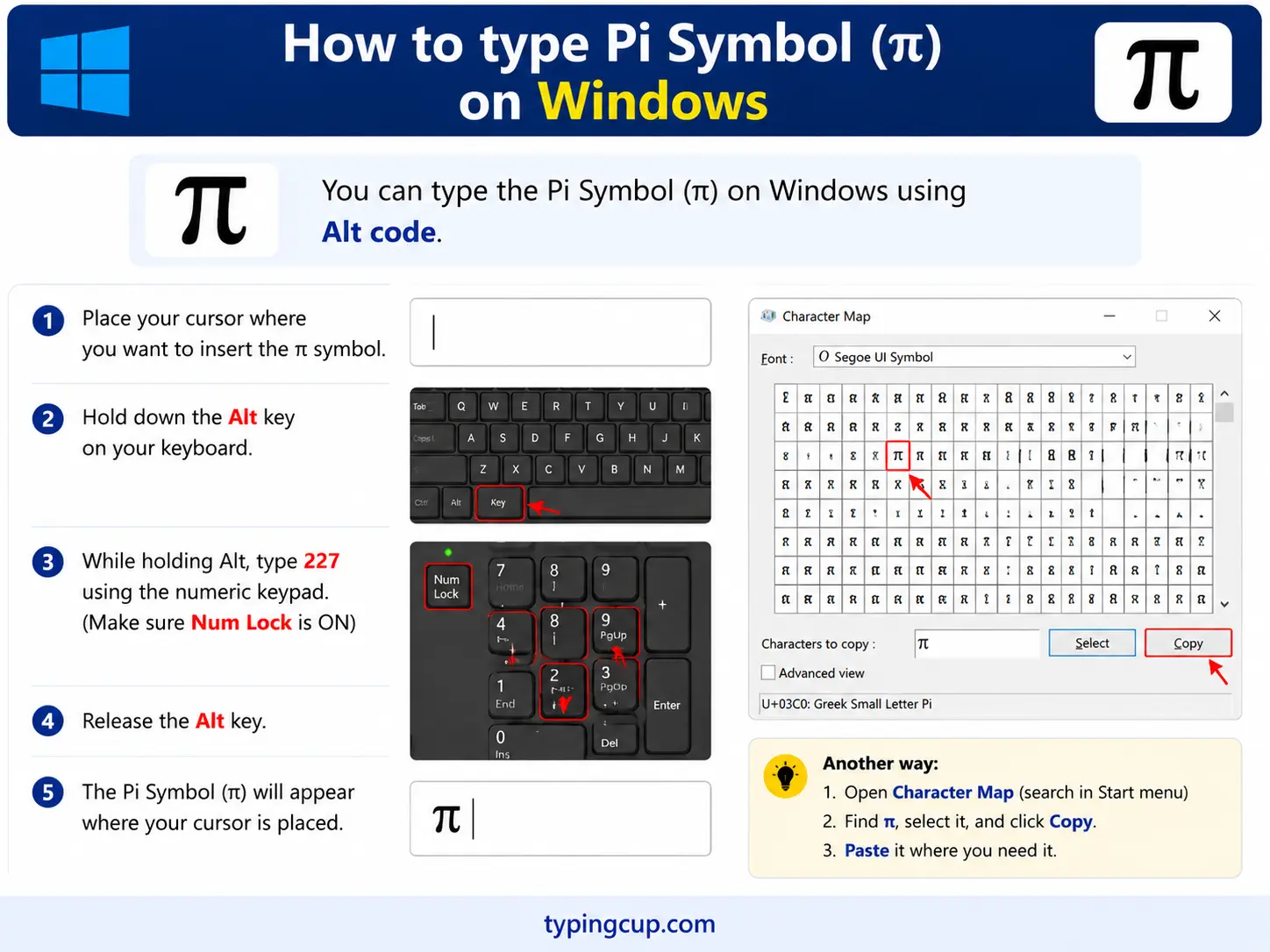
The quickest route is the Alt code: turn on Num Lock, hold Alt, and type 227 on the numeric keypad for π. The longer decimal code Alt + 960 works in apps that support it. On a laptop with no keypad, press Windows + . for the symbol panel and search “pi.”
Type the pi symbol on Mac
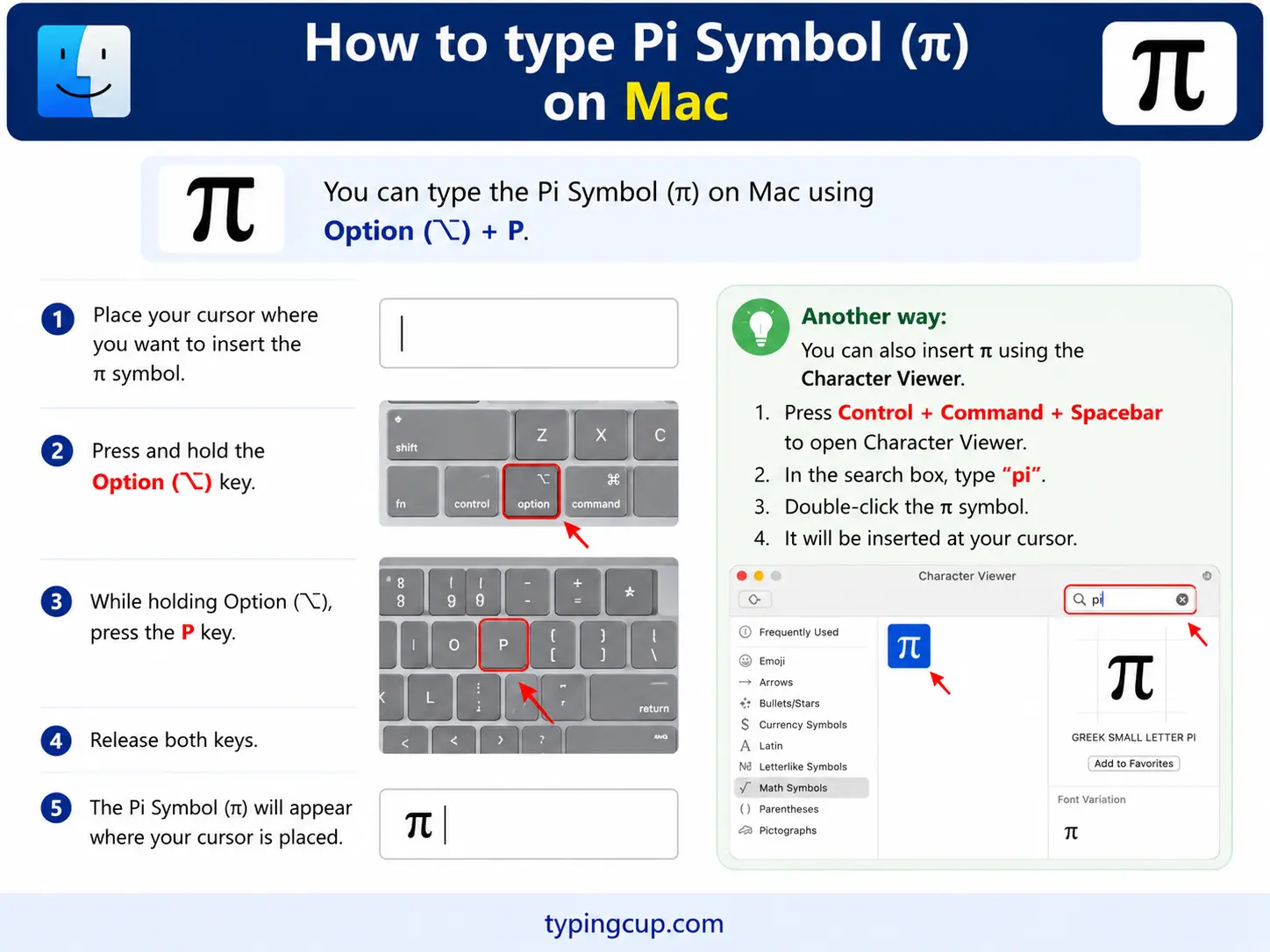
On a Mac, press Option + P for π — an easy one to remember, since P is for pi. It’s a single shortcut with no dead-key step. For the capital Π, use the Character Viewer (Control + Command + Space) and search “pi.”
Type the pi symbol on iPhone and Android
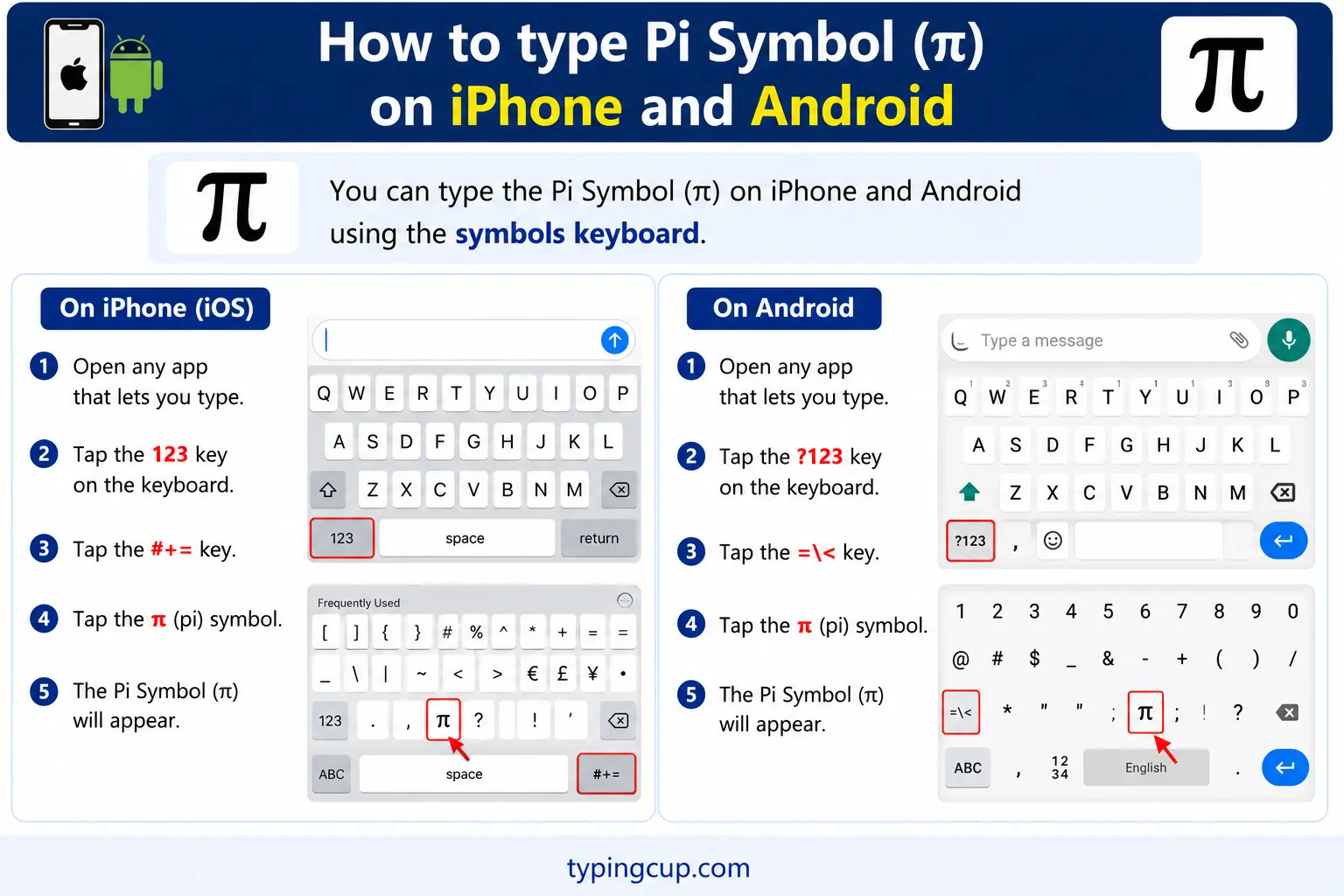
Neither phone keyboard has π on the English layout, so copying is easiest on mobile. If you add a Greek keyboard in settings, π sits where the P key would be. Otherwise, tap and hold in the grid above to copy it, then paste.
Type the pi symbol in Microsoft Word
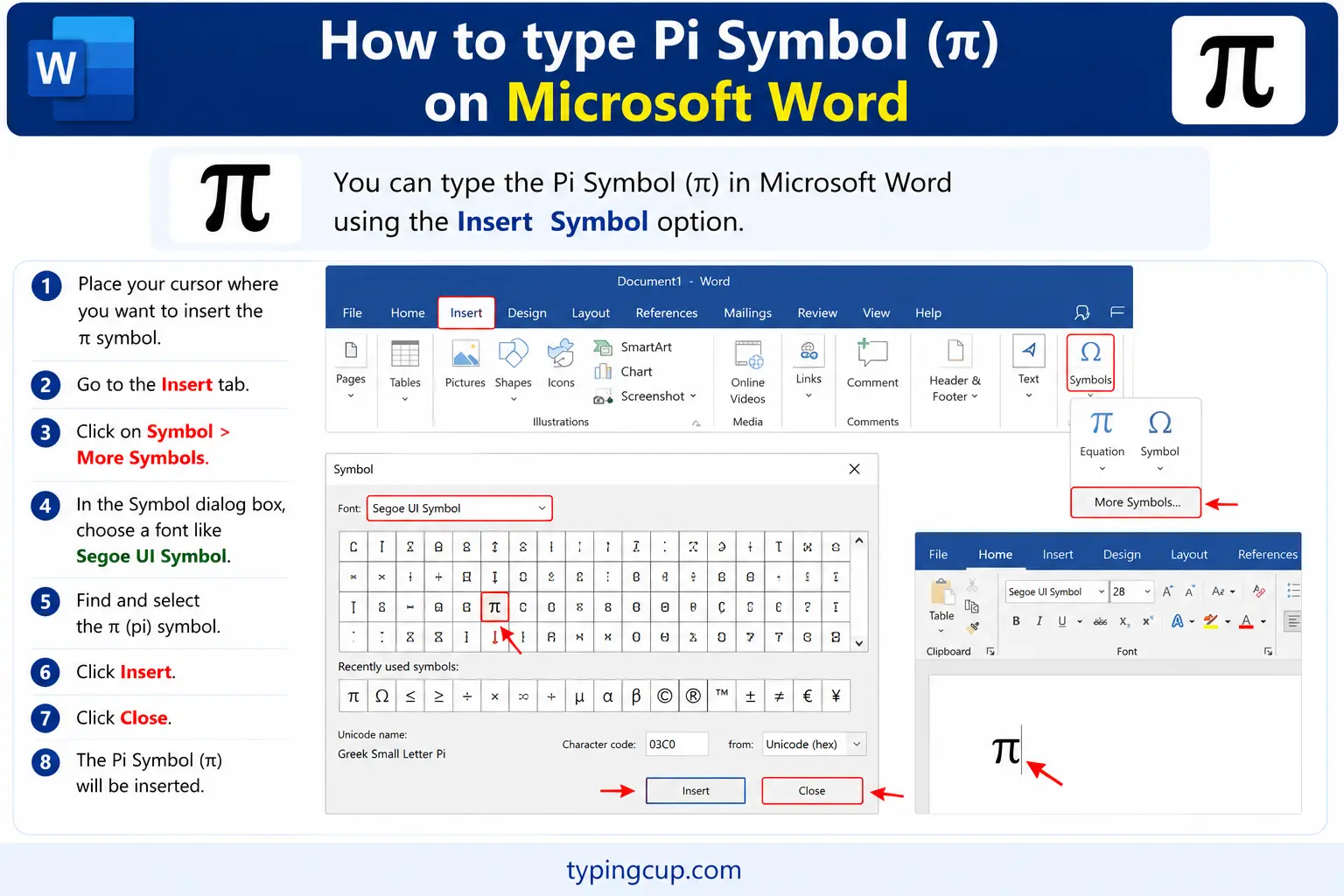
Two easy routes. Type 03C0 and press Alt + X to turn the code into π. Or use Insert → Symbol and find it among the Greek letters. For real maths, the equation editor (Alt + =) has π as a named symbol you can type as \pi.
Type the pi symbol on Linux
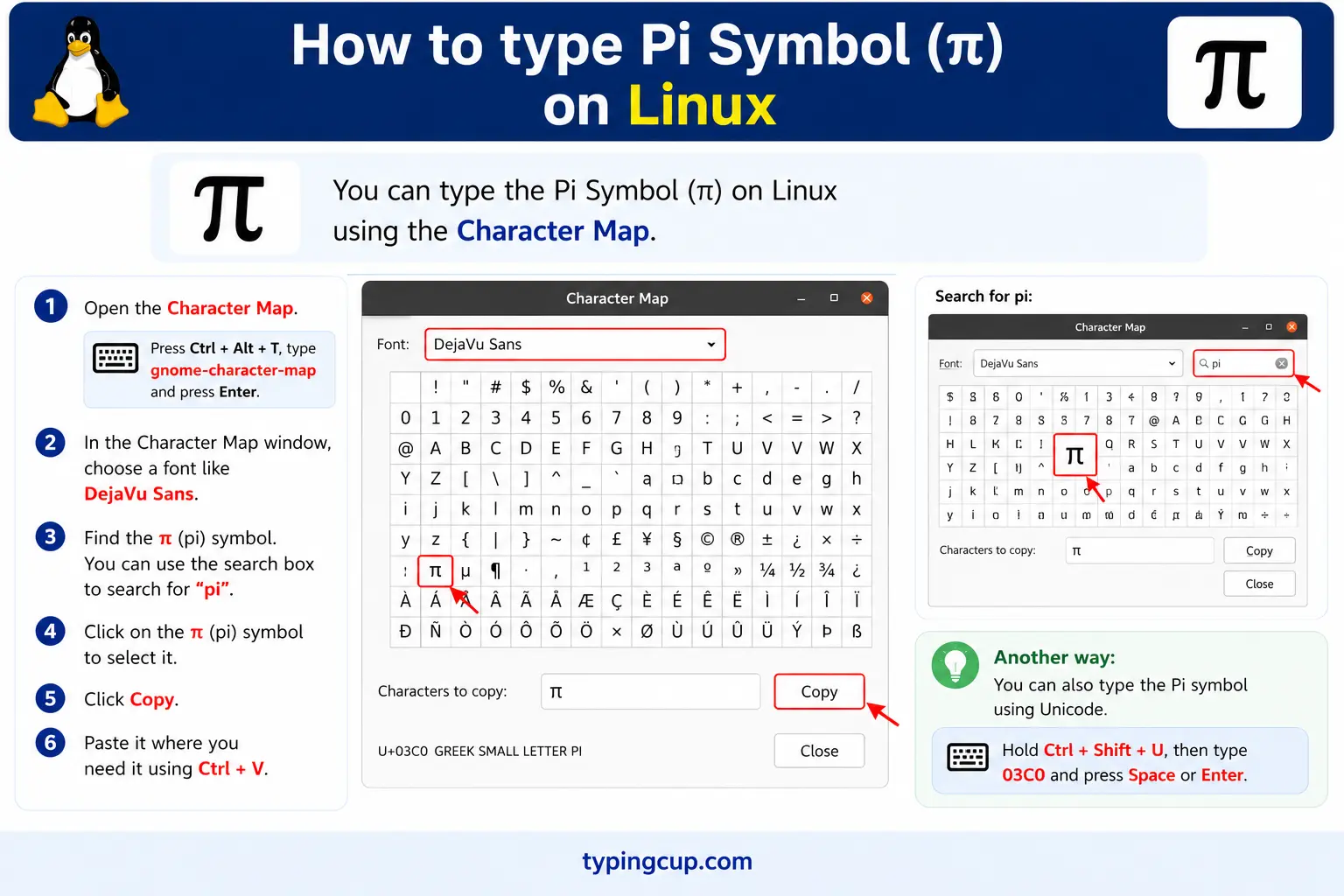
Press Ctrl + Shift + U, type 03c0, then press Enter. Adding a Greek keyboard layout also puts π on the P key.
Type the pi symbol in Excel and Google Sheets
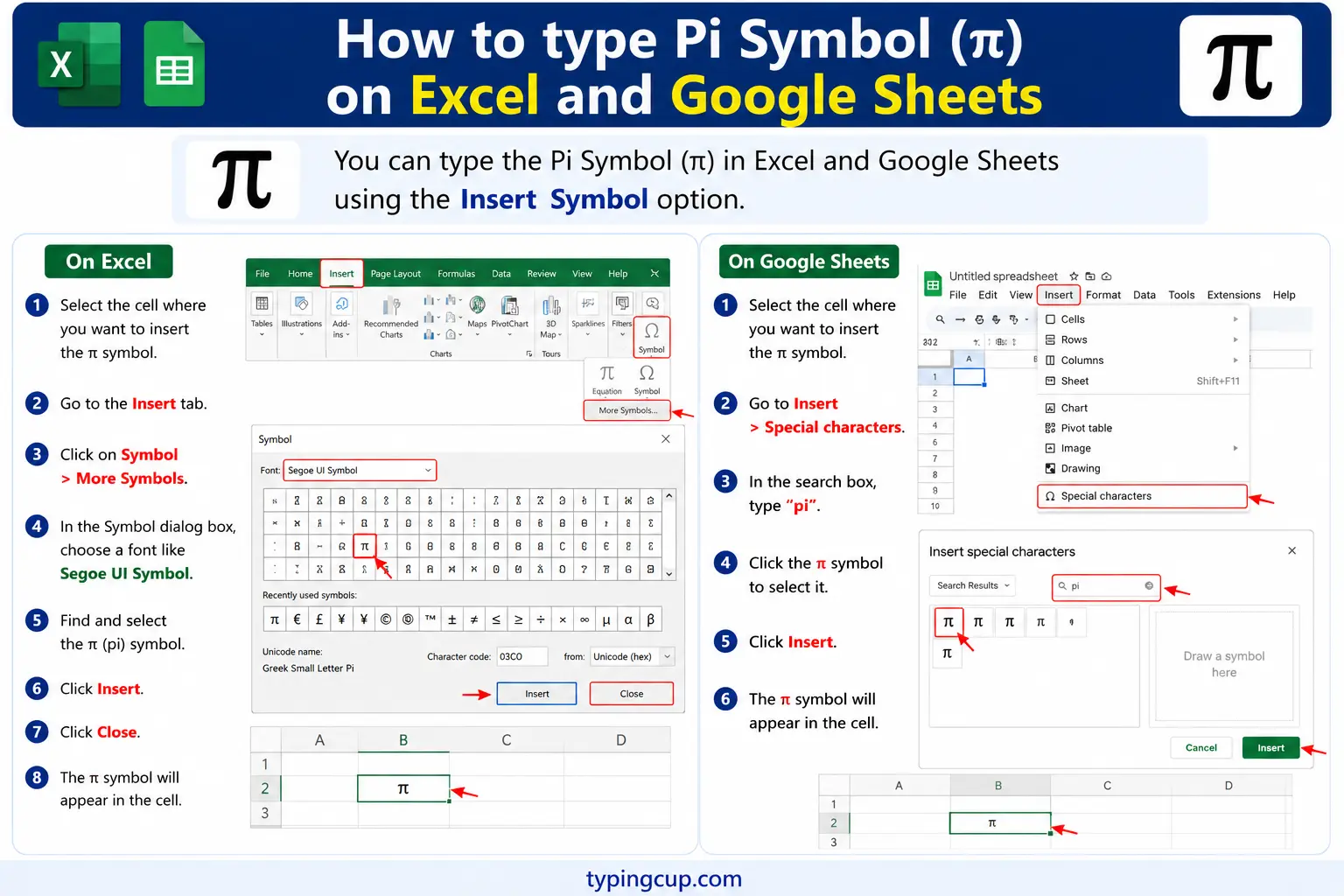
To use the value, the function =PI() returns 3.14159265358979 — that’s what you want in a calculation like =PI()*A1^2. To show the symbol, use =UNICHAR(960) in Excel or =CHAR(960) in Google Sheets. Don’t confuse the two: PI() does maths, UNICHAR just draws π.
Type the pi symbol in HTML and CSS
In HTML, pi is π (lowercase) or Π (capital), or the numeric π. In CSS, a literal π in a content value is the escaped code point \03C0.
The π symbol vs the number it stands for
It’s worth being clear about a distinction that trips people up: the character π and the number it represents aren’t the same thing. π is a Greek letter, a symbol you can paste anywhere. The number is roughly 3.14159265, an endless, never-repeating decimal that the letter is standing in for.
This matters most in code and spreadsheets. If you paste the letter π into a calculation, nothing happens; it’s just text. To do maths you need the value, which every system provides separately: Math.PI in JavaScript, math.pi in Python, =PI() in a spreadsheet. Think of the letter as the label on the jar and the value as what’s inside.
The reason we use a letter at all is precisely because the number never ends. You can’t write pi out in full, ever, so mathematicians gave the exact value a one-character name. Whenever you see π, read it as “that specific endless number,” not as an approximation someone rounded off.
Capital Pi (Π) is a completely different symbol
Here’s a mix-up that causes real confusion: the lowercase π and the capital Π are not the same symbol at two sizes. They mean entirely different things in maths.
Lowercase π is the circle constant, 3.14159. Capital Π is the product operator: it tells you to multiply a whole sequence of terms together, exactly the way the capital sigma Σ tells you to add them up. So Π from 1 to 4 of n means 1 × 2 × 3 × 4. One is a number; the other is an instruction.
| Symbol | Name | Meaning |
|---|---|---|
| π | pi (lowercase) | the number 3.14159… |
| Π | capital pi | multiply a sequence |
| Σ | capital sigma | add a sequence |
So if you want the circle constant, always use the small π. Reach for the capital Π only when you mean “take the product of,” and you’ll avoid a surprisingly common source of errors.
π vs tau: are we using the wrong constant?
Not many people know there’s a long-running argument that π is the wrong choice, and that maths would be cleaner with a constant called tau (τ), equal to 2π (about 6.283).
The case is this: a full circle is tau radians, so a quarter turn is τ/4, a half turn is τ/2, and the fractions line up intuitively with how far around the circle you’ve gone. With π you’re always working with 2π for a full turn, which the tau supporters argue is a needless factor of two that confuses students. The idea was laid out in a piece called the Tau Manifesto, and every year on Tau Day (June 28, or 6/28) its fans make the case again.
It’s a real debate, but a friendly one, and π isn’t going anywhere. It’s woven through centuries of textbooks, and plenty of formulas are tidier with π than with tau. Still, it’s a good reminder that even the most familiar symbols are, in the end, just choices someone made.
How many digits of pi do you actually need?
Pi has been computed to staggering lengths — well past 100 trillion digits — and people compete to memorise thousands of them. It makes for great records, but it raises an honest question: how many digits does any real calculation actually require?
The answer is surprisingly few. NASA uses about 15 digits for interplanetary navigation. With just 40 digits of pi you could calculate the circumference of the entire observable universe to within the width of a single hydrogen atom. Everything beyond that is curiosity and computing-power flexing, not necessity. For ordinary work, 3.14159 is plenty, and even 3.14 is fine for a rough answer.
The reason pi gets computed so far isn’t that anyone needs the digits — it’s that pi makes an excellent stress test for supercomputers and algorithms. And the enthusiasm has its own holiday: Pi Day, on March 14 (3/14), when people celebrate the number, recite digits, and, inevitably, eat pie.
Where the π symbol came from
Pi the idea is ancient — Babylonian and Egyptian scribes had approximations thousands of years ago, and Archimedes pinned it down cleverly around 250 BC — but the symbol π is much younger. It was first used for this purpose by the Welsh mathematician William Jones in 1706.
Jones chose π because it’s the first letter of the Greek words for “periphery” and “perimeter” (periphereia), which is what you’re measuring around a circle. The symbol only became standard after the great mathematician Leonhard Euler adopted it a few decades later; once Euler used it, everyone did. So the letter we use today is essentially Jones’s idea with Euler’s stamp of approval.
Pi in code and spreadsheets
In programming you use pi’s value, not the symbol, and it’s built in almost everywhere. It’s Math.PI in JavaScript and Java, math.pi in Python (after import math), M_PI in C, and =PI() in Excel and Google Sheets. Each gives you the full double-precision value, around 3.141592653589793.
The thing to avoid is typing your own 3.14 as a constant. The built-in value is more precise and makes your intent obvious, so an area is Math.PI * r * r, not 3.14 * r * r. And remember the π character is never a number in code; it’s just text in a string.
Copy-paste HTML codes
Every code for the pi symbol in one place. Click a cell and copy.
| Symbol | Named entity | Numeric entity | URL (percent) code |
|---|---|---|---|
| π | π | π | %CF%80 |
| Π | Π | Π | %CE%A0 |
In a CSS content value, use \03C0 for lowercase pi. For related maths symbols, the infinity guide and the square root guide get the same copy-and-code treatment.
Troubleshooting
My pi symbol shows as a box or garbled text
That’s an encoding mismatch: the UTF-8 bytes for π (CF 80) are being read as an older encoding. Set the file, database, and page charset to UTF-8 and it displays correctly.
Alt + 227 isn’t giving me π
Make sure Num Lock is on and you’re using the numeric keypad, not the top-row numbers. In apps that prefer the decimal code, try Alt + 960, or copy the symbol from the grid above.
My π isn’t calculating in code or Excel
The π character is only text. For maths, use the value: Math.PI, math.pi, or =PI(). Pasting the letter π into a formula won’t compute anything.
I got Π when I wanted π
You’ve got the capital Pi (the product operator) instead of the lowercase circle constant. Use the small π from the grid above, or Option + P on a Mac.
FAQ
How do I type the pi symbol?
On Windows, hold Alt and type 227. On a Mac, press Option + P. In Word, type 03C0 then Alt + X. In HTML, write π. On a phone, copy it or add a Greek keyboard. Or click π in the grid above.
What is the difference between π and Π?
Lowercase π is the circle constant, about 3.14159. Capital Π is the product operator, meaning “multiply this sequence together,” the multiplication counterpart of the summation sign Σ. They are not the same symbol at two sizes.
How many digits of pi do I need?
For almost anything, very few. NASA uses about 15 digits, and 40 digits would size the observable universe to atomic precision. For everyday work, 3.14159 is plenty.
How do I use pi in code or Excel?
Use the built-in value, not the symbol: Math.PI in JavaScript, math.pi in Python, or =PI() in a spreadsheet. The π character itself is just text and won’t calculate.
How do I write the pi symbol in HTML?
Use π for lowercase or Π for capital, or the numeric π. In a URL, lowercase pi is %CF%80.
