
Square Root Symbol (√): How to Type, Copy, and Use It
The square root symbol, √, is the radical sign you put in front of a number to ask “what times itself gives this?” So √9 is 3, and √2 is about 1.414. It isn’t on any keyboard, so most people copy it or use a shortcut. This page has both, plus the parts of the √ symbol that trip people up in plain text.
If you just need the character, copy √ from the grid below, along with the cube root ∛, the HTML entity, or the URL code.
Below you’ll find how to type √ on every device, how to show exactly what’s under the root when you can’t draw the bar, how it differs from a checkmark, and how to write cube and higher roots.
In a hurry?
- Copy it: click √ in the grid below.
- On Windows: hold Alt and type 251 on the numeric keypad.
- On a Mac: press Option + V.
- In Word: type 221A then press Alt + X.
- Show what’s under it: wrap it in brackets, like √(a + b), since plain text has no overbar.
Click to copy: the square root symbol
Grab the √ symbol, the cube root ∛, the HTML entity, or the URL code
Table of Contents
Copy and paste the square root symbol
The square root symbol with every code you’re likely to need, plus the cube root for good measure. Use the grid above to copy with one click; this table is the reference.
| Symbol | Name | Unicode | Windows | Mac | HTML |
|---|---|---|---|---|---|
| √ | square root | U+221A | Alt + 251 | Option + V | √ |
| ∛ | cube root | U+221B | Alt + 8731 | — | ∛ |
| ∜ | fourth root | U+221C | Alt + 8732 | — | ∜ |
There’s no root key on any keyboard, so it always takes a shortcut, a code, or a copy. The sections below cover each device, then the thing plain text can’t do: draw the bar that shows where the root ends.
How to type the square root symbol on any device
The radical sign isn’t on the keys, so here’s the quickest way to produce one on each system.
Type the square root symbol on Windows
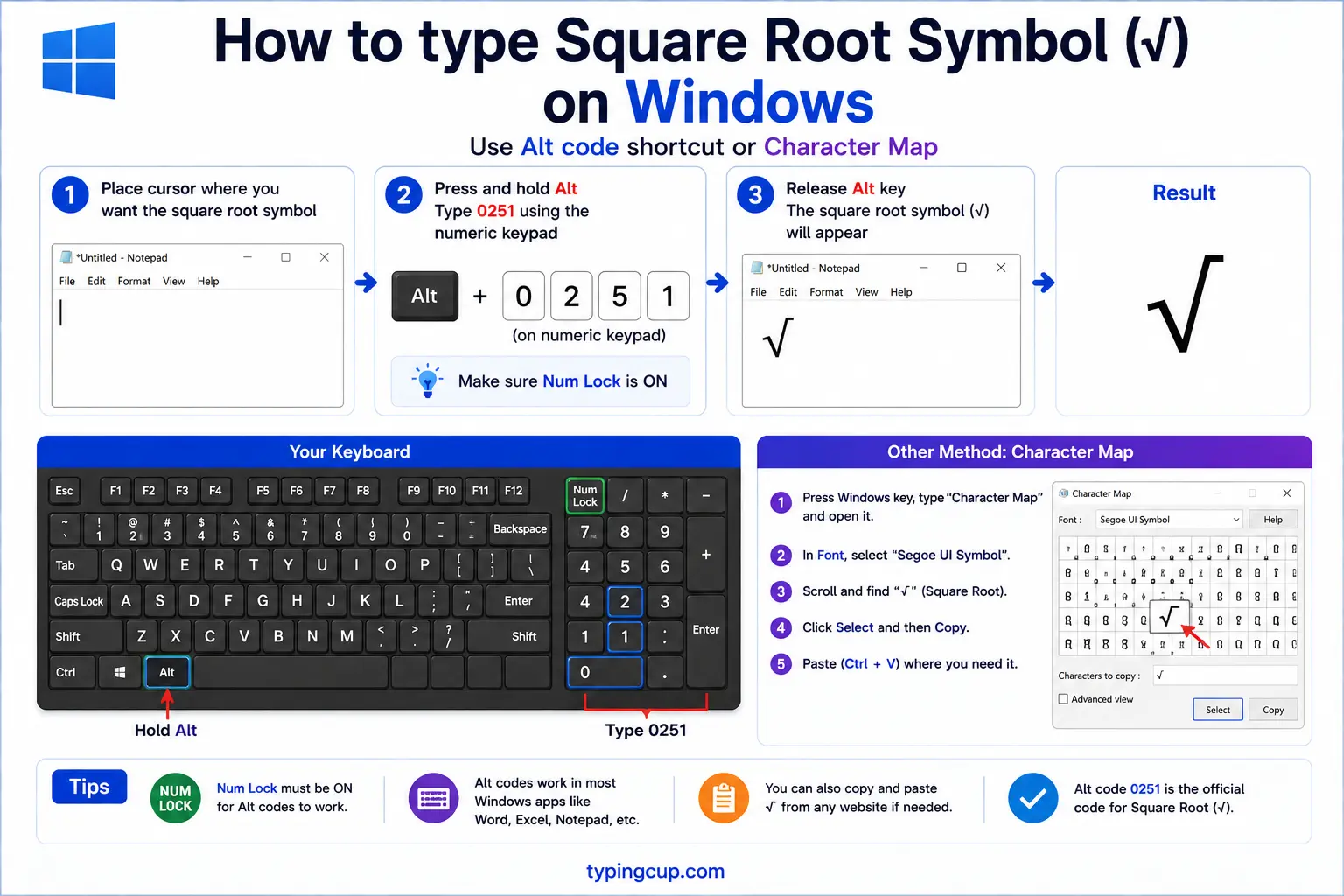
The quickest route is the Alt code: turn on Num Lock, hold Alt, and type 251 on the numeric keypad for √. The longer decimal code Alt + 8730 also works in apps that support it. On a laptop with no keypad, press Windows + . for the symbol panel and search “square root.”
Type the square root symbol on Mac
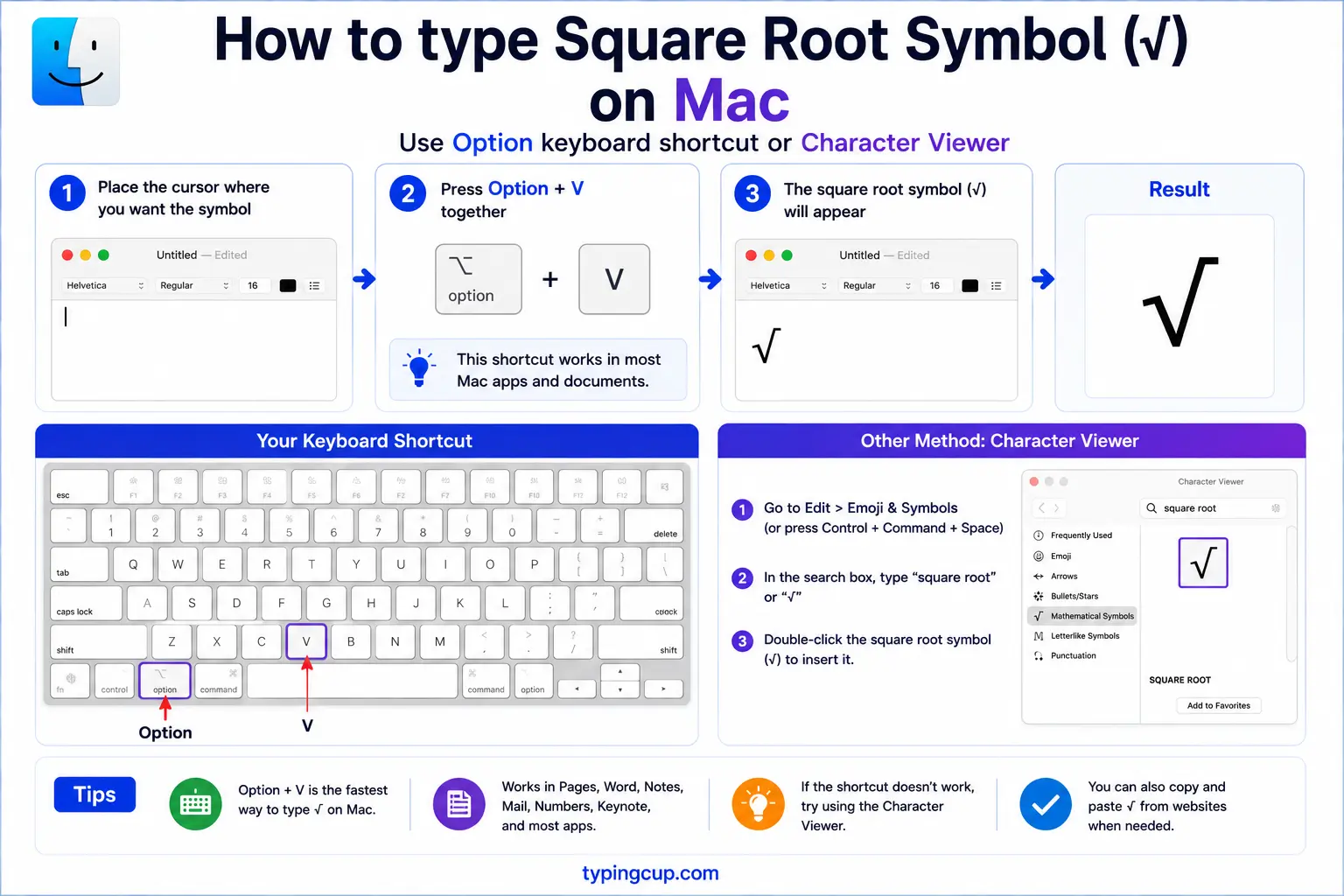
On a Mac, press Option + V for √. It’s a single shortcut, no dead-key step. For roots beyond square, you’ll need the Character Viewer (Control + Command + Space) and a search for “root,” or just copy them from the grid above.
Type the square root symbol on iPhone and Android
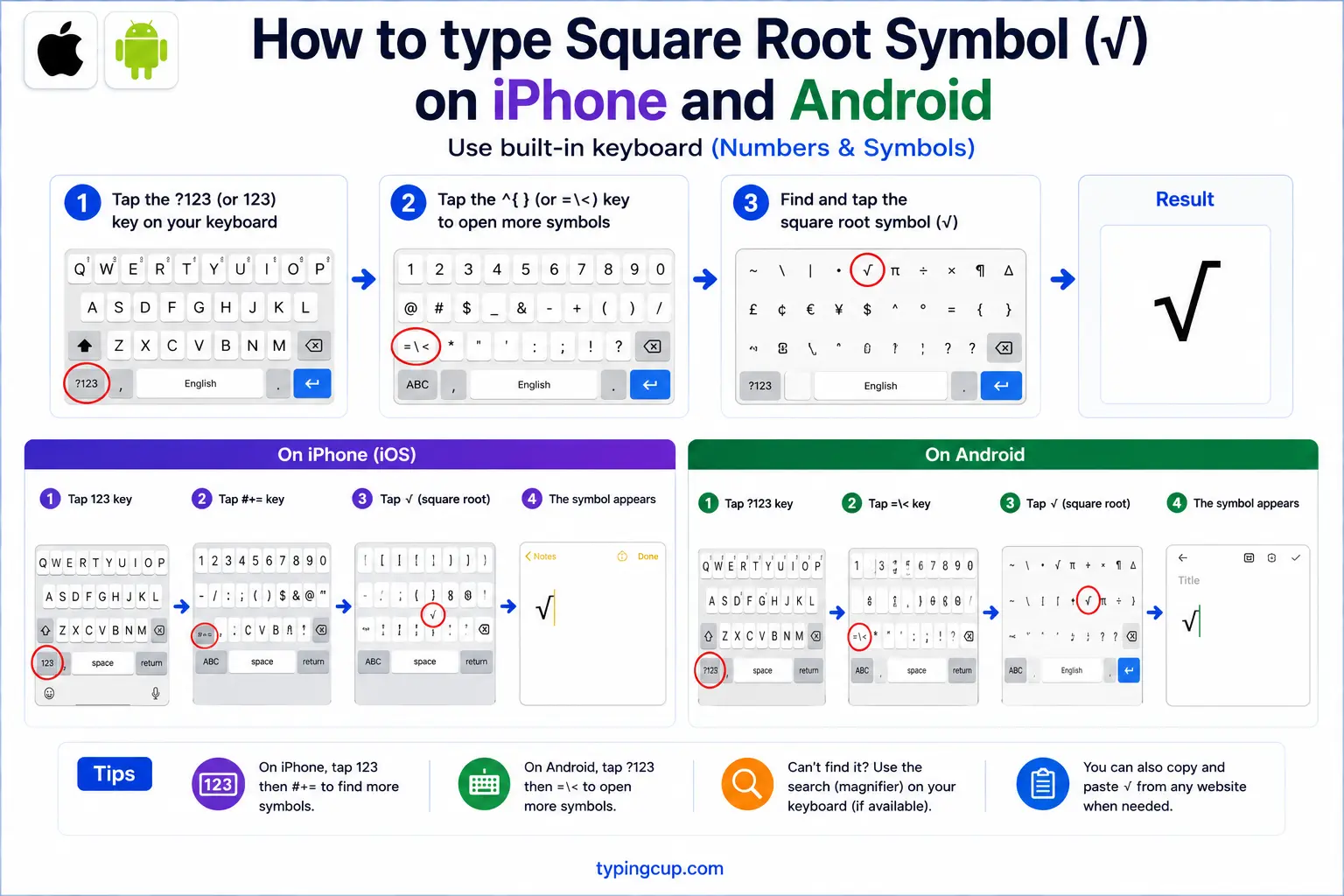
Neither phone keyboard has √ built in, which is why copying is usually easiest on mobile. If you type maths often, a calculator or scientific keyboard app adds it, and some third-party keyboards include a symbols page with √. Otherwise, tap and hold in the grid above to copy it.
Type the square root symbol in Microsoft Word
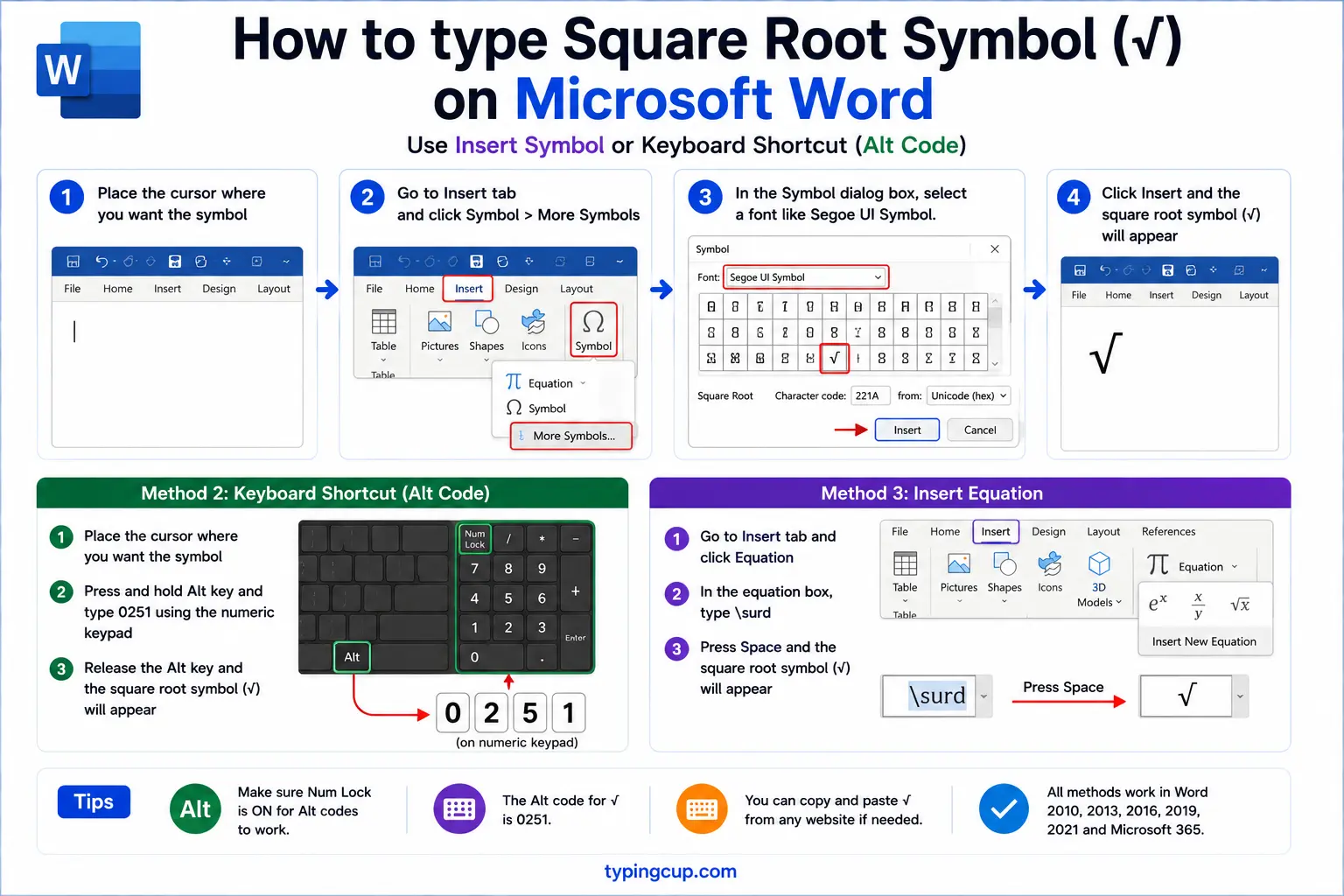
Two good options. For inline text, type 221A and press Alt + X to turn the code into √. For real maths, use Insert → Equation (or Alt + =) and pick the radical: that version draws the proper bar over the number, which the plain √ character can’t do.
Type the square root symbol on Linux
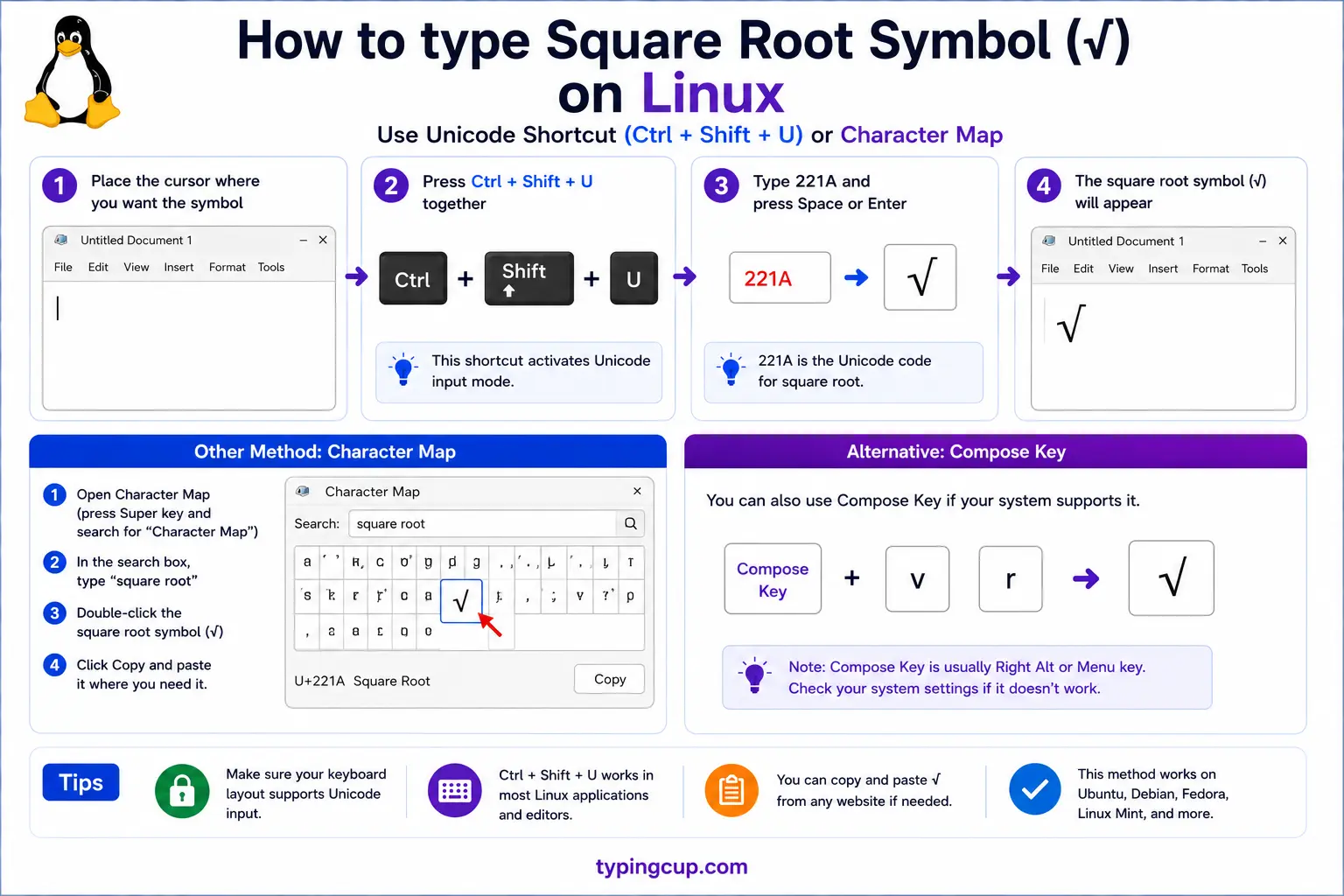
Press Ctrl + Shift + U, type 221a, then press Enter. That Unicode input method works in most GTK and Qt apps.
Type the square root symbol in Excel and Google Sheets
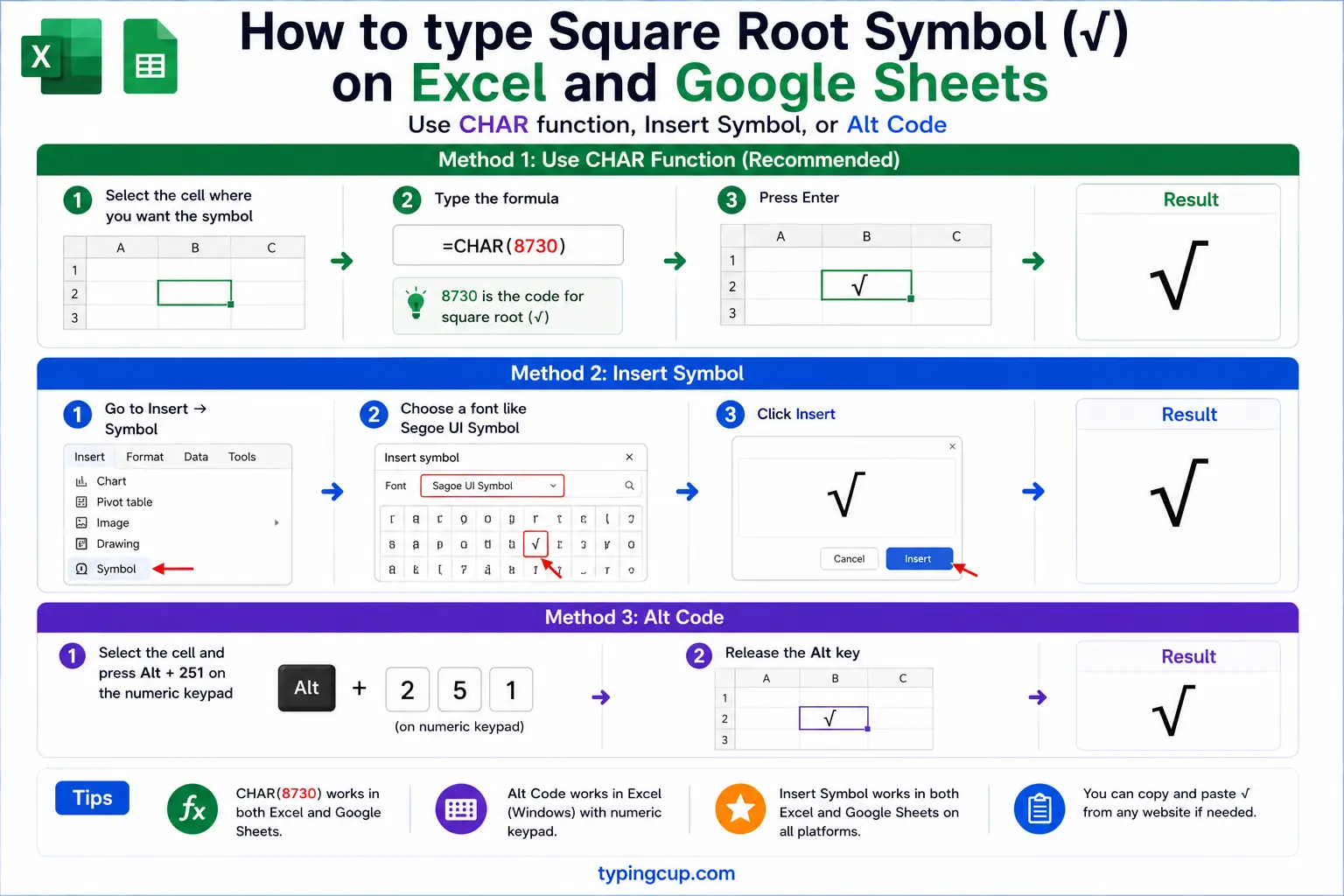
To calculate, use the =SQRT() function (=SQRT(9) returns 3). To show the symbol, use =UNICHAR(8730) in Excel or =CHAR(8730) in Google Sheets. Note that a spreadsheet’s √ is just text; the number under it won’t be calculated.
Type the square root symbol in HTML and CSS
In HTML, the radical is √ or the numeric √. To draw the bar over the radicand, wrap it in <span style="text-decoration:overline"> after the √, or use MathML. In CSS content, the escaped code point is \221A.
The radical, and the bar that’s missing
Here’s the thing almost no guide explains: the √ character on its own is only half of the real square root sign. In proper maths notation, the symbol has two parts — the radical (the tick, √) and the vinculum, the horizontal bar that stretches over the number to show exactly what’s inside the root.
The Unicode character √ (U+221A) is just the radical. It has no bar, and it can’t grow one, because plain text can’t draw a line over the characters that follow it. So when you type √16, the symbol technically doesn’t say whether you mean the root of 16 or the root of 1, times 6. A human reads it correctly, but strictly it’s ambiguous.
This is why the equation editors in Word, Google Docs, and LaTeX don’t use the plain √ at all. They build a proper radical that draws the bar over the whole radicand and stretches to fit it. The bare √ character is for casual, inline use, where everyone understands what you mean.
How to show exactly what’s under the root
Since the plain √ can’t draw its bar, you need another way to mark where the root starts and stops. There are three common approaches, depending on where you’re writing.
The simplest, and the one everyone understands, is parentheses: write √(a + b) so it’s obvious the whole sum is inside. For a single number, √16 is fine. When you need the real overbar, switch to an equation editor (Word’s Alt + = , or LaTeX’s \sqrt{}), which draws it properly. And on the web, you can fake the bar with an overline on the radicand: the √ followed by text styled with text-decoration: overline.
| Where | How to bound the root | Example |
|---|---|---|
| Chat, email | parentheses | √(a + b) |
| Word / Docs | equation editor | Alt + =, then radical |
| LaTeX | sqrt command | \sqrt{a+b} |
| Web page | CSS overline | √16 |
For most everyday writing, parentheses are all you need. Reserve the equation editor for documents where the notation has to look exactly right.
The square root is not a checkmark
Because a handwritten √ looks a lot like a tick, people often reach for the square root character when they actually want a checkmark ✓. They’re different symbols with different jobs, and using the root as a tick can look off, especially in a font where the √ has its little upward tail on the right.
If you want a tick, use the real checkmark ✓ (U+2713) or the heavy version ✔ (U+2714). Save √ for maths. The two get mixed up so often partly because on paper a quick check and a quick radical look nearly the same, but on screen the difference is clear.
Cube roots, fourth roots, and nth roots
The square root has siblings. The cube root ∛ (U+221B) asks what number cubed gives you the value (∛27 = 3), and the fourth root ∜ (U+221C) goes one further. Each has its own single Unicode character, which you can copy from the grid above.
For any higher root, there’s no dedicated character, so it’s written with a small index tucked into the radical’s notch: an n-th root shows a little raised n before the √. In plain text people approximate this in a few ways, such as writing the root as a fractional power (x^(1/5) for a fifth root) or spelling it out (“the 5th root of x”). The square root is really just the nth root where n is 2, with the 2 left off because it’s the default.
Where the √ symbol came from
The radical sign is younger than you might expect. Before it, mathematicians wrote roots out in words or used a letter. The symbol we know first appeared in print in 1525, in a German algebra book by Christoff Rudolff.
The common story is that the shape is a stylised lowercase r, for the Latin radix, meaning “root” (the same root as “radish” and “radical”). Rudolff’s version had no bar over the number; the vinculum was added later, often credited to René Descartes in the 1600s, who joined the bar to the tick to make the single stretching symbol used today. So the character on your keyboard is essentially Rudolff’s half, and the full modern radical is his plus Descartes’ bar.
The square root in code and spreadsheets
In programming you almost never type the √ symbol; you call a function or raise to a power. Most languages have a sqrt: Math.sqrt(x) in JavaScript, math.sqrt(x) in Python, sqrt(x) in C and PHP. You can also raise to the one-half power — x ** 0.5 in Python, Math.pow(x, 0.5) in JavaScript — which is the same thing and works for other roots too (x ** (1/3) for a cube root).
In spreadsheets it’s =SQRT(9) for the value, and =UNICHAR(8730) (Excel) or =CHAR(8730) (Google Sheets) if you just want the printed √. Keep the two straight: SQRT does the maths, UNICHAR only draws the symbol.
Copy-paste HTML codes
Every code for the square root and its siblings in one place. Click a cell and copy.
| Symbol | Named entity | Numeric entity | URL (percent) code |
|---|---|---|---|
| √ | √ | √ | %E2%88%9A |
| ∛ | — | ∛ | %E2%88%9B |
| ∜ | — | ∜ | %E2%88%9C |
In a CSS content value, use \221A for the square root. For more maths and keyboard symbols, the degree symbol guide and the pipe symbol guide get the same treatment.
Troubleshooting
My square root shows as a box or garbled characters
That’s an encoding mismatch: the UTF-8 bytes for √ (E2 88 9A) are being read as an older encoding. Set the file, database, and page charset to UTF-8 and the symbol displays correctly.
Alt + 251 isn’t giving me √
Make sure Num Lock is on and you’re using the numeric keypad, not the top-row numbers. In apps that prefer decimal codes, try Alt + 8730 instead, or copy the symbol from the grid above.
How do I put the bar over the number?
The plain √ character can’t do that. Use an equation editor (Word’s Alt + = , or LaTeX \sqrt{}) for a real overbar, or wrap the value in parentheses, √(a + b), in plain text.
I wanted a checkmark, not a root
Use the checkmark ✓ (U+2713) or ✔ (U+2714) instead. The √ is the maths radical and can look wrong when used as a tick.
FAQ
How do I type the square root symbol?
On Windows, hold Alt and type 251. On a Mac, press Option + V. In Word, type 221A then Alt + X. On a phone, copy it. Or click √ in the grid above.
How do I show what’s inside the root?
The plain √ can’t draw a bar over the number, so wrap the contents in parentheses: √(a + b). For a proper overbar, use an equation editor or LaTeX \sqrt{}.
What is the difference between √ and a checkmark?
They’re different characters. √ (U+221A) is the maths radical; the checkmark is ✓ (U+2713) or ✔ (U+2714). They look alike by hand but have separate uses, so pick the right one.
How do I write a cube root or nth root?
The cube root has its own character, ∛ (U+221B), and the fourth root ∜ (U+221C). Higher roots have no single symbol; write them as a fractional power like x^(1/5) or spell them out.
How do I write the square root in HTML?
Use √ or √. In a URL it’s %E2%88%9A. For a bar over the radicand, use MathML or an overline style.
