
Tilde Symbol (~): How to Type, Copy, and Use It
The tilde, ~, is the little wave on the backtick key. It’s a quiet overachiever: it stands for your home folder in the terminal, means “about” in front of a number, forms accents like ñ and ã, and even strikes text through in Markdown. This page covers all of it.
If you just need the symbol, copy ~ from the grid below, along with the small raised tilde ˜, its HTML code, or its URL code.
Below you’ll find how to type ~ on every device, what ~/ means on the command line, how it differs from the two other tildes, and why it turns up in accents, URLs, and file names.
In a hurry?
- Copy it: click ~ in the grid below.
- On Windows: press Shift + ` (the backtick key, top-left), or Alt + 126 on the keypad.
- On a Mac: press Shift + ` (the backtick key, top-left).
- On a UK keyboard: it’s Shift + #, the key next to Enter.
- In HTML the tilde is ~; in a URL it’s %7E.
Click to copy: the tilde
Grab ~, the small tilde ˜, the HTML code, or the URL code
Table of Contents
Copy and paste the tilde
The tilde with every code you’re likely to need in one row. Use the grid above to copy with a click; this table is the reference.
| Symbol | Name | Unicode | Windows | Mac | HTML |
|---|---|---|---|---|---|
| ~ | tilde | U+007E | Shift + ` | Shift + ` | ~ |
Note the HTML column: the tilde has no short named entity, so it uses the numeric code. The reason is a second, smaller tilde, covered further down.
How to type the tilde on any device
The tilde sits on the backtick key on most layouts, reached with Shift. Here’s the quickest route on each system.
Type the tilde on Windows
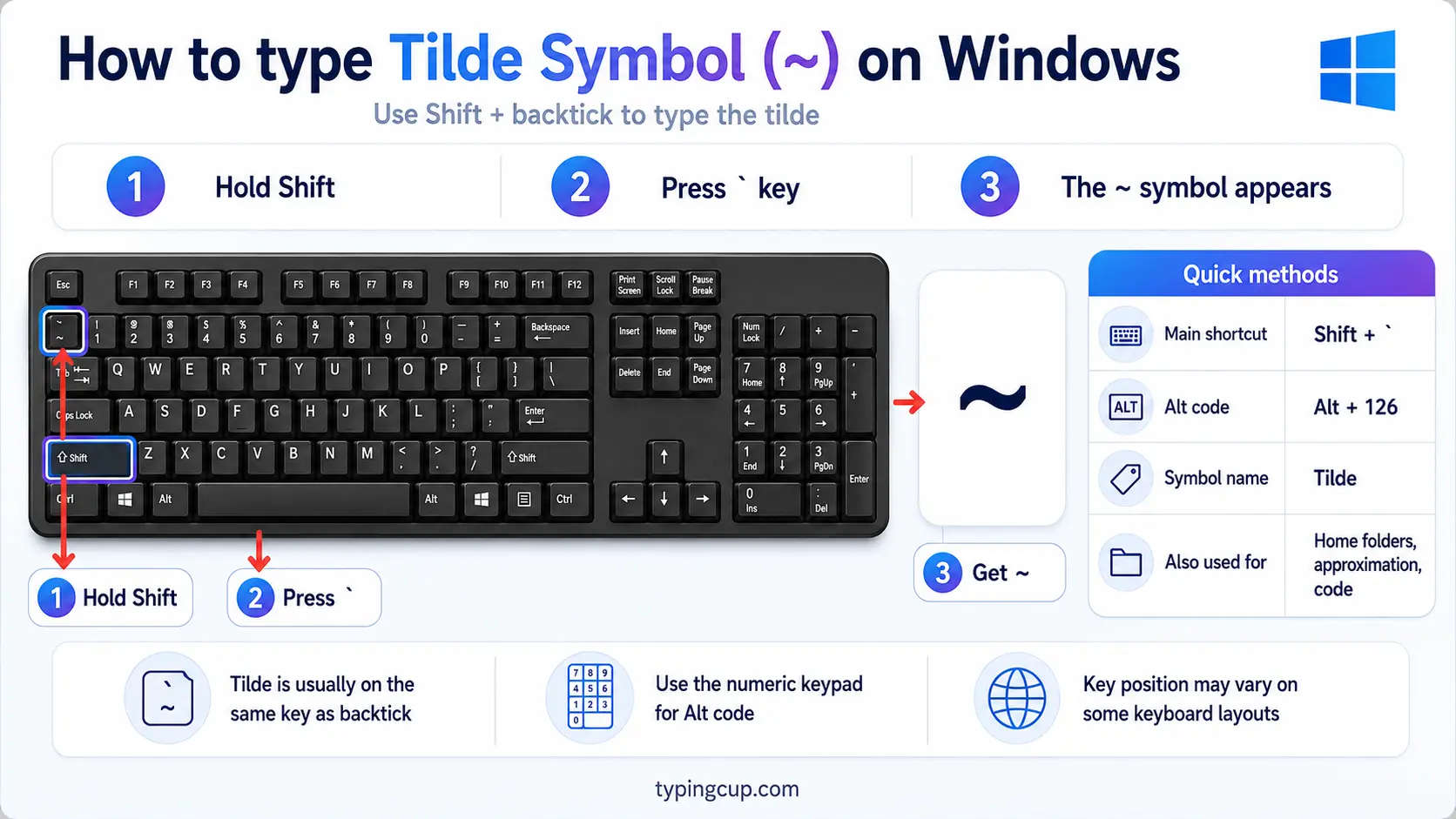
On a US keyboard, press Shift + `, the backtick key at the top-left, just left of the 1. On a UK keyboard, the tilde is Shift + #, the key beside Enter. Either way, you can also hold Alt and type 126 on the numeric keypad, or press Windows + . for the symbol panel.
Type the tilde on Mac
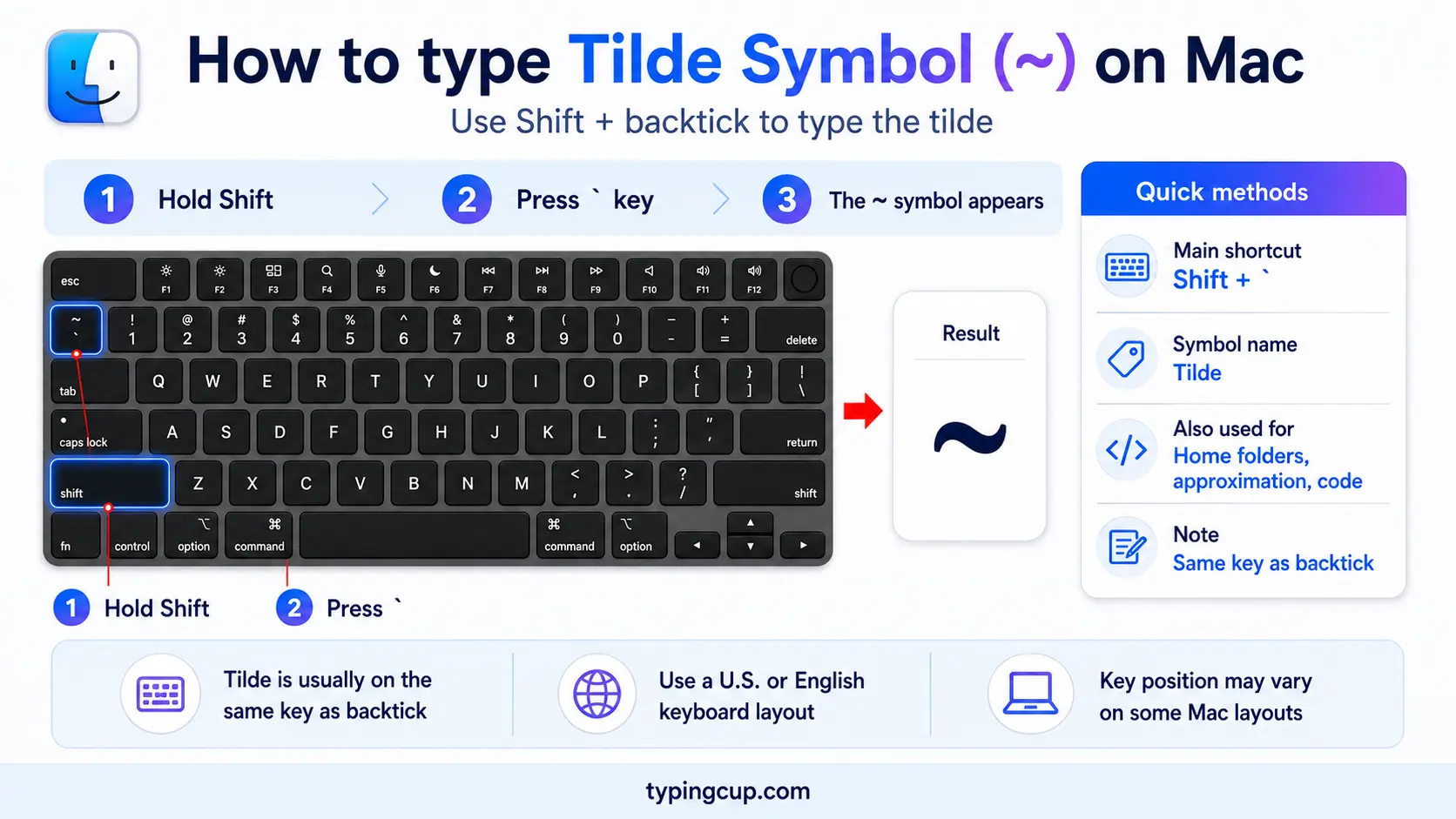
On a Mac, press Shift + `, the backtick key at the top-left of the keyboard. On UK Mac layouts the tilde moves, so check the keyboard viewer under System Settings if Shift + ` gives something else.
Type the tilde on iPhone and Android
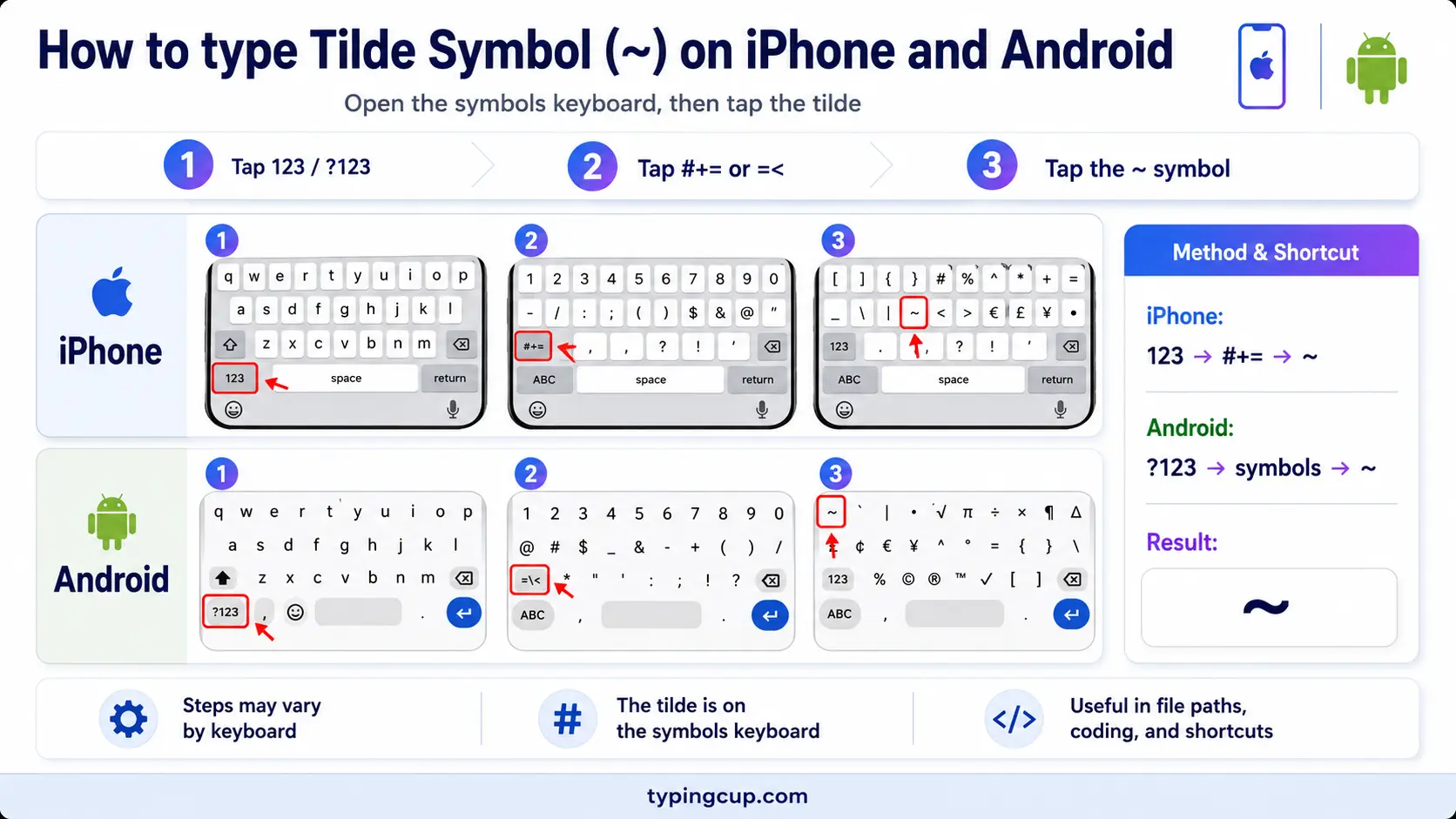
Open the symbols keyboard (the 123 key), then the second symbols page (#+= on iPhone). The tilde sits among the math and punctuation symbols. Slide onto it and lift your finger.
Type the tilde on Linux
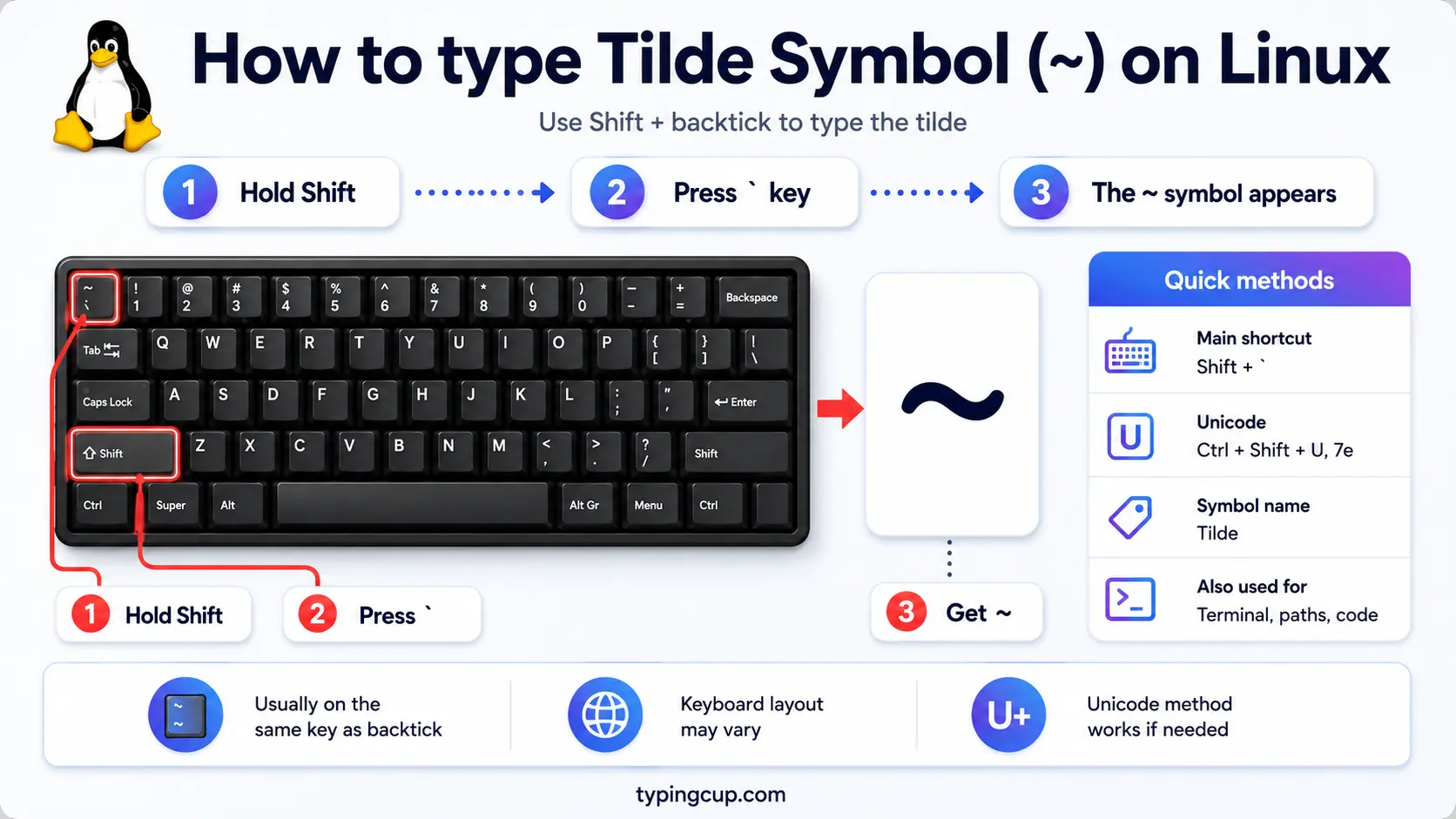
On a US layout it’s Shift + `. You can also press Ctrl + Shift + U, type 007e, and press Enter. On layouts where the key has moved, the Unicode method always works.
Type the tilde in HTML and CSS
In HTML, use the numeric ~ or the hex ~ for the tilde; the plain ~ works in text too. Avoid ˜, which is a different, raised character. In CSS, a literal tilde in a content value is \007E.
The tilde as your home folder (~/)
On the command line, the tilde has a meaning that has nothing to do with squiggles: it stands for your home folder. Type cd ~ and you jump straight to your home directory, and ~/Documents means the Documents folder inside it, wherever your home happens to live.
It’s a shortcut that saves typing the full path. Instead of /Users/anna/Documents on a Mac or /home/anna/Documents on Linux, you write ~/Documents and the shell fills in the rest. You can even point at someone else’s home with their name, so ~bob is Bob’s home directory.
This is also where the old ~username web addresses came from. Early personal home pages lived in users’ home folders on shared servers, so their URLs looked like example.edu/~jsmith/, the tilde marking a personal corner of a bigger site.
~ vs ˜ vs ∼: the three tildes
Confusingly, there’s more than one tilde. The one on your keyboard is the ASCII tilde, ~ (U+007E), which sits on the line like ordinary text. Above it floats the small tilde, ˜ (U+02DC), a raised version used as an accent, and in maths there’s the tilde operator, ∼ (U+223C), which means “is similar to.”
This trips people up in HTML. The entity ˜ doesn’t give you the keyboard tilde; it gives the small raised ˜. For the plain ~ you want the numeric ~, or just type the character. If a tilde looks too high or floats above the text, you’ve probably got one of the other two.
Using the tilde for “approximately”
In everyday writing the tilde is shorthand for “about” or “around.” ~100 people means roughly a hundred, and ~$50 is about fifty dollars. It’s quick, informal, and understood almost everywhere.
Maths makes it more precise. A single tilde means “is similar to” or, for growth, “behaves like,” while the wavy-equals forms (≈, ≅) mean “approximately equal to.” The keyboard ~ often stands in for all of these when the exact symbol isn’t handy, which is fine in casual notes but worth tightening up in formal maths.
The tilde as an accent mark (ñ, ã, õ)
The tilde started life as an accent, and it still does that job. Placed over a letter it becomes a diacritic: the Spanish ñ, and the Portuguese ã and õ, each a distinct letter rather than a plain n or o.
On a US-International keyboard you can build these by pressing ~ and then the letter, so ~ then n gives ñ. The tilde on the keyboard and the tilde on ñ are related but not the same character, which is why typing an accented letter uses a dead key or a shortcut rather than the standalone ~. For the letters themselves, see the ñ guide and the ã guide.
The tilde in Markdown, backups, and file names
The tilde turns up in a few corners of computing. In Markdown, wrapping text in double tildes, ~~like this~~, produces strikethrough. Many text editors save a backup of a file by adding a tilde to the end, so notes.txt~ is the previous version of notes.txt.
Windows uses it in short file names: when a long name has to fit the old eight-character limit, it’s shortened with a tilde and a number, which is why Program Files can appear as PROGRA~1. None of these are things you type on purpose often, but they explain a lot of stray tildes.
The tilde in URLs and code
The tilde has a settled place in web addresses. Modern URL rules treat it as an “unreserved” character, so it’s allowed to appear as a plain ~, which is why those old ~username pages worked without any encoding.
If a system does encode it, the form is %7E. In HTML it’s ~, and in code it’s just the plain character, since the tilde is standard ASCII and never garbles across encodings. In some languages it also has its own meaning, such as bitwise NOT in C and JavaScript.
Copy-paste HTML codes
Every code for the tilde, and the small raised tilde, in one place. Click a cell and copy.
| Symbol | Named entity | Numeric entity | URL (percent) code |
|---|---|---|---|
| ~ | — (none) | ~ | %7E |
| ˜ | ˜ | ˜ | %CB%9C |
In a CSS content value, use \007E. For other symbols, the arrow symbols guide has the same copy-and-code treatment, and for accented letters see the full letters-with-accents list.
Troubleshooting
“My tilde floats up high (˜) instead of on the line.”
That’s the small tilde ˜ (U+02DC), the one you get from ˜. For the normal keyboard tilde, use ~ (U+007E) or ~, both in the grid above.
“I can’t find the tilde key.”
On a US keyboard it’s Shift + the backtick key at the top-left; on a UK keyboard it’s Shift + #, next to Enter. If it’s missing, hold Alt and type 126 on the numeric keypad, or copy it from the grid above.
“Typing ~ then n didn’t make ñ.”
That accent trick needs the US-International layout (or a dead-key setup), where the tilde waits for the next letter. Without it, ~ just types on its own. See the ñ guide for the full method.
“~/ isn’t taking me to my home folder.”
The ~ home shortcut is a feature of the terminal shell, not of file dialogs. Use it in a command line like bash or zsh; in a graphical path box, type the full path instead.
FAQ
How do I type the tilde?
On a US keyboard, Shift + the backtick key (top-left). On a UK keyboard, Shift + #. On Windows you can also hold Alt and type 126. Or click ~ in the grid above.
What does ~ mean in a file path?
It’s your home folder. In a terminal, ~ expands to your home directory, so ~/Documents is the Documents folder inside it, and ~name points at another user’s home.
What does ~ before a number mean?
Approximately. ~100 means about a hundred. In maths a tilde also means “is similar to,” while ≈ means “approximately equal to.”
What’s the difference between ~ and ˜?
Height and use. The keyboard tilde ~ (U+007E) sits on the line; the small tilde ˜ (U+02DC) is raised and used as an accent. The HTML entity ˜ gives the raised one, not the keyboard tilde.
How do I write the tilde in HTML?
Use ~ or ~, or just type ~. Avoid ˜, which is the raised ˜. In a URL, the tilde is allowed as a plain ~, or encoded as %7E.
