
Pipe Symbol (|): How to Type, Copy, and Use the Vertical Bar
The pipe, |, also called the vertical bar, is the tall straight line you’ll find on the backslash key. It looks plain, but it does some of the heaviest lifting in computing: it chains commands together in the terminal, means “or” in code, and reads as “such that” in maths. This page covers all of it.
If you just need the symbol, copy | from the grid below, along with its HTML entity or URL code.
Below you’ll find how to type | on every device, what piping means on the command line, how it differs from the broken bar ¦, its many jobs in code and maths, and why it’s so easily mistaken for the letters l and I.
In a hurry?
- Copy it: click | in the grid below.
- On Windows: press Shift + \ (the backslash key, above Enter), or Alt + 124 on the keypad.
- On a Mac: press Shift + \ (the backslash key, above Return).
- On a phone: it’s on the symbols keyboard, often the second page.
- In HTML the pipe is | or |; in a URL it’s %7C.
Click to copy: the pipe symbol
Grab |, its HTML entity, the numeric code, or the URL code.
Table of Contents
Copy and paste the pipe symbol
The pipe with every code you’re likely to need in one row. Use the grid above to copy with a click; this table is the reference.
| Symbol | Name | Unicode | Windows | Mac | HTML |
|---|---|---|---|---|---|
| | | vertical bar (pipe) | U+007C | Shift + \ | Shift + \ | | |
The pipe is standard ASCII, so it’s on every keyboard and never garbles across encodings. It usually shares the backslash key; the sections below show exactly where.
How to type the pipe symbol on any device
The pipe lives on the backslash key on most layouts, reached with Shift. Here’s the quickest route on each system.
Type the pipe symbol on Windows
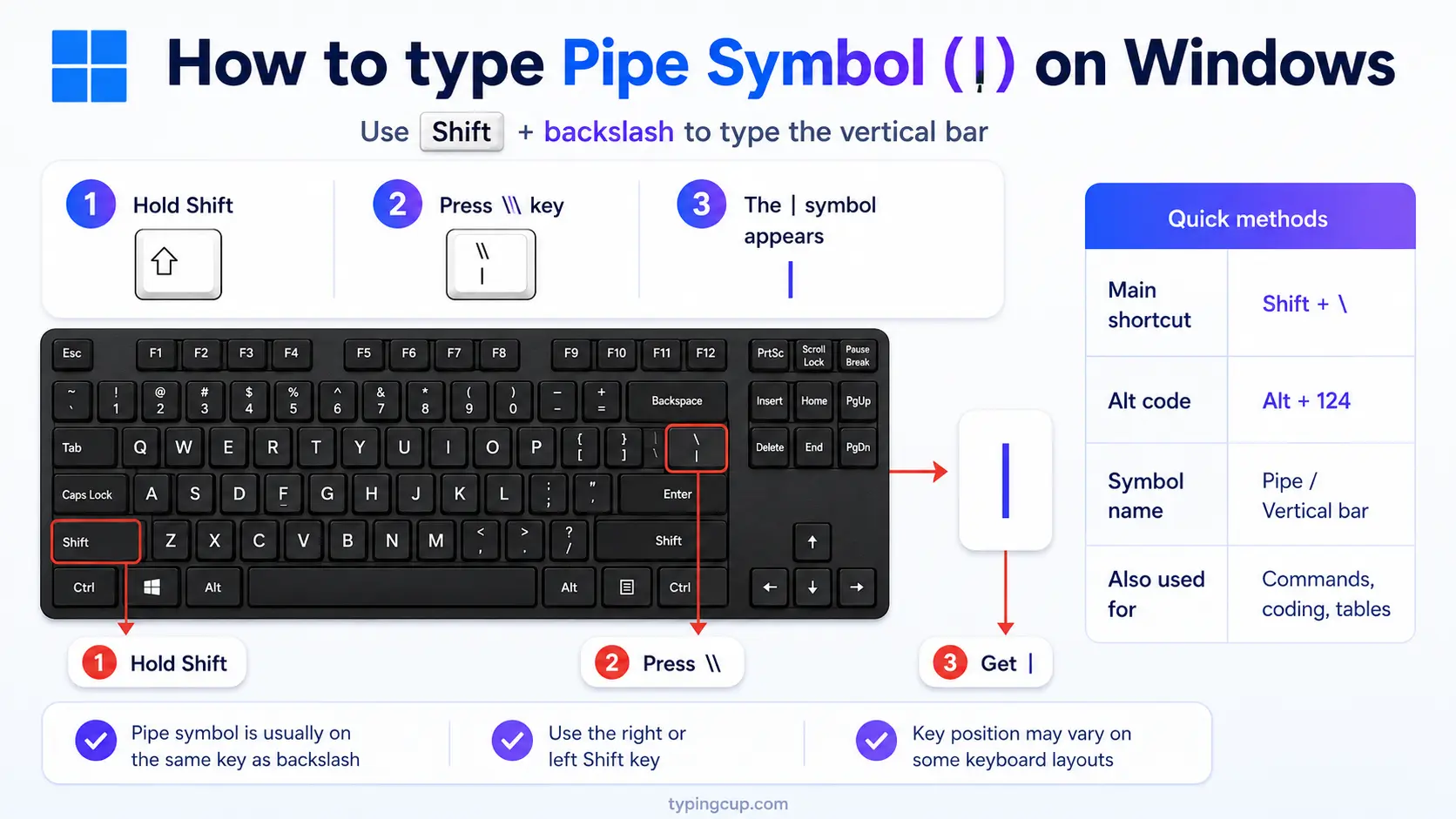
On a US keyboard, press Shift + \, the backslash key just above Enter. On a UK keyboard, the pipe is usually the key next to the left Shift. Either way, you can also hold Alt and type 124 on the numeric keypad, or press Windows + . for the symbol panel.
Type the pipe symbol on Mac
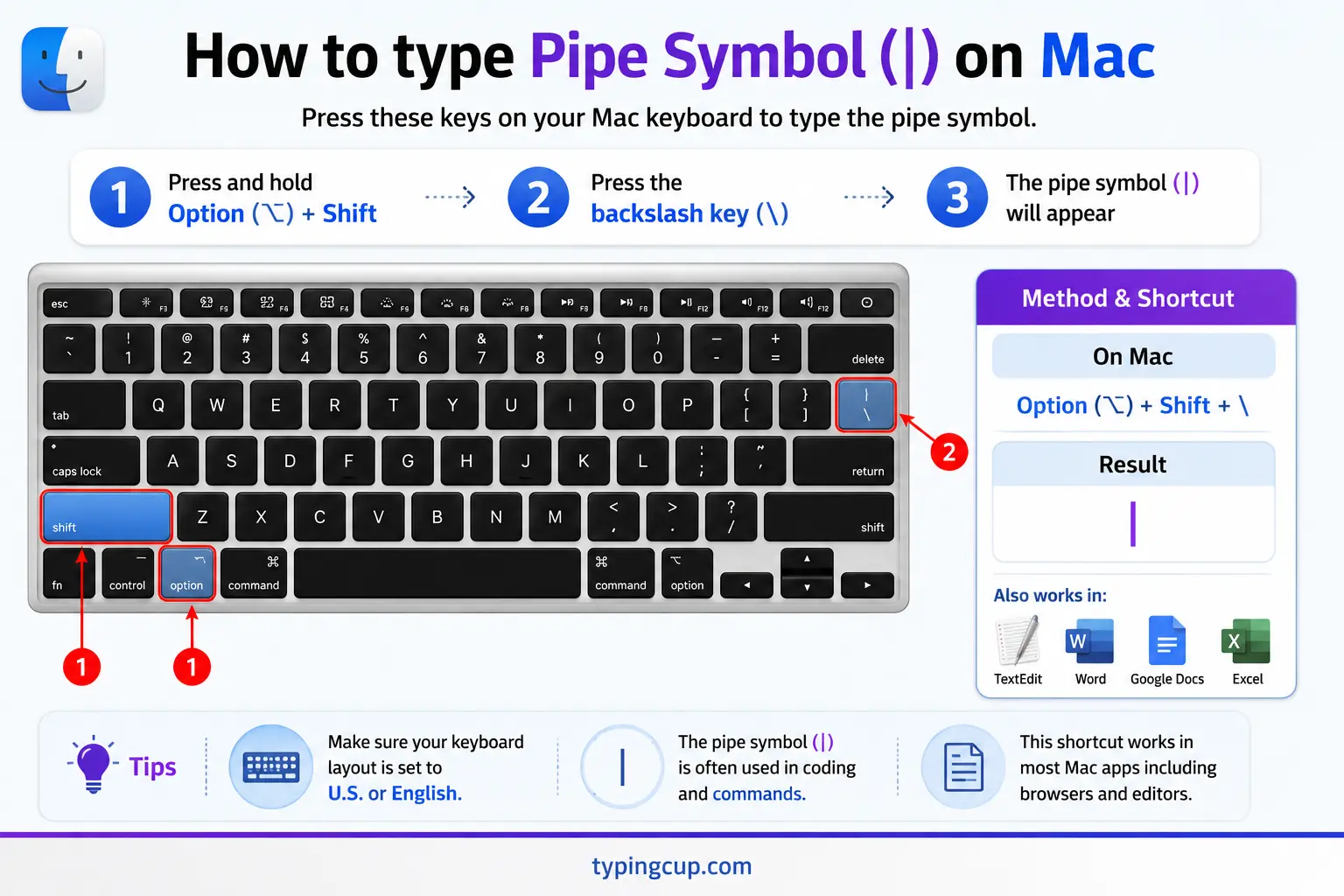
On a Mac, press Shift + \, the backslash key above Return. On UK and some European Mac layouts the key moves near the left Shift, so check the keyboard viewer under System Settings if it isn’t where you expect.
Type the pipe symbol on iPhone and Android
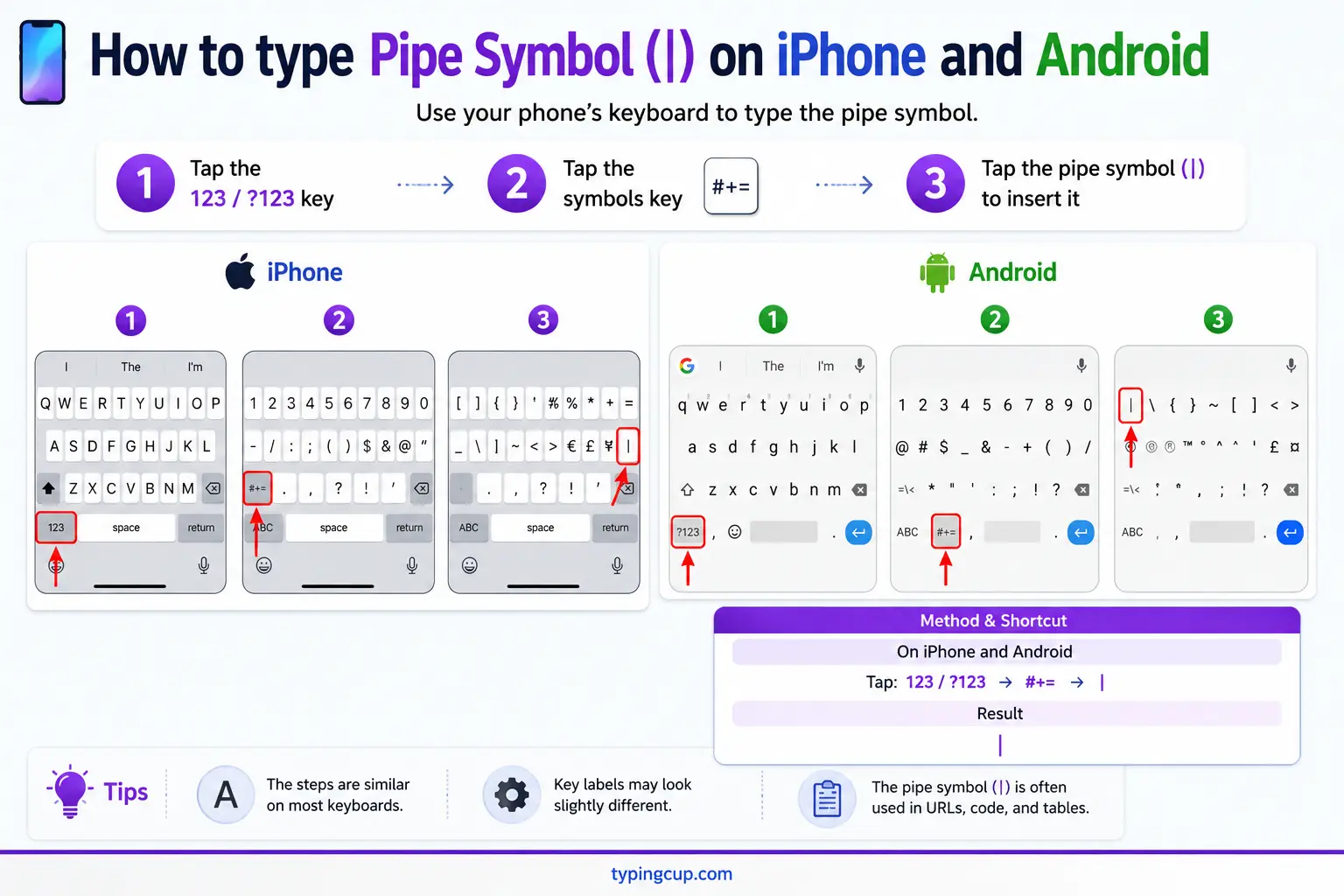
Open the symbols keyboard (the 123 key), then the second symbols page (#+= on iPhone). The pipe sits among the brackets and math symbols. Slide onto it and lift your finger.
Type the pipe symbol on Linux
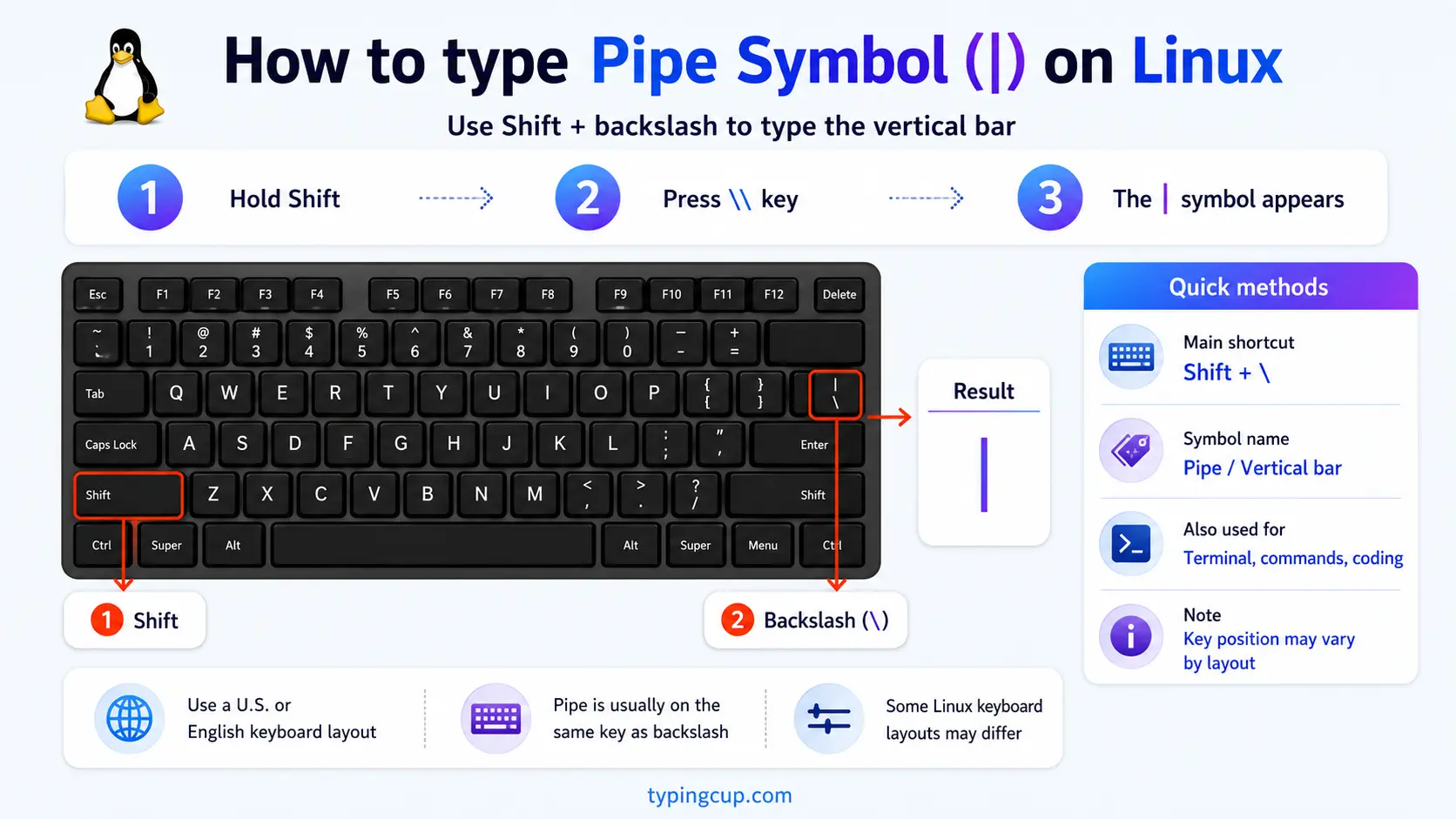
On a US layout it’s Shift + \. You can also press Ctrl + Shift + U, type 007c, and press Enter. On layouts where the key has moved, the Unicode method always works.
Type the pipe symbol in HTML and CSS
In HTML, the pipe is | or the numeric |, though the plain | works in text. In CSS, a literal pipe in a content value is the escaped code point \007C.
The pipe and the command line: what piping means
The pipe’s most important job is on the command line, where it does exactly what its name suggests: it pipes the output of one command straight into another. Type ls | grep .txt and the list of files from ls flows through the pipe into grep, which filters it down to the .txt files.
This is one of the great ideas in computing. The concept came from Doug McIlroy at Bell Labs, and Ken Thompson built it into Unix in 1973, reportedly in a single night. It let small, simple programs be chained together, each doing one thing well and passing its results along, an idea that still shapes how command lines and data pipelines work today.
So when you see cat log.txt | sort | uniq, you’re reading a little assembly line: read the file, sort the lines, then remove duplicates, each stage handing off to the next through a pipe.
| vs ¦: the pipe and the broken bar
There are two vertical-bar characters, and they’re easy to confuse. The pipe | (U+007C) is a solid, unbroken line, the one used on the command line and in code. The broken bar ¦ (U+00A6) has a small gap in the middle.
The mix-up is a hangover from older hardware. On some early terminals and IBM PCs, the character at the pipe’s code point was drawn with a gap, and a few keyboards, especially older UK ones, still print a ¦ on the key even though it types a solid |. For anything technical, you want the solid pipe |; the broken bar is essentially decorative now.
The pipe in code: OR, regex, and tables
In programming the pipe is everywhere. A double pipe, ||, means logical OR in languages like C, Java, and JavaScript, so a || b is true if either side is. A single pipe, |, is the bitwise OR. In regular expressions, the pipe is alternation: cat|dog matches either word.
It also draws tables. In Markdown, columns are separated by pipes, as in | Name | Age |, and many plain-text tables use the pipe as a vertical rule. Some languages fence block parameters with it, like Ruby’s |x|. The same key quietly handles OR, matching, and layout depending on where it sits.
The pipe in maths: |x| and “such that”
Mathematics uses the pipe in two neat ways. A value written between two pipes is its absolute value: |-5| is 5, the distance from zero regardless of sign. Doubling them, ||v||, denotes the length, or norm, of a vector.
The pipe also reads as “such that” in set-builder notation. The expression { x | x > 0 } means “the set of all x such that x is greater than zero.” So one symbol serves as brackets of size in one place and as the words “such that” in another.
Is that a pipe, an l, or an I?
In many fonts the pipe |, a lowercase L (l), and a capital i (I) look almost identical, which causes real trouble. A password or a serial number that mixes them can be nearly impossible to read, and scammers have used the resemblance to fake web addresses.
When precision matters, use a font that separates them, like a coding font where the pipe is clearly taller and unbroken, the lowercase L may have a small tail, and the capital I has serifs. If you’re copying a code that mixes these characters, pasting rather than retyping saves you from guessing which one it is.
The pipe symbol in URLs and encoding
The pipe has an awkward status in web addresses. It isn’t in the set of characters allowed unencoded in a URL, so strictly it should be percent-encoded, even though most browsers quietly accept a raw one.
The encoded form is %7C. In HTML it’s | or |, and in code it’s just the plain character, since the pipe is standard ASCII. It never garbles across encodings, which makes it safe to use in identifiers and config files.
Copy-paste HTML codes
Every code for the pipe symbol in one place. Click a cell and copy.
| Symbol | Named entity | Numeric entity | URL (percent) code |
|---|---|---|---|
| | | | | | | %7C |
In a CSS content value, use \007C. For other symbols, the arrow symbols guide has the same copy-and-code treatment, and the backslash guide covers the key the pipe shares.
Troubleshooting
“I can’t find the pipe key.”
It’s on the backslash key: Shift + \, above Enter on a US keyboard, or next to the left Shift on a UK one. If it’s missing, hold Alt and type 124 on the numeric keypad, or copy it from the grid above.
“My pipe looks broken, with a gap in the middle.”
That’s either the broken bar ¦ (U+00A6) or a font that draws the pipe with a gap. For a solid pipe, copy | (U+007C) from the grid above, or switch to a font that renders it unbroken.
“My pipe, l, and I look the same.”
That’s a font problem, not a wrong character. Use a coding font that clearly separates the pipe, lowercase L, and capital I, and paste codes rather than retyping them.
“My command or regex with a pipe isn’t working.”
Make sure it’s a real pipe | and not a broken bar ¦ or a stray letter. Copying the exact character from the grid above rules out a look-alike.
FAQ
How do I type the pipe symbol?
Press Shift + \ (the backslash key), above Enter on a US keyboard or beside the left Shift on a UK one. On Windows you can also hold Alt and type 124. Or click | in the grid above.
What is the pipe symbol used for?
On the command line it pipes one program’s output into another; in code it means OR (||) and regex alternation (a|b); in Markdown it separates table columns; and in maths it marks absolute value and “such that.”
What’s the difference between | and ¦?
The pipe | (U+007C) is a solid line used in code and the terminal; the broken bar ¦ (U+00A6) has a gap in the middle and is a separate, mostly decorative character.
Where is the pipe key on the keyboard?
On a US keyboard it’s Shift + backslash, just above Enter. On a UK keyboard it’s usually the key next to the left Shift. On a Mac it’s Shift + backslash as well.
How do I write the pipe in HTML or a URL?
In HTML, use | or |, though the plain | works. In a URL, the pipe is percent-encoded as %7C.
