
Euro Symbol (€): How to Type, Copy, and Use the Euro Sign
The euro sign, €, is the symbol for the euro, the shared currency of much of Europe. It’s built around the Greek letter epsilon, it sits before or after a number depending on the country, and it’s one of the most common characters to break when text encoding goes wrong. This page covers all of it.
If you just need the symbol, copy € from the grid below, along with its HTML entity, its URL code, or the three-letter currency code EUR.
Below you’ll find how to type € on every device and keyboard, where it goes in an amount, how to format euro figures in a spreadsheet, why it sometimes shows up as €, which countries use it, and a quick reference to the other currency symbols.
In a hurry?
- Copy it: click € in the grid below.
- On Windows: hold Alt and type 0128 on the numeric keypad, or press AltGr + E.
- On a Mac: press Option + Shift + 2 (US layout) or Option + 2 (UK and Irish).
- On a phone: on the numbers-and-symbols keyboard, long-press the currency or $ key and pick €.
- In HTML the euro sign is €; in a URL it’s %E2%82%AC.
Click to copy: the euro sign
Grab €, its HTML entity, its URL code, or the EUR currency code
Table of Contents
Copy and paste the euro sign
The euro sign with every code you’re likely to need in one row. Use the grid above to copy with a click; this table is the reference for typing or coding it yourself.
| Symbol | Name | Unicode | Windows | Mac | HTML |
|---|---|---|---|---|---|
| € | euro sign | U+20AC | Alt + 0128 | Option + Shift + 2 | € |
Unlike most currency symbols, the euro sign has a fixed spot in Unicode (U+20AC) but no single agreed keyboard position, which is why the shortcut changes from one device and layout to the next. The sections below walk through each one.
How to type the euro sign on any device
The euro sign was added to keyboards after the layouts were already set, so it turns up in a different place on almost every system. Here’s where to find it on each.
Type the euro sign on Windows
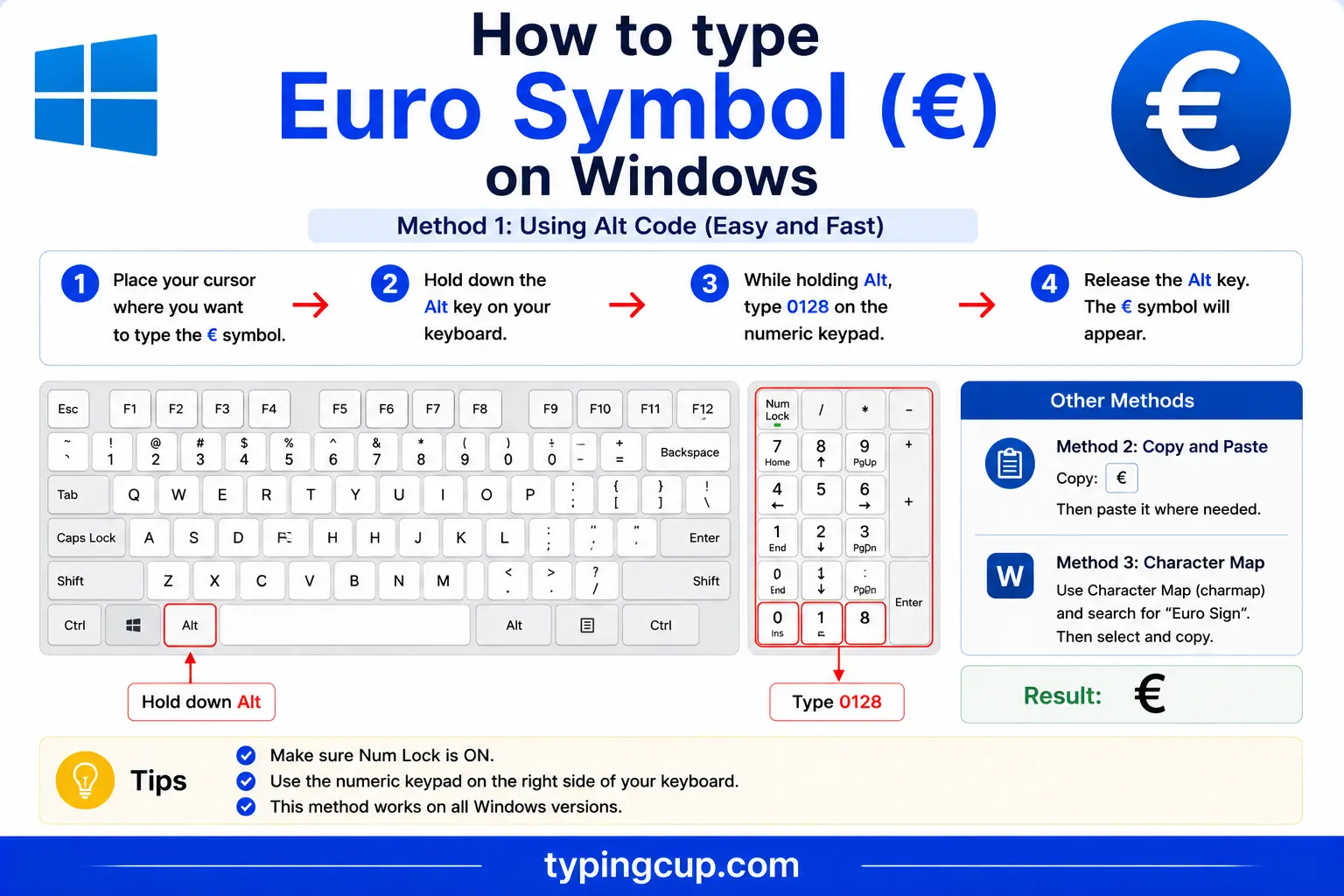
The reliable method is the Alt code. Turn on Num Lock, hold Alt, and type 0128 on the numeric keypad. It works in nearly every Windows program because 128 is where the euro sits in the standard Windows character set.
Most European Windows keyboards also print € on a key. On German and US-International layouts, AltGr + E produces it; on a UK layout, it’s AltGr + 4. AltGr is the right-hand Alt key. If your keyboard doesn’t cooperate, press Windows + . to open the symbol panel, or open Character Map.
Type the euro sign on Mac
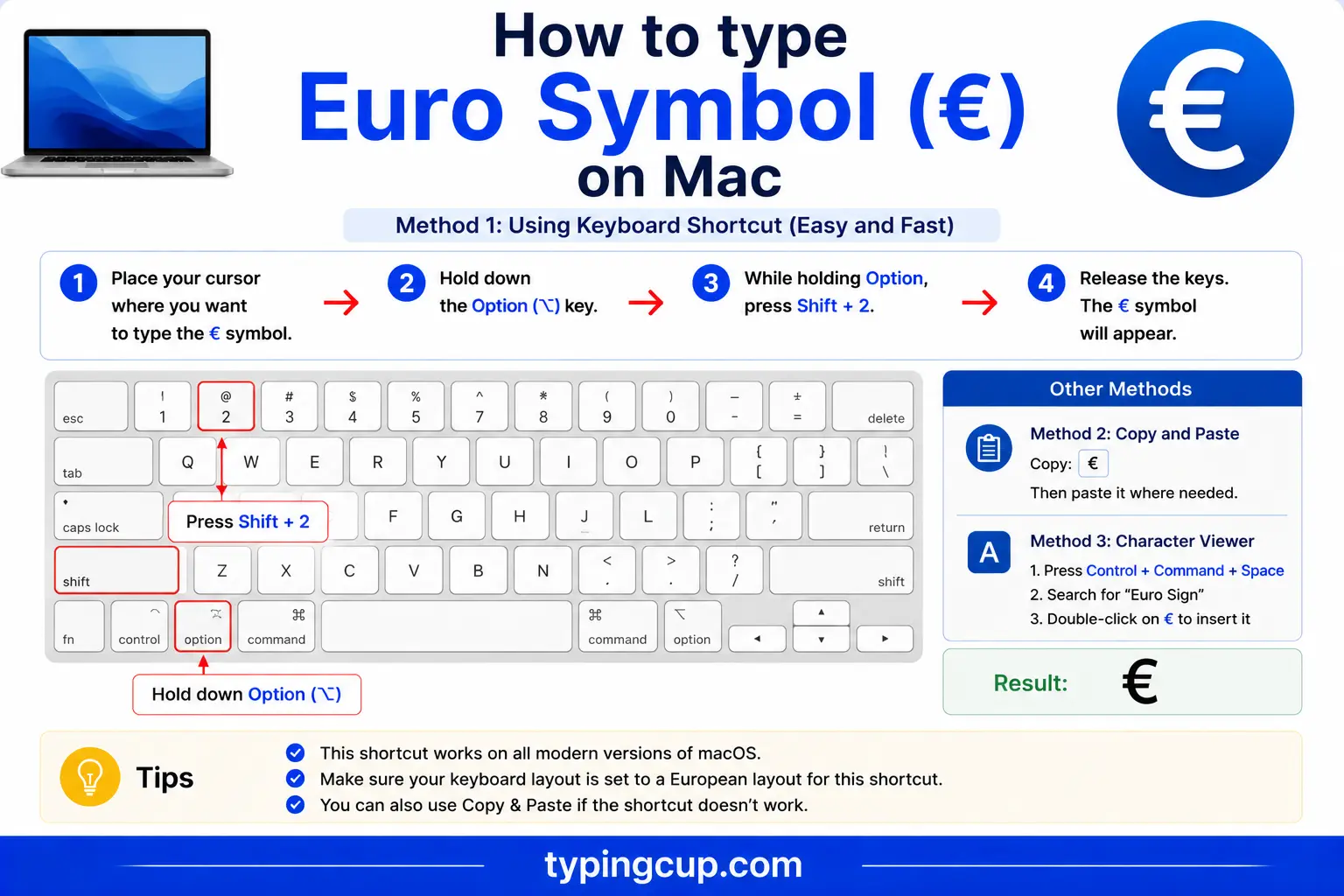
The shortcut depends on your keyboard layout. On the US layout, press Option + Shift + 2. On the UK and Irish layouts, it’s simply Option + 2, because the euro was placed on the 2 key there.
If one combination gives you a different symbol, such as a ™ or a €-less character, try the other, or open the Character Viewer with Control + Command + Space and search “euro.”
Type the euro sign on iPhone and Android
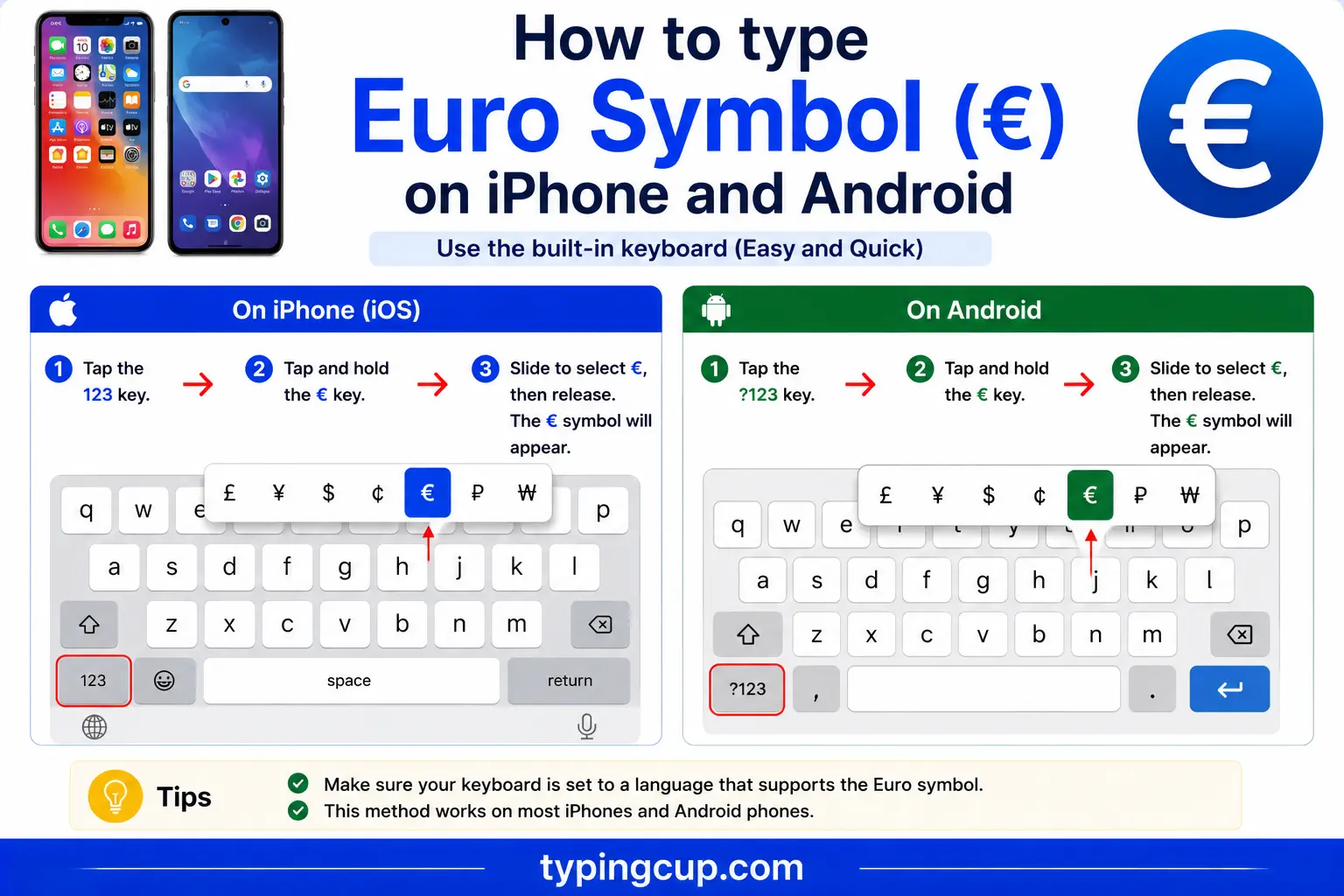
Open the numbers-and-symbols keyboard (the 123 key), then find the currency symbols. On most phones you press and hold the $ key or the dedicated currency key, and a little menu of symbols appears with € among them. Slide onto it and lift your finger.
If you type euro amounts constantly, adding a European language keyboard puts the sign within easier reach, sometimes on its own key.
Type the euro sign in Microsoft Word
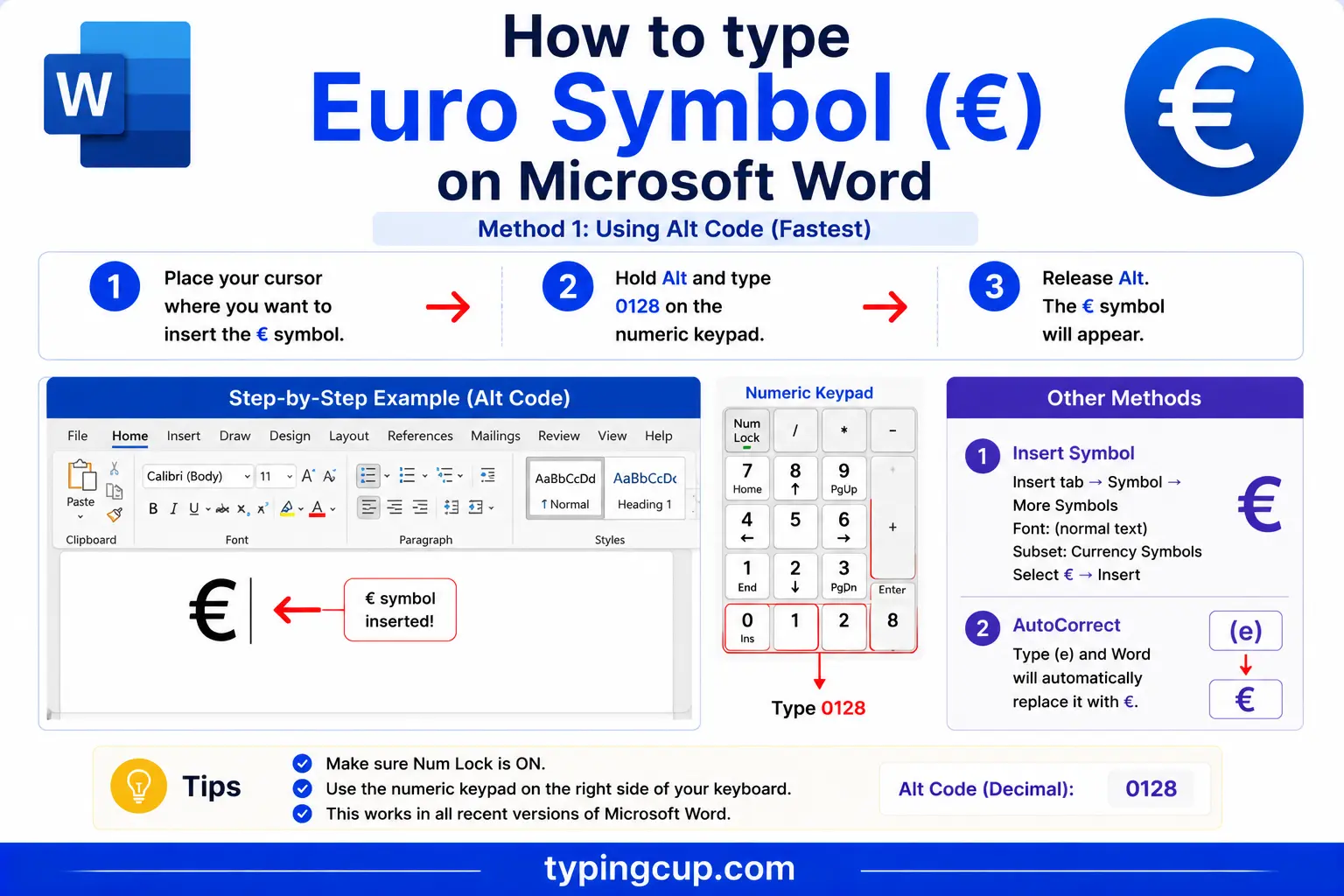
Word has a built-in shortcut: Ctrl + Alt + E inserts € directly. If that’s taken by another tool, the Windows Alt code (0128) works, and so does the hex method: type 20AC and press Alt + X.
Type the euro sign on Linux
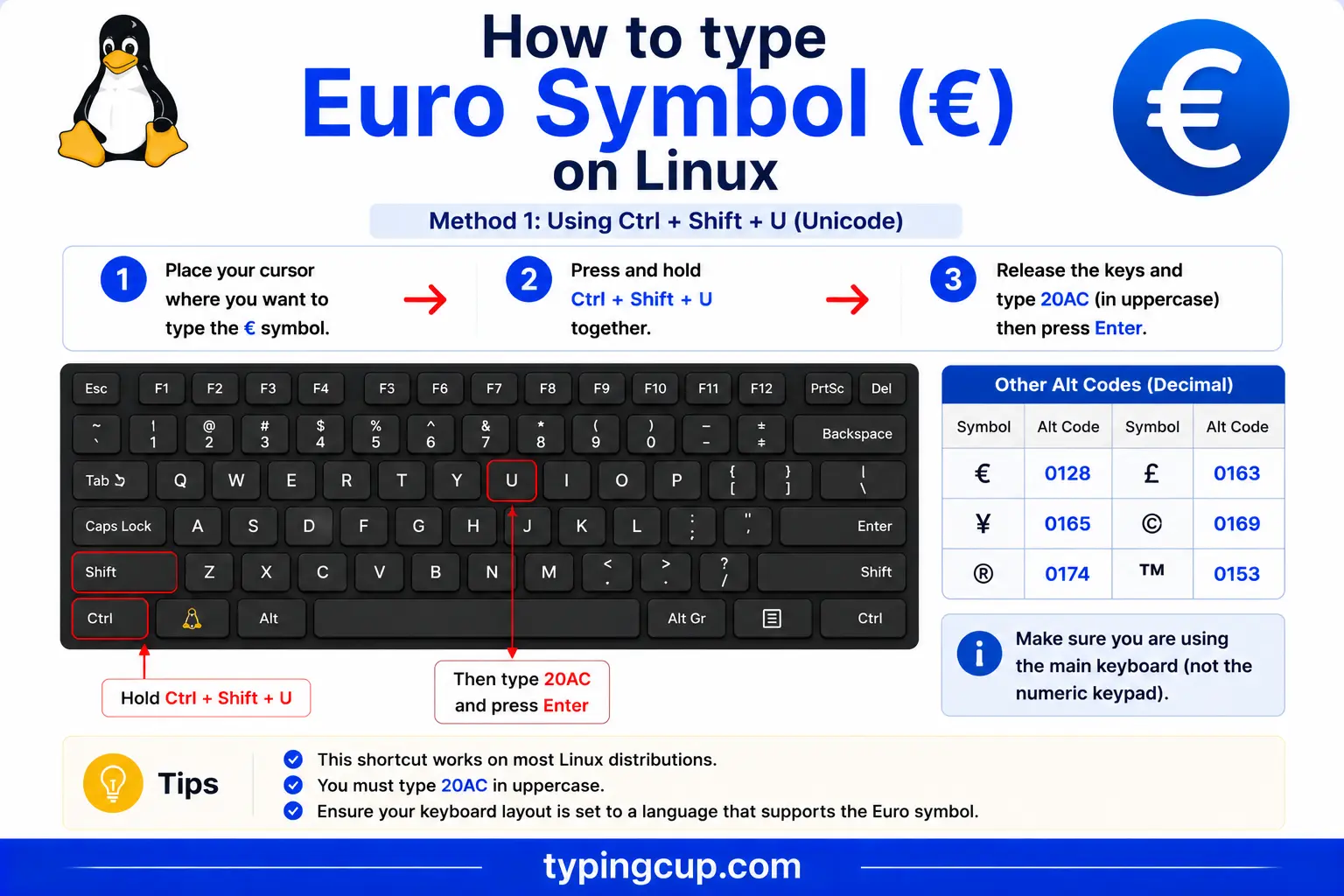
Press Ctrl + Shift + U, type 20ac, then press Enter. On most European layouts AltGr + E also works, and with a Compose key the sequence is Compose, then =, then e.
Type the euro sign in Excel and Google Sheets
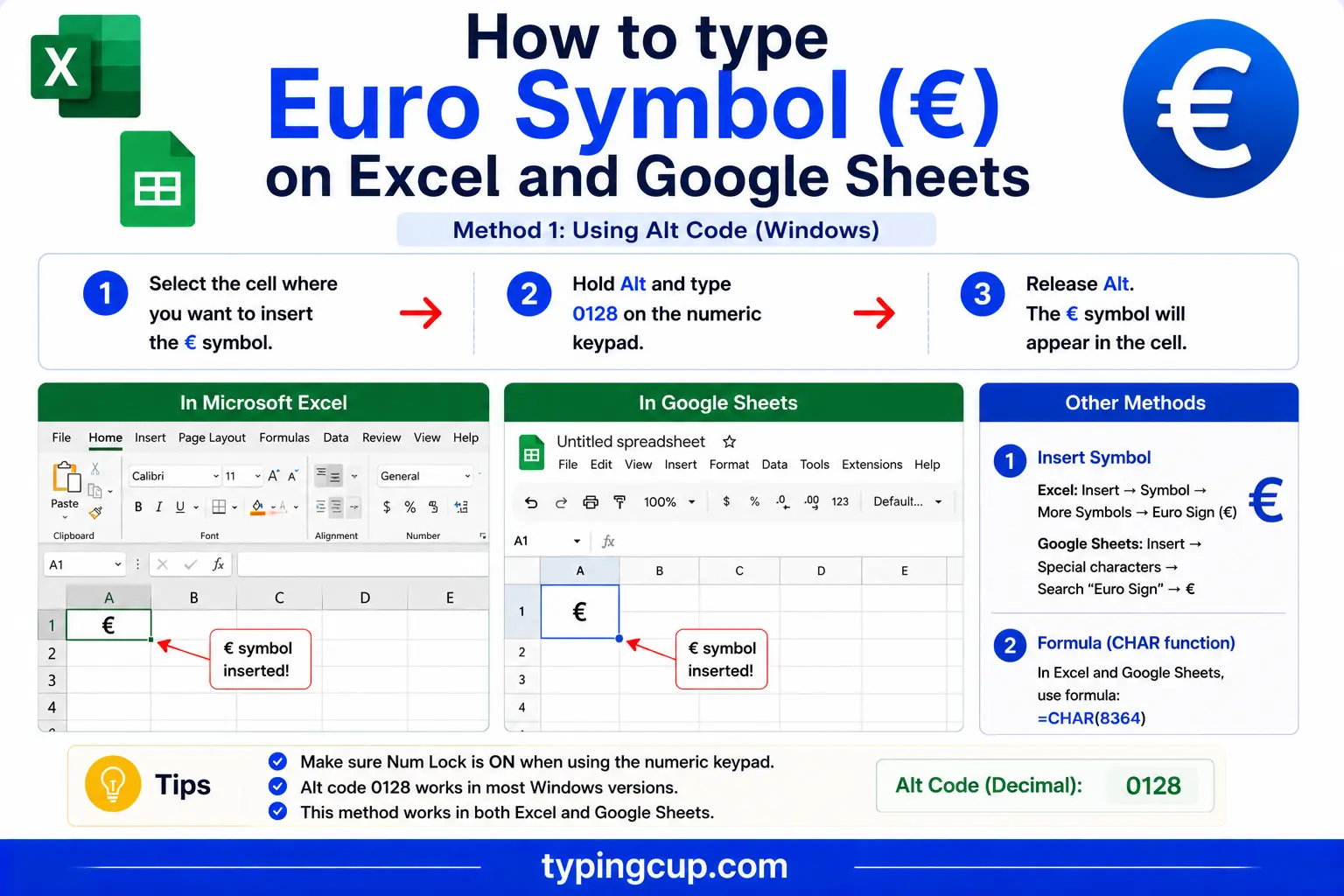
You can type € with the Alt code, but for figures it’s better to format the cells. Choose Currency or Accounting and pick the euro, and the sign is added automatically with the right spacing. The =UNICHAR(8364) formula also returns € if you need it inside a text string, and it works the same in Google Sheets.
Type the euro sign in HTML and CSS
In HTML, the euro sign has a short named entity, €, plus the numeric forms € and €. In CSS, use the escaped code point in a content value: \20AC. As always, serve the page as UTF-8 so the symbol renders everywhere.
Before or after the number? €10 vs 10 €
One of the most common euro questions has nothing to do with typing: where does the symbol go? The answer depends on the language, and both orders are correct in their place.
In English, and in Ireland, the symbol comes before the number with no space: €10, €49.99. The European Union’s own English style guide uses this order. In most eurozone countries, though, the symbol comes after the number with a space, following local convention: French, German, and Spanish writers typically put 10 €.
So €10 looks right in an English text and 10 € looks right in a German one, and neither is wrong. If you’re writing for an international audience, pick the order your readers expect, and be consistent through the document.
The story and design of the euro sign
The euro sign wasn’t just picked from a font. The European Commission ran a design process and unveiled the symbol in December 1996, a few years before the currency itself went live.
The shape is deliberate. It’s based on the Greek letter epsilon (ε), a nod to the cradle of European civilisation and to the first letter of the word “Europe.” The two parallel lines crossing it were meant to suggest stability. The Commission even published a precise geometric construction for the symbol, with exact proportions and an official colour pairing, blue and yellow, so it would be reproduced consistently.
In practice, fonts render € in their own house style rather than the official geometry, which is why the sign looks a little different from one typeface to the next while staying instantly recognisable.
€ vs EUR: the symbol and the currency code
Alongside the symbol, the euro has a three-letter code, EUR, from the ISO 4217 standard that assigns a code to every currency (USD for the US dollar, GBP for the pound, and so on).
The two are used in different places. The symbol € is for everyday prices and shop signs: €10. The code EUR is for finance and anything international, where clarity matters more than compactness, as in exchange rates (EUR/USD), bank statements, and invoices that cross borders. Writing EUR 10 or 10 EUR removes any doubt about which euro-like currency is meant.
Both the € card and the EUR card in the grid above copy the version you need.
Formatting euro amounts in Excel and spreadsheets
Typing the symbol is the easy part; formatting euro figures correctly is where people trip up, because Europe writes numbers differently from the English-speaking world.
Many eurozone countries use a comma as the decimal separator and a dot or space for thousands, so one thousand euros and fifty cents is written 1.000,50 € or 1 000,50 €, not 1,000.50. In a spreadsheet, that’s controlled by your regional settings and the cell’s number format, not by the euro sign itself.
The clean way to handle it is to format the cells as Currency or Accounting with the euro selected, and let the spreadsheet place the sign and the separators. If you’re sharing a file internationally, spell out the format you intend, or use the EUR code, so a reader in another region doesn’t misread the separators.
Why the euro sign breaks: the encoding trap
The euro sign is famous among developers for turning into gibberish, and there’s a historical reason. It was added to computing later than most symbols, so different character sets store it differently, and older ones don’t have it at all.
When a page saved as UTF-8 is read with the wrong encoding, € commonly shows up as €, and a doubly mangled version appears as € becoming €. Seeing either of these in place of a price is the classic sign that the text and the reader disagree about the encoding, not that the symbol is broken.
The fix is the same as for accented letters: make the file, the database, and the page’s charset all agree on UTF-8. Because the euro is so often the first symbol to break, it’s a handy canary; if your euro signs are clean, your encoding is usually fine.
Which countries use the euro
The euro is the official currency of the eurozone, a group of European Union countries that have adopted it. As of the mid-2020s that’s twenty EU members, and the group has been slowly growing as more countries qualify.
The eurozone members are Austria, Belgium, Croatia, Cyprus, Estonia, Finland, France, Germany, Greece, Ireland, Italy, Latvia, Lithuania, Luxembourg, Malta, the Netherlands, Portugal, Slovakia, Slovenia, and Spain. Croatia was the most recent to join, in 2023.
A handful of small states use the euro by formal agreement with the EU, including Andorra, Monaco, San Marino, and Vatican City, and a couple more, such as Kosovo and Montenegro, use it without a formal arrangement. So the euro sign turns up well beyond the EU’s core.
The euro sign vs other currency symbols
If you work with more than one currency, it helps to have the neighbours to hand. Here are the common symbols alongside the euro, with their Unicode points.
| Symbol | Currency | Unicode | HTML |
|---|---|---|---|
| € | Euro | U+20AC | € |
| £ | Pound sterling | U+00A3 | £ |
| $ | Dollar | U+0024 | $ |
| ¥ | Yen / Yuan | U+00A5 | ¥ |
| ₹ | Indian rupee | U+20B9 | ₹ |
| ₩ | Korean won | U+20A9 | ₩ |
| ₽ | Russian ruble | U+20BD | ₽ |
| ¢ | Cent | U+00A2 | ¢ |
The euro, pound, and yen all have short named HTML entities; most of the newer symbols, like the rupee and the ruble, use the numeric form.
The euro sign in web addresses, URLs, and code
You’ll rarely put a euro sign in a domain name, but it does appear in URL paths and query strings, and in code all the time.
In a URL, € is percent-encoded as %E2%82%AC, its three UTF-8 bytes (0xE2, 0x82, 0xAC) written out. In code, the escapes are \u20AC in JavaScript, Java, JSON, and Python, and € or € in HTML. There’s no meaningful password use case for the euro sign, and given how often it breaks across encodings, it’s one to avoid in passwords and identifiers.
Copy-paste HTML codes
Every code for the euro sign in one place. Click a cell and copy.
| Symbol | Named entity | Numeric entity | URL (percent) code |
|---|---|---|---|
| € | € | € | %E2%82%AC |
In a CSS content value, use \20AC. For other symbols, the arrow symbols guide has the same copy-and-code treatment, and for accented letters see the full letters-with-accents list.
A quick history of the euro
The symbol arrived before the money. The European Commission unveiled the € design in 1996, and the currency followed in two steps: it went live for banks and electronic payments in 1999, and the notes and coins reached people’s pockets on 1 January 2002, replacing marks, francs, lira, pesetas, and more.
That staggered rollout is part of why the sign was awkward on computers for years. Keyboards, fonts, and character sets from before 1999 simply had no euro on them, and manufacturers had to retrofit it, each in their own way. The Alt code, the AltGr key, and the various Mac shortcuts are all fingerprints of that scramble to add one new symbol to hardware that was already finished.
Two decades on, the euro is one of the world’s major currencies, second only to the US dollar in global reserves, and the sign is on keyboards across the continent, even if it still hides in a slightly different place on each one.
Euro cents: writing small amounts
The euro divides into 100 cents, but there’s no special symbol for the cent the way there is for the euro itself. Small amounts are usually written with the euro sign and a decimal, as in €0.50 or 0,50 €, depending on the regional number format.
When people do abbreviate the cent, they tend to write a lowercase c or ct after the number, so fifty cents becomes 50c or 50 ct. These are informal; on price tags and in accounts, the decimal euro form is the norm. The old cent symbol, ¢, belongs to the dollar and isn’t used for the euro.
Typing the euro sign without a euro key
Plenty of keyboards, especially older or US ones, have no euro key at all. The quickest fix is the copy grid at the top of this page, but if you type the sign often, it’s worth setting up a shortcut so you’re not hunting for it every time.
On Windows, the US-International layout gives you AltGr + E, and Word’s Ctrl + Alt + E works in documents. Across any app, a text-expansion tool can turn a trigger you’d never type by accident, like eur$, into €. On a Mac, add the symbol as a Text Replacement under System Settings, and on a phone do the same through the keyboard’s text-replacement or shortcut feature. Set it once and the euro sign is always a couple of keys away.
Is it “euro” or “euros”? Writing the word
The word itself causes small arguments. In everyday English the plural is euros, as in “it costs ten euros,” and the same goes for cents. But EU legislation deliberately uses the invariant form euro for both singular and plural, so official texts read “ten euro,” which can look odd to an English eye.
A couple of other habits are worth knowing. The word takes a lowercase e, euro rather than Euro, except at the start of a sentence, and the symbol € replaces the word in prices. So you’d write “the fee is €20,” not “the fee is €20 euros,” which doubles up.
Troubleshooting
“My euro sign shows up as € or €.”
That’s an encoding mismatch: UTF-8 euro bytes are being read as an older encoding like Windows-1252 or Latin-1. Set the file, database, and page charset to UTF-8 and the € returns. The euro is often the first symbol to break, so it’s a good early warning.
“Alt + 0128 just beeps or types nothing.”
Num Lock is off, you’re using the top-row numbers, or the laptop has no keypad. Turn Num Lock on and use the keypad. No keypad? Try AltGr + E (or AltGr + 4 on a UK keyboard), the copy grid above, or Windows + .
“My Mac shortcut gives the wrong symbol.”
The euro sits on a different key in different Mac layouts. Try both Option + Shift + 2 and Option + 2, or open the Character Viewer and search “euro.”
“Should I write €10 or 10 €?”
Both are correct, by region. English and Irish usage puts the sign first with no space (€10); most eurozone countries put it after with a space (10 €). Match your audience and stay consistent.
FAQ
How do I type the euro sign?
On Windows, Alt + 0128 or AltGr + E. On a Mac, Option + Shift + 2 (or Option + 2 on UK layouts). On a phone, long-press the currency key. In Word, Ctrl + Alt + E. Or click € in the grid above.
Does the euro sign go before or after the number?
It depends on the language. English and Irish write it before, with no space (€10). Most eurozone countries write it after, with a space (10 €). Both are correct in their own context.
What’s the difference between € and EUR?
€ is the symbol, used for everyday prices; EUR is the ISO 4217 currency code, used in finance and international contexts like exchange rates (EUR/USD) and cross-border invoices.
Why does my euro sign turn into €?
It’s an encoding problem, not a font problem. UTF-8 euro bytes are being read as the wrong encoding. Set everything to UTF-8 and the € displays correctly.
How do I write the euro sign in HTML?
Use the named entity €, or the numeric € or €. In a URL it’s %E2%82%AC, and in CSS content it’s \20AC.
How many countries use the euro?
As of the mid-2020s, twenty EU countries use the euro, along with several microstates such as Andorra, Monaco, San Marino, and Vatican City. Croatia was the most recent EU member to adopt it, in 2023.
