
Umlaut Letters (ä ö ü): How to Type Them on Any Device
The umlaut is the pair of dots that sits over a vowel: ä, ö, ü, and their capitals Ä, Ö, Ü. The same two dots also show up as ë, ï, and ÿ, where they usually go by a different name, the diaeresis, and do a slightly different job.
If you just need the character, copy it from the box below. If you type these letters often, learning the keystroke for your device pays off fast, and one shortcut in particular (the US-International layout) makes umlauts almost effortless on Windows.
This page has every umlaut and diaeresis letter to copy, the codes to type them on any device, ready-made HTML entities, and a plain explanation of what those two dots actually mean.
In a hurry?
- Copy it: grab any letter from the box below.
- On a phone: press and hold the vowel (a, o, u, e, i), then slide to the version with dots.
- On Windows: hold Alt and type the code on the number pad, e.g. Alt + 0228 for ä.
- On a Mac: press Option + u, let go, then the vowel, e.g. Option + u, then a for ä.
- Best for daily use on Windows: switch to the US-International layout, then type “ followed by the vowel.
Copy and paste umlaut letters
Click any umlaut or diaeresis letter to copy it instantly.
Alt + 0228
Alt + 0246
Alt + 0252
Alt + 0196
Alt + 0214
Alt + 0220
Alt + 0235
Alt + 0203
Alt + 0239
Alt + 0207
Alt + 0255
Word 0178 Alt+X
Table of Contents
Copy and paste umlaut letters
Every umlaut and diaeresis letter, lowercase and capital. Tap or highlight one to copy it. The code columns are there if you’d rather type the letter yourself.
| Character | Unicode | Windows | Mac |
|---|---|---|---|
| ä | U+00E4 | Alt + 0228 | Option + u, a |
| ö | U+00F6 | Alt + 0246 | Option + u, o |
| ü | U+00FC | Alt + 0252 | Option + u, u |
| Ä | U+00C4 | Alt + 0196 | Option + u, Shift + A |
| Ö | U+00D6 | Alt + 0214 | Option + u, Shift + O |
| Ü | U+00DC | Alt + 0220 | Option + u, Shift + U |
| ë | U+00EB | Alt + 0235 | Option + u, e |
| Ë | U+00CB | Alt + 0203 | Option + u, Shift + E |
| ï | U+00EF | Alt + 0239 | Option + u, i |
| Ï | U+00CF | Alt + 0207 | Option + u, Shift + I |
| ÿ | U+00FF | Alt + 0255 | Option + u, y |
| Ÿ | U+0178 | Word 0178 + Alt + X | Option + u, Shift + Y |
Nearly all of these have a Windows Alt code because they live in the older Latin-1 range. The one exception is capital Ÿ, which sits just past it, so on Windows you reach it with Word’s 0178 then Alt + X, or from the copy box above.
Umlaut or diaeresis? What the two dots mean
Here’s the part that surprises people: ä and ë carry the same mark, two dots, but for two different reasons.
The umlaut is a German invention. It shows that a vowel has shifted forward in the mouth, usually because of a sound that once followed it. That shift often carries grammar with it: Mann (“man”) becomes Männer (“men”), and Buch (“book”) becomes Bücher (“books”). The dots change the vowel’s sound, so ä, ö, and ü really are different letters from a, o, and u, not decorated versions of them.
The diaeresis comes from Greek and does close to the opposite. It tells you to pronounce a vowel on its own rather than blend it into the one before. French naïve is “na-eev,” not “nave,” because the diaeresis splits the a and the i. It’s the reason Noël has two syllables, and why the name Zoë ends in a sounded “e.”
In print the two marks are identical, and Unicode doesn’t tell them apart; ä is the same code point whether a German speaker or a phonetician typed it. Which name is correct just depends on what the dots are doing in that particular word.
English mostly gave up the diaeresis, but you’ll still meet it in names like Brontë and in a few stubborn house styles. The New Yorker is famous for still printing coöperate with the dots.
Which languages use umlaut and diaeresis letters
The same letters turn up across a lot of languages, sometimes as sound-changing umlauts, sometimes as vowel-splitting diaereses.
| Language | Letters | What the dots do | Example |
|---|---|---|---|
| German | ä ö ü | umlaut: a shifted vowel sound | Männer (“men”) |
| Turkish | ö ü | separate front vowels | gün (“day”) |
| Hungarian | ö ü | vowels in their own right | öt (“five”) |
| Finnish | ä ö | full letters of the alphabet | hyvää (“good”) |
| Swedish | ä ö | letters near the end of the alphabet | träd (“tree”) |
| French | ë ï ü ÿ | diaeresis: say the vowel separately | naïve |
| Spanish | ü | diaeresis: sound the u in güe/güi | pingüino (“penguin”) |
| Dutch | ë ï | diaeresis across vowel pairs | coëfficiënt |
Two quick cautions. In German the ä ö ü are true umlauts, but in Finnish and Swedish the ä and ö are simply letters, filed at the end of the alphabet rather than under a and o. And in Spanish, the dots on ü appear only in a couple of spellings, where they quietly remind you to pronounce a u that would otherwise stay silent.
How to type umlaut letters on any device
Pick your device. Because most umlaut letters sit in the older Latin range, they’re some of the easiest accented characters to reach; the phone and the US-International layout barely count as work.
Windows
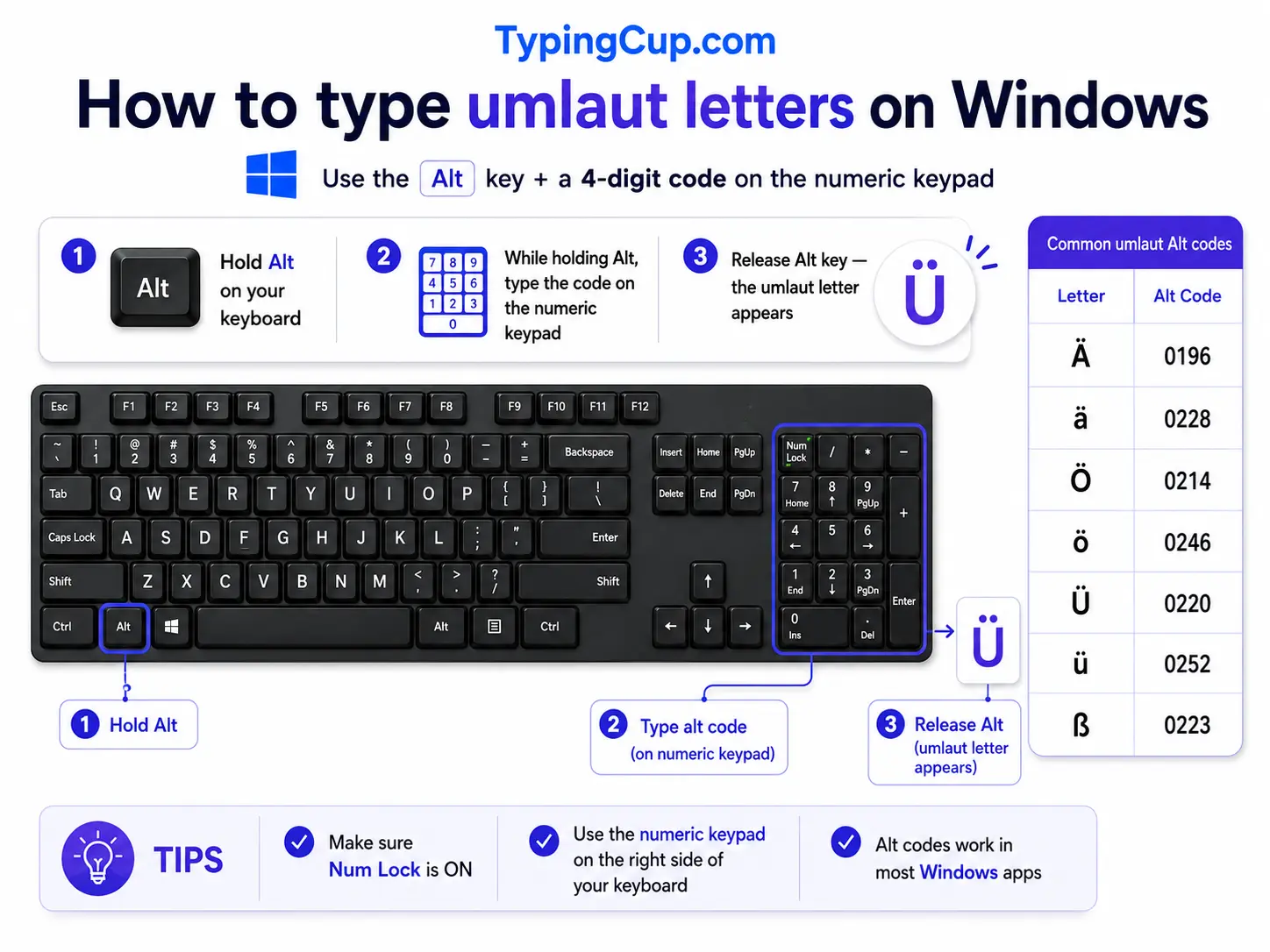
Windows gives you three good routes, and one of them is close to magic if you type umlauts often.
The direct way is the Alt code. Turn on Num Lock, hold Alt, and type the four-digit code on the numeric keypad: 0228 for ä, 0246 for ö, 0252 for ü. The capitals have their own codes, listed below. The number row along the top won’t work; it has to be the keypad.
| Lowercase | Alt code | Uppercase | Alt code |
|---|---|---|---|
| ä | Alt + 0228 | Ä | Alt + 0196 |
| ö | Alt + 0246 | Ö | Alt + 0214 |
| ü | Alt + 0252 | Ü | Alt + 0220 |
| ë | Alt + 0235 | Ë | Alt + 0203 |
| ï | Alt + 0239 | Ï | Alt + 0207 |
| ÿ | Alt + 0255 | Ÿ | Word 0178 + Alt + X |
The route worth setting up is the US-International layout (Settings, then Time & Language, then your language, then keyboard options). With it on, you type a “ (double quote) and then the vowel, and the two come out as one letter: “ then a gives ä, “ then o gives ö. It matches how the letter looks, so it’s the fastest method once it’s on. The only catch is that a plain quote now needs a space after it.
If you’d rather not change anything, press Windows + . to open the symbol panel, click the Ω tab, and pick the letter from the Latin set. And if you write German full-time, add the German keyboard, which gives ä, ö, ü, and ß their own keys.
Mac
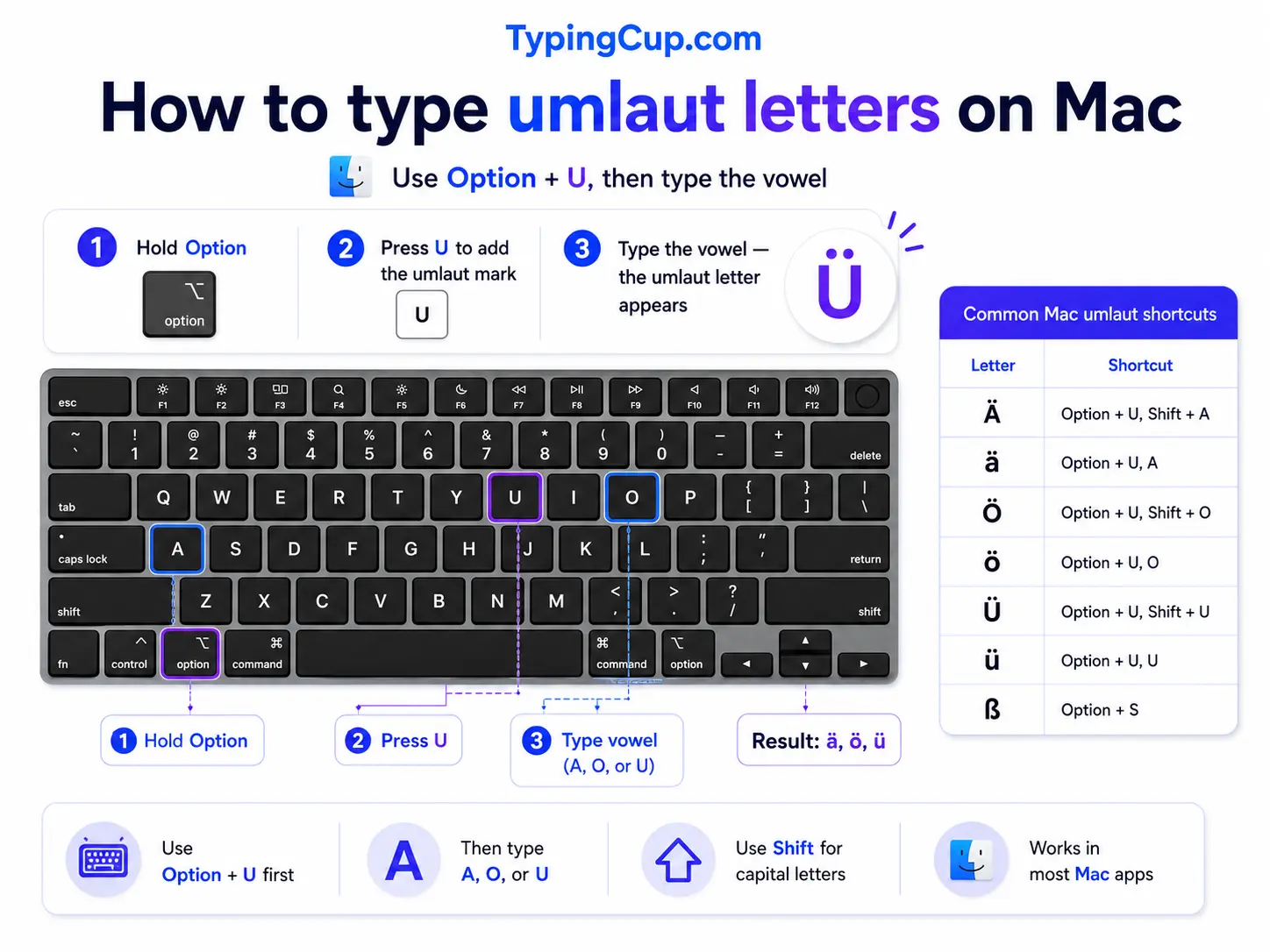
The Mac handles umlauts with one tidy shortcut. Press Option + u together and let go (nothing appears yet), then press the vowel. Option + u, then a, gives ä; Option + u, then o, gives ö. For a capital, press the vowel with Shift, so Option + u, then Shift + A, gives Ä.
You can also hold the vowel key down until a small menu of accented options appears and click the one with dots. Anything the menu misses is in the Character Viewer (Control + Command + Space).
iPhone and Android
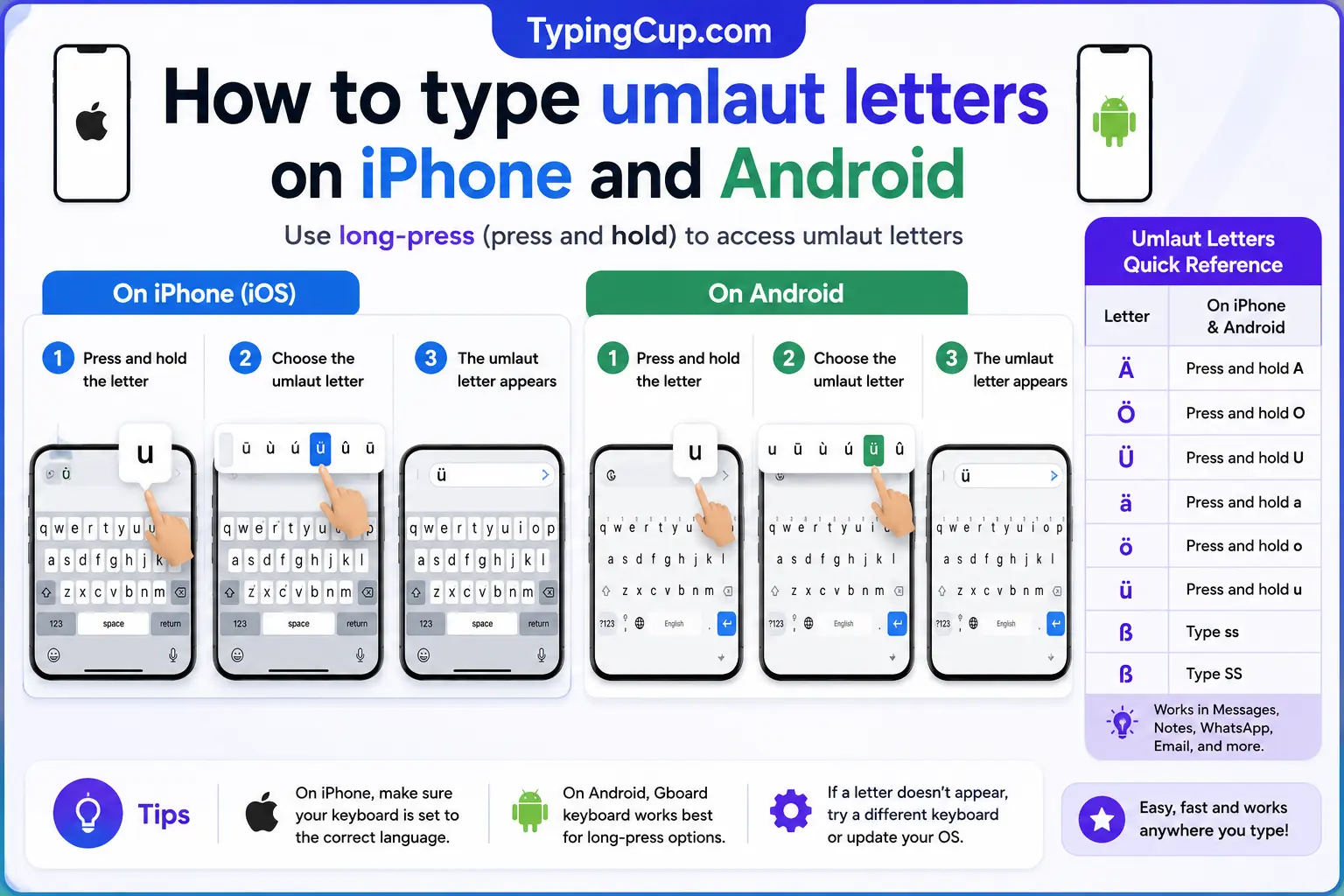
This is the easy case. Press and hold the vowel on the on-screen keyboard, and a row of accented versions appears above your finger, the dotted one among them. Slide onto it and lift your finger.
It works the same in almost every app, with nothing to set up first, and it covers ä, ö, ü, ë, and ï without any special keyboard.
Microsoft Word
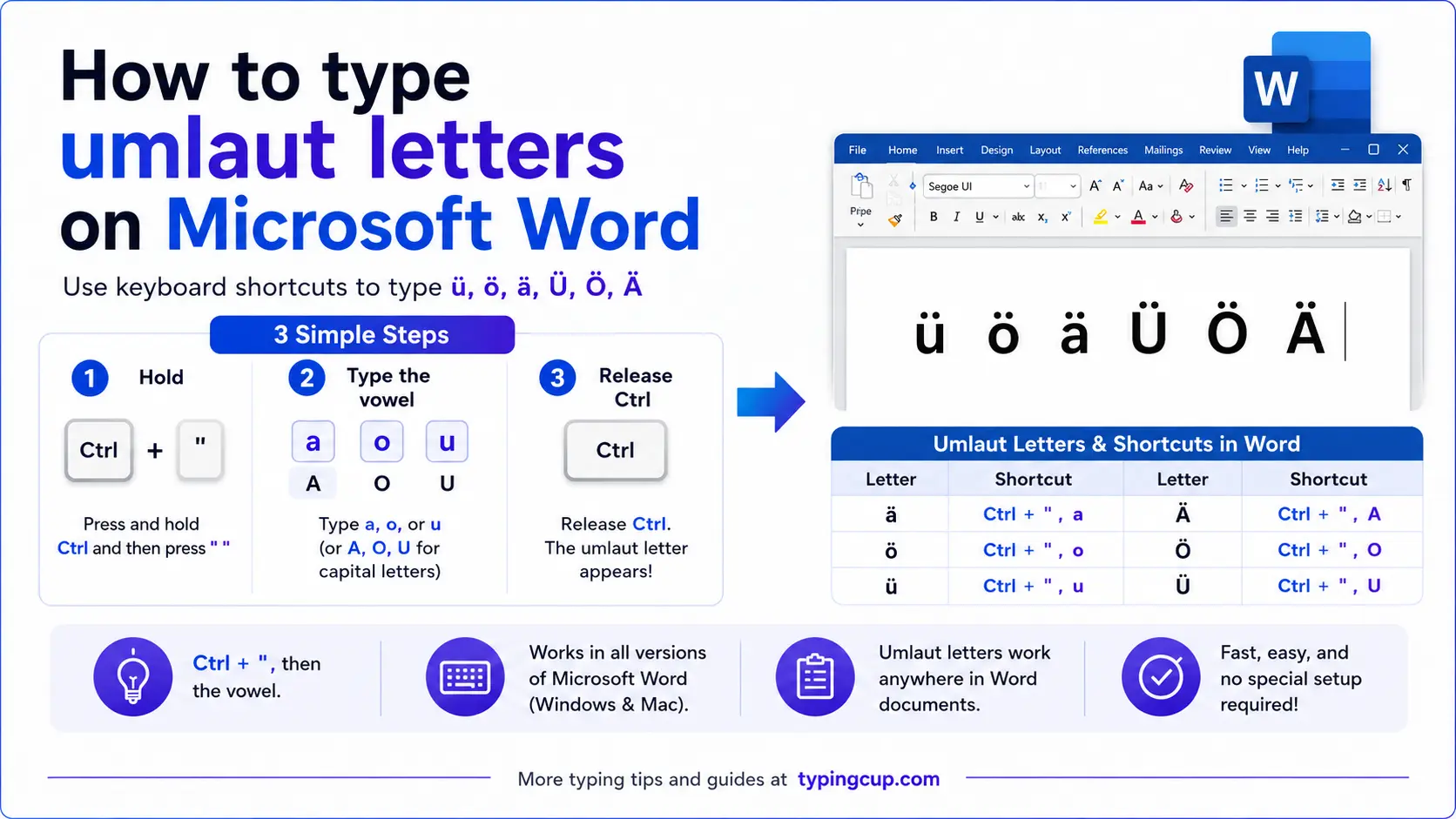
Word has its own shortcut, separate from the Windows Alt codes. Press Ctrl + Shift + : (the colon key), let go, then press the vowel. Add Shift on the vowel for the capital.
For the one letter without an Alt code, capital Ÿ, type 0178 and press Alt + X. The same hex-then-Alt-X trick reaches any character Word’s shortcuts don’t.
Linux
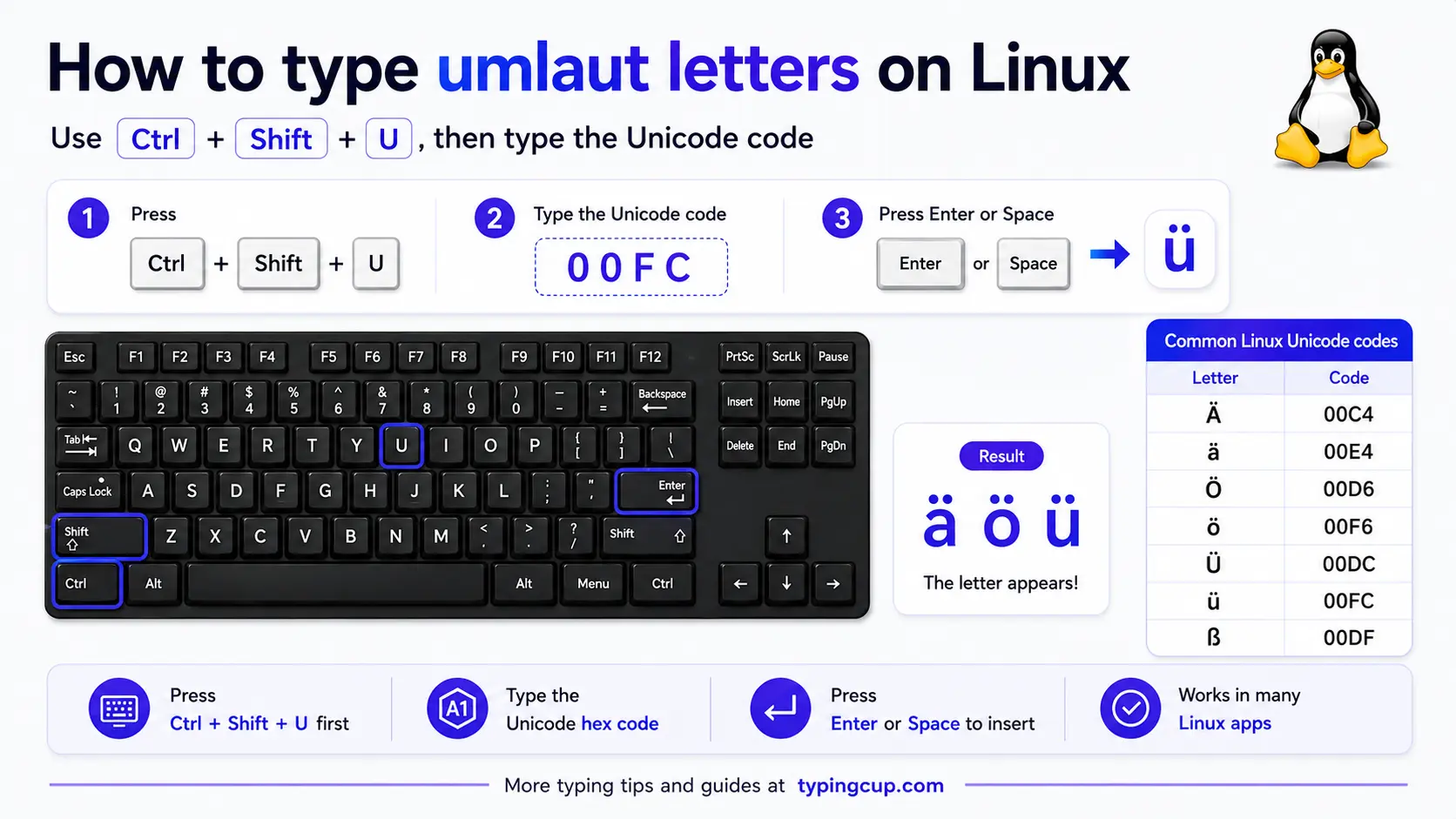
Press Ctrl + Shift + U, type the hex code, then press Enter: 00e4 for ä, 00f6 for ö, 00fc for ü. With a Compose key set up, it’s quicker: Compose, then “, then the vowel, so Compose, “, a gives ä.
Excel and Google Sheets
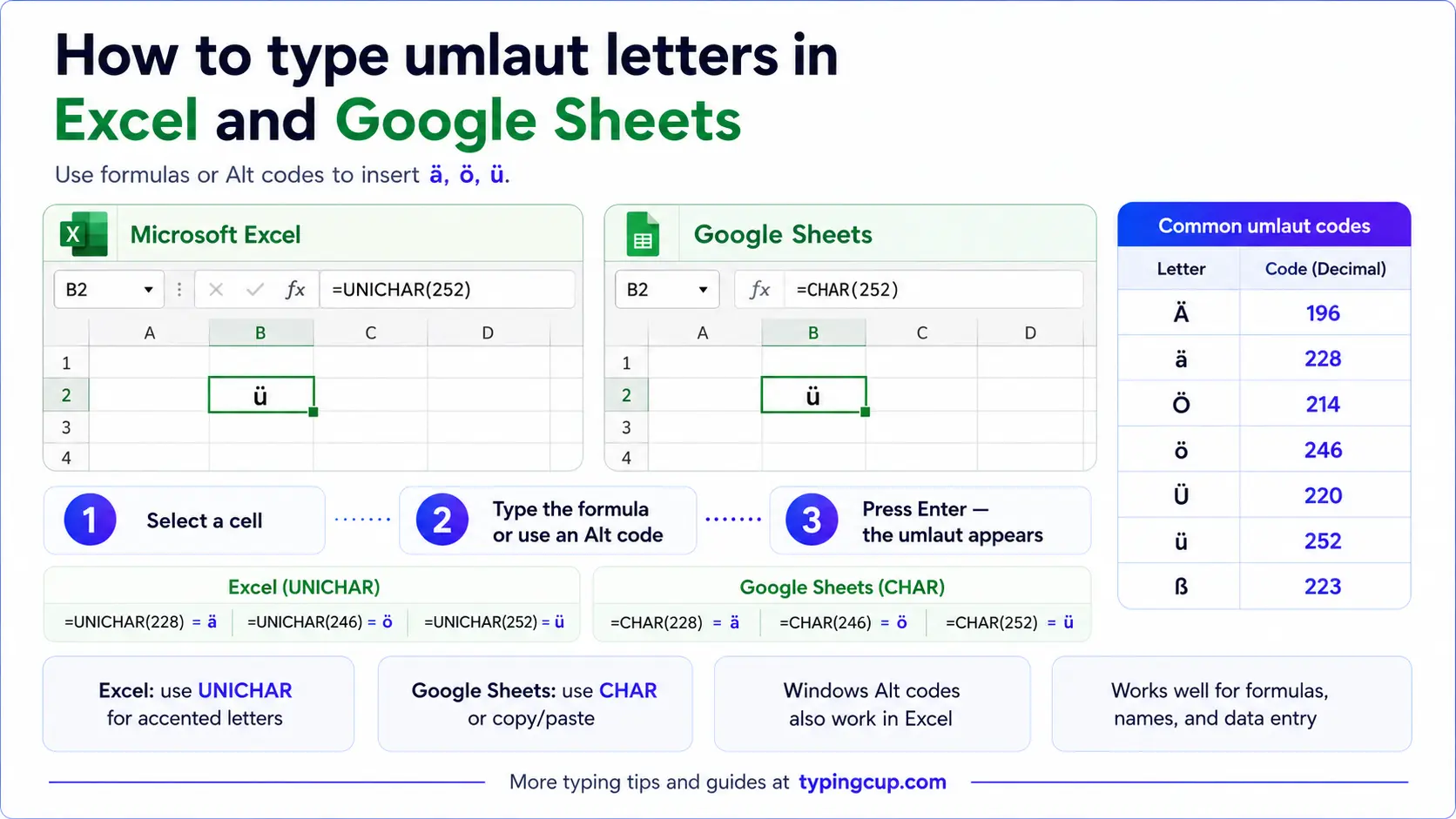
In Excel the Windows Alt codes work on the numeric keypad, or you can use the UNICHAR formula: =UNICHAR(228) returns ä, =UNICHAR(246) returns ö, =UNICHAR(252) returns ü. For capital Ÿ it’s =UNICHAR(376). The same formulas work in Google Sheets, which has no special-characters menu of its own.
Google Docs
Open Insert, then Special characters, and type the name (“a with diaeresis”) or draw the shape. On a Mac, the Option + u shortcut works directly inside Docs. If you type one letter constantly, set up a substitution under Tools, then Preferences, so a code like ;ae becomes ä.
Copy-paste HTML codes
Umlaut letters are among the few accented characters with easy, memorable named entities: the vowel plus uml. Capitalise the first letter for the uppercase version. If you’d rather not remember the names, the numeric codes on the right do the same job. Click into any cell and copy.
| Character | Named entity | Numeric entity |
|---|---|---|
| ä | ä | ä |
| ö | ö | ö |
| ü | ü | ü |
| Ä | Ä | Ä |
| Ö | Ö | Ö |
| Ü | Ü | Ü |
| ë | ë | ë |
| Ë | Ë | Ë |
| ï | ï | ï |
| Ï | Ï | Ï |
| ÿ | ÿ | ÿ |
| Ÿ | Ÿ | Ÿ |
In a CSS content value, use the escaped code point instead, like \00e4 for ä. And whichever form you use, make sure the page is served as UTF-8 so the characters survive.
For every other accented character beyond the umlauts, the full letters-with-accents list has the copy boxes and codes, and the a with accent guide covers the rest of the a family, ä included.
Troubleshooting
“My Alt code just beeps or does nothing.”
Three usual causes: Num Lock is off, you’re using the top-row numbers instead of the keypad, or your laptop has no keypad at all. Turn Num Lock on and use the keypad. No keypad? Use the copy box above, the US-International layout, or Windows + .
“On US-International I get a floating ” then the vowel.”
The quote and the vowel were too far apart, or there was a space between them. Type the “ and the vowel back to back, with nothing in between. To get a normal quote mark, press “ and then a space.
“Alt + 0178 won’t give me Ÿ.”
Capital Ÿ is code point 376, just past the Alt-code range that ends at 255. Use Word’s 0178 then Alt + X, the copy box above, or =UNICHAR(376) in a spreadsheet.
“Shift with the Alt code gives the wrong character.”
Capitals have their own codes. Don’t hold Shift with the lowercase code; type the capital’s own code, like Alt + 0196 for Ä.
“It looks right here but breaks when I paste it elsewhere.”
The other program is using an older text encoding. Save or paste as UTF-8 and the dots will survive the move.
FAQ
What’s the difference between an umlaut and a diaeresis?
They’re the same two dots doing different jobs. An umlaut (German) changes a vowel’s sound, as in Männer. A diaeresis (Greek) tells you to pronounce a vowel separately, as in naïve. Unicode doesn’t distinguish them, so ä is one character either way.
How do I type ä, ö, ü on a US keyboard?
The smoothest way is to switch on the US-International layout, then type a quote followed by the vowel. Without it, use the Windows Alt codes (Alt + 0228, 0246, 0252) on the numeric keypad, or just copy the letters from the box above.
Is ß an umlaut?
No. ß is the eszett, or sharp s, a separate German letter that stands in for a double s. It has no dots and isn’t part of the umlaut set, though it often shares a keyboard with them.
Do capital umlauts have their own Alt codes?
Yes. Ä is Alt + 0196, Ö is Alt + 0214, and Ü is Alt + 0220. Holding Shift with the lowercase code won’t work; each capital has its own number.
What’s the fastest way to type umlauts?
On a phone or Mac, long-press the vowel. On Windows, the US-International layout is quickest once it’s set up. For a one-off on any device, copy the letter from the box above.
