
A with accent | how to type á, â, à, ä, ã, å, and ā
You want to write café, à la carte, São Paulo, or Ångström. The word needs an “a” with a mark on top. Your keyboard has no key for it.
There is a fast way on every device. Copy it, tap it, or type a short code. Pick the part you need below.
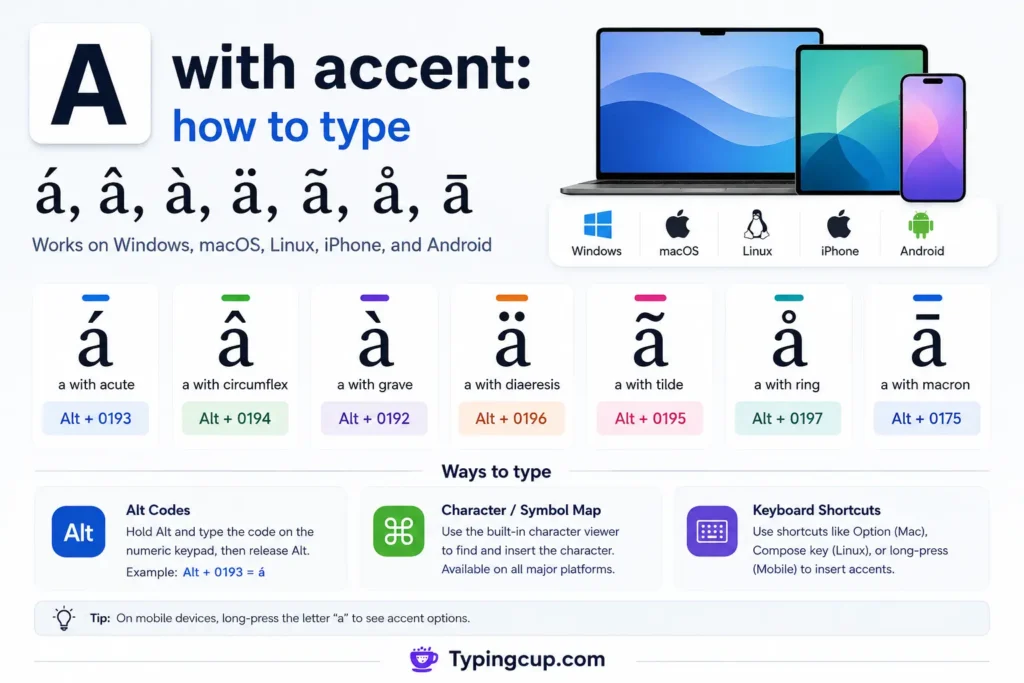
How do you type “a” with an accent?
Need it right now? Copy one of these:
Small: á â à ä ã å ā
Capital: Á Â À Ä Ã Å Ā
On a phone, hold the “a” key and slide to the one you want. On Windows, hold Alt and type 0225 for á. On a Mac, press Option + e, then a. That covers most cases in under a minute.
Keep reading if you want the mark for a certain language, or the steps for your exact app.
Copy and paste “a” with an accent (á â à ä ã å ā)
Highlight a letter, copy it, and paste it anywhere. This works in email, chat, Word, and any browser.
Click to copy a with accent
Click any letter to copy it, then paste it wherever you need.
Small a with accent
Capital A with accent
More accented a letters used in other languages
Here is what each mark on the “a” is called:
- à – a with grave
- á – a with acute
- â – a with circumflex
- ã – a with tilde
- ä – a with umlaut / diaeresis
- å – a with a small circle on top (ring)
- ā – a with a macron (long a)
Small a with accent:
á â à ä ã å ā
Capital A with accent:
Á Â À Ä Ã Å Ā
That is the whole set. Grab the one you need and move on.
Other accented a letters (ā, ą, ǎ, ấ, ạ, æ)
Some languages put rarer marks on the “a.” Copy any of these:
ā ą ă ǎ ȧ ạ ả ấ ầ ậ ắ ặ æ ǽ ǣ
Ā Ą Ă Ǎ Ȧ Ạ Ả Ấ Ầ Ậ Ắ Ặ Æ Ǽ Ǣ
These cover Latvian and Māori (ā), Polish (ą), Romanian and Vietnamese (ă, ấ, ạ), and the æ ligature used in Danish, Norwegian, and old English.
Which “a” accent goes with which language?
The mark is not just decoration. Each one belongs to certain languages and changes the sound.
a with accent in Spanish (á)
Spanish uses á, a with an acute accent. You see it in más, allá, and árbol. The mark shows which syllable to stress. Spanish speakers call it acento agudo.
a with accent in French (à and â)
French uses à (a with grave) and â (a with circumflex). Think of à and là, or âge and château. The grave marks a different word. The circumflex, the little hat, often marks an old dropped letter.
a with accent in German (ä)
German uses ä, a with an umlaut. It shows up in Mädchen, Bär, and Käse. The two dots change the vowel sound. Germans call it a-Umlaut.
a with accent in Portuguese (ã)
Portuguese uses ã (a with tilde) plus á, â, and à. São Paulo and pão use the tilde. The wave makes the vowel nasal, sent partly through the nose.
a with accent in Scandinavian languages (å)
Swedish, Norwegian, and Danish use å, a with a ring. It appears in Ångström and in the word å, which means a small river. Swedish also uses ä.
a with accent in Latvian and Māori (ā)
Both use ā, a with a macron. The flat bar means a long “a.” Latvian has āboli. Māori has whānau and Māori itself.
How to type “a” with an accent on every device
Here is the method for each device and app. Find yours and follow the steps.
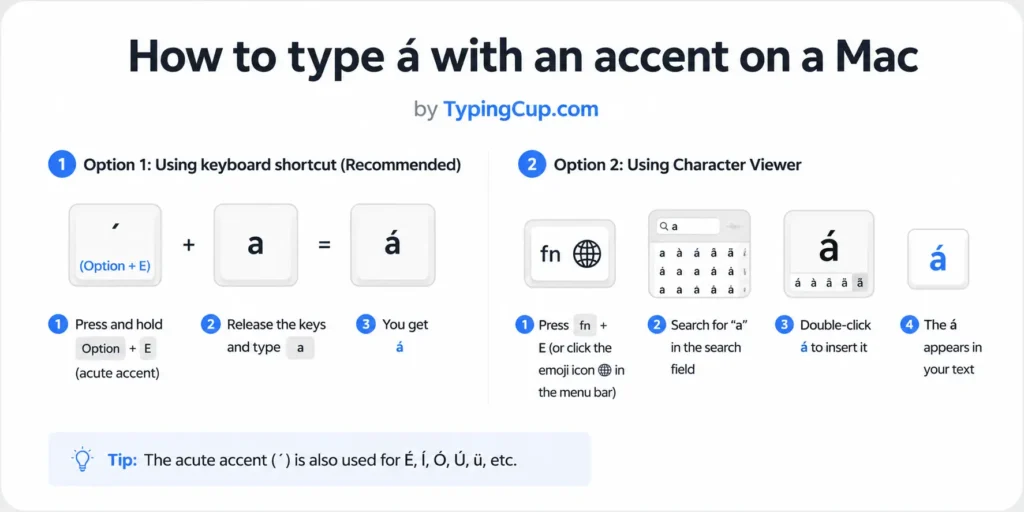
How to type á with an accent on a Mac
Mac gives you two easy ways.
Press and hold the “a” key. A small menu pops up with à á â ä ã å and more. Slide to the one you want and let go.
Or use the Option key. Press a combo, then the letter:
- á: Option + e, then a
- à: Option + backtick key, then a
- â: Option + i, then a
- ä: Option + u, then a
- ã: Option + n, then a
- å: Option + a
- ā: Option + a, then the hyphen (macron)
For capitals, hold Shift on the final letter. These shortcuts work in most Mac apps.
How to type á with an accent on Windows (Alt codes)
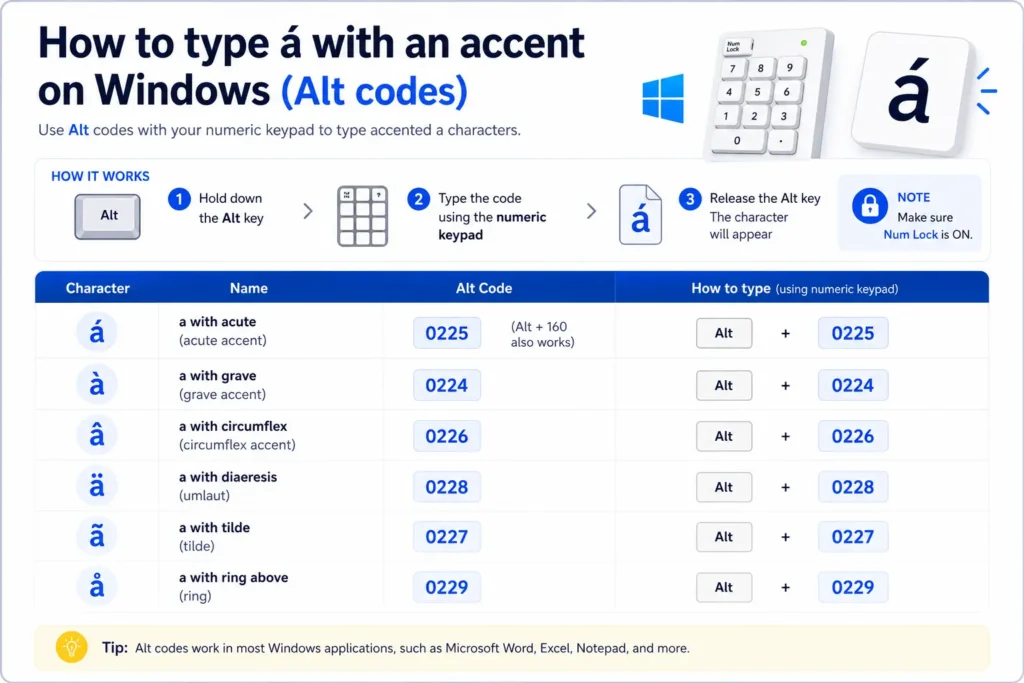
- á = Alt + 0225 (Alt + 160 also works)
- à = Alt + 0224
- â = Alt + 0226
- ä = Alt + 0228
- ã = Alt + 0227
- å = Alt + 0229
Capitals: Á = Alt + 0193, À = Alt + 0192, Â = Alt + 0194, Ä = Alt + 0196, Ã = Alt + 0195, Å = Alt + 0197.
Turn on Num Lock first. Use the number pad on the right, not the top row. For ā (macron), the code panel is easier: press the Windows key and the period key, then search for “a.”
How to type á with an accent on Linux
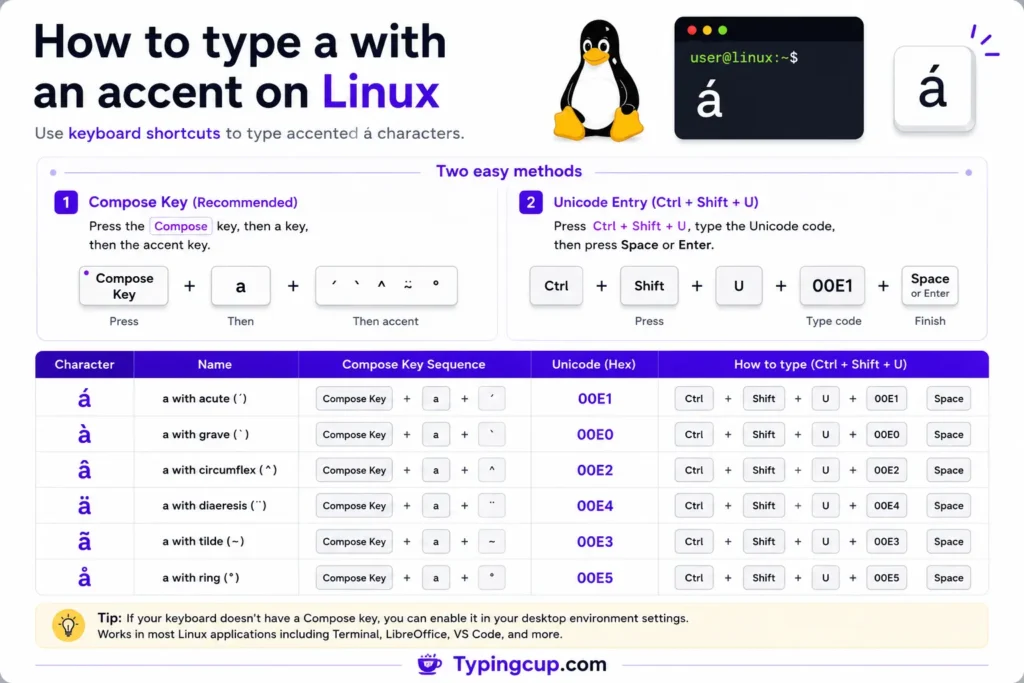
Linux has a clean trick. Press Ctrl + Shift + U, type the hex code, then press Enter or Space.
- á = 00e1
- à = 00e0
- â = 00e2
- ä = 00e4
- ã = 00e3
- å = 00e5
- ā = 0101
Prefer a Compose key? Set one in your keyboard settings. Then Compose, then apostrophe, then a gives you á. Compose, then tilde, then a gives ã.
How to type á with an accent on iPhone and Android
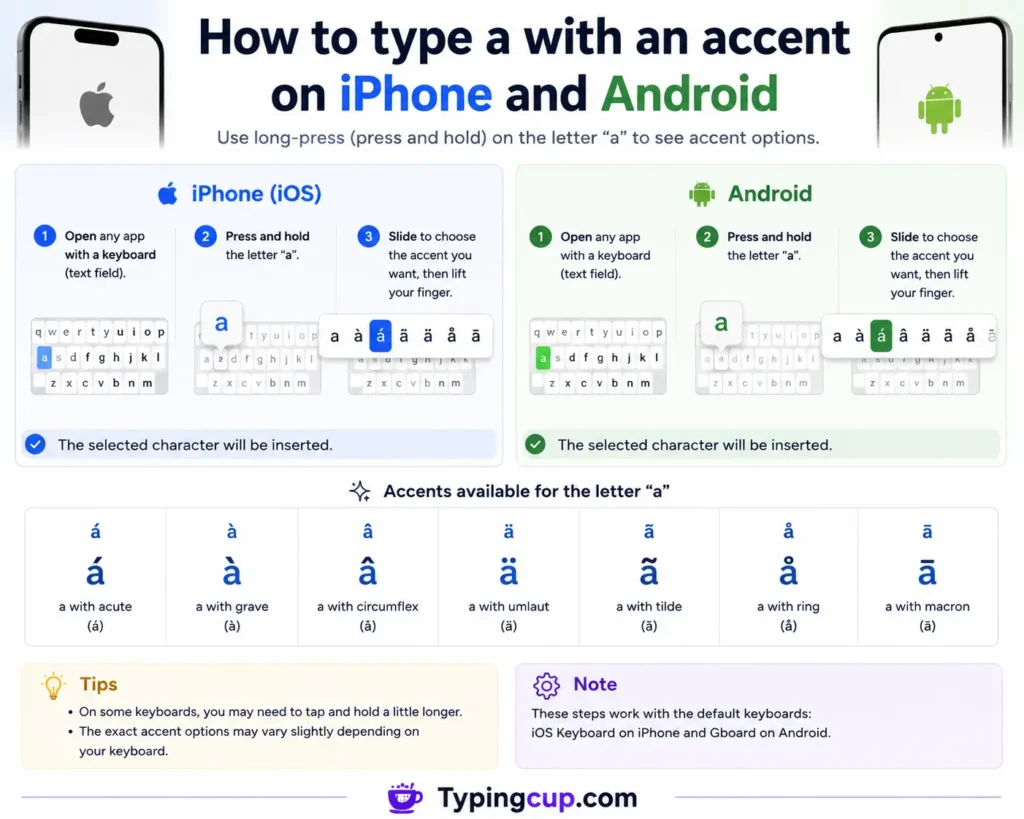
Phones are the easiest of all. Open any keyboard.
Press and hold the “a” key. Do not tap it. Hold it. A row slides up: à á â ä ã å and more. Slide your finger to the mark you want, then let go.
Turn on Shift first if you need a capital. The same hold trick works on other letters too.
How to type á with an accent in Microsoft Word
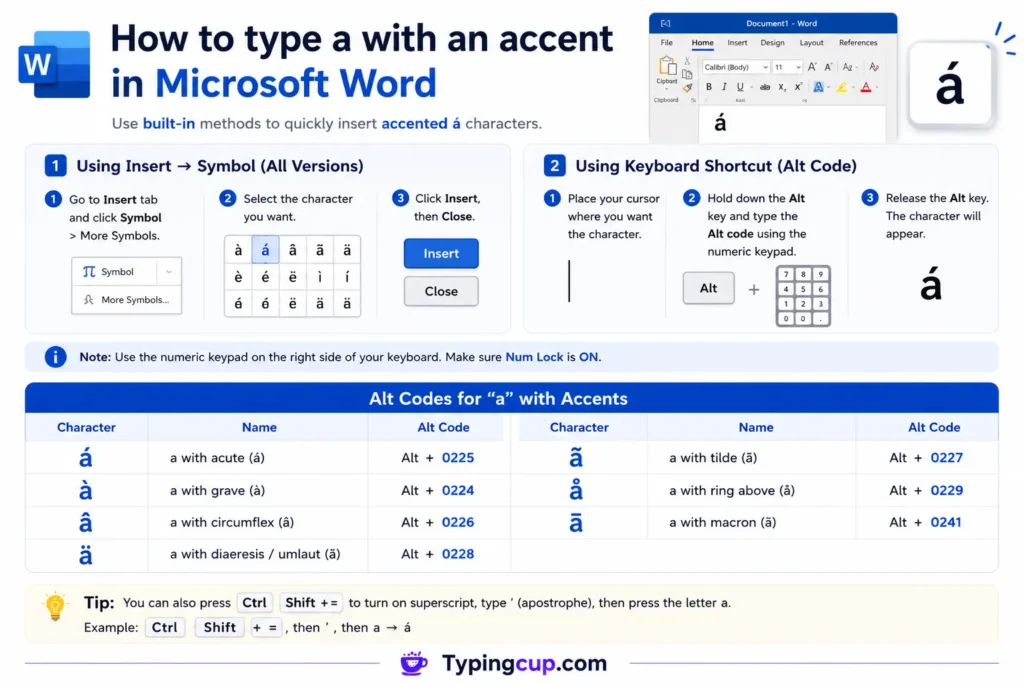
Word gives you three routes. Alt codes on Windows and Option keys on Mac both work here. If you prefer the mouse, use the menu.
Click Insert, then Symbol, then More Symbols. Set the subset to Latin-1 Supplement. Find À Á Â Ã Ä Å or à á â ã ä å, then click Insert.
Word also has its own shortcuts. Press the combo, let go, then type a:
- á: Ctrl + ‘ (apostrophe), then a
- à: Ctrl + ` (grave), then a
- â: Ctrl + Shift + ^ (the 6 key), then a
- ä: Ctrl + Shift + : (colon), then a
- ã: Ctrl + Shift + ~ (tilde), then a
Hold Shift on the final a for a capital, like Á. For a letter you type often, set up autocorrect so Word swaps your shortcut for the accented letter as you write.
How to type á with an accent in Microsoft Excel
Excel gives you three options.
Type the Alt code on the number pad, like Alt + 0225 for á. Or click Insert, then Symbol, and pick the letter from the grid.
You can also build it with a formula. Type =UNICHAR(225) in a cell to get á. Swap the number for another letter: 224 for à, 228 for ä, 257 for ā.
How to type á with an accent in PowerPoint
PowerPoint works like Excel. Use the Alt codes on the number pad for á, à, â, ä, ã, and å.
For any accent, including ā, use the menu. Click Insert, then Symbol. Set the subset to Latin-1 or Latin Extended-A. Find your letter and click Insert.
How to type á with an accent in Google Docs
Google Docs has a built-in picker. Click Insert, then Special characters.
Type a name in the search box, like “a acute” or “a with macron.” Or draw the shape in the box on the right. Click the letter to drop it into your doc. You can also copy any letter from the top of this page and paste it straight in.
How to type á with an accent in HTML and CSS
Building a web page? Write the accent as code and the browser shows the letter.
HTML named and number codes:
- á = á or á
- à = à or à
- â = â or â
- ä = ä or ä
- ã = ã or ã
- å = å or å
- ā = ā
For capitals, use a capital first letter, like Á for Á.
In CSS, use the escaped hex in a content value. For example, content: “\00e1” prints á. Set your page charset to UTF-8 and you can also paste the real letter right into the code.
Frequently asked questions about a with an accent
What is á called?
It is “a with an acute accent.” The mark leans up to the right. In Spanish it marks stress.
What is the difference between ä and å?
ä has two dots and is common in German. å has a small ring and is common in Swedish, Norwegian, and Danish.
What is the bar over ā?
That is a macron. It means a long “a.” Latvian and Māori use it a lot.
How do you type á on Windows without a number pad?
Press the Windows key and the period key to open the symbol panel. Search for “a” and pick á. Copy-paste also works every time.
How do you type á on a Mac?
Press Option + e, then press a. Hold Shift on the a for a capital Á.
Do these accents work in every app?
The copy-paste method does. Alt codes and Option keys work in most apps, though a few older programs may need Insert, then Symbol instead.
Pick the way that fits your day. Bookmark this page so the letters are always one copy away.
