
Hashtag Symbol (#): How to Type, Copy, and Use It
The hashtag, #, is one of the busiest symbols on the keyboard. It tags posts on social media, marks comments in code, jumps to a spot in a web page, and, on your phone, it’s the pound key. It also goes by half a dozen names, which is where a lot of the confusion starts. This page sorts all of it out.
If you just need the character, copy # from the grid below, or grab its HTML entity or URL code.
After the copy box you’ll find how to type # on every device (including the reason UK keyboards hide it), why it has so many names, what it does in a URL, and how it’s used in code and on social.
In a hurry?
- Copy it: click # in the grid below.
- US keyboard: press Shift + 3.
- UK keyboard: press Alt Gr + 3 (Windows) or Option + 3 (Mac) — Shift + 3 gives £ there.
- Windows Alt code: hold Alt and type 35.
- In a URL: # is written as %23, because a bare # starts a page anchor.
Click to copy: the hashtag
Grab the # symbol, its HTML entity, or its URL code
Table of Contents
Copy and paste the hashtag
The hashtag with every code you’re likely to need. Use the grid above to copy with one click; this table is the reference.
| Symbol | Name | Unicode | Windows | Mac (US) | HTML |
|---|---|---|---|---|---|
| # | Hashtag / number sign | U+0023 | Alt + 35 | Shift + 3 | # |
Unlike most symbols on this site, # is actually printed on the keyboard, so the fastest route is usually just a keypress. The catch is that where that key lives depends on your keyboard layout, which the next section covers.
How to type the hashtag on any device
On most keyboards # is a keypress away, but the exact combination changes with the layout. Here’s each device.
Type the hashtag on Windows
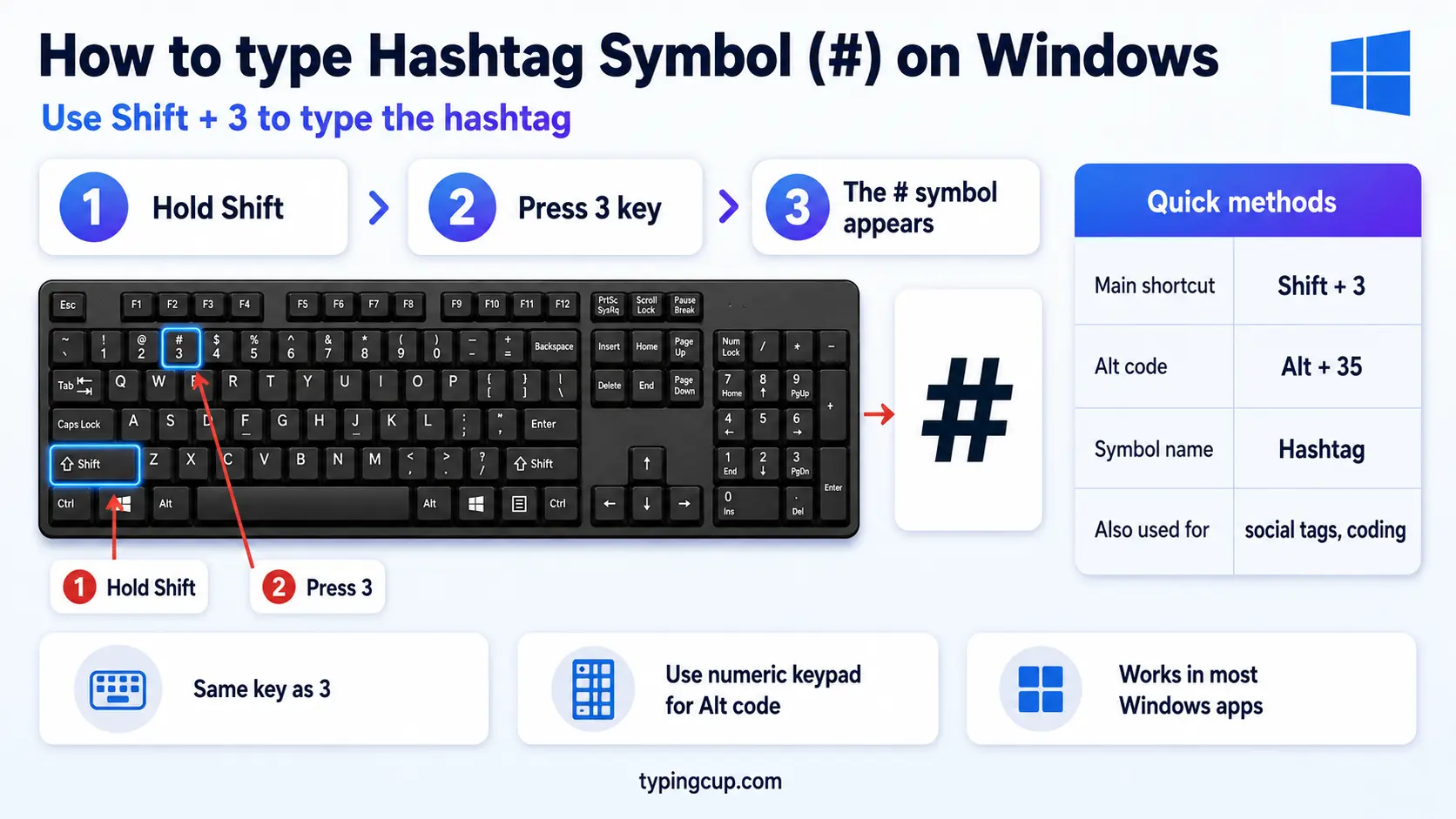
On a US keyboard, press Shift + 3. On a UK keyboard, Shift + 3 gives you £ instead, so use Alt Gr + 3 (the right-hand Alt key plus 3). If neither works, the Alt code always does: hold Alt and type 35 on the numeric keypad.
Type the hashtag on Mac
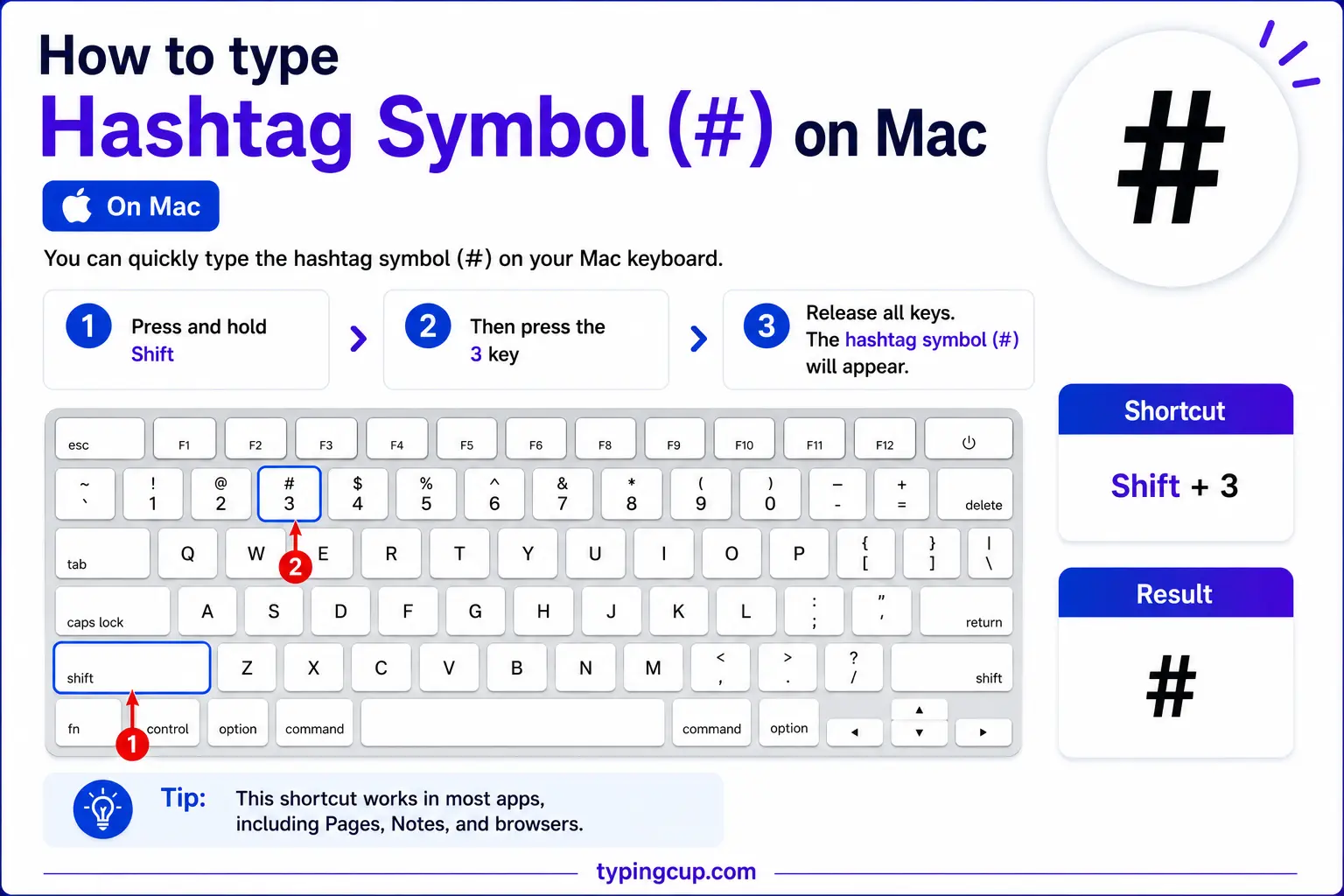
On a US Mac keyboard, press Shift + 3. On a UK Mac keyboard, Shift + 3 is the £ sign, so press Option + 3 for #. This trips up a lot of people who switch between US and UK Macs.
Type the hashtag on iPhone and Android
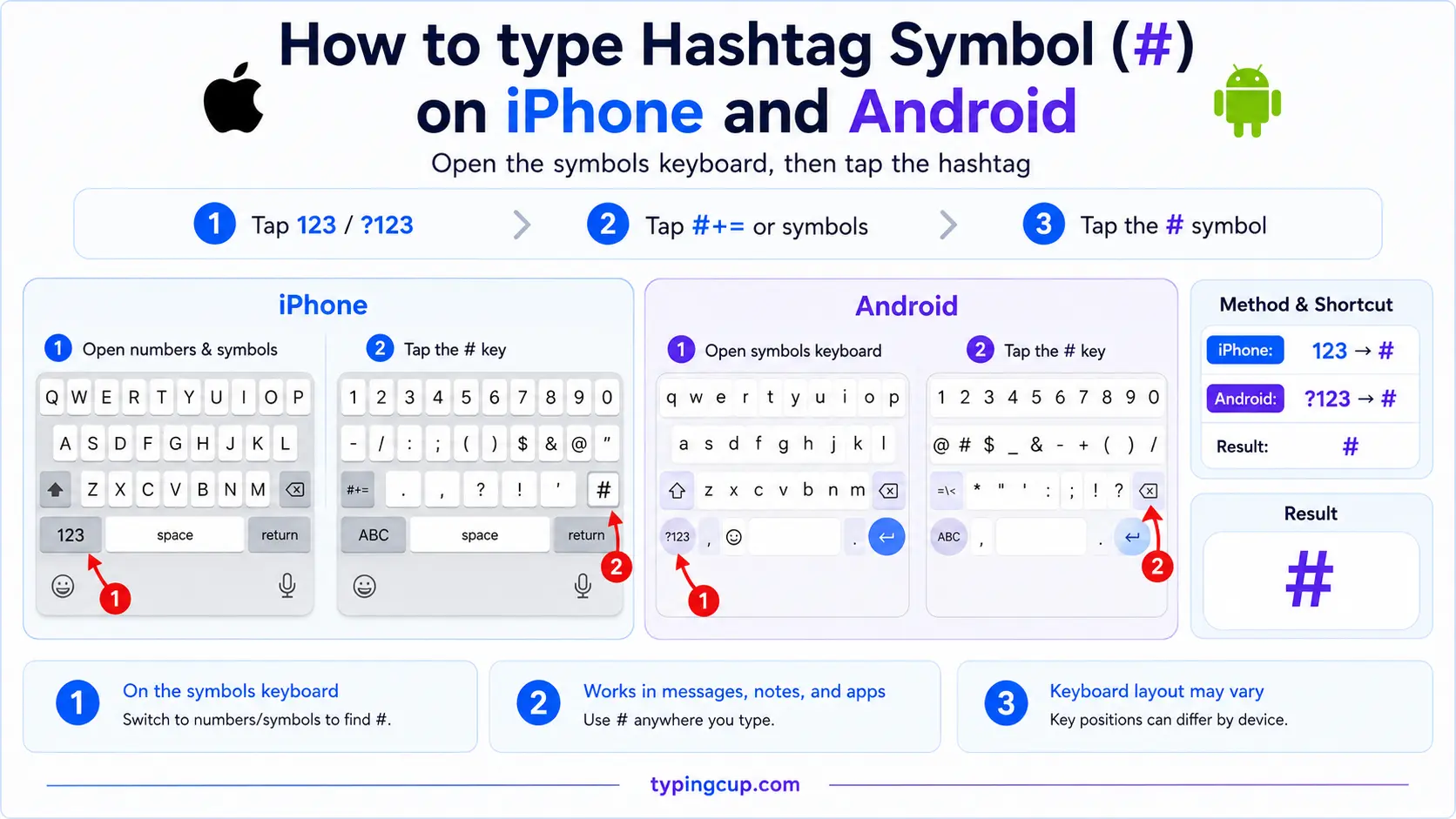
Tap the 123 key to switch to numbers and symbols; # sits on that first symbol screen, no long-press needed. In most apps it’s right there next to the other common punctuation.
Type the hashtag in Microsoft Word
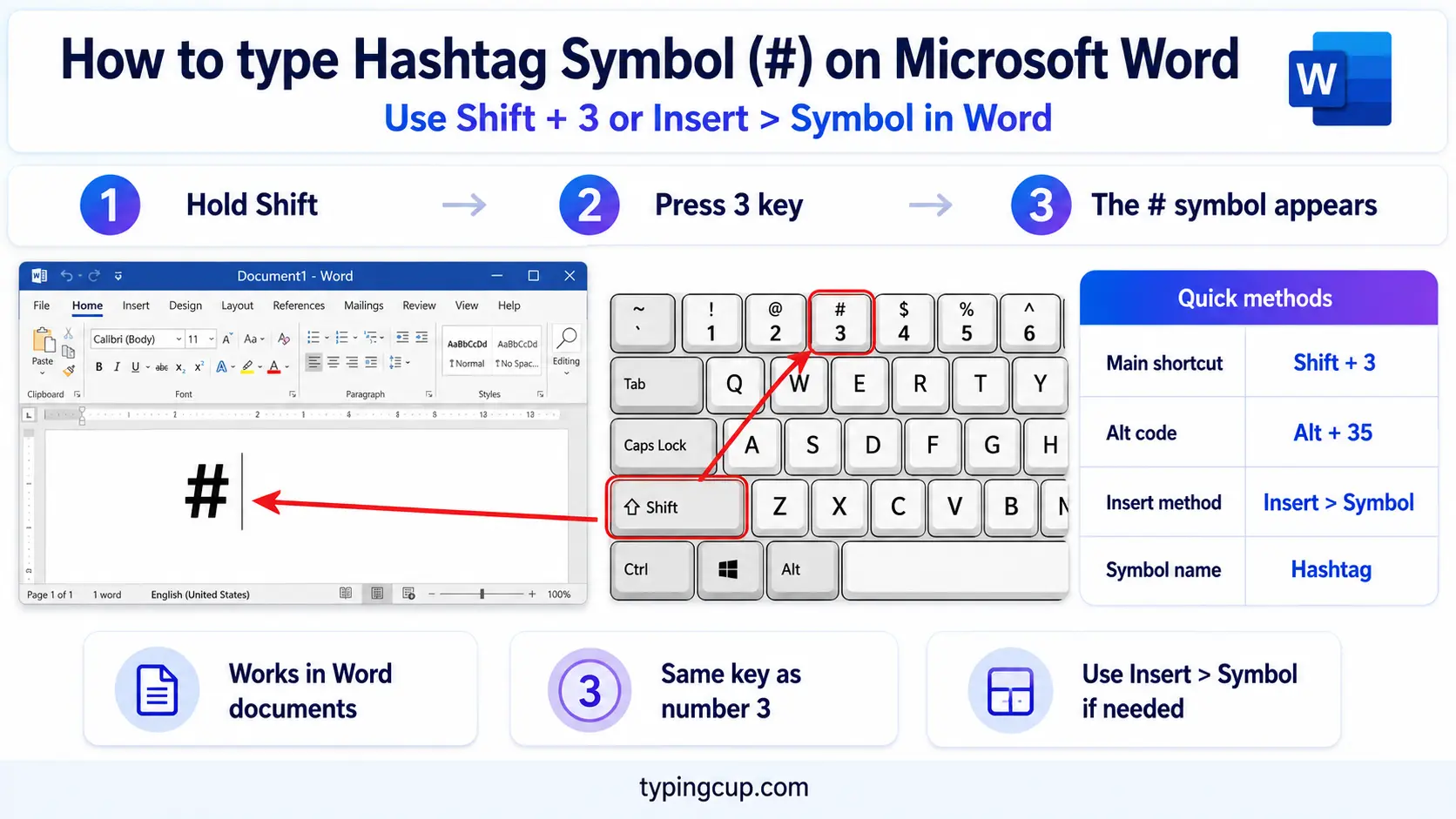
The keyboard shortcut for your layout works directly (Shift + 3 on US, Alt Gr + 3 on UK Windows). You can also type 0023 and press Alt + X to convert the code into #, or use Insert → Symbol.
Type the hashtag on Linux
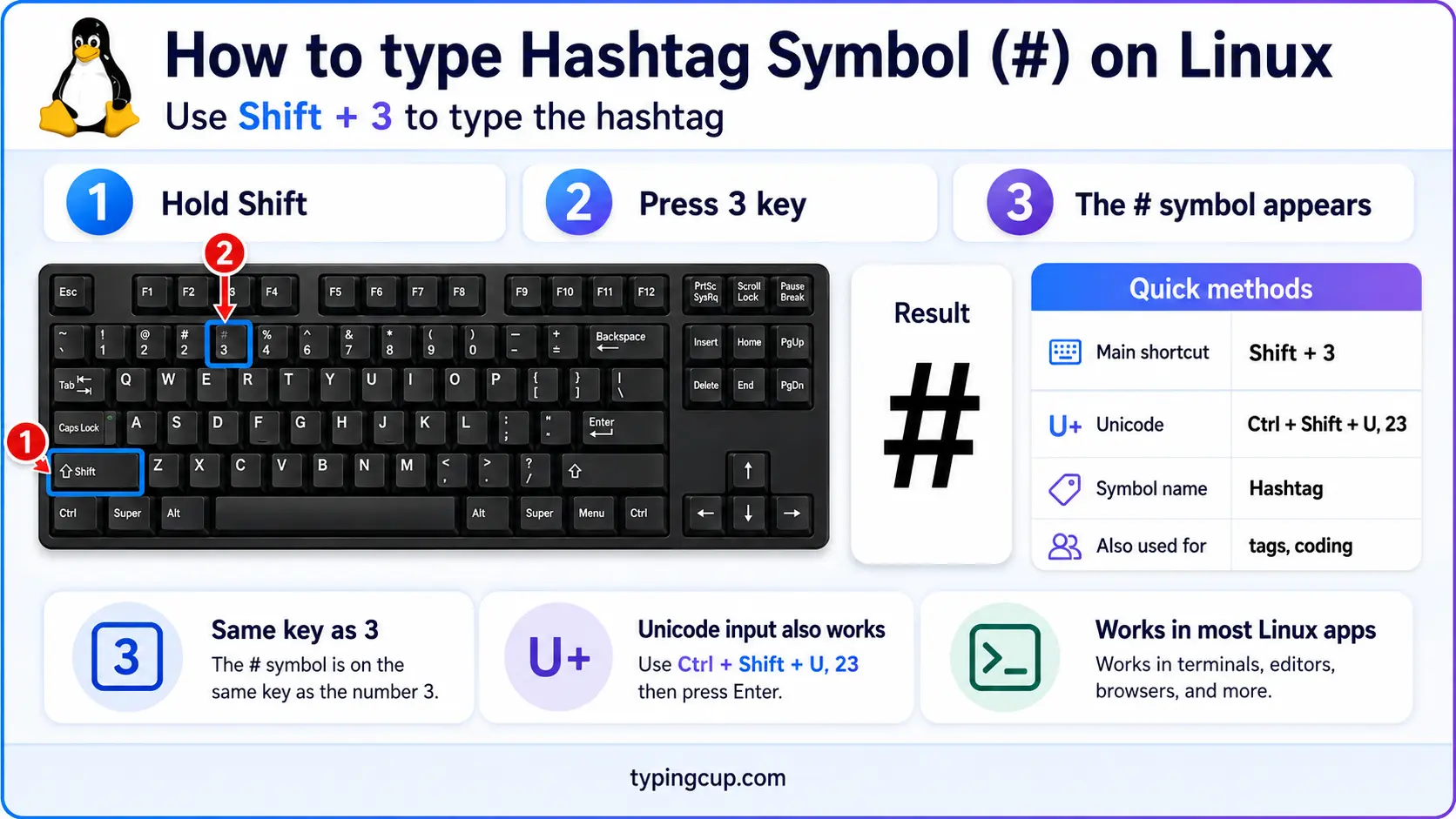
Use your layout’s key (Shift + 3 on US), or the Unicode input: Ctrl + Shift + U, then 0023, then Enter. On a UK layout it’s usually Alt Gr + 3.
Type the hashtag in HTML and CSS
In HTML, # is # or the numeric #, though a plain # works fine in text too. In CSS, # is the ID selector (#header) and the start of a hex colour (#1a1a1a), so it’s used literally, not escaped.
Why Shift + 3 gives you £ instead of #
This is the single most common hashtag problem, and it isn’t a fault. It’s the keyboard layout. On a US layout, Shift + 3 is #. On a UK layout, that same key is the pound-sterling sign £, and # is moved elsewhere.
So if you press Shift + 3 and keep getting £, your system is set to UK English. You have two options: press the # where the UK layout actually puts it (Alt Gr + 3 on Windows, Option + 3 on a UK Mac), or switch your input language to US English if you’d rather have # on Shift + 3 permanently.
It works the other way too: US-layout users sometimes go looking for a £ sign and can’t find it, for the same reason in reverse. The symbol you get from a key is decided by the layout, not the physical printing on the cap.
Hashtag, pound sign, octothorpe: the many names of #
Few characters answer to as many names as #. Which one you use mostly depends on your age, your country, and what you do for a living.
To most people under about forty it’s the hashtag, the name that came with social media. Older phone systems call it the pound sign (“enter your PIN, then press pound”), which confuses British users, for whom “pound” means £. Editors and mathematicians call it the number sign, since #1 means “number one.” Programmers often just say hash. And its oddest name, coined at Bell Labs, is the octothorpe.
| Name | Who uses it | Context |
|---|---|---|
| Hashtag | social media users | tagging posts |
| Pound sign | US phone systems | “press pound” |
| Number sign | editors, US | #1, #2 |
| Hash | programmers | code, shell |
| Octothorpe | telephony, trivia | the formal odd name |
They’re all the same character, U+0023. The music sharp sign ♯ looks nearly identical but is a different symbol entirely, which is worth its own section below.
Where the word “octothorpe” came from
The # has an unusually well-documented origin story. Its pound-sign meaning traces back to ℔, a handwritten shorthand for the Latin libra pondo (“pound in weight”). Scribbled quickly over the centuries, that abbreviation collapsed into the two-slash-two-stroke shape we now write as #.
The name octothorpe is younger and stranger. It was coined by engineers at Bell Labs in the early 1960s, when the symbol was added to the new touch-tone telephone keypad. “Octo” is for the eight points around the symbol’s edge; the “thorpe” part has never been pinned down, with stories crediting everything from an Olympic athlete to a pure joke. Either way, the name stuck as the official one in telephone engineering.
The # in a URL is special
Here’s something most symbol guides skip: in a web address, # isn’t just a character. Everything after a # is the fragment (or anchor), a pointer to a spot within the page rather than to a different page. A link ending in #pricing loads the page and jumps to the element with that id.
Because # has that job, you can’t drop a literal # into a URL and expect it to be read as text. If a # needs to be part of the address itself, it has to be percent-encoded as %23. This is exactly why a hashtag in a shared social link, or a # in a filename you’re linking to, sometimes shows up as %23.
The browser also never sends the fragment to the server; it’s handled entirely on your side. That’s why single-page apps lean on # routes so heavily, and why an analytics link’s tracking sometimes hides after the #.
The hashtag in code: comments, IDs, and channels
The # is one of the hardest-working symbols in programming, and it means something different in almost every language.
In Python, Ruby, shell scripts, and YAML, a # starts a comment. In C and C++, it begins a preprocessor directive like #include. In CSS, #id targets an element by its id. In Markdown, one to six # characters set a heading level. It even names a language, C#, and channels in Slack and IRC (#general). Same key, a dozen meanings, all decided by context.
Hashtag (#) vs the sharp sign (♯)
The musical sharp sign, ♯ (U+266F), looks so much like # that people use them interchangeably, but they’re different characters. The sharp has two vertical strokes and two slanted horizontals; the hashtag has two horizontals and two slanted verticals. Look closely and the tilt is reversed.
This is why the language is written C# with a plain hashtag, not the true sharp ♯, even though it’s pronounced “C sharp”: the # is on every keyboard and the ♯ isn’t. For real musical notation, use the actual sharp, ♯; for everything else, the hashtag # is what you want.
How the hashtag took over social media
The hashtag as we know it is barely old enough to drive. In August 2007, a designer named Chris Messina suggested on Twitter that people use the # symbol to group related messages, so that clicking one would gather every post on the topic. Twitter didn’t build support for it at first, but people started using it anyway.
Once the tags became clickable, they spread everywhere: Instagram, TikTok, LinkedIn, YouTube. The word “hashtag” was added to major dictionaries, and the symbol picked up a whole second life as a way to label and find content. Not bad for a mark that spent its first few decades mostly meaning “number” or “pound.”
A couple of practical notes if you’re tagging posts: a hashtag can’t contain spaces or most punctuation, which is why multi-word tags run together, and capitalising each word (#ThrowbackThursday) makes long ones far easier to read.
Copy-paste HTML codes
Every code for the hashtag in one place. Click a cell and copy.
| Symbol | Named entity | Numeric entity | URL (percent) code |
|---|---|---|---|
| # | # | # | %23 |
Remember that in a URL a bare # starts a page anchor, so a literal hashtag in an address must be written %23. For other keyboard symbols, the at sign guide and the backslash guide give the same copy-and-code treatment.
Troubleshooting
Shift + 3 gives me a £ sign
Your keyboard is on a UK layout. Use Alt Gr + 3 on Windows or Option + 3 on a UK Mac to get #, or switch your input language to US English to put # back on Shift + 3.
My hashtag link turned into %23
That’s correct behaviour. Because a plain # starts a URL fragment, a literal # inside an address is percent-encoded as %23. The link still works; it just displays the encoded form.
My # jumps the page somewhere instead of linking
A link like href="#" or #name is treated as an on-page anchor, not a new page. Use a real path, or %23 if you genuinely need a hashtag in the URL.
I can’t find the # key at all
Fall back to the Alt code on Windows (hold Alt, type 35), the Unicode input on Linux (Ctrl + Shift + U, 0023), or just copy it from the grid above.
FAQ
How do I type a hashtag?
On a US keyboard, Shift + 3. On a UK keyboard, Alt Gr + 3 on Windows or Option + 3 on a Mac. The Windows Alt code is Alt + 35. Or click # in the grid above.
Why is # called the pound sign?
It comes from ℔, an old shorthand for the Latin libra pondo (pound in weight). US phone systems kept the “pound” name, which confuses British users, for whom “pound” means the £ currency.
What is the difference between # and the sharp sign ♯?
They’re different characters. The hashtag # (U+0023) has horizontal crossbars and slanted verticals; the musical sharp ♯ (U+266F) is the reverse. C# the language uses the plain hashtag because it’s on every keyboard.
Why does a # in a URL become %23?
Because a bare # marks the start of a page anchor (fragment). To include a literal hashtag in a web address, it has to be percent-encoded as %23.
What is the # called in code?
Usually “hash.” It starts comments in Python, Ruby, and shell scripts, preprocessor directives in C, id selectors in CSS, and headings in Markdown.
How do I write a hashtag in HTML?
Use # or #, though a plain # also works in body text. In a URL it’s %23.
