
Copyright Symbol (©): How to Type, Copy, and Use It
The copyright symbol, ©, is the little c in a circle that marks a creative work as protected. You’ll see it in website footers, book pages, and photo credits. It isn’t on a standard keyboard, so most people copy it or use a shortcut. This page has both, plus the parts that actually matter — why (c) isn’t the real symbol, how it differs from ® and ™, and whether you even need it.
If you just need the mark, copy © (or ®, ™, ℗) from the grid below. If you want the shortcuts or the rules around using it, the sections below cover both.
In a hurry?
- Copy it: click © in the grid below.
- On Windows: hold Alt and type 0169.
- On a Mac: press Option + G.
- In Word or many apps: type (c) and autocorrect turns it into ©.
- In HTML: write © (or ©).
Click to copy: copyright and related marks
Grab © copyright, ® registered, ™ trademark, or ℗ sound recording
Table of Contents
Copy and paste the copyright symbol
The copyright mark and its relatives, with the codes you’re likely to need. Use the grid above to copy with one click; this table is the reference.
| Symbol | Name | Unicode | Windows | Mac | HTML |
|---|---|---|---|---|---|
| © | copyright | U+00A9 | Alt + 0169 | Option + G | © |
| ® | registered | U+00AE | Alt + 0174 | Option + R | ® |
| ™ | trademark | U+2122 | Alt + 0153 | Option + 2 | ™ |
| ℗ | sound recording | U+2117 | Alt + 8471 | — | ℗ |
None of these are on a standard keyboard, so each takes a shortcut, a code, or a copy. The sections below cover each device, then the rules that matter more than the typing.
How to type the copyright symbol on any device
The © isn’t on the keys, so here’s the quickest way to make one on each system.
Type © on Windows
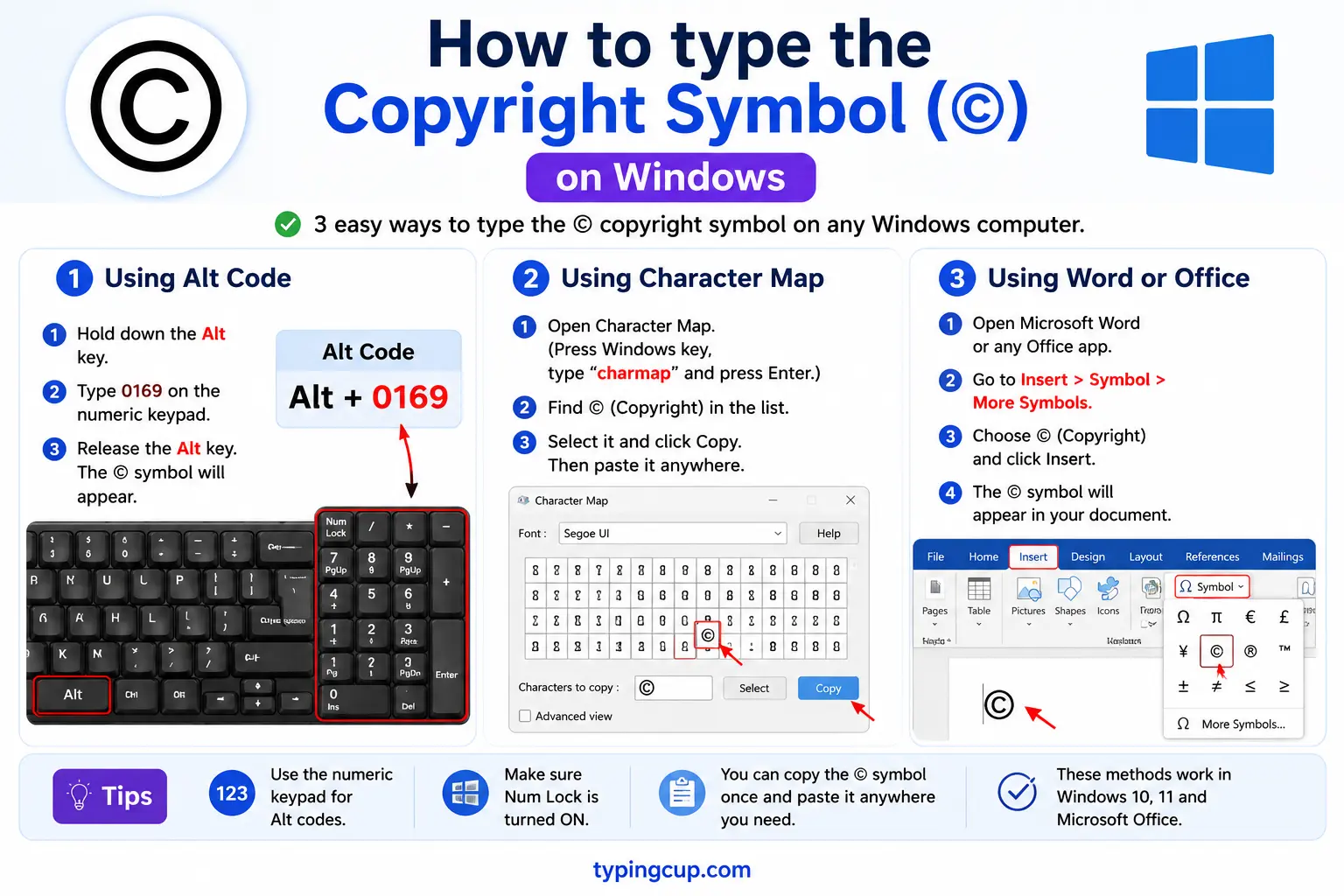
Use the Alt code: turn on Num Lock, hold Alt, and type 0169 on the numeric keypad for ©. The quickest route in most apps, though, is autocorrect: type (c) and it becomes ©. If that’s off, Windows + . opens the emoji panel — search “copyright.”
Type © on Mac
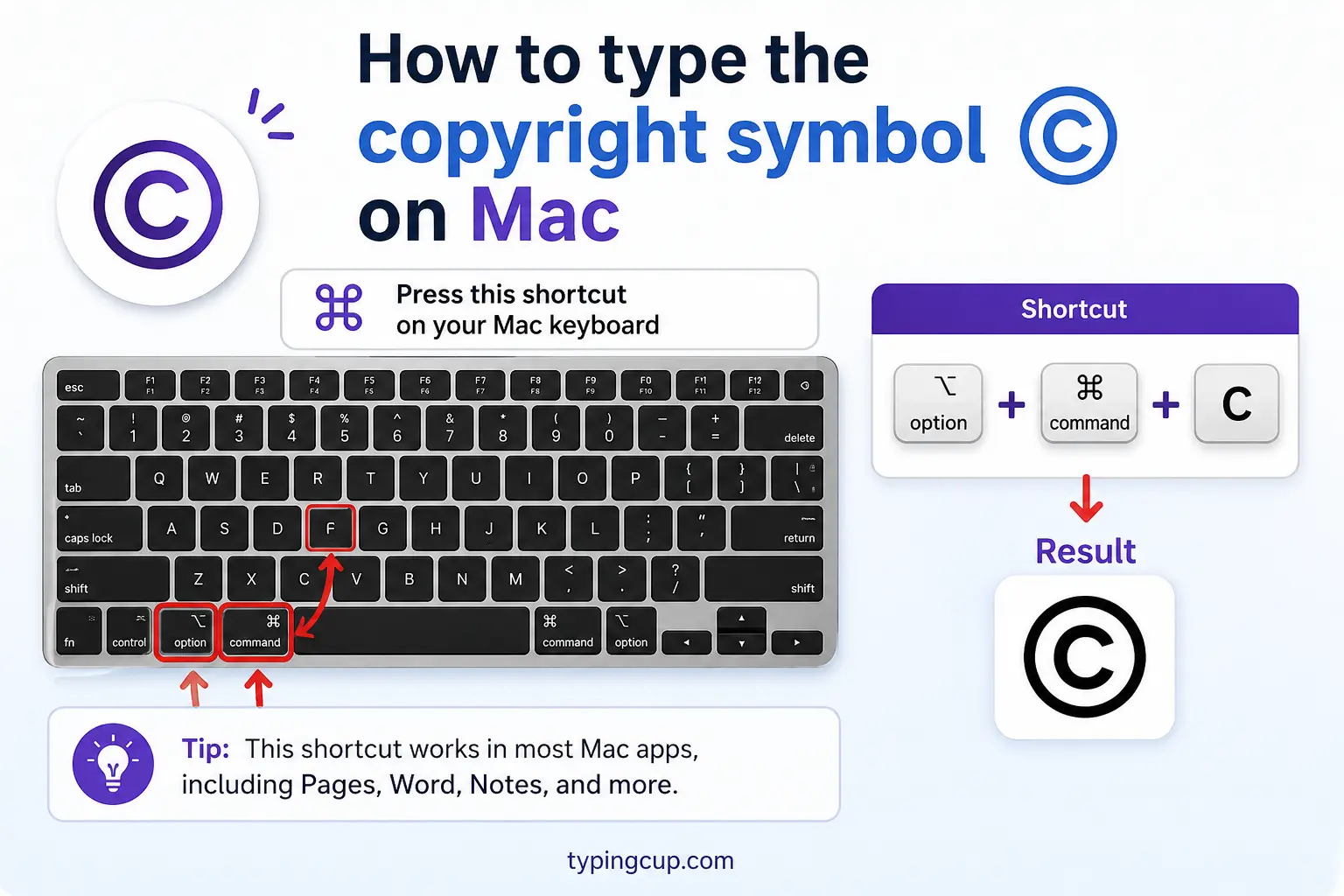
On a Mac, press Option + G for ©. It’s a single shortcut with no dead-key step. For ® it’s Option + R, and for ™ it’s Option + 2, so the three main marks are each one keystroke away.
Type © on iPhone and Android
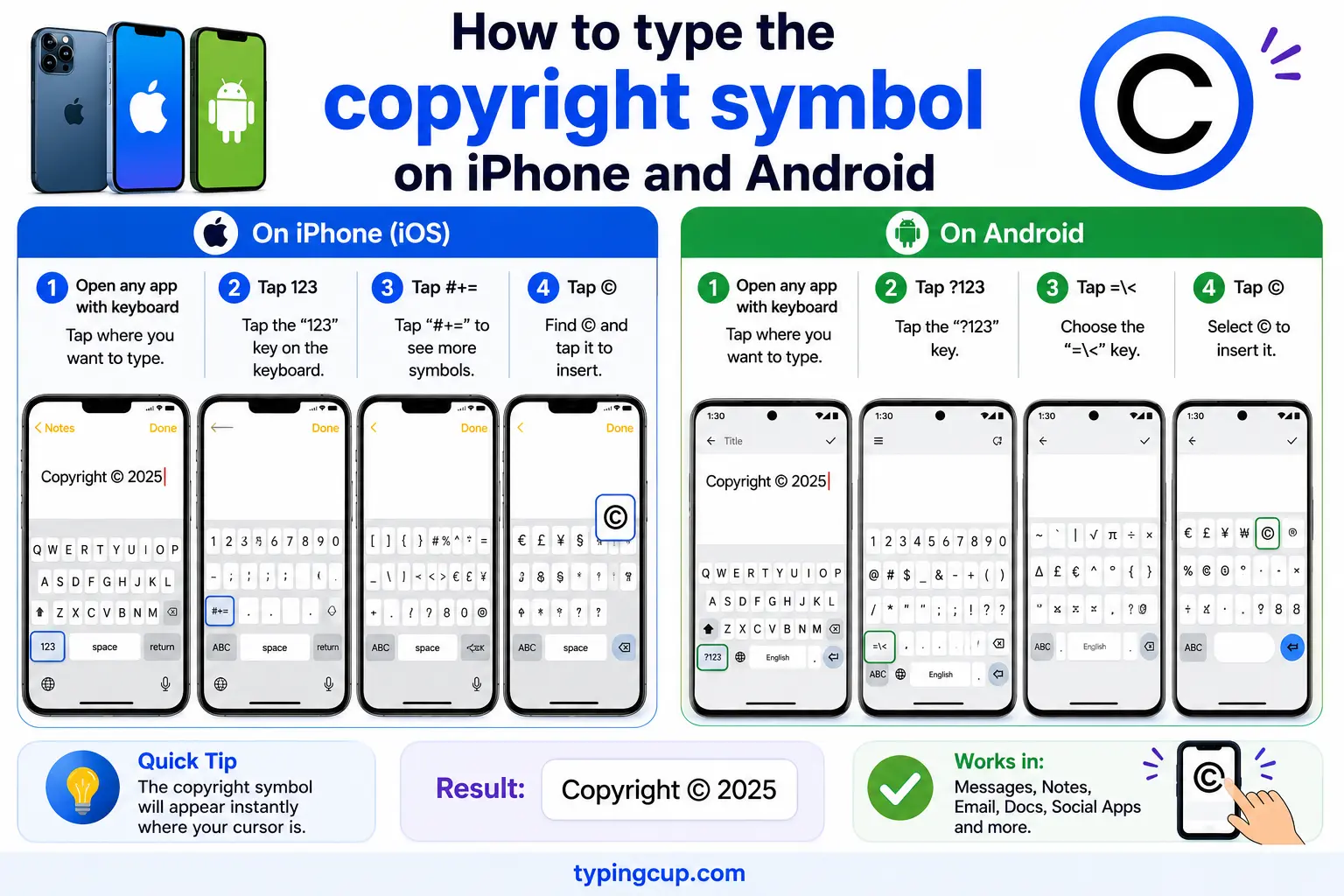
Open the emoji keyboard and search “copyright” to find © (and ® and ™). Some keyboards also convert (c) as you type. On iPhone the marks live in the emoji symbols section; on Android they’re in the emoji picker or on the symbols keyboard.
Type © in Microsoft Word
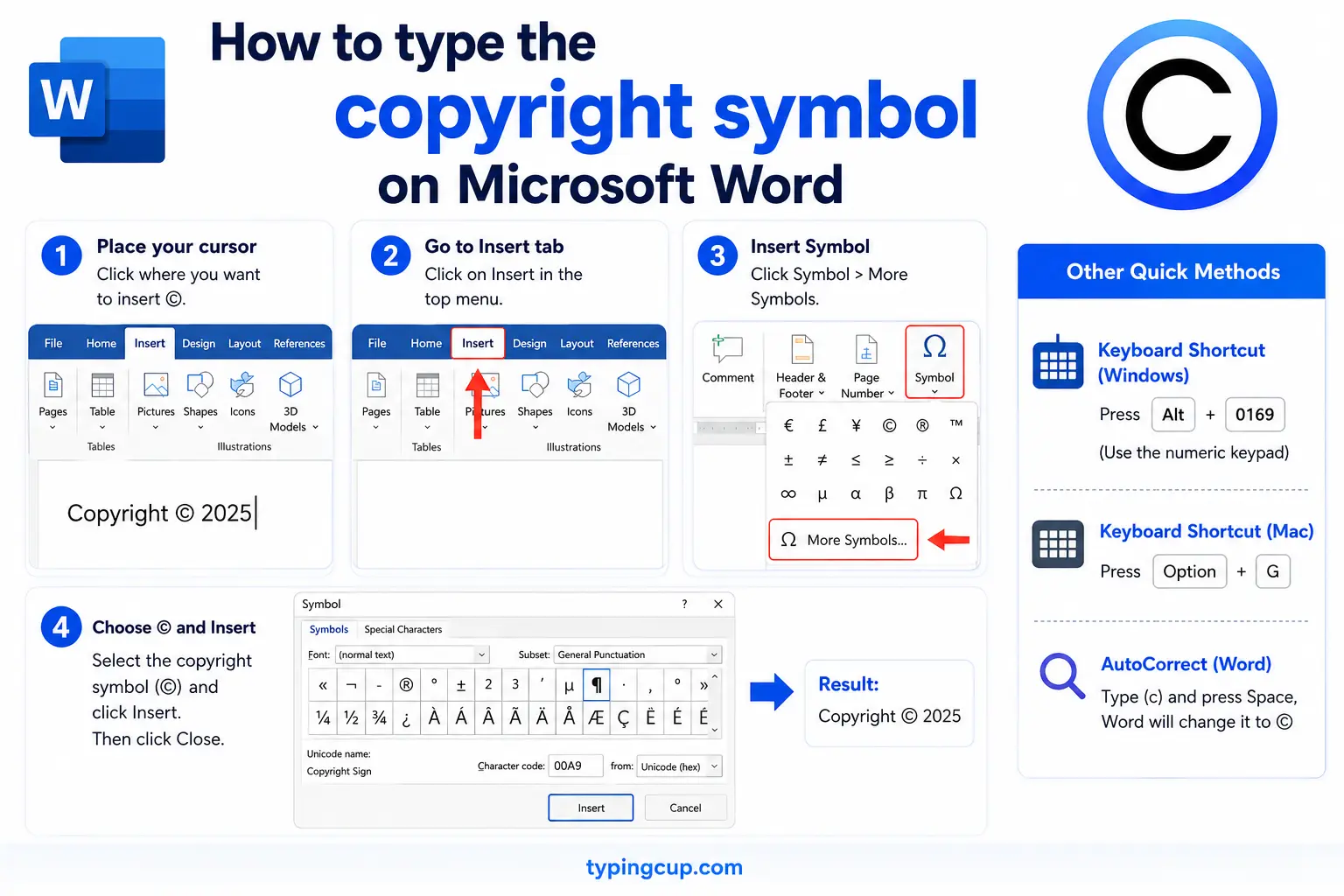
The easy way: type (c) and Word’s AutoCorrect turns it into © instantly (the same trick gives (r) → ® and ™ → ™). You can also type 00A9 then Alt + X, or use the Windows Alt code, Alt + 0169.
Type © on Linux
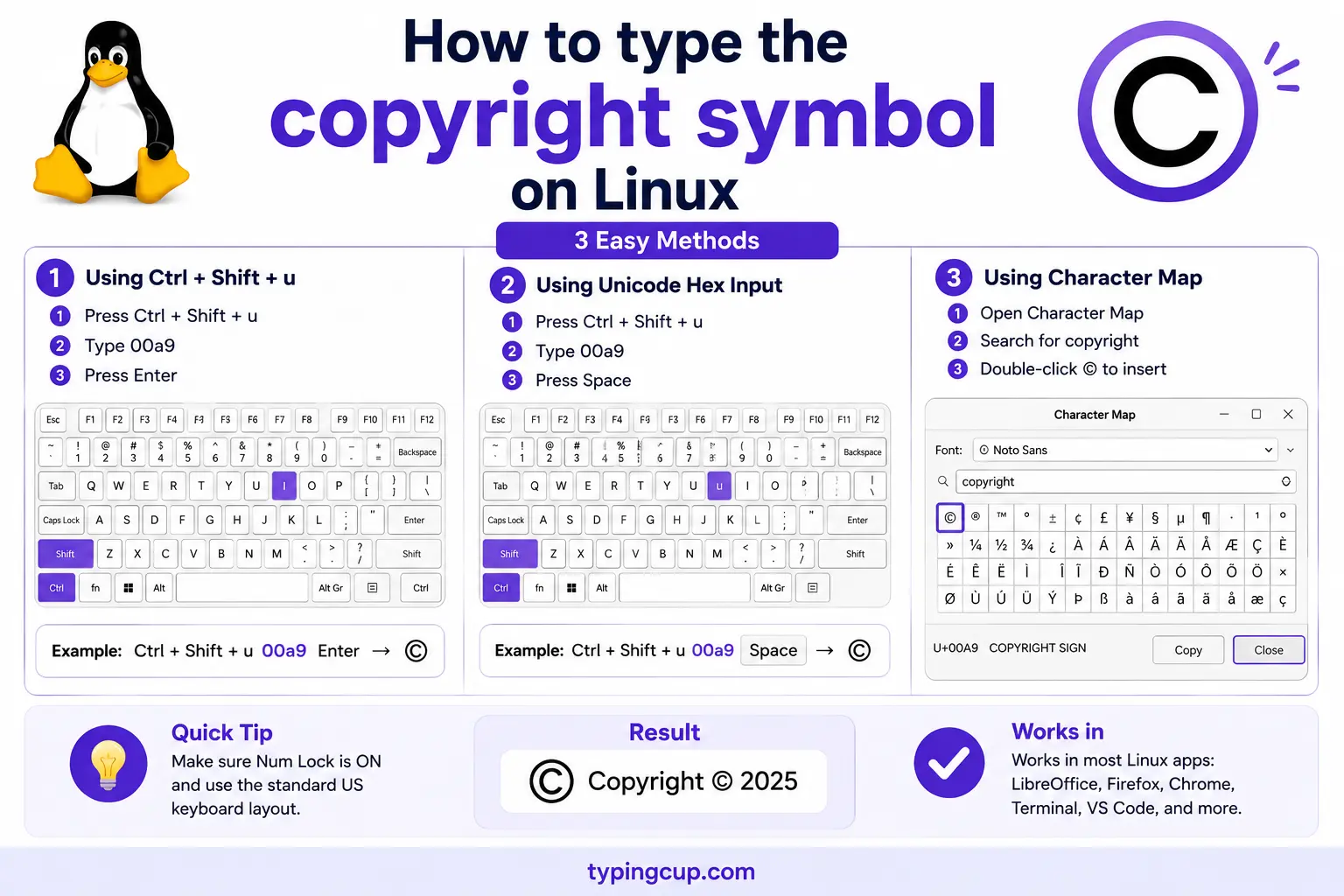
Press Ctrl + Shift + U, type 00a9, then Enter. With a Compose key, Compose then o then c (or c then o) also makes ©.
Add © in HTML and CSS
In HTML, the mark is © or the numeric © (® is ®, ™ is ™). In CSS, a © in a content value is the escaped code point \00A9.
(c) in parentheses is not the copyright symbol
Here’s the thing most people get wrong: typing a c in parentheses, (c), is not the copyright symbol. The real symbol is a single character, ©, with the c fully enclosed in a circle. The parenthetical (c) is just three ordinary characters that look a bit like it — which is why word processors quietly autocorrect (c) into © for you.
Does the difference matter? For a formal copyright notice, use the real ©, because the whole point of the notice is to be recognised, and (c) has never been officially defined as a substitute. In casual writing where you can’t type the symbol, (c) is widely understood as a stand-in, but the moment you can insert the real ©, you should. Copy it from the grid above and you never have to rely on the parentheses.
© vs ® vs ™ vs ℗: which mark to use
These four marks look related but protect completely different things, and mixing them up is common. Here’s what each one actually means.
© (copyright) protects creative works — writing, music, photos, code, art. ® (registered trademark) marks a brand name or logo that has been officially registered with a trademark office; using it when you haven’t registered can be illegal. ™ (trademark) marks a brand you’re claiming as a trademark but haven’t registered — anyone can use it to stake a claim. ℗ (the phonogram or sound-recording copyright) is the audio equivalent of ©, used specifically for recorded music.
| Mark | Protects | Requires registration? |
|---|---|---|
| © | creative works | no |
| ® | registered brand | yes |
| ™ | claimed brand | no |
| ℗ | sound recordings | no |
So a song has both a © (for the composition) and a ℗ (for the recording); a brand name uses ™ until it’s registered, then ®; and a blog post or photo uses ©.
Do you actually need the © symbol?
This surprises people: in most of the world, you don’t legally need the © symbol for your work to be protected. Under the Berne Convention, which nearly every country has signed, copyright is automatic the moment you create an original work — write the post, take the photo, record the song — with no symbol, registration, or paperwork required. The © notice used to be mandatory in the United States, but that changed in 1989.
So why still use it? Because it’s useful, even if not required. A visible © tells people the work is claimed and who owns it, which deters casual copying, and in some legal systems it removes an infringer’s ability to claim they “didn’t know” it was protected, which can affect damages. Think of it as a helpful sign rather than a legal switch: your rights exist without it, but it makes them obvious.
This is general information, not legal advice — rules vary by country and situation, so for anything high-stakes it’s worth checking with a lawyer or your local copyright office.
How to write a proper copyright notice
A standard copyright notice has three parts in order: the symbol ©, the year of first publication, and the owner’s name. So: © 2026 Acme Ltd. That’s the whole formula, and it’s what belongs in a website footer or on a title page.
A few practical points. For a work updated over time, a year range is common: © 2018–2026 Acme Ltd., showing first and latest years. The phrase “All rights reserved” is now largely redundant (it came from an old treaty that’s no longer needed) but is still added out of habit and does no harm. And you can use the word or abbreviation instead of the symbol — Copyright or Copr. are technically valid — though the symbol © is the cleanest and most recognised.
© in website footers and code
Almost every website footer carries a copyright line, and the neat trick is to make the year update itself so you never ship a stale “© 2019.” In HTML you write the symbol as ©, and a single line of JavaScript keeps the year current: new Date().getFullYear() inserted next to the mark.
So a footer might read © <span id="y"></span> Acme Ltd. with a script setting that span to the current year on load. In a URL the © is percent-encoded as %C2%A9, and if the mark ever shows as © the fix is the usual one: serve the page as UTF-8.
Copy-paste HTML codes
Every code for the copyright family in one place. Click a cell and copy.
| Symbol | Named entity | Numeric entity | URL (percent) code |
|---|---|---|---|
| © | © | © | %C2%A9 |
| ® | ® | ® | %C2%AE |
| ™ | ™ | ™ | %E2%84%A2 |
| ℗ | — | ℗ | %E2%84%97 |
In a CSS content value, use \00A9 for ©. For other everyday marks and how to type them across platforms, see the [keyboard shortcuts for symbols](/keyboard-shortcuts-for-symbols/) guide and the full [symbol Alt codes list](/symbol-alt-codes-list/).
Troubleshooting
My © shows as © or a box
That’s an encoding mismatch: the UTF-8 bytes for © are being read as an older encoding. Set the file, database, and page charset to UTF-8 and © displays correctly.
My (c) won’t turn into ©
Autocorrect is off or unsupported in that app. Turn on AutoCorrect in Word, or use Alt + 0169 on Windows, Option + G on a Mac, or copy © from the grid above.
Alt + 0169 isn’t working
Make sure Num Lock is on and you’re using the numeric keypad, not the top-row numbers. On a laptop without a keypad, use Windows + . and search “copyright,” or copy the symbol above.
FAQ
How do I type the copyright symbol?
On Windows, hold Alt and type 0169. On a Mac, press Option + G. In Word or many apps, type (c) and it becomes ©. In HTML, write ©. Or click © in the grid above.
Is (c) the same as ©?
No. © is a single character with the c fully enclosed in a circle; (c) is three ordinary characters that only resemble it. Word processors autocorrect (c) into ©. For a real notice, use the actual © symbol.
What’s the difference between ©, ®, and ™?
© protects creative works like writing and photos. ® marks a brand that’s officially registered as a trademark. ™ marks a brand claimed as a trademark but not yet registered. They’re not interchangeable.
Do I need to register or use © to be protected?
In most countries, no. Under the Berne Convention, copyright is automatic when you create an original work. The © symbol is optional but useful, as it signals ownership and can affect infringement claims. This is general information, not legal advice.
How do I write a copyright notice?
Use the symbol, the year, and the owner: © 2026 Your Name. For an ongoing work, a range like © 2018–2026 is common. “All rights reserved” is optional and now largely redundant.
