
Í / í (I With Acute Accent): How to Type and Copy It
The letter í is an i with an acute accent — the little stroke leaning to the right. You’ll meet it constantly in Spanish (sí, día), and in Irish, Czech, Portuguese, and more. It isn’t on an English keyboard, so this page gives you the quickest way to type it on any device, a click-to-copy grid, and a few things about í that other guides skip — like why it loses its dot.
If you just need the character, copy í (or the capital Í) from the grid below. If you want the shortcuts, or to understand what the accent is doing, the sections after it cover both.
In a hurry?
- Copy it: click í in the grid below.
- On Windows: hold Alt and type 0237 (capital Í is 0205).
- On a Mac: press Option + E, then i.
- On a phone: press and hold the i key and choose í.
- In Word: press Ctrl + ‘ (apostrophe), then i.
Click to copy: i with acute
Grab lowercase í, uppercase Í, the HTML entity, or the URL code
Table of Contents
Copy and paste í
The accented i in both cases, with the codes you’re likely to need. Use the grid above to copy with one click; this table is the reference.
| Character | Name | Unicode | Windows | Mac | HTML |
|---|---|---|---|---|---|
| í | i with acute (lower) | U+00ED | Alt + 0237 | Option + E, i | í |
| Í | I with acute (upper) | U+00CD | Alt + 0205 | Option + E, Shift + I | Í |
The accent isn’t on an English keyboard, so í takes a shortcut, a code, or a copy. The sections below cover each device, then what the accent actually means.
How to type í on any device
The acute-accented i isn’t on the keys, so here’s the quickest way to make one on each system.
Type í on Windows
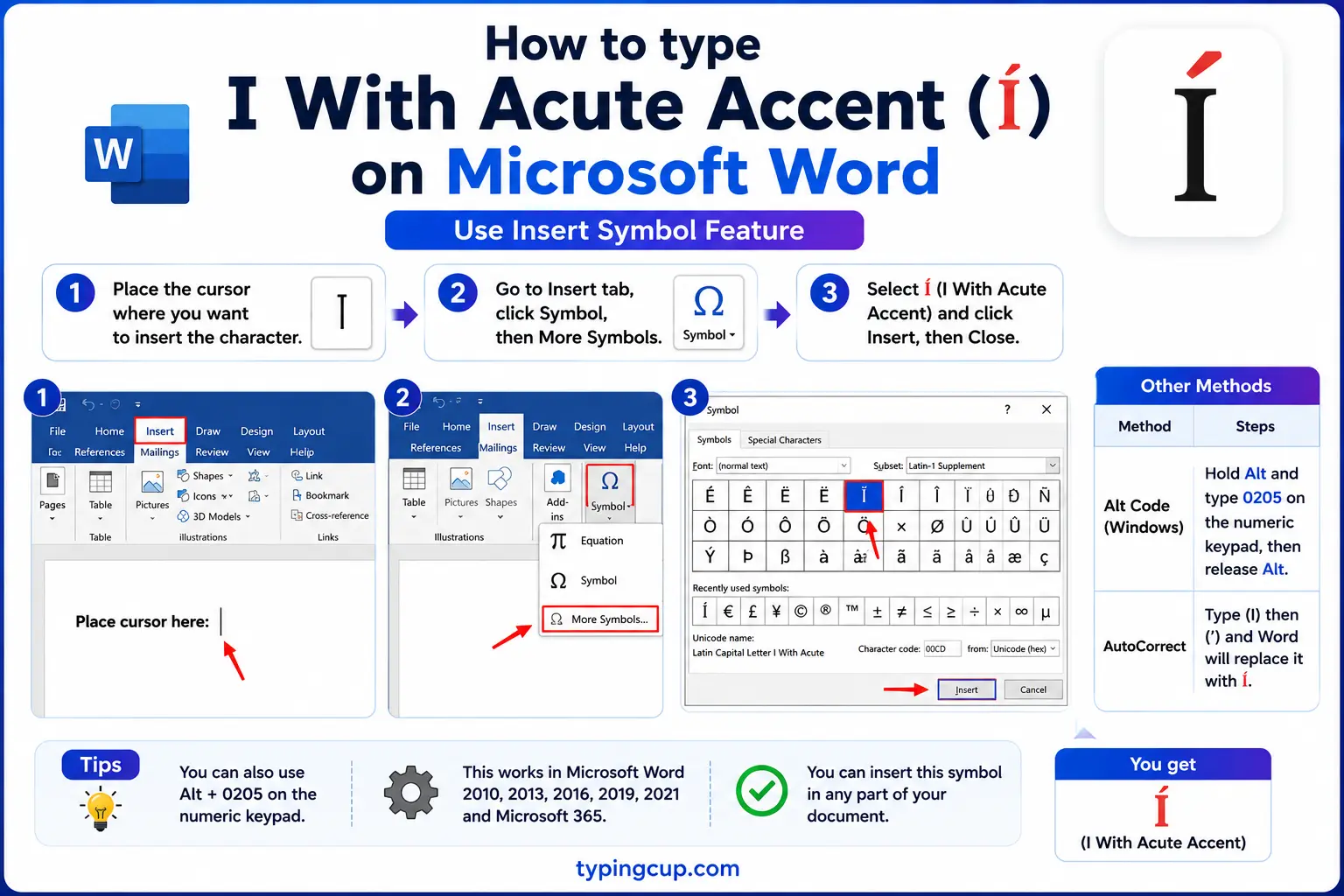
Use the Alt code: turn on Num Lock, hold Alt, and type 0237 on the numeric keypad for í, or 0205 for the capital Í. (The shorter Alt + 161 also gives í.) If you switch languages often, the US-International keyboard layout lets you type an apostrophe then i to get í directly.
Type í on Mac
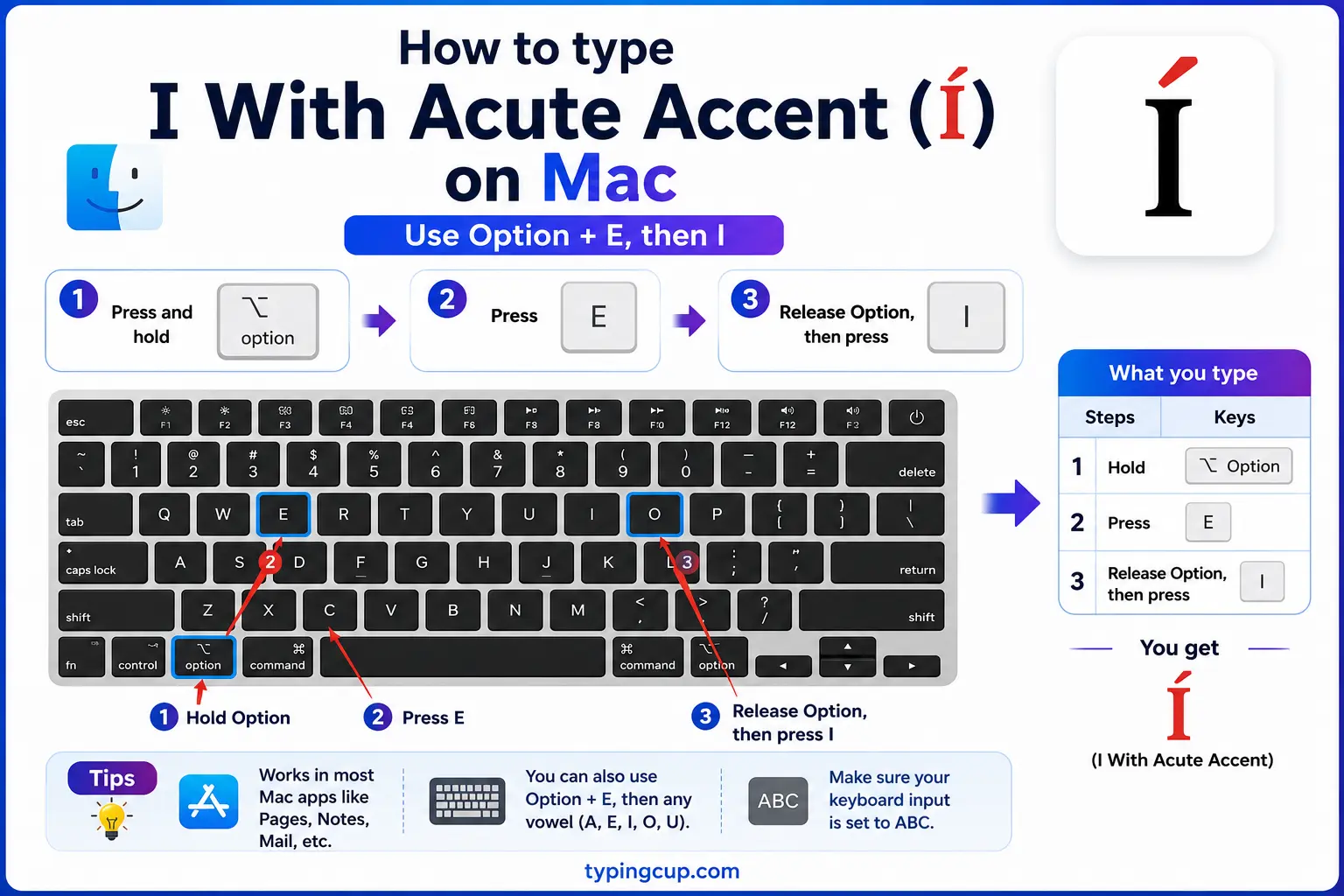
On a Mac, press Option + E (nothing appears yet that arms the acute accent), then press i, and í appears. For the capital, do Option + E, then Shift + i. The same two-step works for the other acute vowels: á, é, ó, ú.
Type í on iPhone and Android
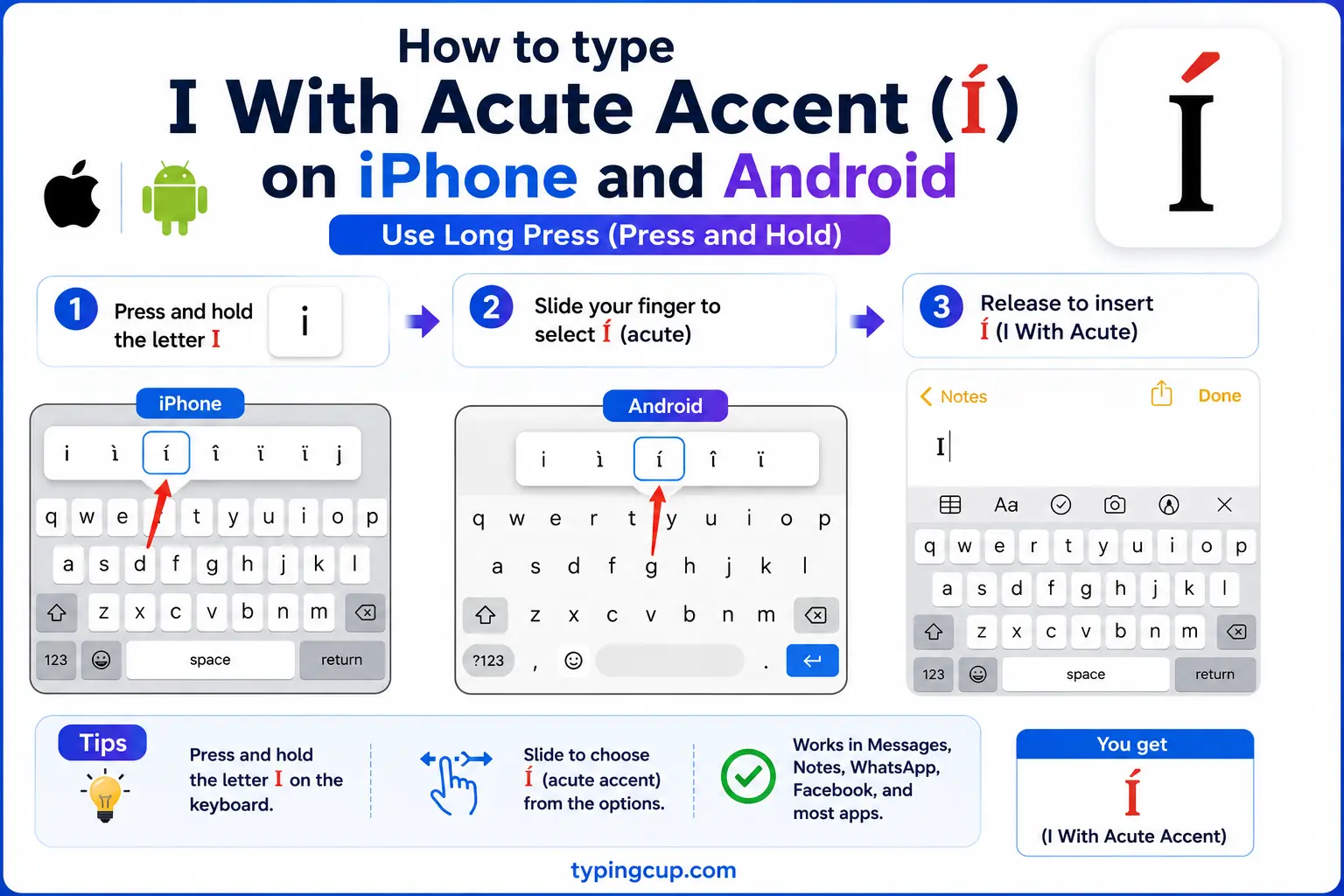
Press and hold the i key on the on-screen keyboard. A little row of accented options pops up; slide onto í and lift your finger. It’s the same long-press trick that works for every accented letter on a phone.
Type í in Microsoft Word
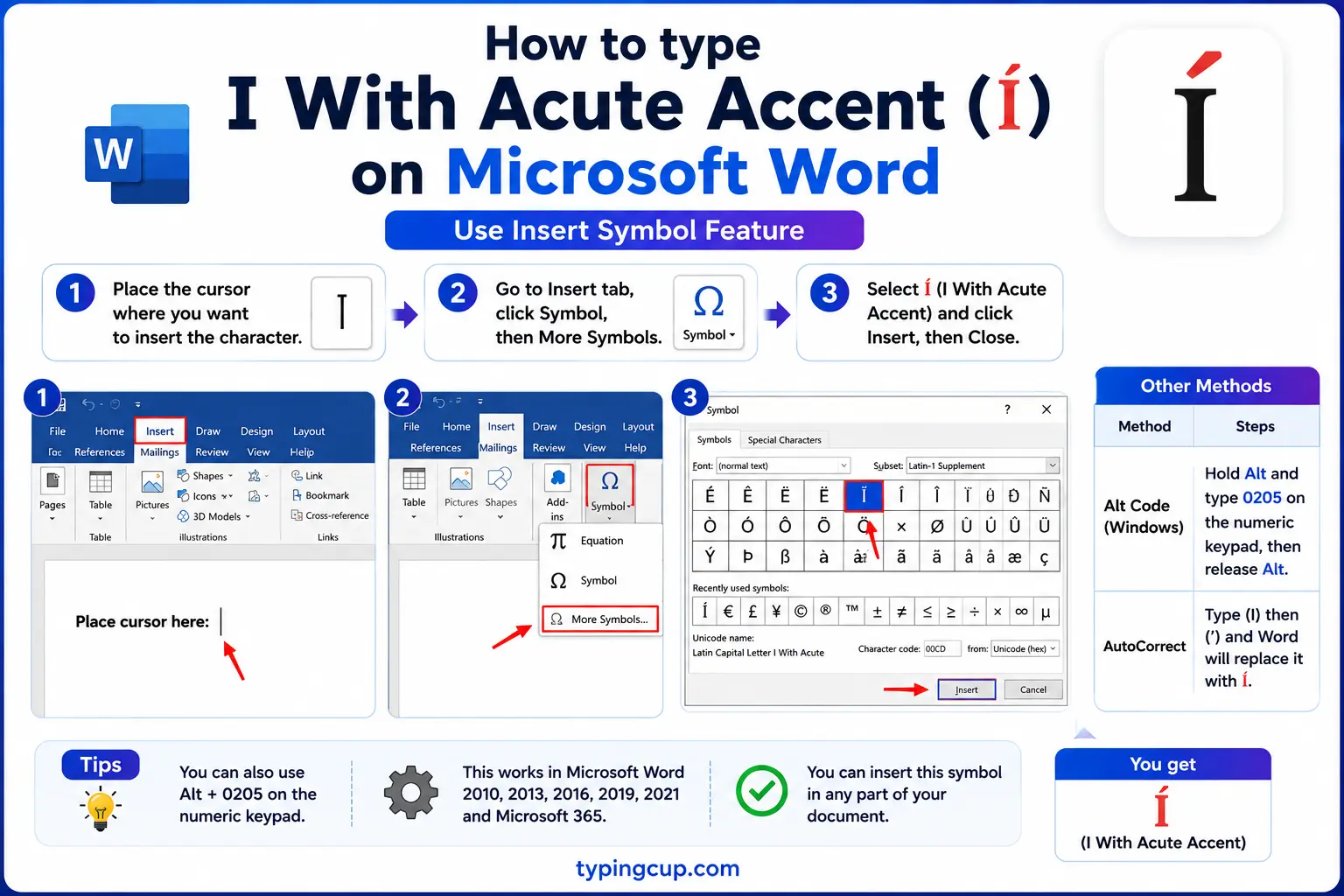
Word has a built-in accent shortcut: press Ctrl + ‘ (Ctrl and the apostrophe key), release, then press i, and you get í. For the capital, add Shift on the letter. You can also type 00ED then Alt + X, or use the Windows Alt code.
Type í on Linux
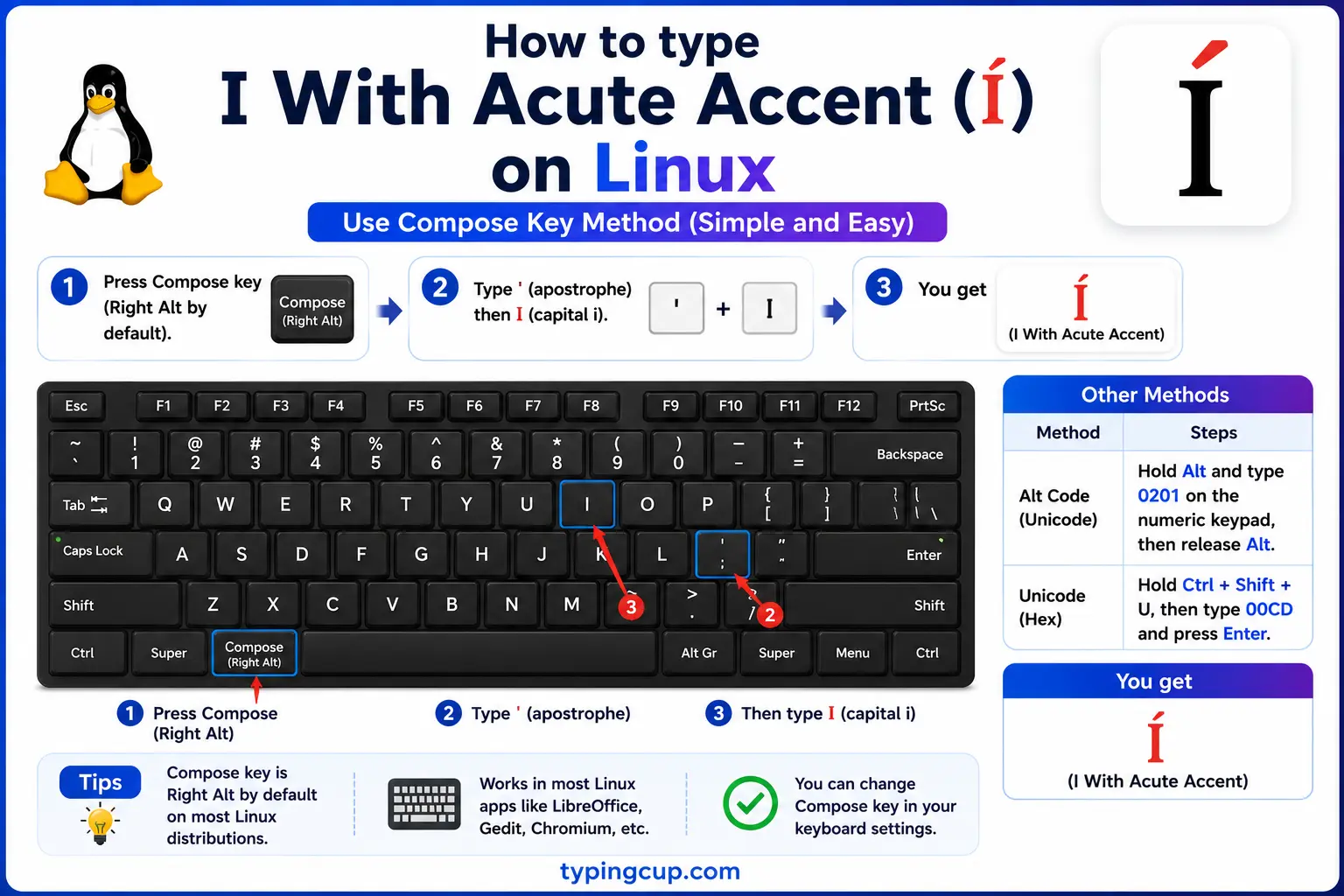
Press Ctrl + Shift + U, type 00ed, then Enter. With a Compose key, Compose then ‘ (apostrophe) then i also makes í.
Type í in HTML and CSS
In HTML, í is í or the numeric í (capital Í is Í). In CSS, a literal í in a content value is the escaped code point \00ED.
What the accent on í actually means
The same little stroke does different jobs in different languages. Knowing which one you’re dealing with is the difference between spelling a word right and changing what it means.
In Spanish, the acute usually marks which syllable is stressed, and sometimes tells two words apart. In Irish, the accent (called a fada) makes the vowel long, so i and í are genuinely different sounds. In Czech and Slovak, í is also a long ee. In Portuguese, it marks stress much as in Spanish. Same mark, different rule each time.
| Language | What í does | Example |
|---|---|---|
| Spanish | stress / word contrast | día (day) |
| Irish | long vowel (fada) | sí (she) |
| Czech / Slovak | long ee sound | víno (wine) |
| Portuguese | stressed syllable | saída (exit) |
í in Spanish: the accent that changes meaning
Spanish is where í earns its keep, because the accent can flip a word’s meaning entirely. The clearest pair is sí (“yes”) versus si (“if”), and mí (“me”) versus mi (“my”). Drop the accent and you’ve written a different word, not just a misspelling.
It also carries plain stress. In a word like día (“day”), the accent tells you to stress the i and, importantly, that the i and a are two separate syllables (dee-a) rather than a single glide. The same happens in país (“country”) and frío (“cold”). So in Spanish the accent on í isn’t decoration — it changes how the word is said, and sometimes what it is.
If you’re writing Spanish more broadly, the type Spanish letters guide covers the whole set of accents and the ñ, and i with accent covers the letter i in every accented form.
The tittle: why í loses its dot
Here’s a detail almost no one notices until it’s pointed out: the ordinary letter i has a dot on top, but í does not. The accent takes the dot’s place. That dot has a name — it’s called a tittle — and the rule across Latin scripts is that when you add an accent above an i (or a j), the accent replaces the tittle rather than sitting on top of it.
So í is really “i, but with the acute instead of the dot,” which is why it looks clean rather than cluttered with both marks. It’s a small piece of typographic logic that has been baked into how these letters are designed for centuries. (The word “tittle” is also the origin of the phrase “to a T” and the expression “jot and tittle,” both meaning the tiniest detail.)
í, the dotless ı, and the Turkish-i bug
The tittle leads straight into one of the most famous bugs in software. Most languages have one letter i, but Turkish has two: a dotted i and a dotless ı (U+0131), which are genuinely different letters with different sounds. Crucially, their capitals are swapped from what English expects: the capital of dotted i is İ (with a dot), and the capital of dotless ı is plain I.
This wrecks naive text handling. When a program “uppercases” text using Turkish rules, a normal i can become the dotted İ instead of I, and code that compares text after changing its case can suddenly fail. It’s caused real security holes and login bugs, and it’s the classic example of why programmers are told never to change letter case without specifying which language’s rules to use. Your accented í isn’t the dotless letter, but it lives in the same family of “the letter i is more complicated than it looks.”
í in code, URLs, and domain names
The accented i turns up in filenames, URLs, and increasingly in web addresses themselves. In a URL, í is percent-encoded as %C3%AD (its two UTF-8 bytes), so a page about días might appear as d%C3%ADas in the address bar. In code, the escape is \u00ED in JavaScript, Java, JSON, and Python.
Domain names can now contain í through internationalized domain names (IDN), but under the hood they’re converted to an ASCII form called Punycode (starting with xn--) so the old system can route them. That conversion is also a known phishing risk, since a í can be made to resemble a plain i in some fonts, so browsers sometimes show the Punycode form as a safeguard. As always, if í ever shows up as à or a box, the fix is to serve everything as UTF-8.
Copy-paste HTML codes
Every code for the acute-accented i in one place. Click a cell and copy.
| Character | Named entity | Numeric entity | URL (percent) code |
|---|---|---|---|
| í | í | í | %C3%AD |
| Í | Í | Í | %C3%8D |
In a CSS content value, use \00ED for í. For the rest of the accented vowels, see [a with acute](/a-with-acute/), [e with acute](/e-with-acute/), and the full [letters with accents](/letters-with-accents/) hub.
Troubleshooting
My í shows as à or a box
That’s an encoding mismatch: the UTF-8 bytes for í are being read as an older encoding. Set the file, database, and page charset to UTF-8 and í displays correctly.
Option + E just types an e on my Mac
Option + E arms the accent but shows nothing on its own; you have to press i straight after. If it still fails, your keyboard layout may not support dead keys; switch to the standard US or ABC layout.
Alt + 0237 isn’t working
Make sure Num Lock is on and you’re using the numeric keypad, not the top-row numbers. On a laptop without a keypad, use Windows + . and search, or copy í from the grid above.
My í has a dot and an accent
A correctly formed í replaces the dot with the accent. If you see both, you’ve probably combined a plain i with a separate combining accent that didn’t merge; use the single precomposed í from the grid above instead.
FAQ
How do I type í?
On Windows, hold Alt and type 0237. On a Mac, press Option + E then i. On a phone, long-press the i key. In Word, press Ctrl + ‘ then i. Or click í in the grid above.
What does the accent on í mean?
It depends on the language. In Spanish it usually marks stress and can distinguish words (sí “yes” vs si “if”). In Irish, Czech, and Slovak it makes the vowel long. It’s not decorative — it changes how the word sounds.
Why doesn’t í have a dot?
Because the accent replaces the dot. That dot is called a tittle, and the rule across Latin scripts is that an accent above an i takes the tittle’s place, so í carries the acute instead of the dot.
What’s the difference between í and the Turkish ı?
í is an ordinary dotted i with an acute accent. The Turkish ı (U+0131) is a separate dotless letter with no accent and a different sound. Turkish also has İ, a capital i with a dot, which is what causes the famous case-conversion bug in software.
How do I write í in HTML?
Use í or í (capital Í is Í). In a URL, í is percent-encoded as %C3%AD.
