
Ñ (N With a Tilde): How to Type the Eñe, Copy It, and Use It Anywhere
ñ is the Spanish eñe: an n with a tilde, the little wave on top. Its capital is Ñ. It stands for the “ny” sound in español, and in Spanish it isn’t an accented n at all, but a separate letter with its own place in the alphabet.
If you just need the character, copy ñ or Ñ from the grid below. You can also grab its HTML entity or URL code straight from there, which the rest of this page explains and which most guides skip entirely.
Further down you’ll find how to type ñ on every device, how it behaves in web addresses and code, the story of how it nearly vanished from keyboards, and a plain pronunciation guide.
In a hurry?
- Copy it: click ñ or Ñ in the grid below.
- On Windows: hold Alt and type 0241 for ñ (0209 for Ñ).
- On a Mac: press Option + n, then press n again.
- On a phone: press and hold the n key, then slide to ñ.
- In a URL ñ is written %C3%B1; in HTML it’s ñ.
Click to copy: ñ, and its codes
Grab the letter, the HTML entity, or the URL code
Table of Contents
Copy and paste ñ
The two characters, with every code you’re likely to need in one row. Use the grid above to copy with a click; this table is the reference.
| Character | Name | Unicode | Windows | Mac | HTML |
|---|---|---|---|---|---|
| ñ | n with tilde | U+00F1 | Alt + 0241 | Option + n, n | ñ |
| Ñ | N with tilde | U+00D1 | Alt + 0209 | Option + n, Shift + N | Ñ |
How to type ñ on any device
ñ sits in the old Latin range, so it’s easy to reach almost everywhere.
Windows
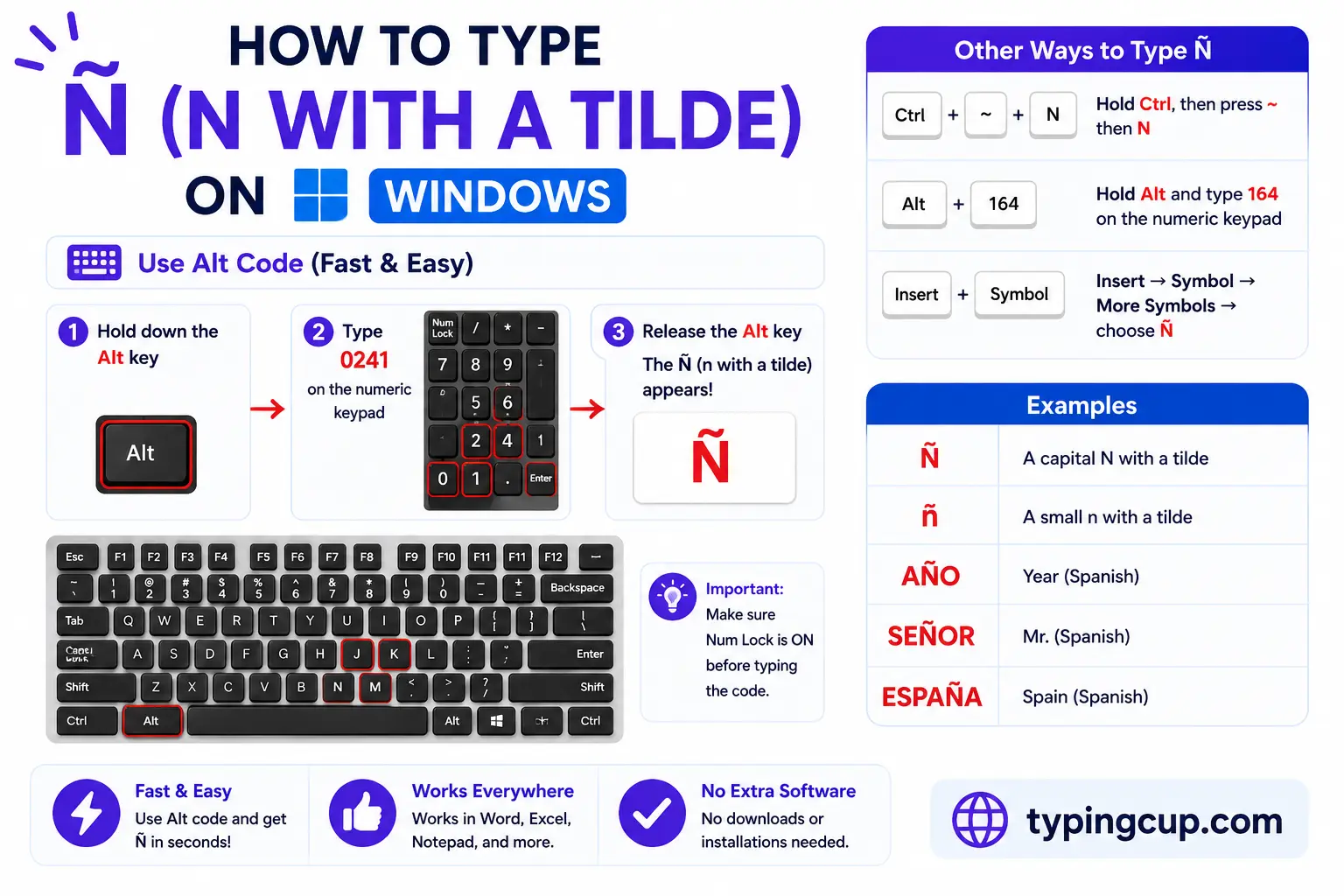
Turn on Num Lock, hold Alt, and type 0241 on the numeric keypad for ñ, or 0209 for Ñ. The top-row numbers won’t work; it has to be the keypad.
For regular use, switch to the US-International layout and type a tilde (~) then n, or add the Spanish keyboard, which gives ñ its own dedicated key just right of the L. You can also press Windows + . and pick ñ from the symbol panel.
Mac
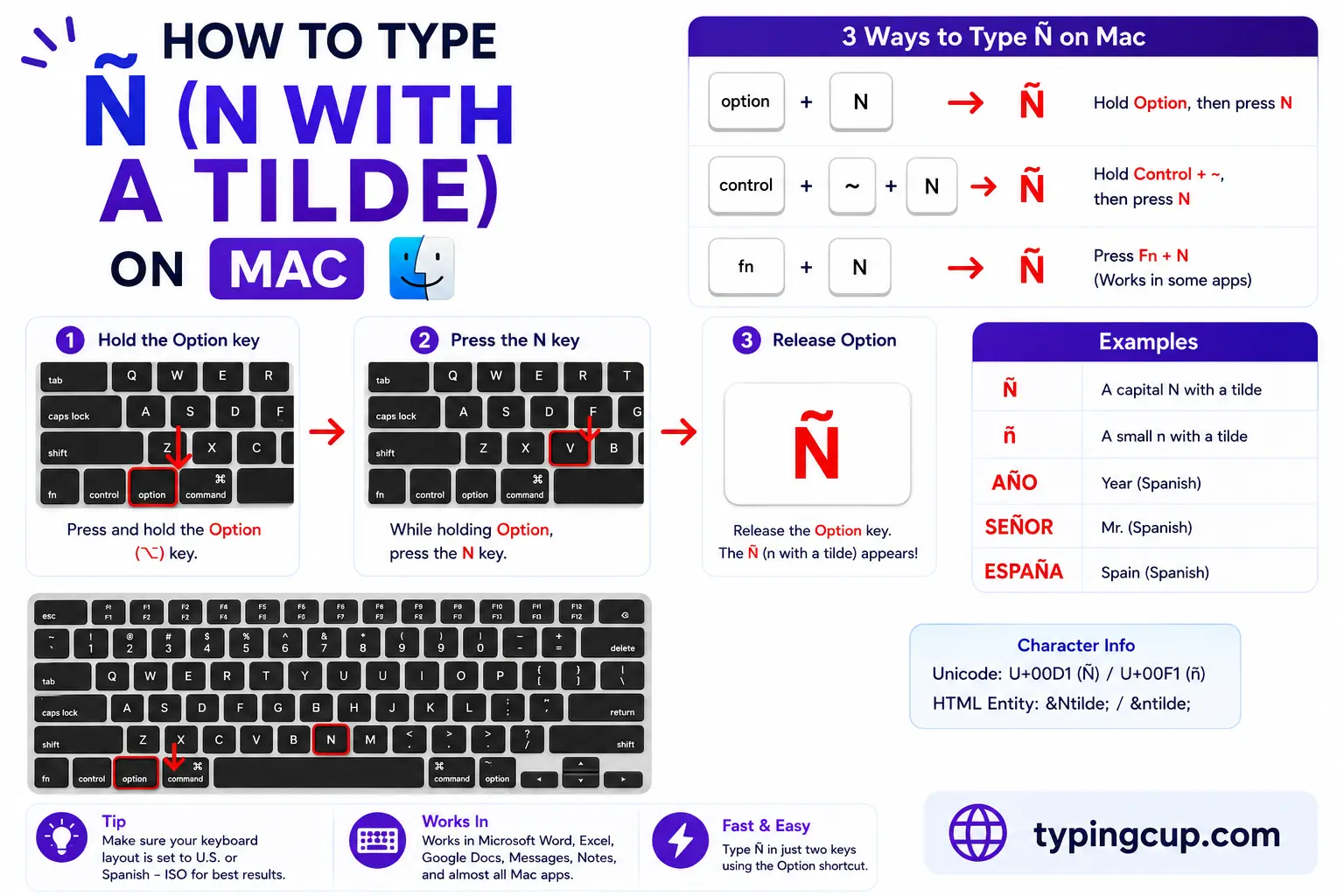
Press Option + n together and let go; nothing shows yet. Press n again and ñ appears. For the capital, it’s Option + n, then Shift + N. Holding the n key down also brings up a small menu with ñ on it.
iPhone and Android
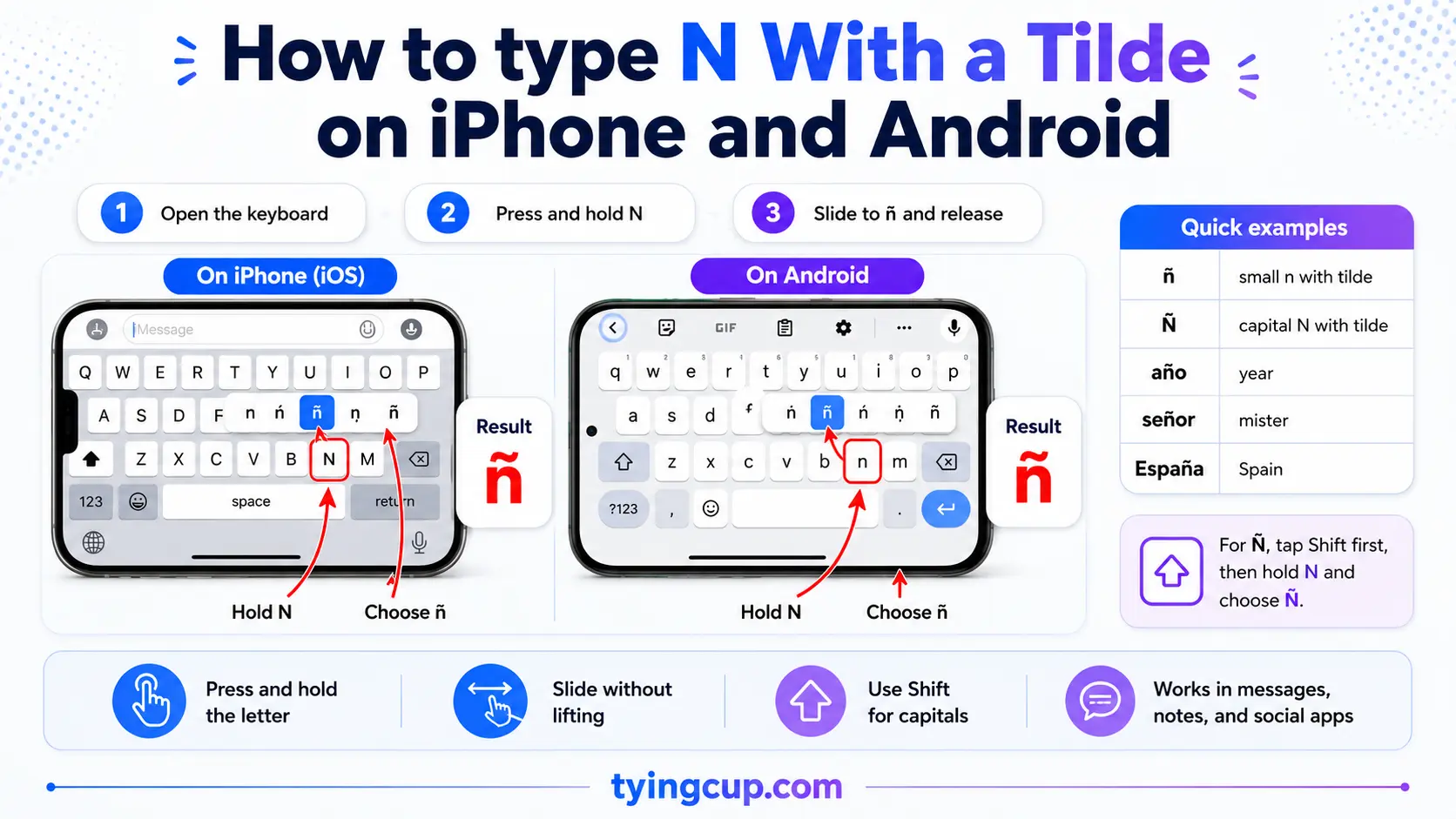
Press and hold the n key on the on-screen keyboard, then slide onto ñ and lift your finger. Nothing to set up, and it works the same in nearly every app.
Microsoft Word
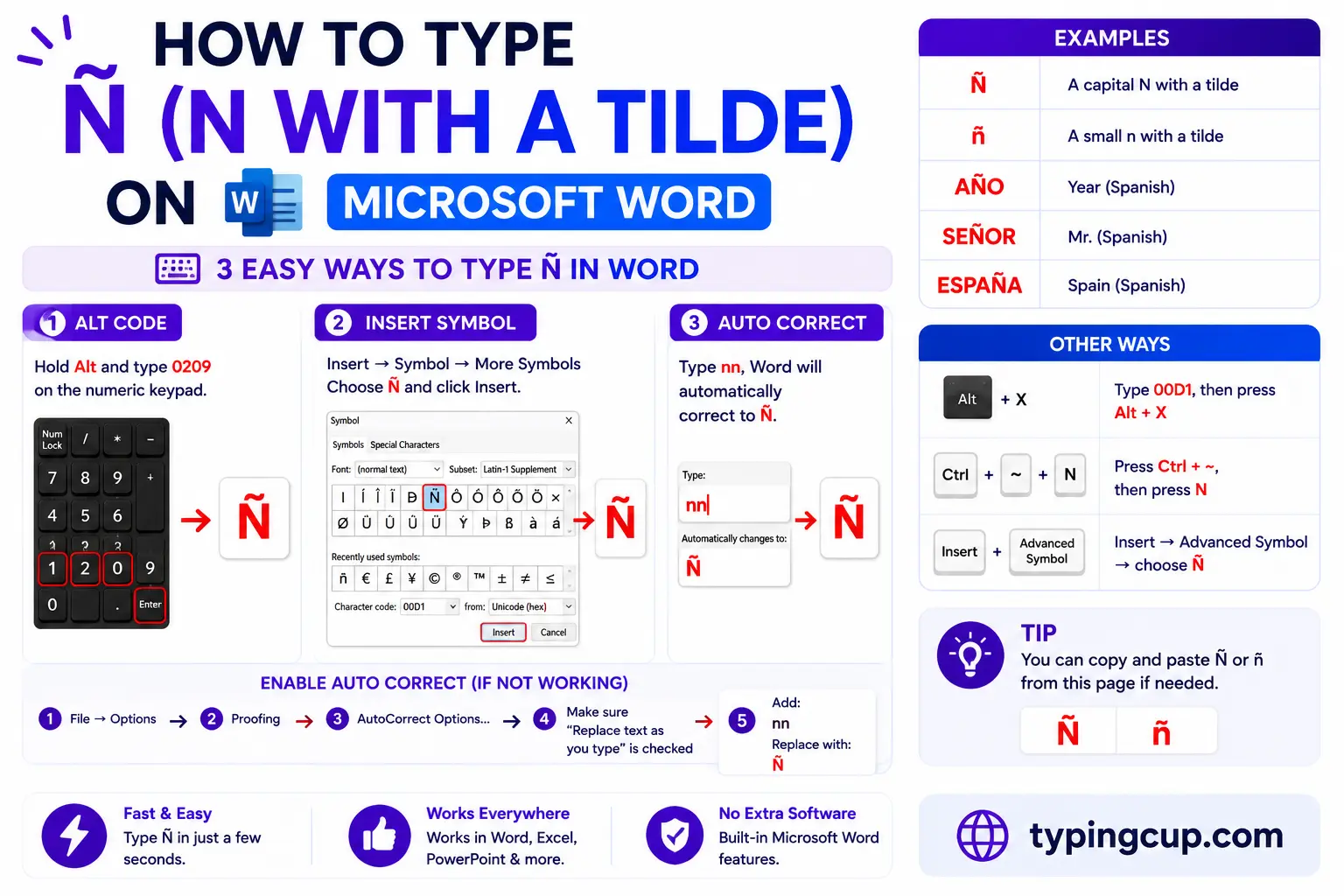
Press Ctrl + Shift + ~ (the tilde key), let go, then press n. Add Shift on the n for Ñ. The Windows Alt code works here too.
Linux
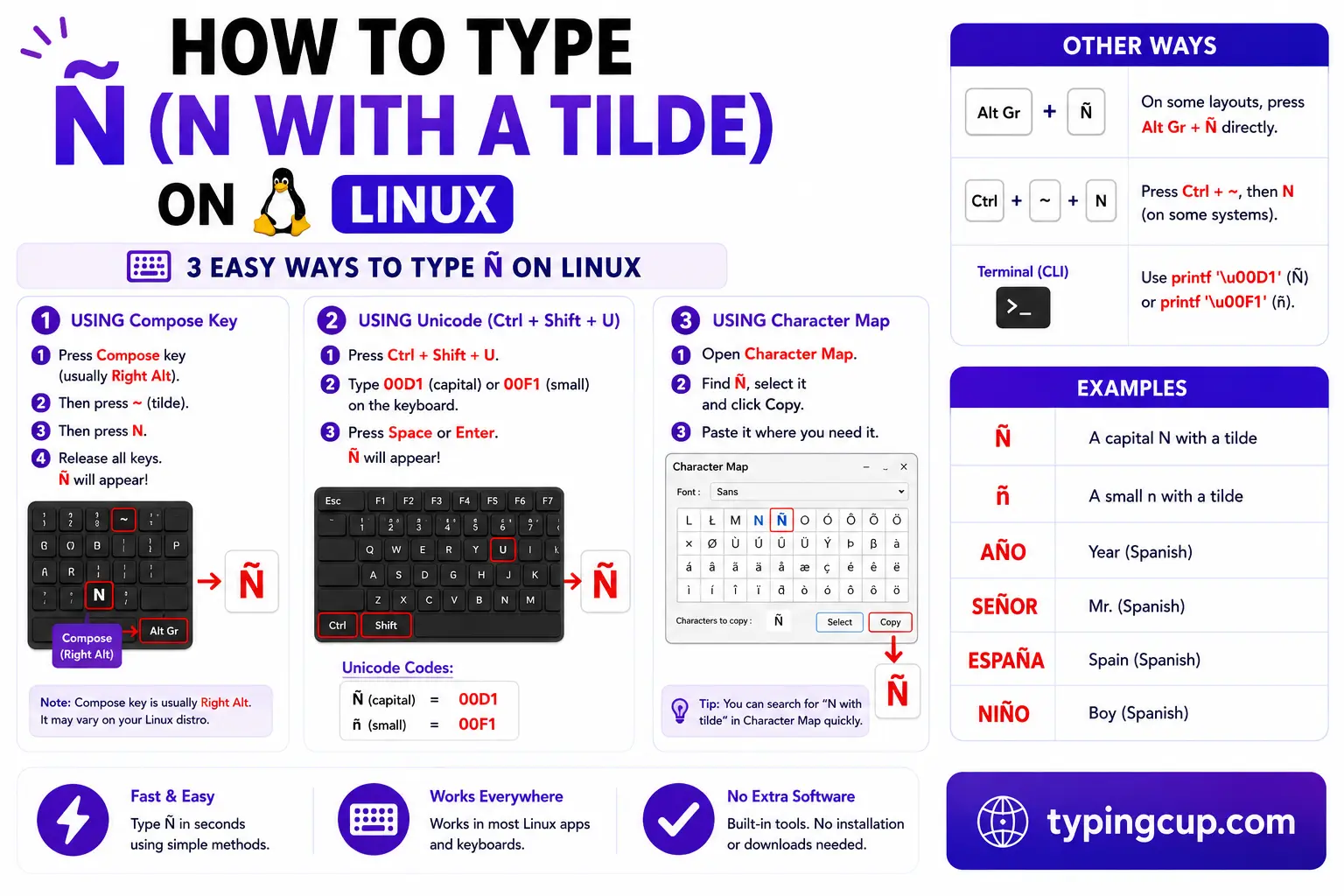
Press Ctrl + Shift + U, type 00f1, then press Enter. With a Compose key, it’s Compose, then ~, then n.
Excel and Google Sheets
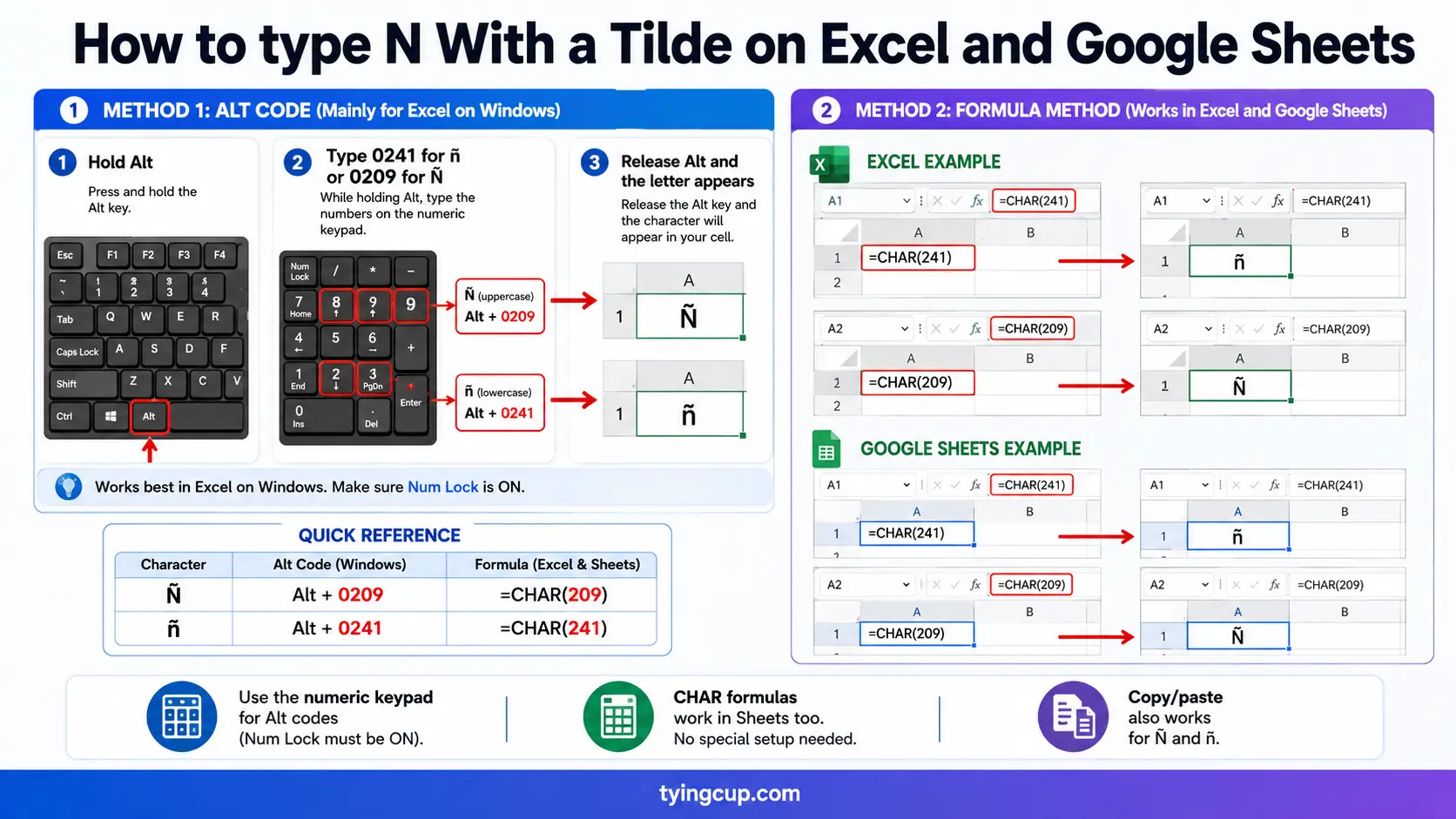
Use the Alt code on the keypad, or the UNICHAR formula: =UNICHAR(241) returns ñ and =UNICHAR(209) returns Ñ. The same works in Google Sheets.
The story of the ñ
The ñ began as a scribal shortcut. Medieval scribes writing Latin were forever short on space, so a double n, as in annus (“year”), got squeezed into a single n with a small n drawn above it. That little mark flattened into the tilde, Spanish adopted the ñ as a full letter, and annus became año.
It nearly didn’t survive the computer age. In 1991 the European Community drafted rules that would have let manufacturers sell keyboards without the ñ key, to standardise hardware across the market. Spain pushed back hard. The writer Gabriel García Márquez called the idea a scandal, and the government argued the letter was part of the country’s cultural heritage. Spain kept the right to require the ñ on keyboards sold there.
Today the eñe is a small emblem of the language itself. The Instituto Cervantes, which promotes Spanish around the world, built its logo around it, and you’ll see the letter used as shorthand for Hispanic identity well beyond the alphabet.
ñ in web addresses, URLs, and email
You can use ñ in a domain name. piñata.com is a valid address, but the domain name system only understands plain ASCII, so behind the scenes the name is stored in a form called Punycode that begins with xn--. Your browser shows you the ñ and quietly translates it, which is handy to know when a perfectly real domain suddenly looks like a jumble of letters.
Inside a web address, an ñ in the path or query is percent-encoded as %C3%B1. Those are the two UTF-8 bytes for the character (0xC3 and 0xB1) written out in the URL. The capital Ñ is %C3%91. If you’ve ever seen a link with %C3%B1 buried in it, that was an ñ.
Email is more cautious. The part after the @ can carry ñ through the same Punycode system, but plenty of mail servers still stumble over non-ASCII addresses, so a ñ in an email address is best avoided unless you know both ends support it.
ñ in code, passwords, and older software
In modern code, ñ is just another Unicode character and behaves fine in strings, comments, and even variable names in many languages. The trouble is nearly always encoding. If a file saved as UTF-8 gets read as Latin-1, ñ turns into the tell-tale ñ. That garbled pair is a sign the encoding got crossed, not that the character itself is broken.
Passwords are where to be careful. A ñ in a password can lock you out when you move between devices, because a keyboard without an easy ñ, or a login form that handles encoding differently, may not produce the exact bytes you set. If a password has to travel across systems, plain ASCII is the safer choice.
When you do want the character in code, the escape forms save you: \u00f1 in JavaScript, Java, and JSON, \u00f1 or \N{LATIN SMALL LETTER N WITH TILDE} in Python, and ñ or ñ in HTML.
Words and names with ñ
A quick sense of how common the letter is in everyday Spanish.
| Word | Meaning |
|---|---|
| niño | child |
| año | year |
| España | Spain |
| señor | mister, sir |
| mañana | tomorrow, morning |
| piña | pineapple |
| pequeño | small |
| sueño | dream, sleep |
| baño | bathroom |
| cariño | affection |
English has borrowed several ñ words outright, including jalapeño, piñata, piña colada, El Niño, and señorita, and careful writing keeps the tilde. It also turns up in surnames like Núñez, Ibáñez, Muñoz, and Peña, where dropping the mark changes the name.
How ñ is pronounced and where it sorts
ñ is a palatal nasal, written /ɲ/ by phoneticians. The closest English sound is the “ny” in canyon or the “ni” in onion: the middle of the tongue presses the roof of the mouth while the sound comes through the nose. It’s a single sound, not an n followed by a separate y.
Because it’s a separate letter, ñ has its own slot in the Spanish alphabet, right after n and before o. So in a Spanish dictionary leña (“firewood”) comes after lento but before leo. Sorting software that treats ñ as a plain n files these in the wrong order, which matters for anything alphabetised in Spanish.
Copy-paste HTML codes
Everything you need for the web and for links, in one place. Click a cell and copy.
| Character | Named entity | Numeric entity | URL (percent) code |
|---|---|---|---|
| ñ | ñ | ñ | %C3%B1 |
| Ñ | Ñ | Ñ | %C3%91 |
In a CSS content value, use the escaped code point \00f1. Serve the page as UTF-8 so the character holds. For the other accented forms of n, like ń and ň, see the n with accent guide; for the rest of the Spanish set, see how to type Spanish letters.
Troubleshooting
“My ñ shows up as ñ or a box.”
The text was saved as UTF-8 but is being read as an older encoding like Latin-1. Set the file or page to UTF-8 and the ñ comes back. The ñ pattern specifically is the classic UTF-8-read-as-Latin-1 mix-up.
“Alt + 0241 just beeps or types nothing.”
Num Lock is off, you’re using the top-row numbers, or the laptop has no keypad. Turn Num Lock on and use the keypad. No keypad? Use the copy grid, the US-International layout, or Windows + .
“My domain with ñ shows up as xn--something.”
That’s normal. Domains with ñ are stored as Punycode, which always starts with xn--. The browser converts it back to ñ for display; the xn-- form is the real registered name.
“A password with ñ won’t log me in on another device.”
Different keyboards and login forms can encode the ñ differently, so the bytes may not match what you first set. For a password you’ll type on many devices, stick to plain ASCII characters.
FAQ
Is ñ a letter or an accented n?
In Spanish it’s a letter in its own right, the fifteenth of the alphabet, sitting between n and o. It isn’t treated as an n with a decoration, which is why it sorts and sounds differently.
How do I write ñ in a URL?
As %C3%B1 (and Ñ as %C3%91), which are its UTF-8 bytes percent-encoded. In a domain name, ñ is stored as Punycode beginning with xn--, though the browser shows the ñ.
How do I write ñ in HTML?
Use the named entity ñ for ñ and Ñ for Ñ, or the numeric ñ and Ñ. All four render the same character.
How do you pronounce ñ?
Like the “ny” in canyon or the “ni” in onion, a single palatal nasal sound. It’s not an n and a y said one after the other.
Why does my ñ look like ñ?
Because UTF-8 text is being read as Latin-1. It’s an encoding mismatch, not a broken character. Set everything to UTF-8 and the ñ displays correctly.
