
C With an Accent: How to Type ç, ć, č, ĉ, ċ on Any Device
The letter c takes a handful of marks, and most of them mean “ch.” The exception is the famous one, ç, the cedilla. This page has the set: ç (cedilla), ć (acute), č (caron), ĉ (circumflex), and ċ (dot above), in lowercase and capitals.
ç is easy to type on any device. The others sit above the old Latin range and have no Alt code, so for those the click-to-copy grid below is usually the quickest way in.
Below you’ll find a one-click copy grid, a full code table, the HTML entities, and a plain note on what each mark does.
In a hurry?
- Copy it: click any letter in the grid below.
- On Windows: hold Alt and type 0231 for ç (0199 for Ç).
- On a Mac: press Option + c for ç directly.
- In Word: press Ctrl + , (comma) then c for ç; for č, type 010D then Alt + X.
- Typing a lot of them: add a French, Czech, or Polish keyboard.
Click to copy: c with an accent
Tap any letter and it is copied to your clipboard
Table of Contents
Copy and paste c with an accent
Every accented c, lowercase and capital, with the codes to type each one. Use the grid above for one-click copying; this table is the reference for typing them yourself.
| Character | Name | Unicode | Windows | Mac |
|---|---|---|---|---|
| ç | c with cedilla | U+00E7 | Alt + 0231 | Option + c |
| ć | c with acute | U+0107 | Word 0107 + Alt + X | Character Viewer |
| č | c with caron | U+010D | Word 010D + Alt + X | Character Viewer |
| ĉ | c with circumflex | U+0109 | Word 0109 + Alt + X | Character Viewer |
| ċ | c with dot above | U+010B | Word 010B + Alt + X | Character Viewer |
| Ç | C with cedilla | U+00C7 | Alt + 0199 | Option + Shift + C |
| Ć | C with acute | U+0106 | Word 0106 + Alt + X | Character Viewer |
| Č | C with caron | U+010C | Word 010C + Alt + X | Character Viewer |
| Ĉ | C with circumflex | U+0108 | Word 0108 + Alt + X | Character Viewer |
| Ċ | C with dot above | U+010A | Word 010A + Alt + X | Character Viewer |
What the marks on c mean
The cedilla ç is the odd one out, and the most familiar. That little tail softens a hard c into an “s” sound before a, o, or u, so French façade and garçon keep their soft c, and Portuguese writes ação. In Turkish, though, the same ç is a “ch,” as in çay (“tea”).
The tail has a nice backstory. Cedilla is Spanish for “little z,” because the mark began as a small cursive z tucked under the c, standing for an old “ts” sound. Spanish itself later dropped the ç and switched to z or c, which is why the word survives but the letter doesn’t.
The other marks nearly all spell “ch.” The caron č is the standard “ch” in Czech, Slovak, and the Baltic languages, and the one linguists use to romanise other scripts, so Russian ч becomes č. It’s the same caron that sits on ǎ and š. The acute ć is a softer Polish and Croatian “ch,” the circumflex ĉ is Esperanto’s “ch,” and the dot ċ marks a “ch” in Maltese.
| Letter | Language | What it does | Example |
|---|---|---|---|
| ç | French, Portuguese | a soft “s” sound | français |
| ç | Turkish | a “ch” sound | çay (“tea”) |
| ć | Polish, Croatian | a soft “ch” | ćma (“moth”) |
| č | Czech, Slovak, Baltic | the “ch” sound | čaj (“tea”) |
| ĉ | Esperanto | the “ch” sound | ĉokolado |
| ċ | Maltese | a “ch” sound | ċavetta (“key”) |
How to type ç on any device
ç is the easy one, so it comes first. The caron, acute, and other c’s have no Alt code and are covered at the end.
Windows
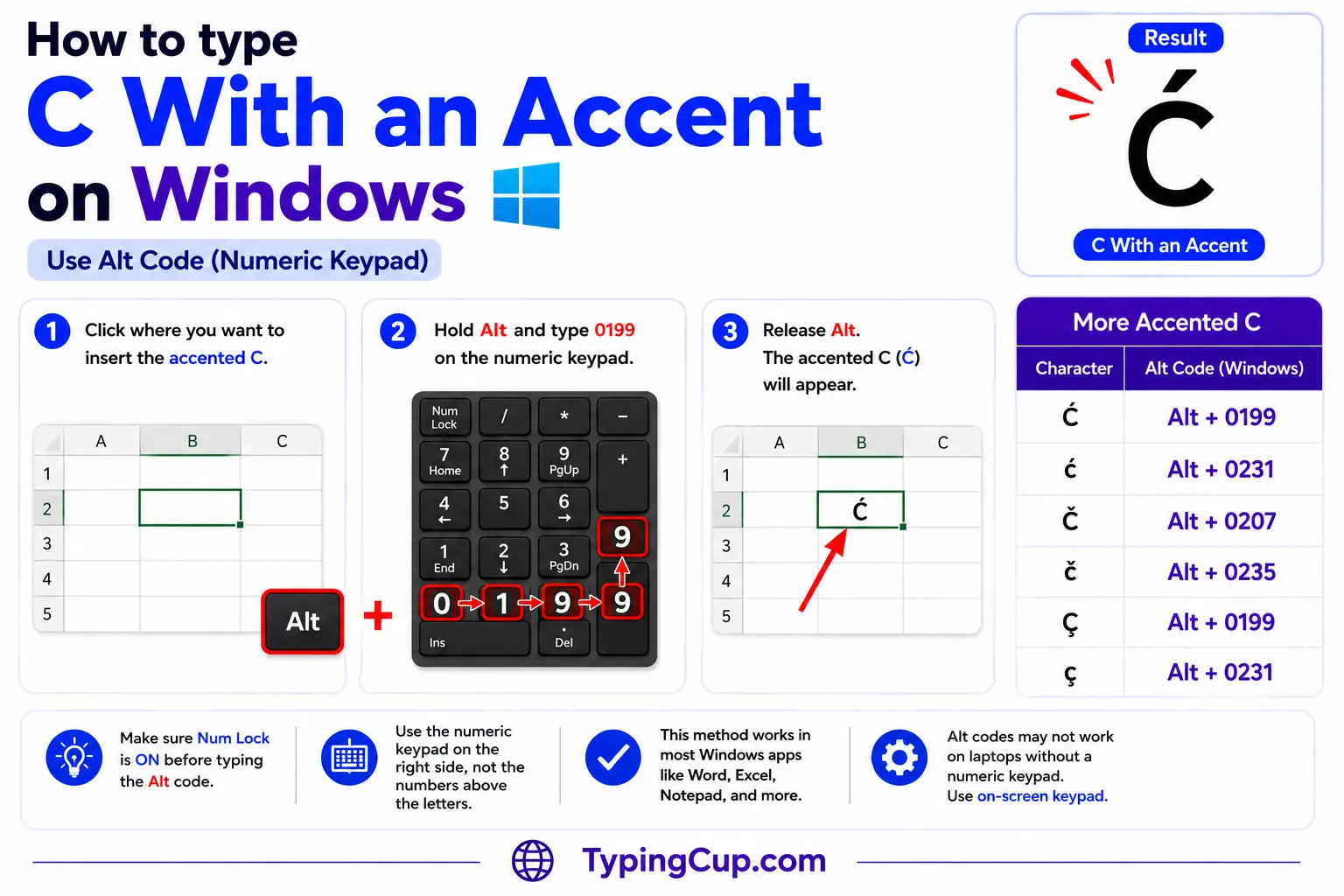
For ç, the Alt code is quickest: turn on Num Lock, hold Alt, and type 0231 for ç or 0199 for Ç on the numeric keypad. On the US-International layout, the right Alt (AltGr) plus c also gives ç directly.
The other accented c’s have no Alt code; they sit past the 255 limit. In Word, type the hex code and press Alt + X, like 010D then Alt + X for č. Outside Word, use Windows + . or Character Map.
If you write French, Czech, or Polish regularly, add that keyboard under Settings, then Time & Language, and the letters get their own keys.
Mac
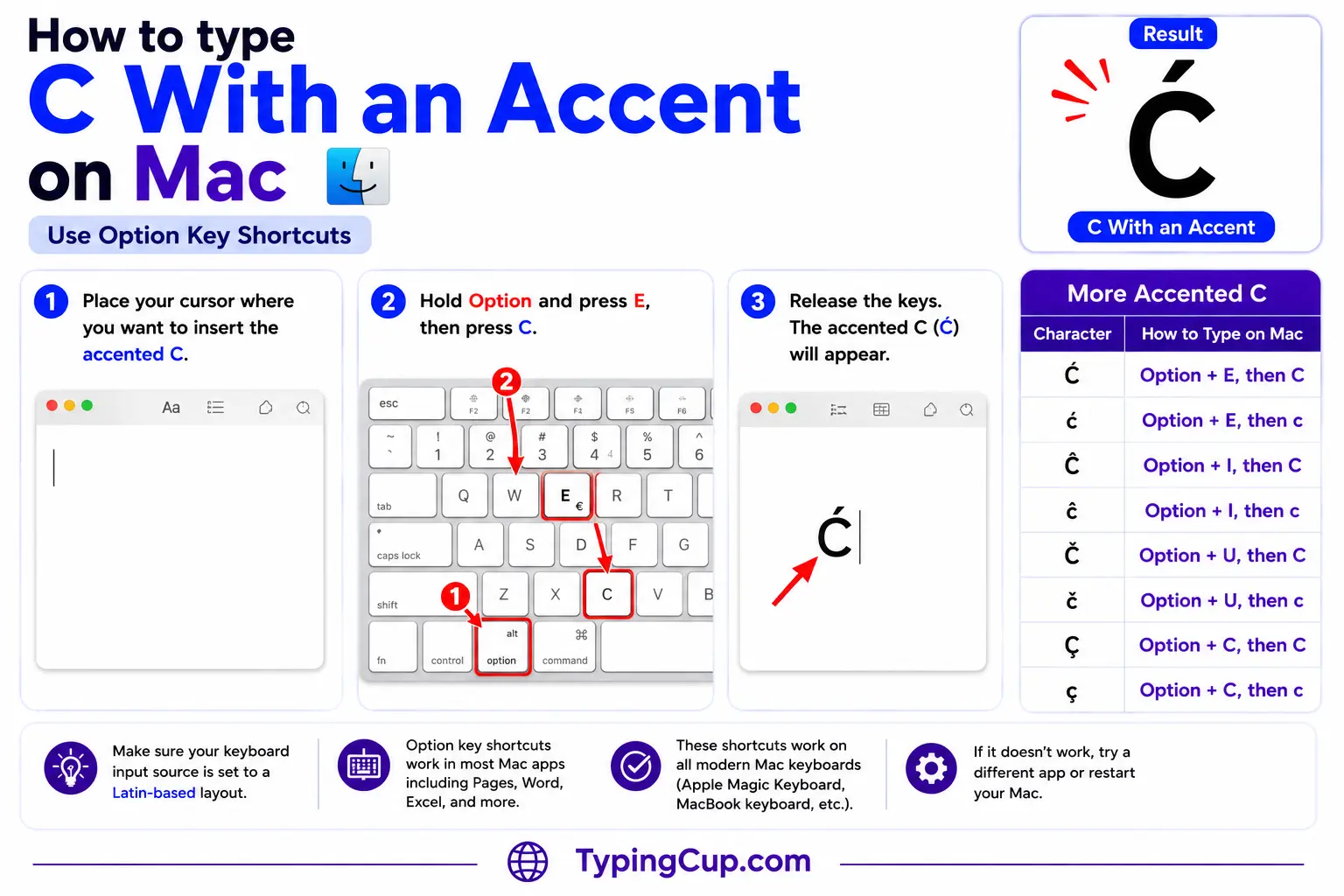
For ç, press Option + c directly; for Ç, Option + Shift + C. No dead-key dance needed.
The caron, acute, circumflex, and dot versions aren’t on the Option layout, so open the Character Viewer with Control + Command + Space, search the mark, and double-click the letter.
iPhone and Android
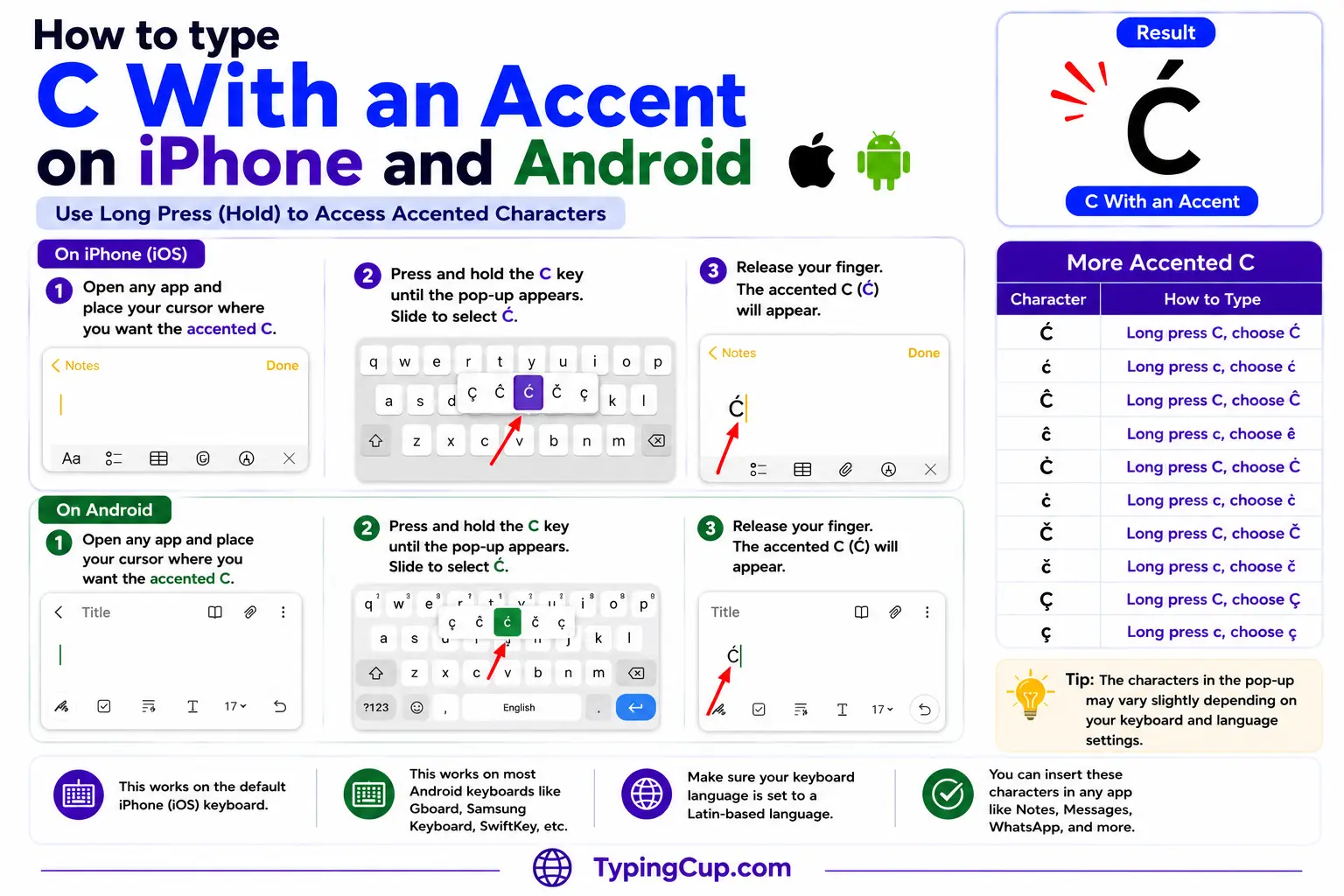
Press and hold the c key on the on-screen keyboard. The pop-up usually offers ç, and often ć and č as well. Slide onto the one you want and lift your finger.
If your keyboard doesn’t show the one you need, copy it from the grid above, or add a French, Czech, or Polish keyboard in your settings.
Microsoft Word
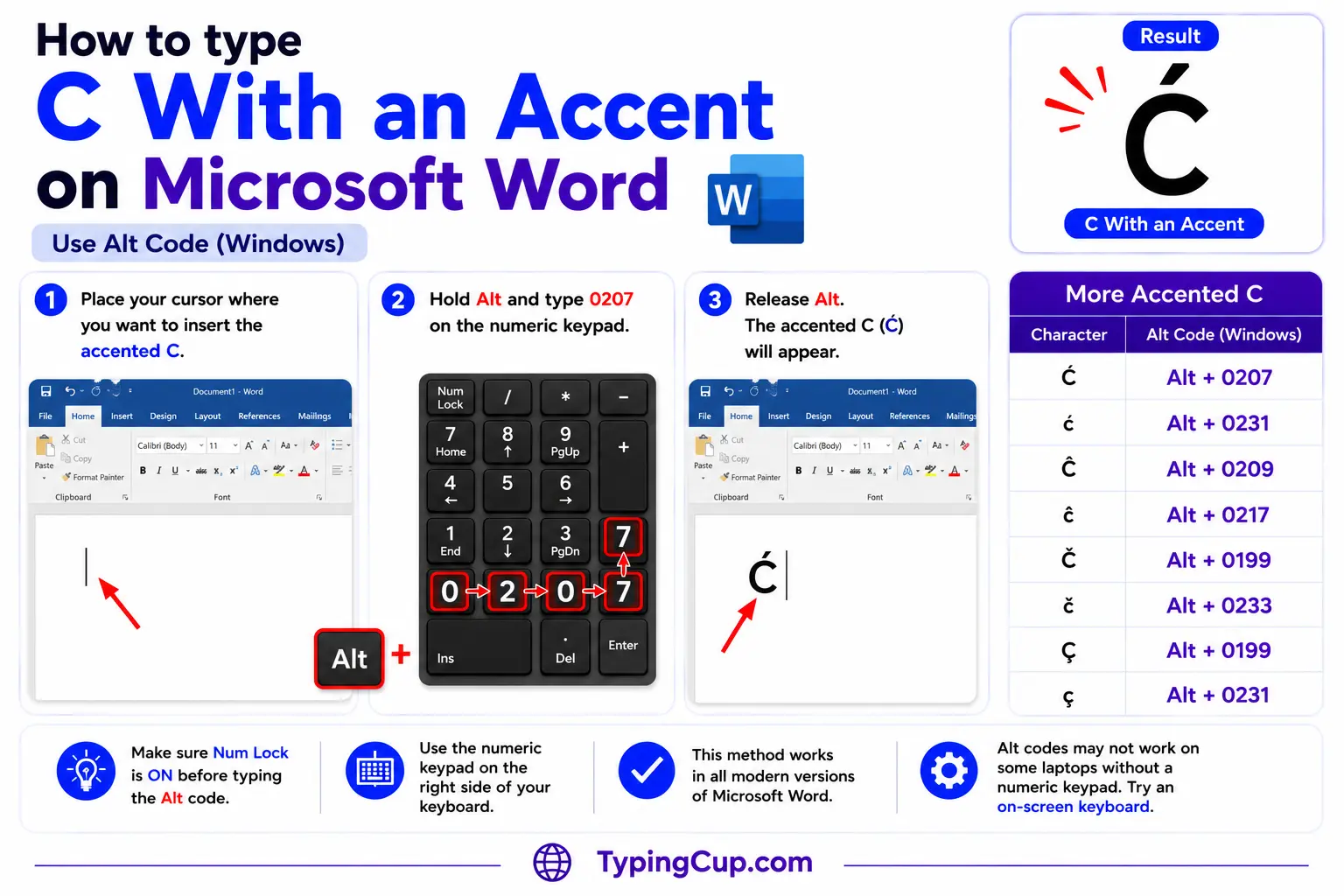
Word has a dedicated cedilla shortcut: press Ctrl + , (comma), let go, then press c for ç. Add Shift on the c for Ç.
For the caron and the rest, type the hex code and press Alt + X, like 010D then Alt + X for č, or 0107 for ć.
Linux
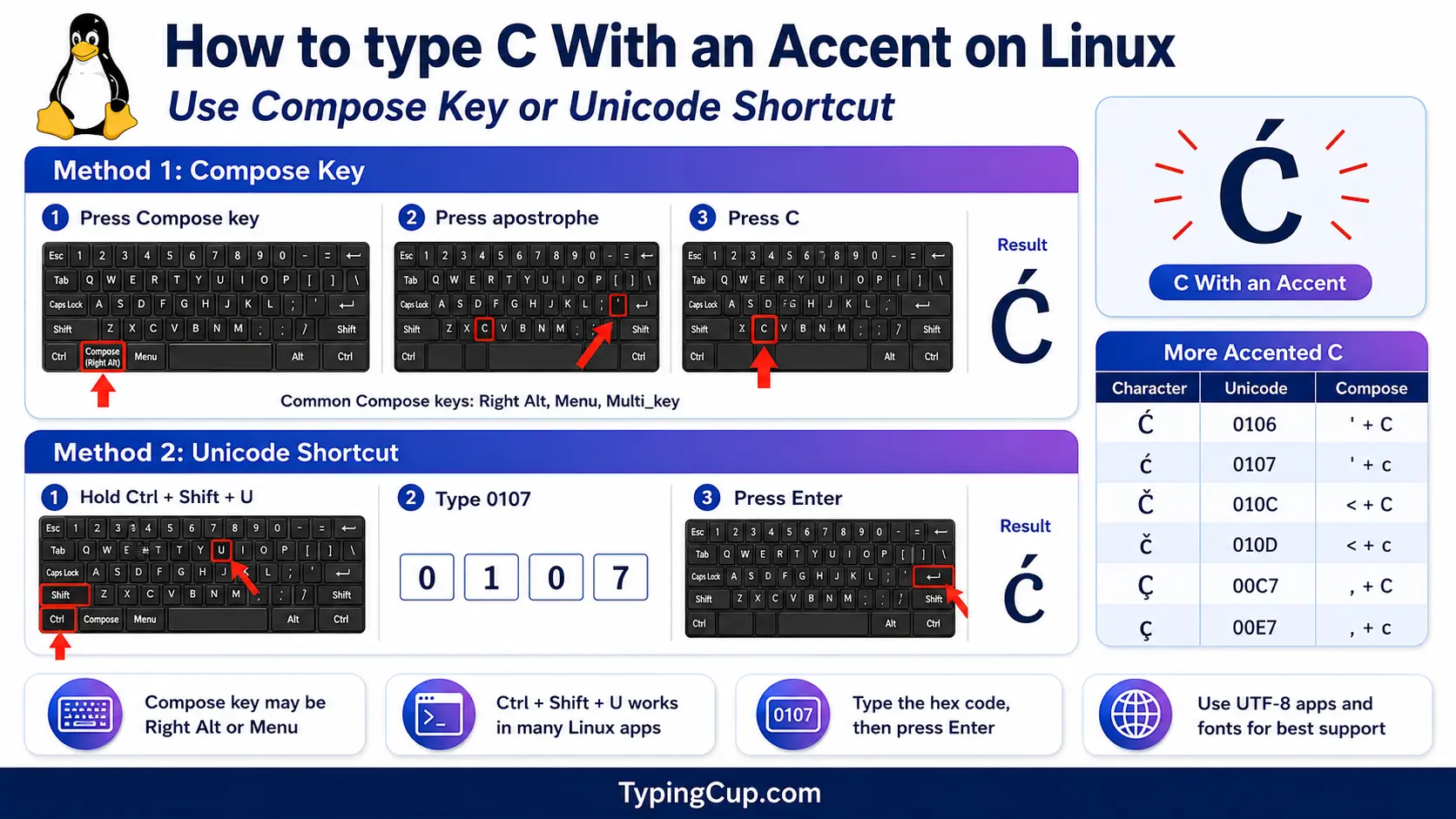
Press Ctrl + Shift + U, type the hex code, then press Enter: 00e7 for ç, 010d for č. With a Compose key, ç is Compose, then , (comma), then c; č is Compose, then the < key, then c; ć is Compose, then ‘, then c.
Excel and Google Sheets
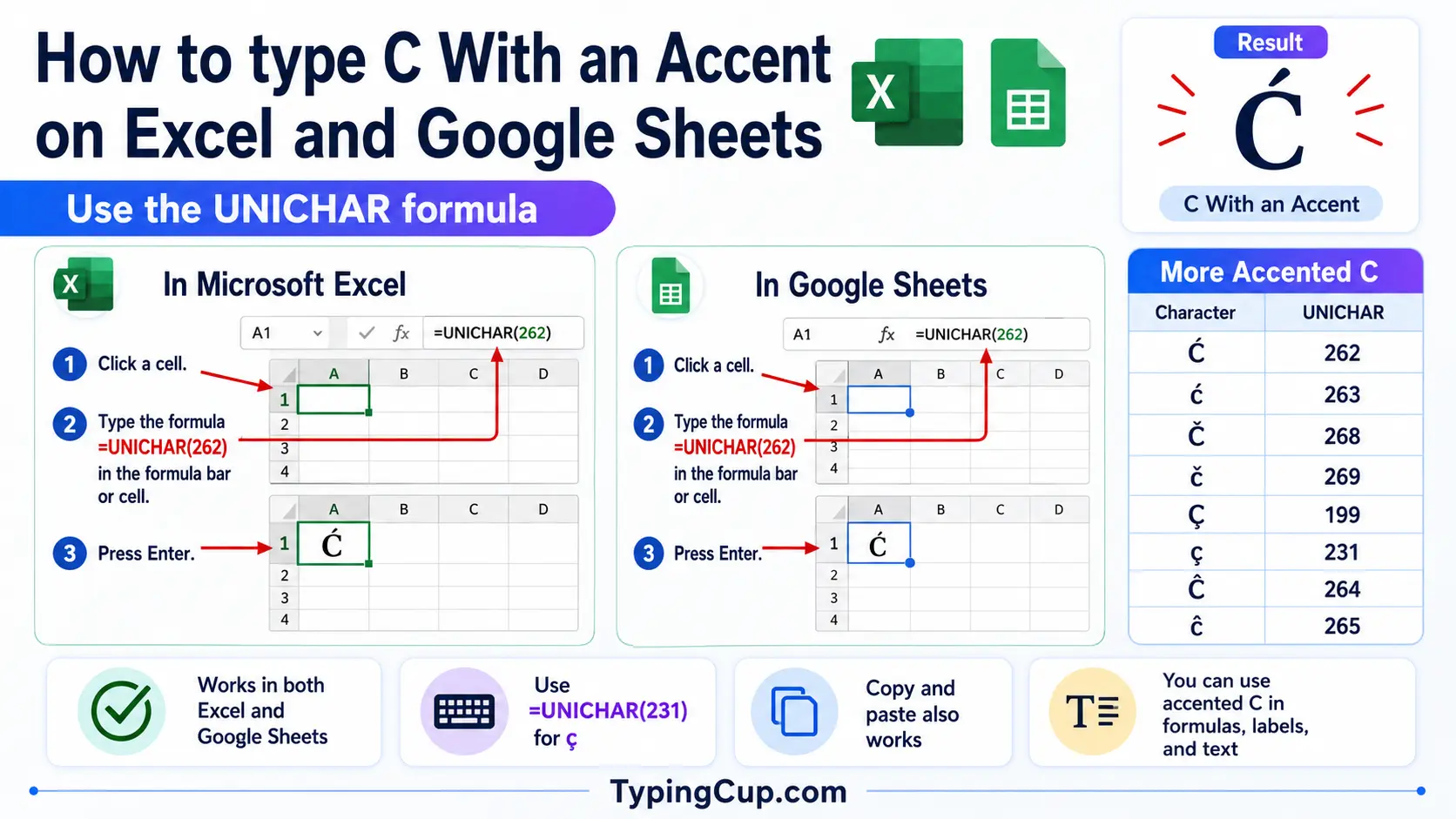
For ç, use Alt + 0231 on the keypad or =UNICHAR(231). For the others, the UNICHAR formula does it: =UNICHAR(269) returns č, =UNICHAR(263) returns ć. The same works in Google Sheets.
Google Docs
Open Insert, then Special characters, and type “c with cedilla” or “c with caron” in the search box, or draw the shape and pick the letter. On a Mac, Option + c for ç works directly inside Docs.
The other accented c’s (ć, č, ĉ, ċ)
None of these has a Windows Alt code; they sit past the 255 limit. Use the click-to-copy grid above, Character Map on Windows, the Character Viewer on Mac, or Word’s hex-then-Alt + X.
If you write Czech, Polish, or Croatian regularly, the real fix is to add that keyboard, where č and ć get their own keys.
Copy-paste HTML codes
Only the cedilla c’s have named HTML entities; the caron and the rest are numeric only. Click a cell and copy.
| Character | Named entity | Numeric entity |
|---|---|---|
| ç | ç | ç |
| ć | — (none) | ć |
| č | — (none) | č |
| ĉ | — (none) | ĉ |
| ċ | — (none) | ċ |
| Ç | Ç | Ç |
| Ć | — (none) | Ć |
| Č | — (none) | Č |
| Ĉ | — (none) | Ĉ |
| Ċ | — (none) | Ċ |
In a CSS content value, use the escaped code point, like \00e7 for ç. Serve the page as UTF-8 so the characters hold wherever they land.
For every other accented letter, the full letters-with-accents list has the copy boxes and codes. The matching “sh” consonants like š and ś are in the s with accent guide.
Troubleshooting
“Alt + 0231 just beeps or does nothing.”
Usually Num Lock is off, you’re on the top-row numbers instead of the keypad, or the laptop has no keypad. Turn Num Lock on and use the keypad. No keypad? Use the copy grid, US-International (AltGr + c), or Windows + .
“There’s no Alt code for č or ć.”
Correct. Those sit above the Alt-code limit of 255. Use the click-to-copy grid above, Word’s hex then Alt + X, Character Map, or a language keyboard.
“Is this ç, č, or ć?”
Look closely. A tail hanging under the c is the cedilla (ç). A small v on top is the caron (č). A stroke leaning right on top is the acute (ć). Three different letters.
“It pastes as a box or a question mark.”
The other program is using a non-Unicode encoding that doesn’t include the letter. Save or paste as UTF-8 and it will hold.
FAQ
What sound does ç make?
In French and Portuguese it softens a c to an “s,” as in façade. In Turkish, the same letter is a “ch,” as in çay. The tail is called a cedilla.
How do I type ç on Windows?
Hold Alt and type 0231 on the numeric keypad (0199 for Ç). On the US-International layout, the right Alt plus c also gives ç. Or click it in the grid above.
What’s the difference between č and ć?
The mark and the sound. č has a caron and is the standard “ch” of Czech and transliteration; ć has an acute and is a softer Polish and Croatian “ch.” They’re separate letters.
Do č, ć, ĉ, and ċ have Windows Alt codes?
No. Only ç does (Alt + 0231). The rest sit past the Alt-code limit of 255, so use the copy grid, Word’s hex then Alt + X, Character Map, or a language keyboard.
What’s the fastest way to type ç?
On a Mac, Option + c. On Windows, Alt + 0231 or AltGr + c on the US-International layout. On a phone, long-press the c. For a one-off, click it in the grid above.
