
O With an Accent: How to Type ó, ò, ô, õ, ö, ø on Any Device
The letter o takes a whole range of marks, from the everyday ó to the Scandinavian ø and the Hungarian ő. This page has the set: ó (acute), ò (grave), ô (circumflex), õ (tilde), ö (diaeresis), ø (stroke), ō (macron), and ő (double acute), in lowercase and capitals.
ó and its Latin-1 neighbours are a quick keystroke on any device. The macron ō and double-acute ő sit outside that range and have no Alt code, so for those the click-to-copy grid below is the fastest way in.
Below you’ll find a one-click copy grid, a full code table, ready-made HTML entities, and a plain note on what each mark does.
In a hurry?
- Copy it: click any letter in the grid below.
- On a phone: press and hold the o key, then slide to the accent you want.
- On Windows: hold Alt and type 0243 for ó (0211 for Ó).
- On a Mac: press Option + e, let go, then press o, for ó.
- In Word: press Ctrl + ‘ (the apostrophe), then o.
Click to copy: o with an accent
Tap any letter and it is copied to your clipboard
Table of Contents
Copy and paste o with an accent
Every accented o, lowercase and capital, with the codes to type each one. Use the grid above for one-click copying; this table is the reference for typing them yourself.
| Character | Name | Unicode | Windows | Mac |
|---|---|---|---|---|
| ó | o with acute | U+00F3 | Alt + 0243 | Option + e, o |
| ò | o with grave | U+00F2 | Alt + 0242 | Option + `, o |
| ô | o with circumflex | U+00F4 | Alt + 0244 | Option + i, o |
| õ | o with tilde | U+00F5 | Alt + 0245 | Option + n, o |
| ö | o with diaeresis | U+00F6 | Alt + 0246 | Option + u, o |
| ø | o with stroke | U+00F8 | Alt + 0248 | Option + o |
| ō | o with macron | U+014D | Word 014D + Alt + X | Character Viewer |
| ő | o with double acute | U+0151 | Word 0151 + Alt + X | Character Viewer |
| Ó | O with acute | U+00D3 | Alt + 0211 | Option + e, Shift + O |
| Ò | O with grave | U+00D2 | Alt + 0210 | Option + `, Shift + O |
| Ô | O with circumflex | U+00D4 | Alt + 0212 | Option + i, Shift + O |
| Õ | O with tilde | U+00D5 | Alt + 0213 | Option + n, Shift + O |
| Ö | O with diaeresis | U+00D6 | Alt + 0214 | Option + u, Shift + O |
| Ø | O with stroke | U+00D8 | Alt + 0216 | Option + Shift + O |
| Ō | O with macron | U+014C | Word 014C + Alt + X | Character Viewer |
| Ő | O with double acute | U+0150 | Word 0150 + Alt + X | Character Viewer |
What the marks on o mean
The acute and grave are a Romance-language pair. In Spanish, ó marks the stressed syllable, as in adiós. In Italian, ò is an open o at the end of a word, as in però (“but”). The circumflex ô often marks an s that dropped out of an older spelling, the way hôtel came from hostel.
The tilde õ is a nasal o, the sound in Portuguese São Paulo and pão (“bread”). The diaeresis ö is the German umlaut, the same two dots covered in the umlaut letters guide. And ø isn’t really an o with a mark at all: in Danish and Norwegian it’s a separate letter, filed near the end of the alphabet, that just happens to sound like ö.
The last two belong to specific languages. ō with a macron is a long o, the mark that keeps Tōkyō from being read with short vowels. ő with a double acute is Hungarian’s long ö, as in nő (“woman”).
| Letter | Language | What it does | Example |
|---|---|---|---|
| ó | Spanish, Polish | marks stress or a closed o | adiós |
| ò | Italian | an open o | però (“but”) |
| ô | French, Portuguese | a closed o; often a dropped s | hôtel |
| õ | Portuguese, Estonian | a nasal o | São Paulo |
| ö | German, Turkish | a fronted vowel (umlaut) | schön (“nice”) |
| ø | Danish, Norwegian | a separate letter, like ö | søn (“son”) |
| ō | Japanese romaji, Māori | a long o | Tōkyō |
| ő | Hungarian | a long ö | nő (“woman”) |
How to type ó on any device
Most accented o’s sit in the old Latin range, so they’re easy to reach. The macron and double-acute versions are the harder cases, covered at the end.
Windows
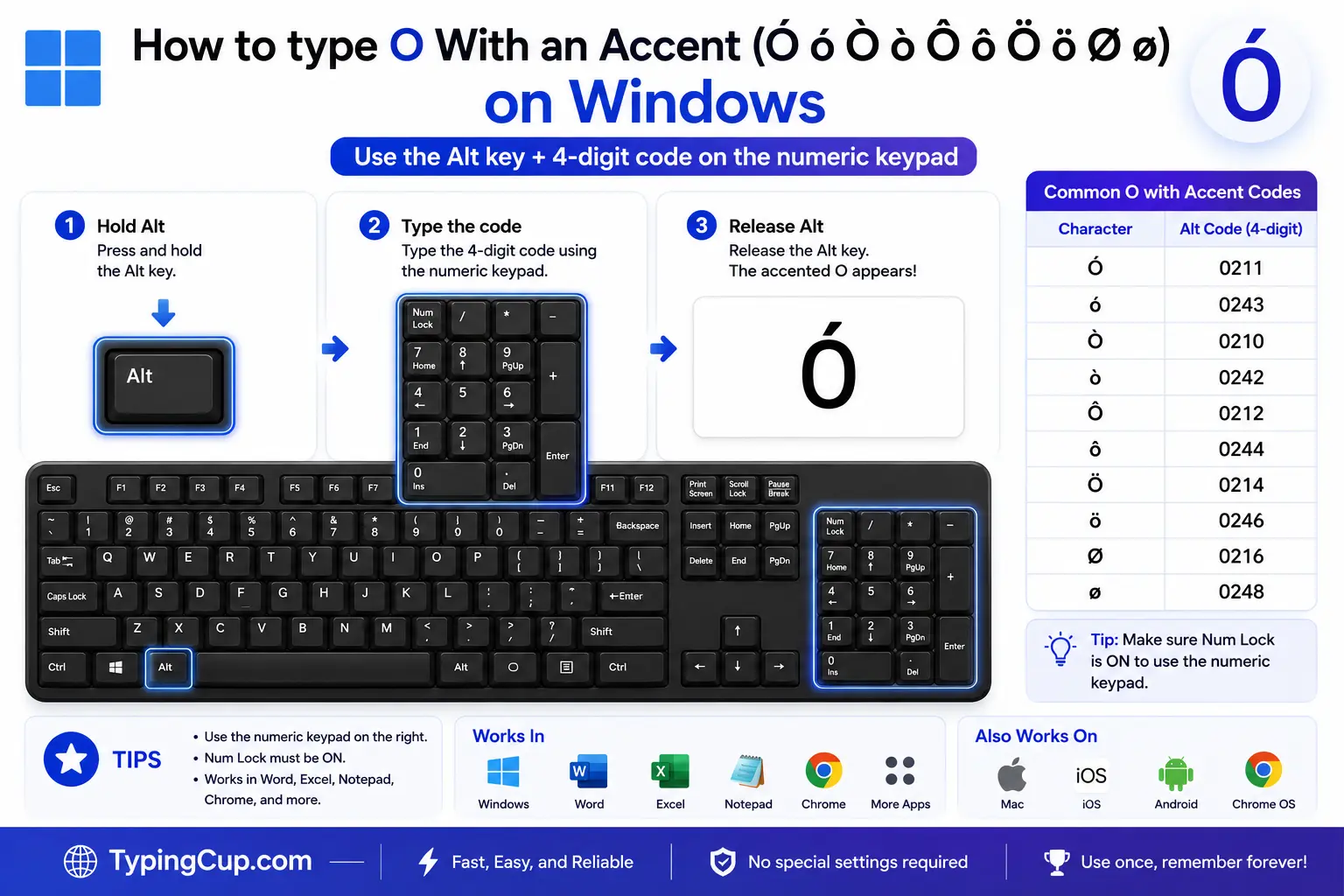
The direct way is the Alt code. Turn on Num Lock, hold Alt, and type 0243 on the numeric keypad for ó, or 0211 for Ó. The grave, circumflex, tilde, diaeresis, and stroke all have their own codes in the table above. The number row along the top won’t work; it has to be the keypad.
For regular use, the US-International layout is smoother (Settings, then Time & Language, then keyboard options). With it on, type an apostrophe then o for ó, a tilde then o for õ, and a quote then o for ö.
If you’d rather not switch layouts, press Windows + . to open the symbol panel, click the Ω tab, and pick the letter from the Latin set.
Mac
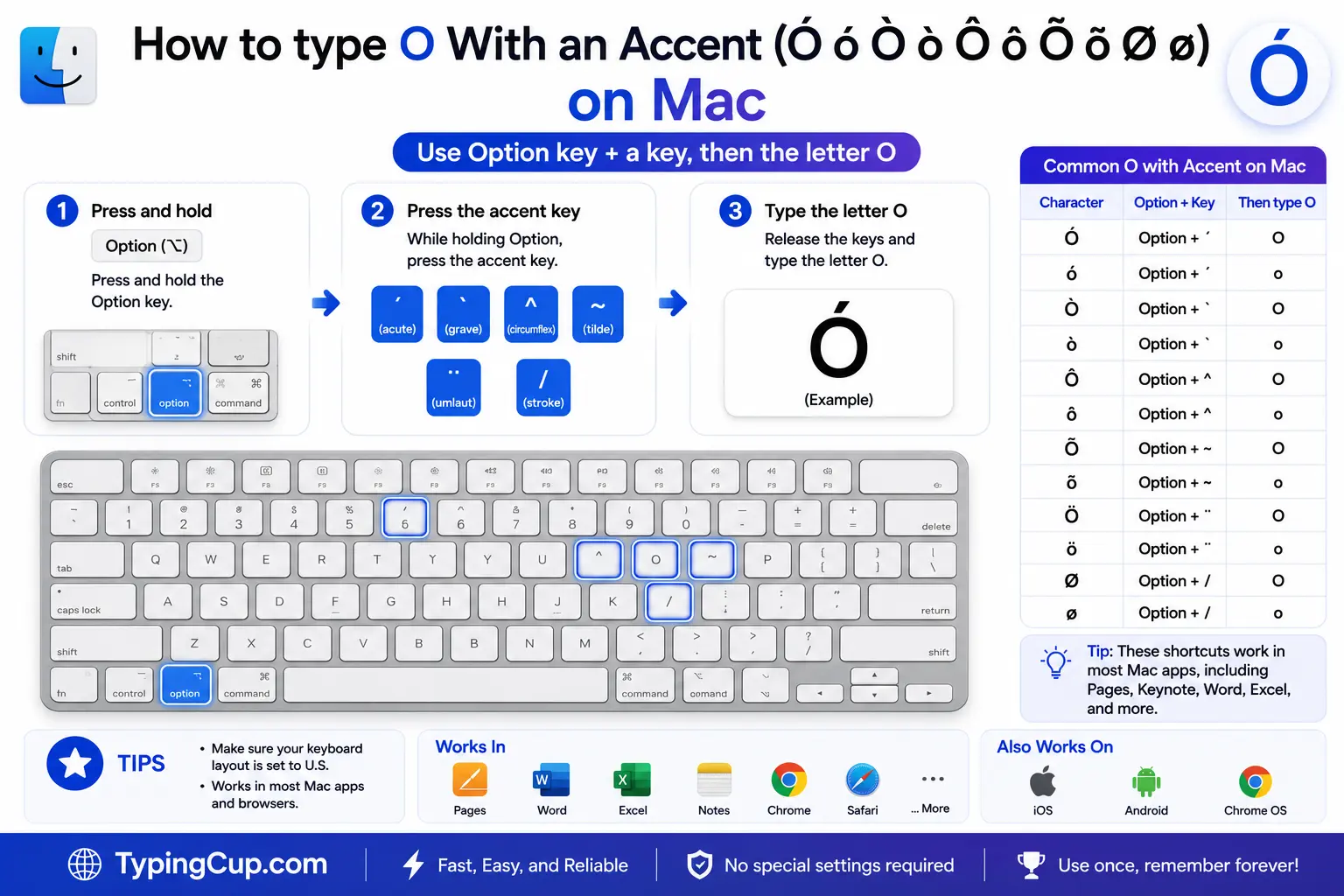
Press Option + e together and let go, then press o for ó. The other accents load the same way: Option + ` then o for ò, Option + i then o for ô, Option + n then o for õ, and Option + u then o for ö.
Two of them are even quicker: Option + o types ø directly, and Option + Shift + O gives Ø. You can also hold the o key down and pick from the pop-up menu.
iPhone and Android
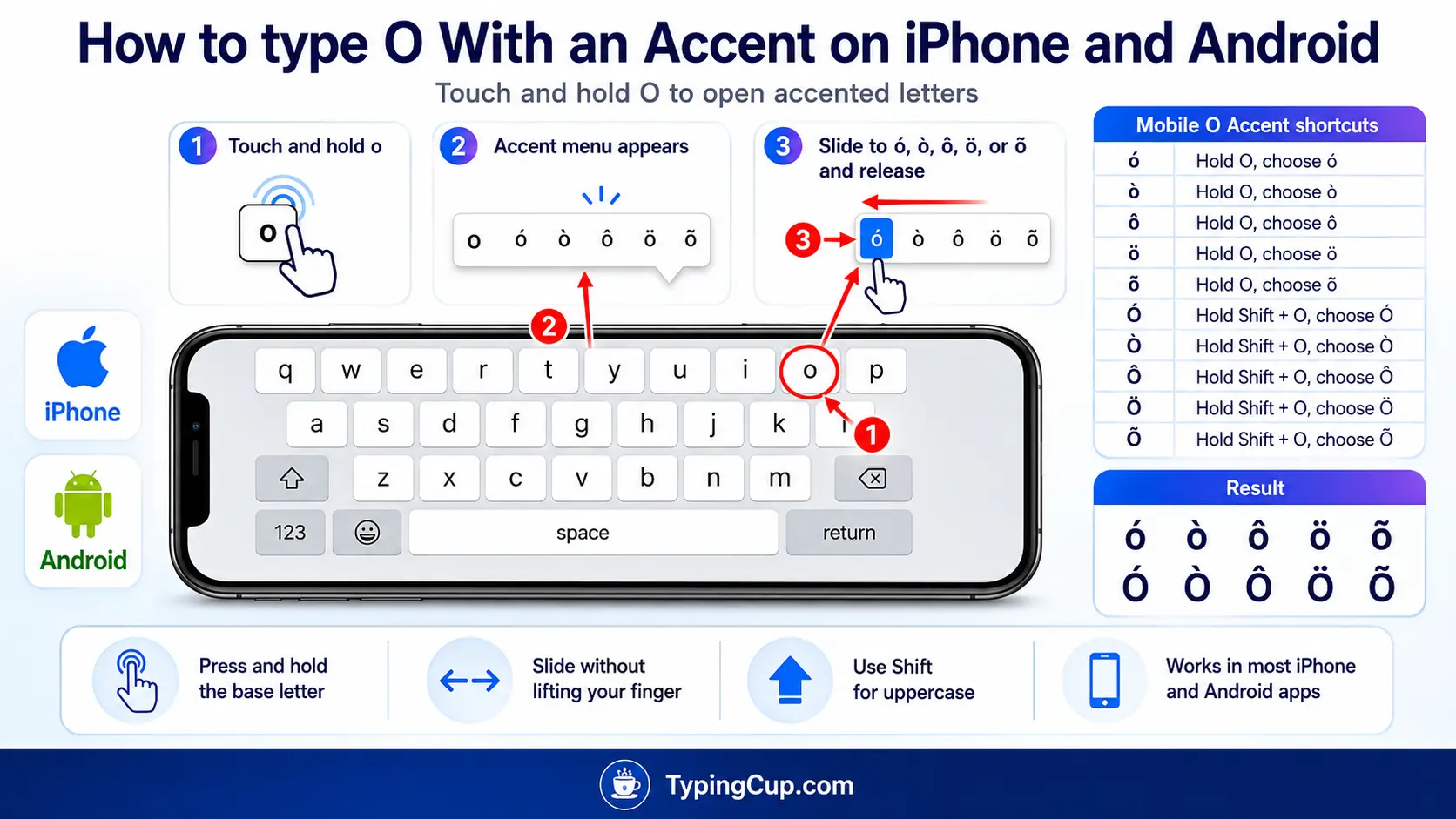
Press and hold the o key on the on-screen keyboard. A row of accented options appears above your finger, ó, ô, õ, ö, and ø among them. Slide onto the one you want and lift your finger.
It works the same in nearly every app, with nothing to set up first.
Microsoft Word
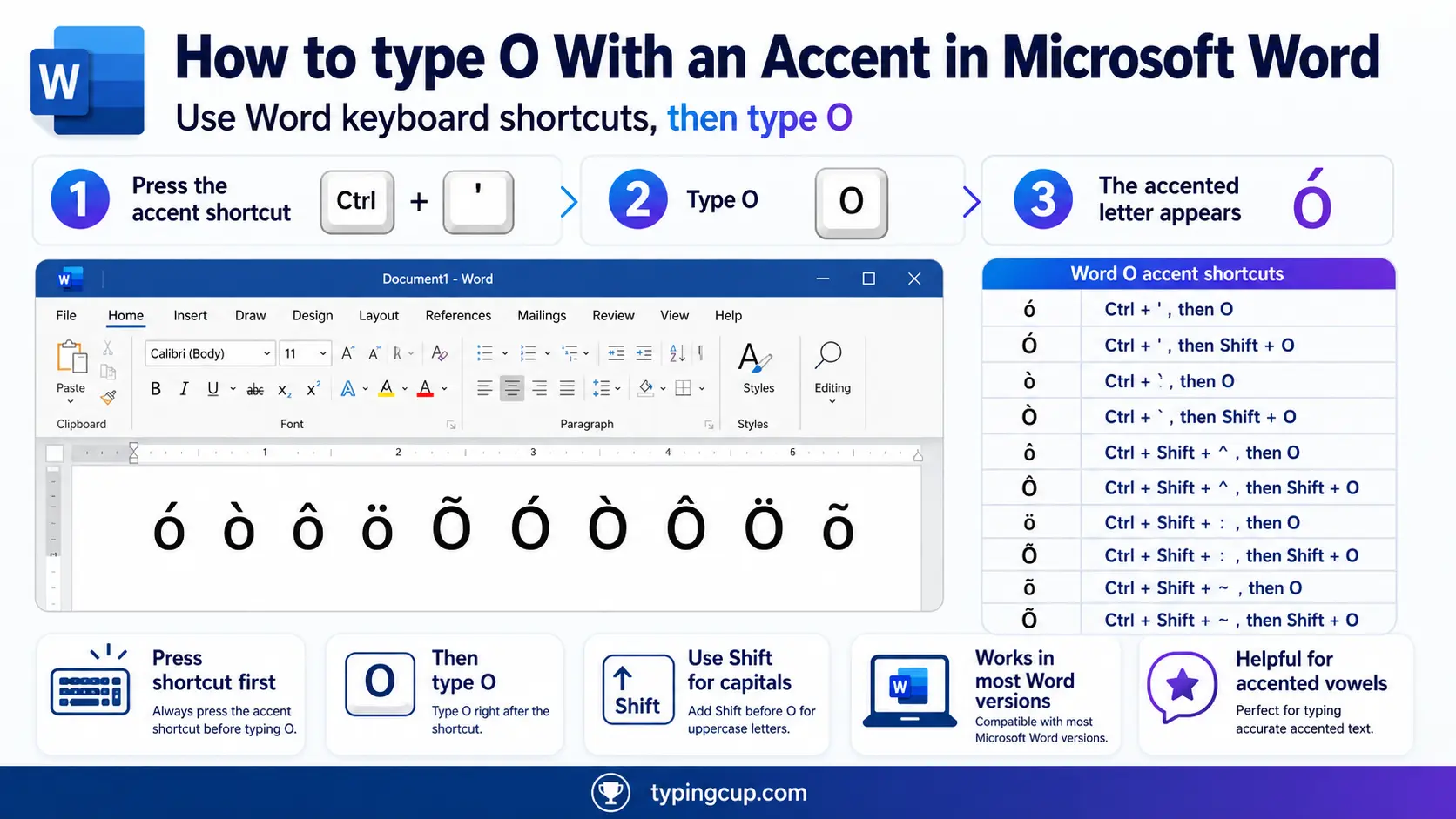
Word has its own shortcuts. Press Ctrl + ‘ then o for ó, Ctrl + ` then o for ò, Ctrl + Shift + ^ then o for ô, Ctrl + Shift + ~ then o for õ, and Ctrl + Shift + : then o for ö. Add Shift on the o for a capital.
For the accents Word’s shortcuts skip, type the hex code and press Alt + X, like 014D then Alt + X for ō.
Linux
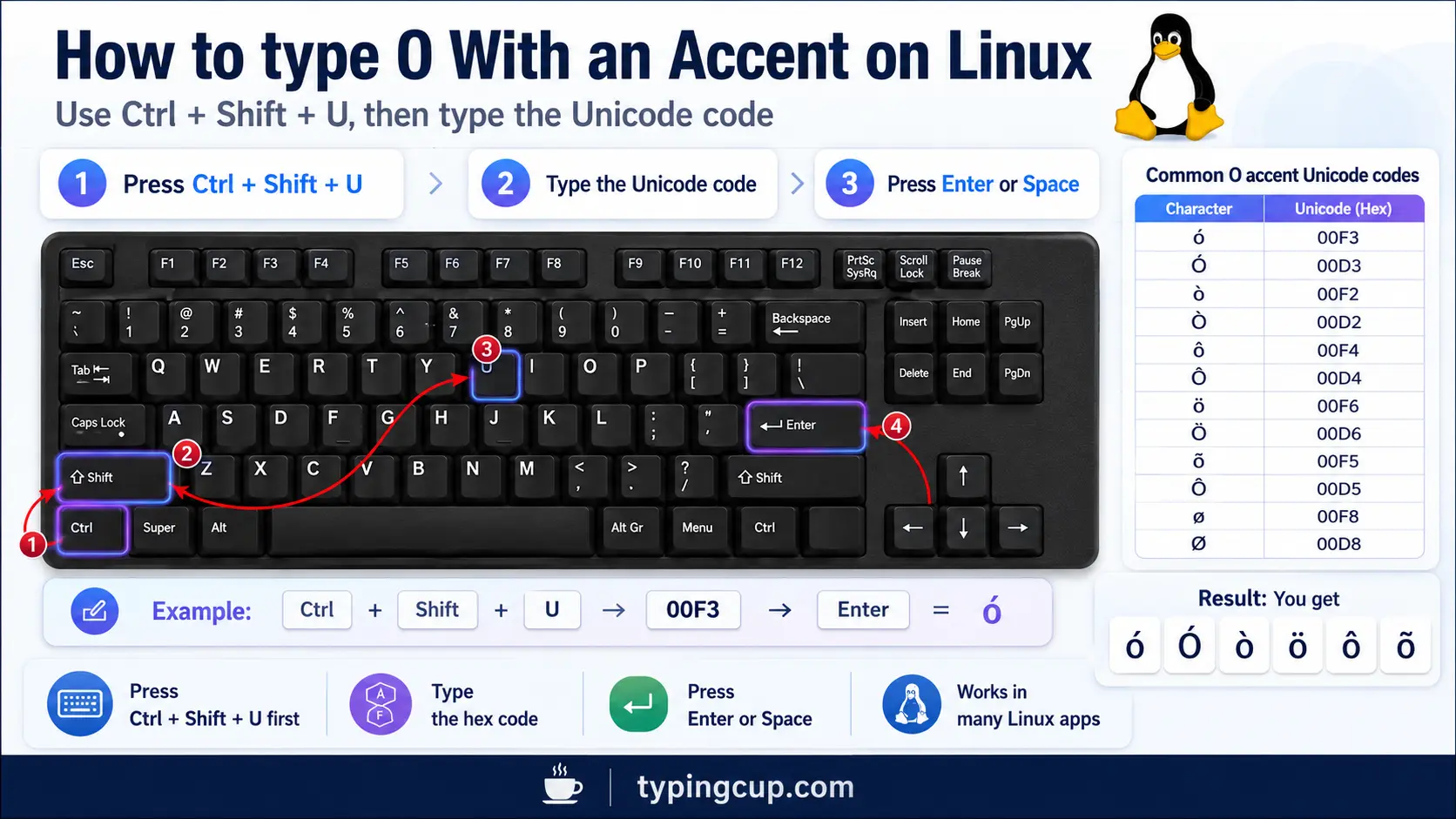
Press Ctrl + Shift + U, type the hex code, then press Enter: 00f3 for ó, 014d for ō. With a Compose key, it’s Compose, then ‘, then o for ó.
Excel and Google Sheets
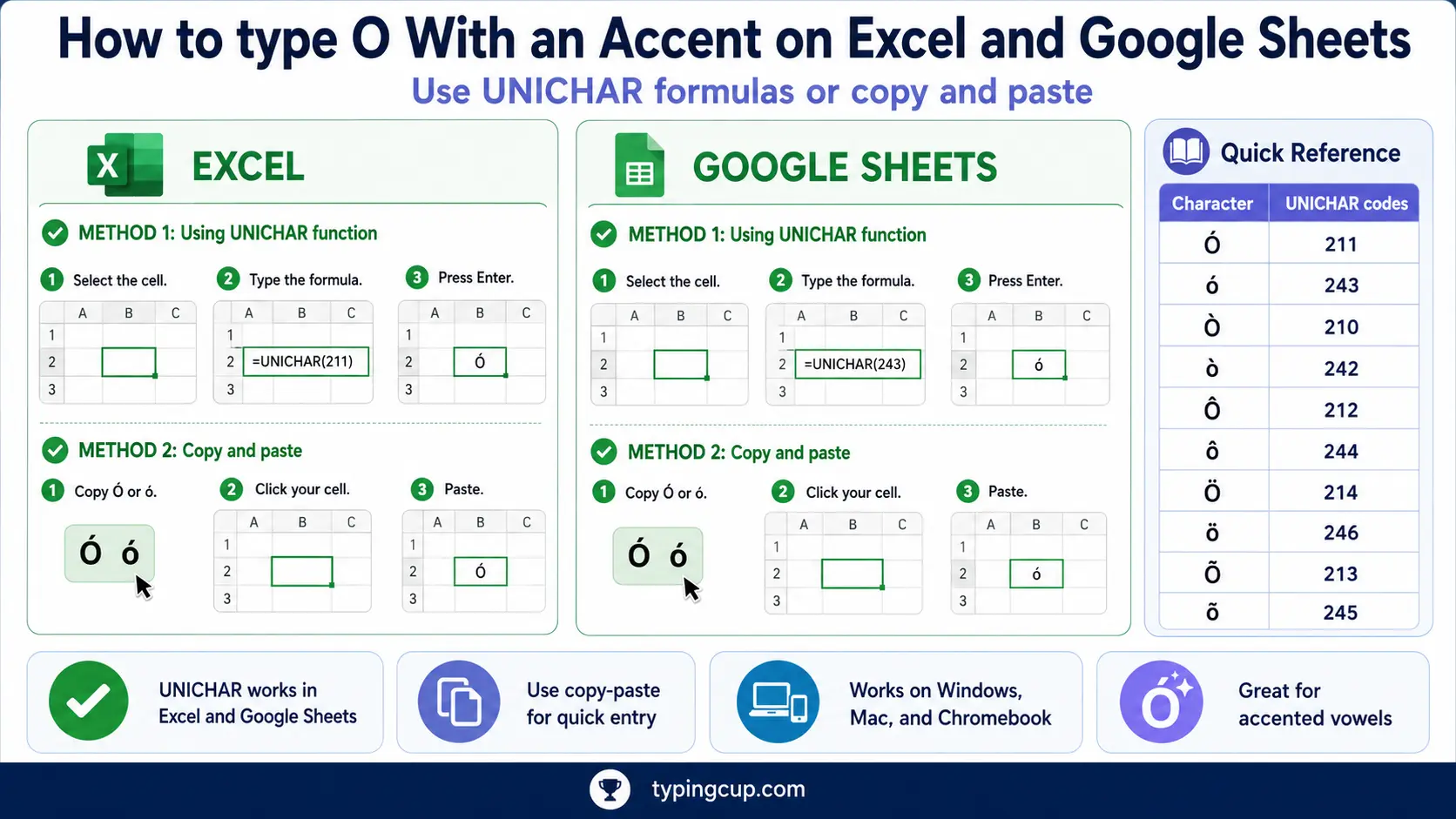
Use the Windows Alt code on the keypad, or the UNICHAR formula: =UNICHAR(243) returns ó and =UNICHAR(211) returns Ó. For the others, =UNICHAR(333) gives ō and =UNICHAR(337) gives ő. The same works in Google Sheets.
The macron and double-acute o’s (ō, ő)
Neither has a Windows Alt code; they sit past the 255 limit. Use the click-to-copy grid above, Character Map on Windows, the Character Viewer on Mac, or Word’s hex-then-Alt + X.
If you write Japanese romaji or Hungarian regularly, add the matching keyboard or input method and the letter gets its own key.
Copy-paste HTML codes
Most accented o’s have memorable named entities, the vowel plus the accent name. The macron and double-acute versions are numeric only. Click a cell and copy.
| Character | Named entity | Numeric entity |
|---|---|---|
| ó | ó | ó |
| ò | ò | ò |
| ô | ô | ô |
| õ | õ | õ |
| ö | ö | ö |
| ø | ø | ø |
| ō | — (none) | ō |
| ő | — (none) | ő |
| Ó | Ó | Ó |
| Ö | Ö | Ö |
| Ø | Ø | Ø |
| Ő | — (none) | Ő |
In a CSS content value, use the escaped code point, like \00f3 for ó. Serve the page as UTF-8 so the characters hold wherever they land.
For every other accented letter, the full letters-with-accents list has the copy boxes and codes. If it’s the Spanish set you’re after, the Spanish accent marks guide covers á, é, í, ó, ú, ü, and ñ together.
Troubleshooting
“Alt + 0243 just beeps or does nothing.”
Usually Num Lock is off, you’re on the top-row numbers instead of the keypad, or the laptop has no keypad. Turn Num Lock on and use the keypad. No keypad? Use the copy grid, the US-International layout, or Windows + .
“I get a floating accent, like ´o.”
The accent and the o were pressed too far apart, or with a space between them. On US-International and the Mac, the accent comes first and the o lands immediately after, nothing in between.
“Alt codes won’t give me ō or ő.”
They can’t. Those letters are above the Alt-code limit of 255. Use the click-to-copy grid above, Character Map, or Word’s hex then Alt + X.
“Is this ø or ö?”
ø has a straight slash through it and is a Scandinavian letter; ö has two dots and is the German umlaut. They look similar at small sizes but they’re different characters.
“It pastes as a box or a question mark.”
The other program is using an older text encoding. Save or paste as UTF-8 and the character will survive.
FAQ
What’s the difference between ó and ò?
The direction of the mark. ó has an acute that leans right; ò has a grave that leans left. In Spanish ó marks stress; in Italian ò is an open o. They aren’t interchangeable.
How do I type ó on a US keyboard?
The smoothest way is the US-International layout: type an apostrophe, then o. Without it, use Alt + 0243 on the numeric keypad, or click ó in the copy grid above.
Is ø the same as ö?
No. ø is a separate letter in Danish and Norwegian, written with a slash. ö is the German umlaut, written with two dots. They sound similar but they’re different characters with different codes.
Do ō and ő have Windows Alt codes?
No. They sit past the Alt-code limit of 255. Use the copy grid, Character Map, Word’s hex then Alt + X, or the matching language keyboard.
What’s the fastest way to type ó?
On a phone or Mac, long-press or Option + e, o. On Windows, the US-International layout once it’s set up. For a one-off, click it in the grid above.
