
N With an Accent: How to Type ñ, ń, ň, ņ on Any Device
ñ is the n most people are here for: the Spanish n with a tilde, the little wave on top. But n takes several other marks too, and this page has them all: ñ (tilde), ń (acute), ň (caron), and ņ (cedilla), in both lowercase and capitals.
If you just need ñ, copy it from the box below, or use the quick shortcut that works on nearly every keyboard. The rarer accented n’s have no Alt code, so for those the copy box and a language keyboard do most of the work.
Below you’ll find every accented n to copy, the codes to type them, ready-made HTML entities, and a short note on what each mark actually does.
In a hurry?
- Copy it: grab ñ or any accented n from the box below.
- On a phone: press and hold the n key, then slide to ñ.
- On Windows: hold Alt and type 0241 for ñ (0209 for Ñ).
- On a Mac: press Option + n, let go, then press n again, for ñ.
- In Word: press Ctrl + Shift + ~, then n.
Copy and paste N with accent
Click any accented N to copy it instantly.
Alt + 0241
Alt + 0209
Word 0144 Alt+X
Word 0143 Alt+X
Word 0148 Alt+X
Word 0147 Alt+X
Word 0146 Alt+X
Word 0145 Alt+X
Specialist use
Specialist use
Specialist use
Copy and paste an accented n
Every common accented n, lowercase and capital. Highlight one to copy it. The code columns are there if you’d rather type the letter yourself.
| Character | Name | Unicode | Windows | Mac |
|---|---|---|---|---|
| ñ | n with tilde | U+00F1 | Alt + 0241 | Option + n, n |
| Ñ | N with tilde | U+00D1 | Alt + 0209 | Option + n, Shift + N |
| ń | n with acute | U+0144 | Word 0144 + Alt + X | Character Viewer |
| Ń | N with acute | U+0143 | Word 0143 + Alt + X | Character Viewer |
| ň | n with caron | U+0148 | Word 0148 + Alt + X | Character Viewer |
| Ň | N with caron | U+0147 | Word 0147 + Alt + X | Character Viewer |
| ņ | n with cedilla | U+0146 | Word 0146 + Alt + X | Character Viewer |
| Ņ | N with cedilla | U+0145 | Word 0145 + Alt + X | Character Viewer |
A few more accented n’s show up in specialist writing: ǹ (grave, used in Pinyin), plus ṅ (dot above) and ṇ (dot below) from Sanskrit transliteration. None of them has an Alt code, so a character map or the copy box is the way to get them.
Table of Contents
What the marks on n mean
The tilde on ñ began as a shortcut. Medieval scribes writing Latin saved space by putting a small n above another letter, and that little squiggle eventually settled over the n itself. In Spanish it grew into a letter in its own right, sitting between n and o in the alphabet and standing for the “ny” sound in español or mañana.
The other marks each point to a softer n. The acute in Polish ń and the caron in Czech and Slovak ň both stand for a palatal n, close to the “ny” in “canyon.” The comma under Latvian ņ does much the same. Different mark, same underlying idea: a gentler n than the plain one. The caron, by the way, is the same mark you’ll meet on ǎ.
Because these are separate letters rather than decorations, dropping the mark changes the word. Spanish año (“year”) without its tilde turns into ano, which means something you did not intend, and that is exactly why teachers drill the tilde so hard.
| Letter | Language | What it is | Example |
|---|---|---|---|
| ñ | Spanish | the “ny” sound, a letter of its own | español |
| ñ | Filipino & Guaraní | borrowed from Spanish | niño |
| ń | Polish | a soft, palatal n | koń (“horse”) |
| ň | Czech & Slovak | a soft, palatal n | kůň (“horse”) |
| ņ | Latvian | a palatal n | saņemt (“to receive”) |
| ṅ / ṇ | Sanskrit romanisation | distinct nasal sounds | — |
How to type ñ on any device
ñ is easy to reach nearly everywhere, because it sits in the older Latin range that keyboards have always handled. The rarer accented n’s are the harder cases, and they come right after.
Windows
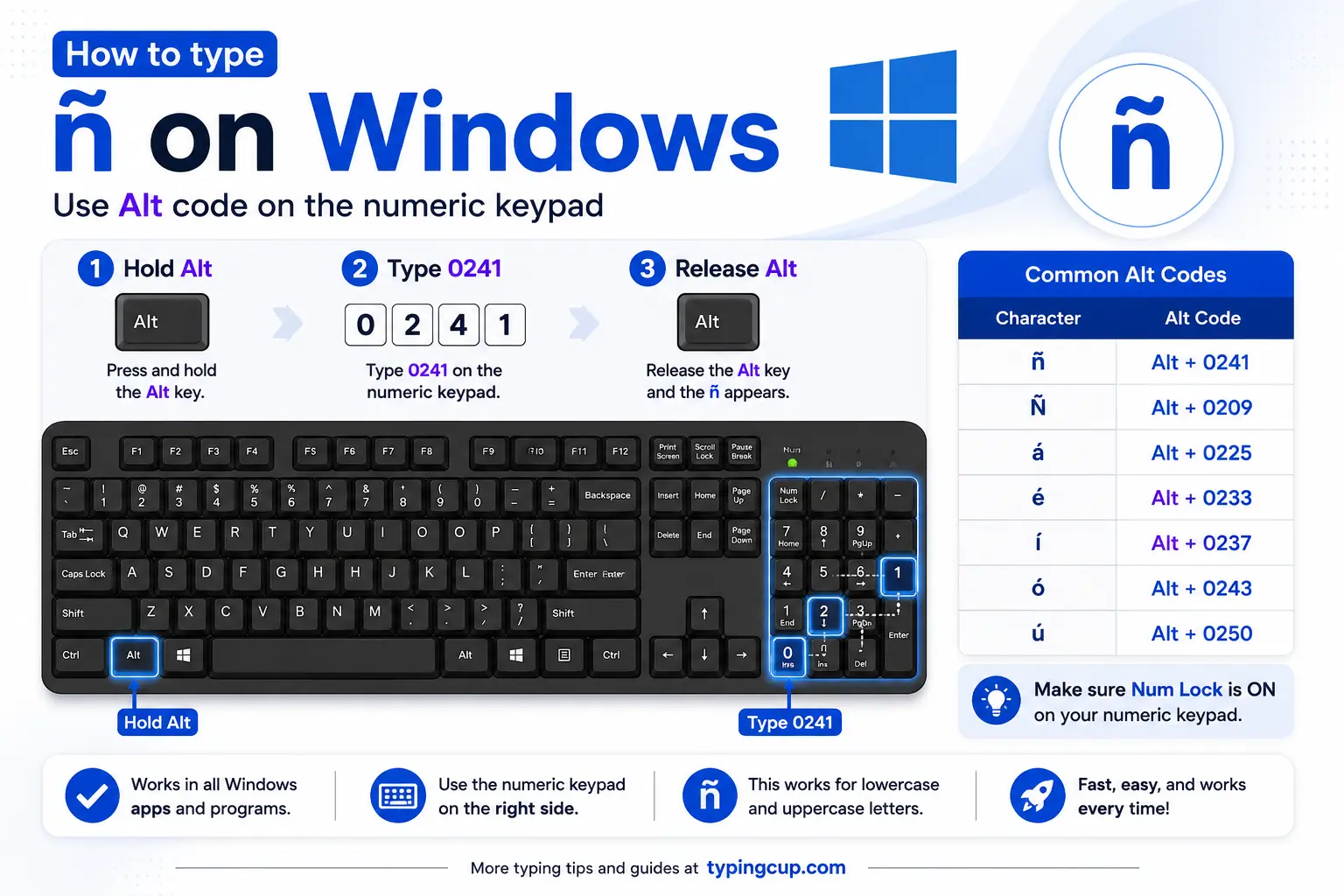
The direct way is the Alt code. Turn on Num Lock, hold Alt, and type 0241 on the numeric keypad for ñ, or 0209 for Ñ. The number row along the top won’t work; it has to be the keypad.
The smoother option for regular use is the US-International layout (Settings, then Time & Language, then keyboard options). With it on, type a ~ (tilde) and then n, and the two come out as ñ.
If you’d rather not change your layout, press Windows + . to open the symbol panel, click the Ω tab, and pick ñ from the Latin set.
Mac
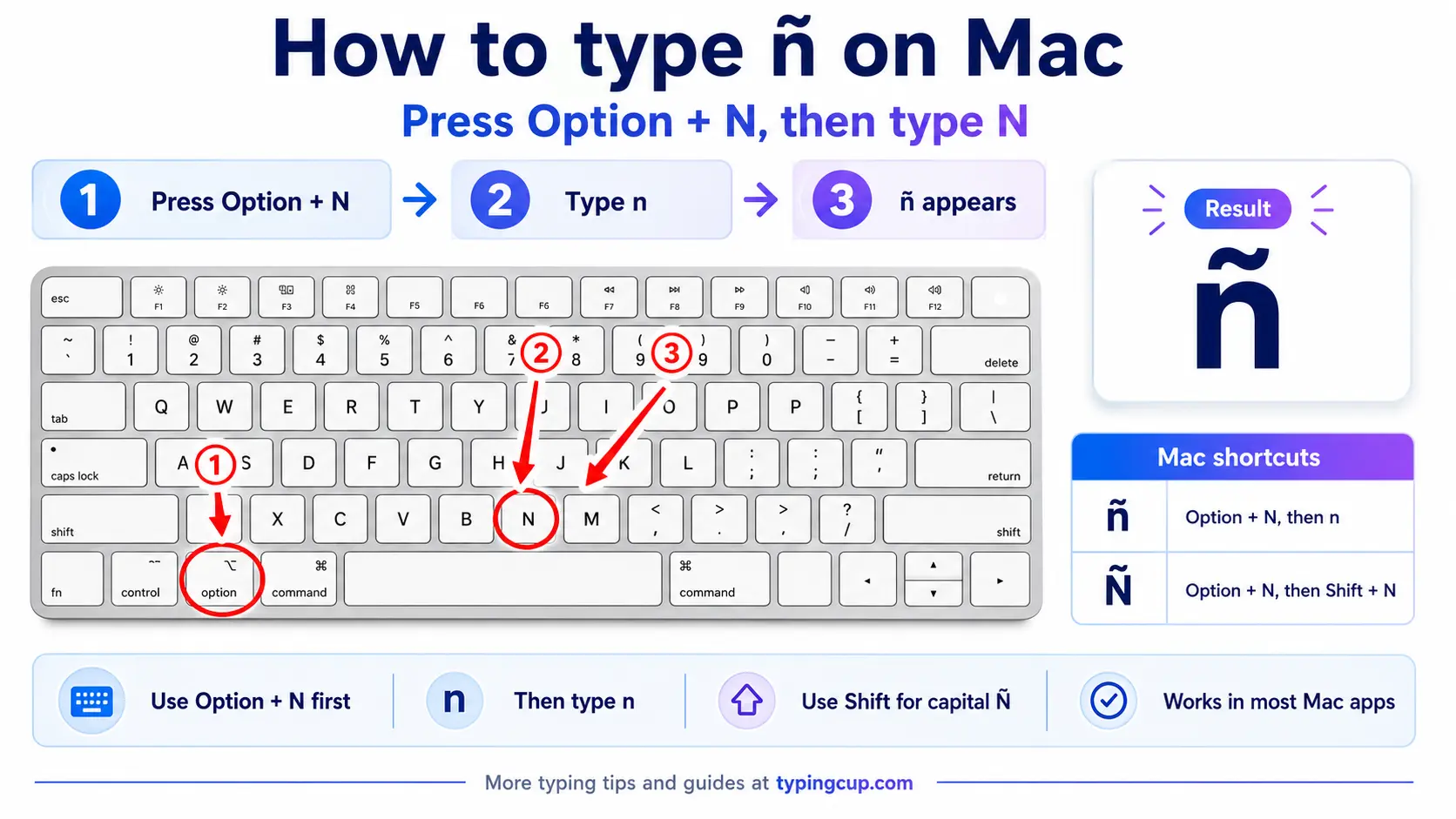
Press Option + n together and let go. Nothing shows yet, which catches people out the first time. Press n again and ñ appears. For the capital, it’s Option + n, then Shift + N.
You can also hold the n key down until a small menu appears and click ñ from there.
iPhone and Android
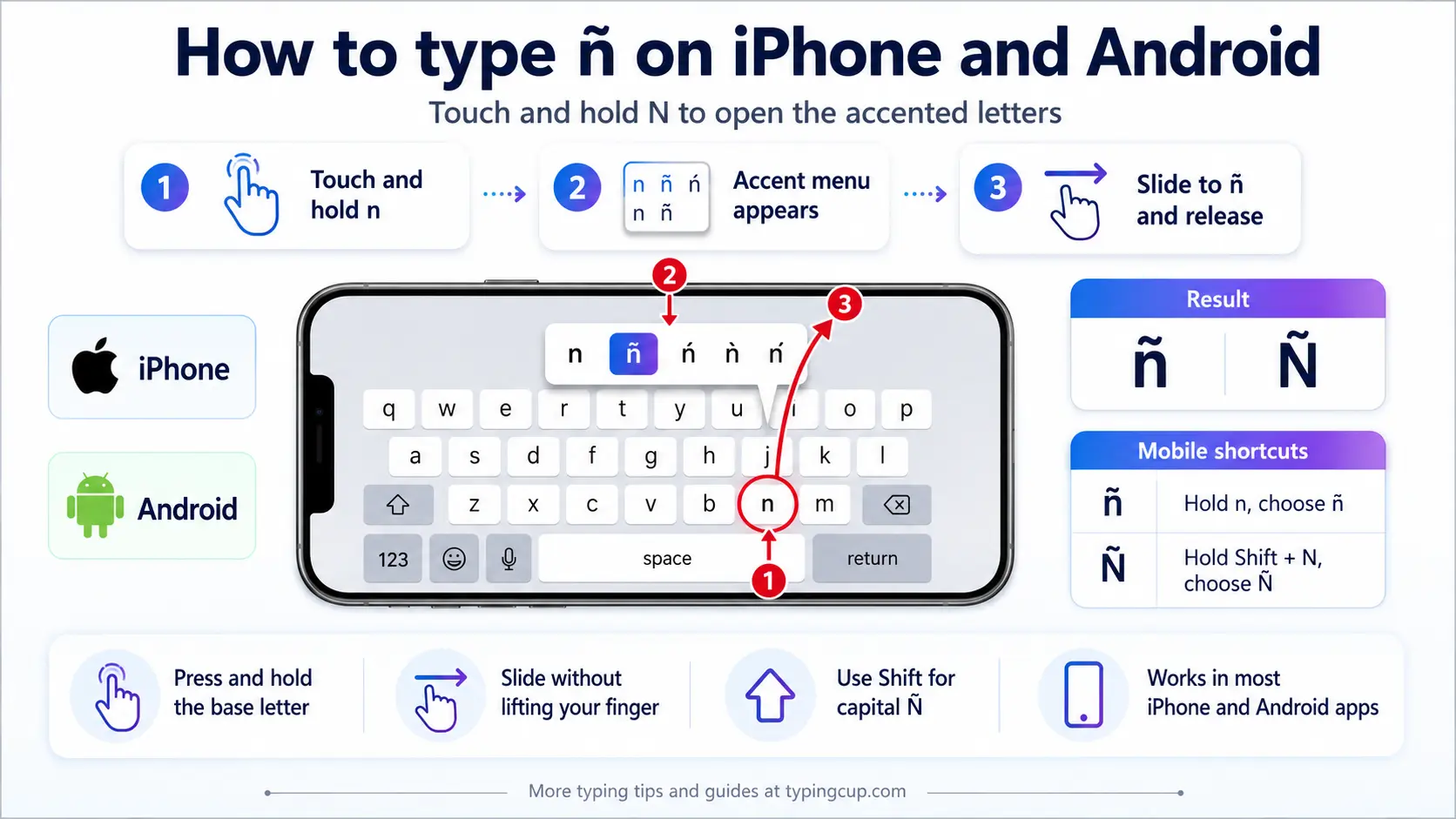
Press and hold the n key on the on-screen keyboard, then slide onto ñ and lift your finger. Nothing to set up, and it works the same in nearly every app.
Microsoft Word
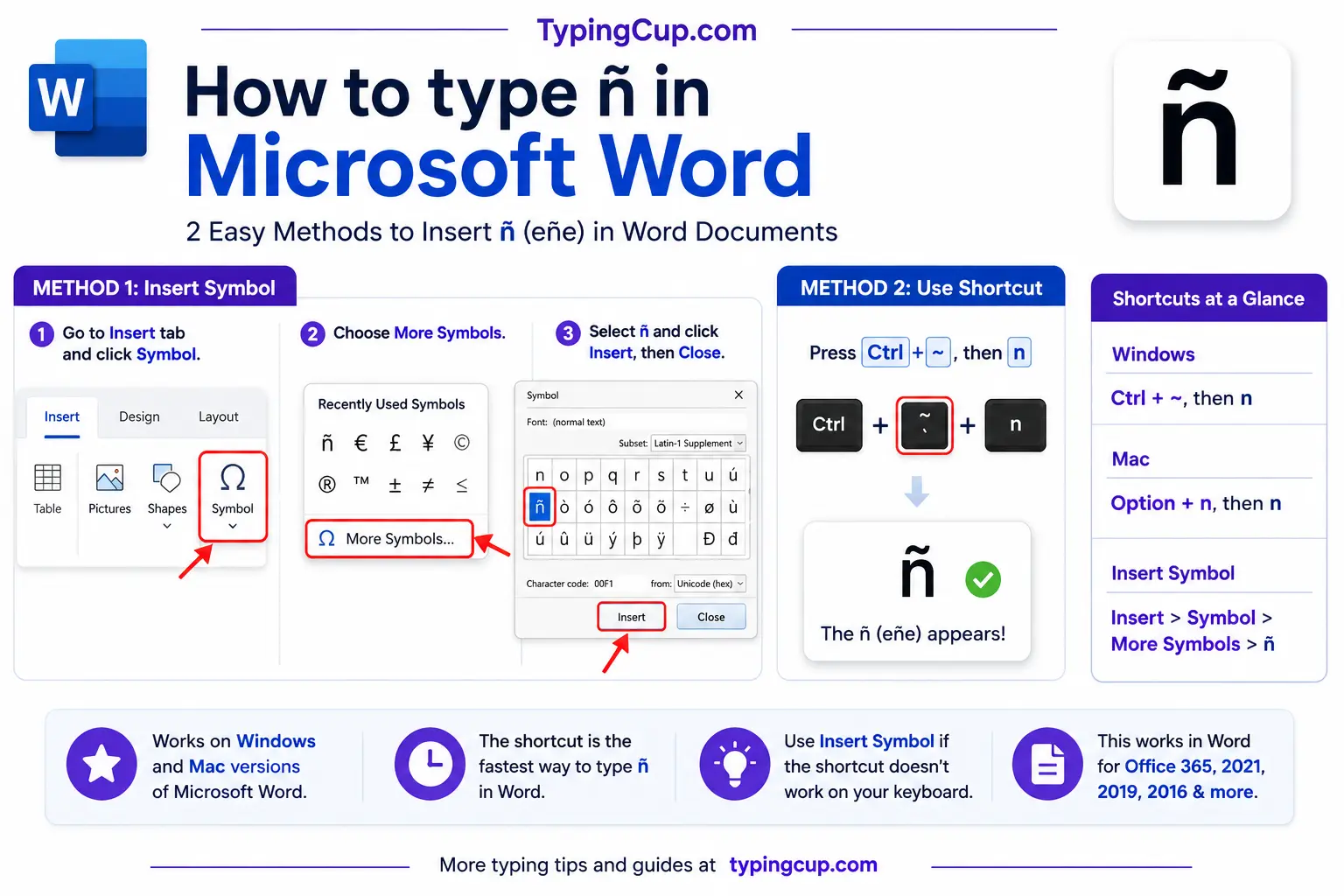
Word has its own shortcut: press Ctrl + Shift + ~ (the tilde key), let go, then press n. Add Shift on the n for Ñ.
For the accented n’s Word’s shortcuts don’t cover, type the hex code and press Alt + X, like 0144 then Alt + X for ń.
Linux
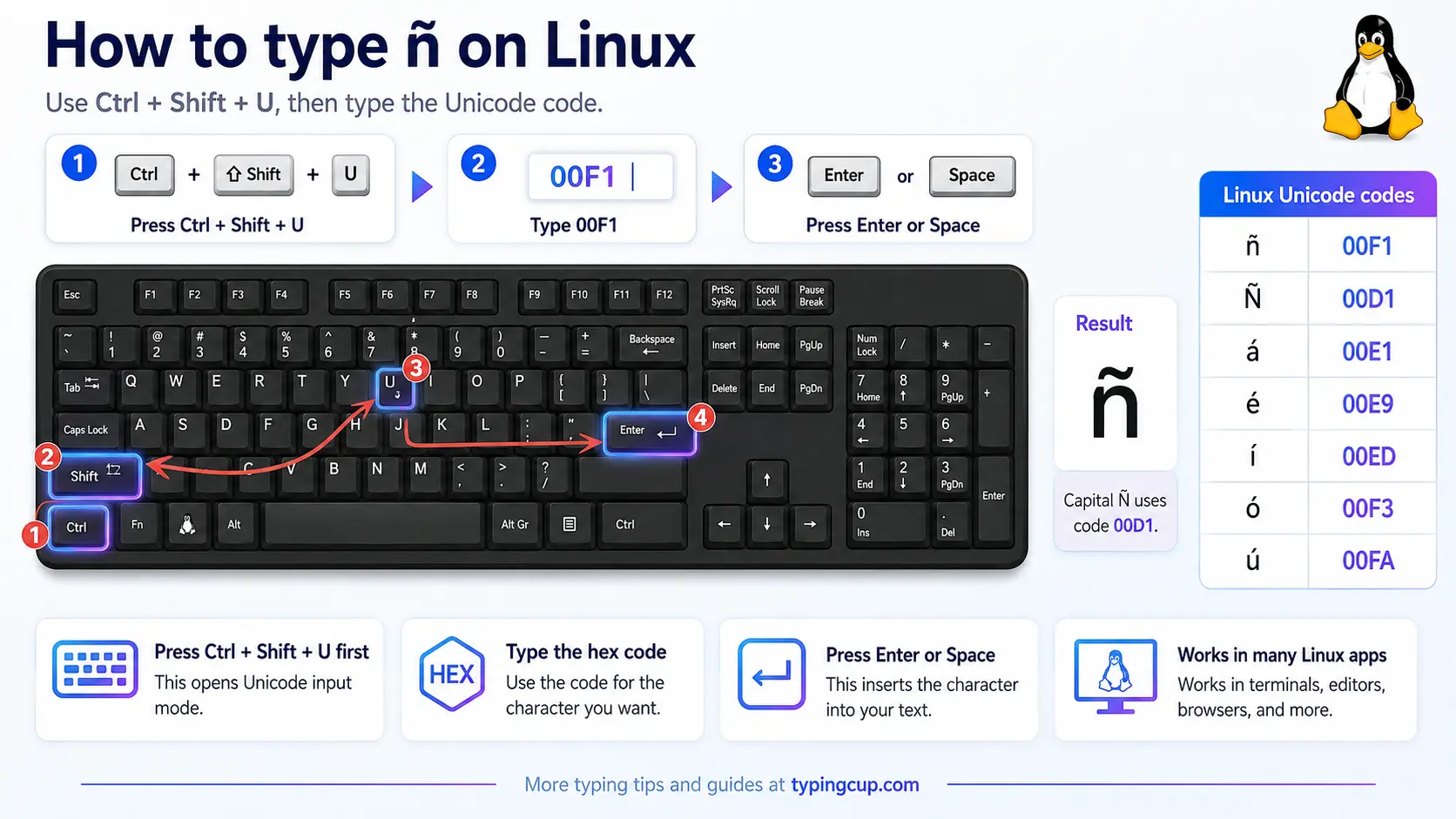
Press Ctrl + Shift + U, type 00f1, then press Enter. With a Compose key set up, it’s Compose, then ~, then n.
Excel and Google Sheets
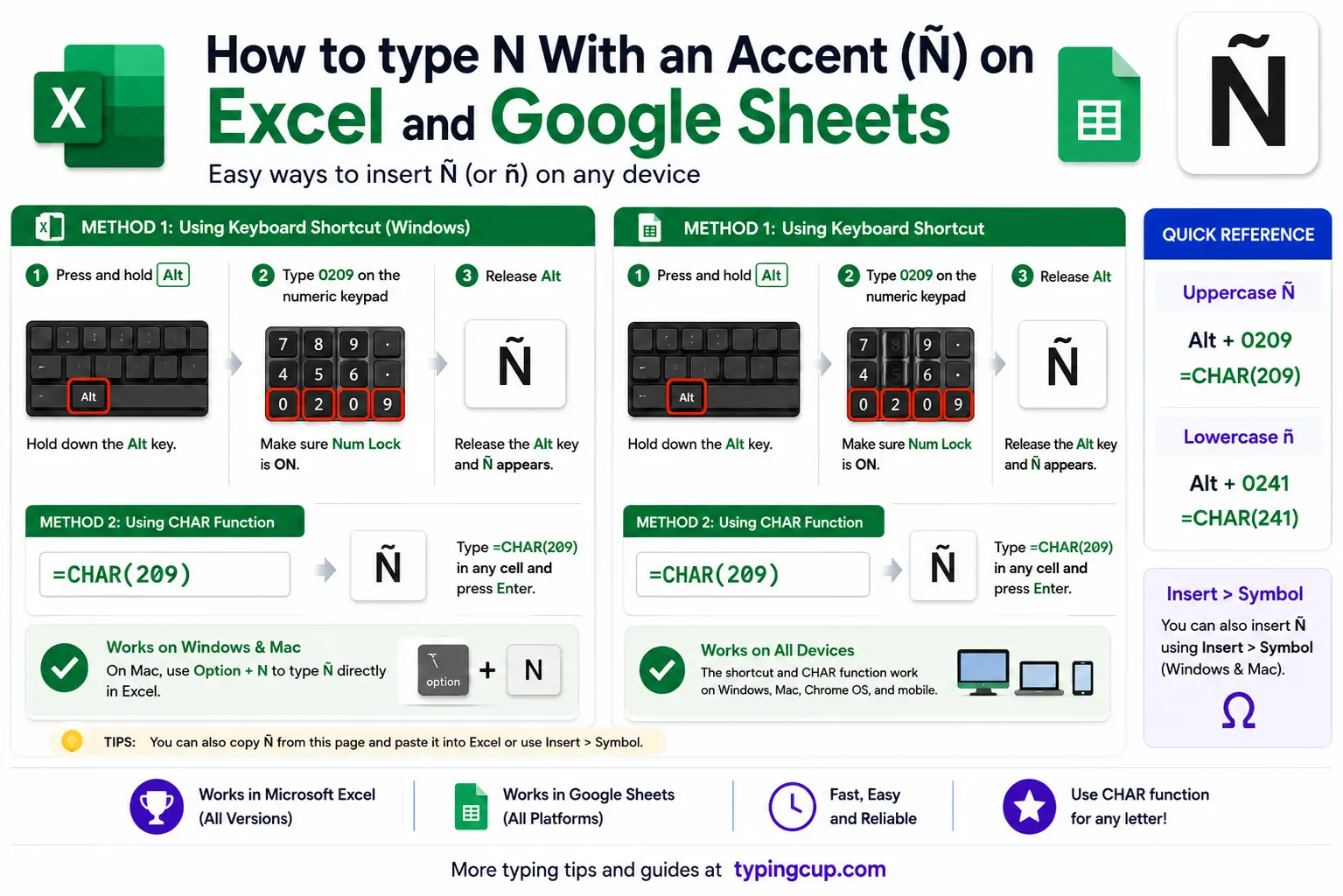
Use the Windows Alt code (0241 on the keypad) or the UNICHAR formula: =UNICHAR(241) returns ñ and =UNICHAR(209) returns Ñ. For the others, it’s =UNICHAR(324) for ń, =UNICHAR(328) for ň, and =UNICHAR(326) for ņ. The same formulas work in Google Sheets.
Google Docs
Open Insert, then Special characters, and type “n with tilde” (or the mark you need) in the search box, or draw the shape. On a Mac the Option + n shortcut works directly inside Docs.
The other accented n’s (ń, ň, ņ)
None of these has a Windows Alt code; they sit above the 255 limit. The practical routes are the copy box above, Character Map on Windows, the Character Viewer on Mac, or Word’s hex-then-Alt + X.
If you write Polish, Czech, or Latvian regularly, the real fix is to add that language’s keyboard. On its native layout, the accented n gets its own key.
Copy-paste HTML codes
Only the tilde n’s have named HTML entities; the rest are numeric. Capitalise the first letter for the uppercase version. Click into a cell and copy.
| Character | Named entity | Numeric entity |
|---|---|---|
| ñ | ñ | ñ |
| Ñ | Ñ | Ñ |
| ń | — (none) | ń |
| Ń | — (none) | Ń |
| ň | — (none) | ň |
| Ň | — (none) | Ň |
| ņ | — (none) | ņ |
| Ņ | — (none) | Ņ |
In a CSS content value, use the escaped code point instead, like \00f1 for ñ. Whichever form you use, serve the page as UTF-8 so the characters hold.
For every other accented letter, the full letters-with-accents list has the copy boxes and codes. If it’s the Spanish set you’re typing, the Spanish accent marks guide covers á, é, í, ó, ú, ü, and ñ together.
Troubleshooting
“Alt + 0241 just beeps or does nothing.”
Usually Num Lock is off, you’re on the top-row numbers instead of the keypad, or the laptop has no keypad. Turn Num Lock on and use the keypad. No keypad? Use the copy box, the US-International layout, or Windows + .
“I get ~ and n separately, or ~n.”
On US-International the tilde and the n were too far apart, or a space slipped in. Type ~ and n back to back, nothing in between. For a normal tilde on its own, press ~ and then a space.
“Alt codes won’t give me ń or ň.”
They can’t. Those letters are above the Alt-code limit of 255. Use Character Map, Word’s hex then Alt + X, or a Polish/Czech keyboard instead.
“Shift with the Alt code gives the wrong character.”
Capital Ñ has its own code. Don’t hold Shift with 0241; type 0209 on its own.
“It pastes as a box or a question mark.”
The other program is using an older text encoding without ñ. Save or paste as UTF-8 and it will hold.
FAQ
How do I type ñ on a US keyboard?
The smoothest way is the US-International layout: type a tilde, then n. Without it, use Alt + 0241 on the numeric keypad, or copy ñ from the box above.
Is ñ a separate letter in Spanish?
Yes. It’s its own letter, filed between n and o in the Spanish alphabet, not an n with a decoration. That’s why año and ano are two different words.
What’s the difference between ñ, ń, and ň?
The mark on top. ñ has a tilde (Spanish), ń an acute (Polish), and ň a caron (Czech and Slovak). The languages differ, but all three point to a soft, palatal n.
Do ń, ň, and ņ have Windows Alt codes?
No. They sit past the Alt-code limit of 255. Use Character Map, Word’s hex then Alt + X, or the matching language keyboard.
What’s the fastest way to type ñ?
On a phone or Mac, long-press or Option + n, n. On Windows, the US-International layout once it’s set up. For a one-off anywhere, copy it from the box above.
