
Empty Checkbox Symbol (☐): How to Type, Copy, and Use It
The empty checkbox ☐ is the little box you tick off. Its proper name is the ballot box, and it comes as a matched set: ☐ empty, ☑ checked, and ☒ crossed out. People reach for it to build to-do lists and forms — but there is a catch worth knowing up front: a copied ☐ is just a picture, so it will not actually tick when you click it. Here is how to type each box, where to copy them, and how to make a checkbox that really works in Word, Docs, and Sheets.
In a hurry?
- Copy it: click ☐, ☑, or ☒ in the grid below.
- Windows: in Word, type 2610 then Alt + X for ☐ (2611 for ☑).
- Mac: open the Character Viewer (Control + Command + Space) and search “ballot”.
- Want a box that clicks? In Google Docs type [] then space; in Sheets use Insert → Checkbox.
- In HTML the symbol is
☐, but a real checkbox is<input type="checkbox">.
Table of Contents
The copied ☐ is a text symbol, good for lists and print, but it does not respond to clicks. For a checkbox that actually toggles, jump to the Word, Docs, and Sheets sections below.
Empty checkbox symbol: every code in one table
The empty box, the checked box, and the crossed box, side by side with the code for each. Copy from the grid above, or use whichever method fits the app you are in.
| Method | ☐ (empty) | ☑ (checked) | ☒ (crossed) |
| Name | Ballot box | With check | With X |
| Unicode | U+2610 | U+2611 | U+2612 |
| Windows Alt code | Alt + 9744* | Alt + 9745* | Alt + 9746* |
| Word (code + Alt+X) | 2610 | 2611 | 2612 |
| Mac | Character Viewer | Character Viewer | Character Viewer |
| HTML numeric | ☐ | ☑ | ☒ |
| URL / percent | %E2%98%90 | %E2%98%91 | %E2%98%92 |
*Alt + 9744 works in Word and other apps that accept decimal Unicode from the numeric keypad, but not everywhere — plain Notepad ignores it. The routes that always work are Word (2610 then Alt + X), Character Map, or copying from the grid above.
How to type the checkbox symbol on any device
On Windows
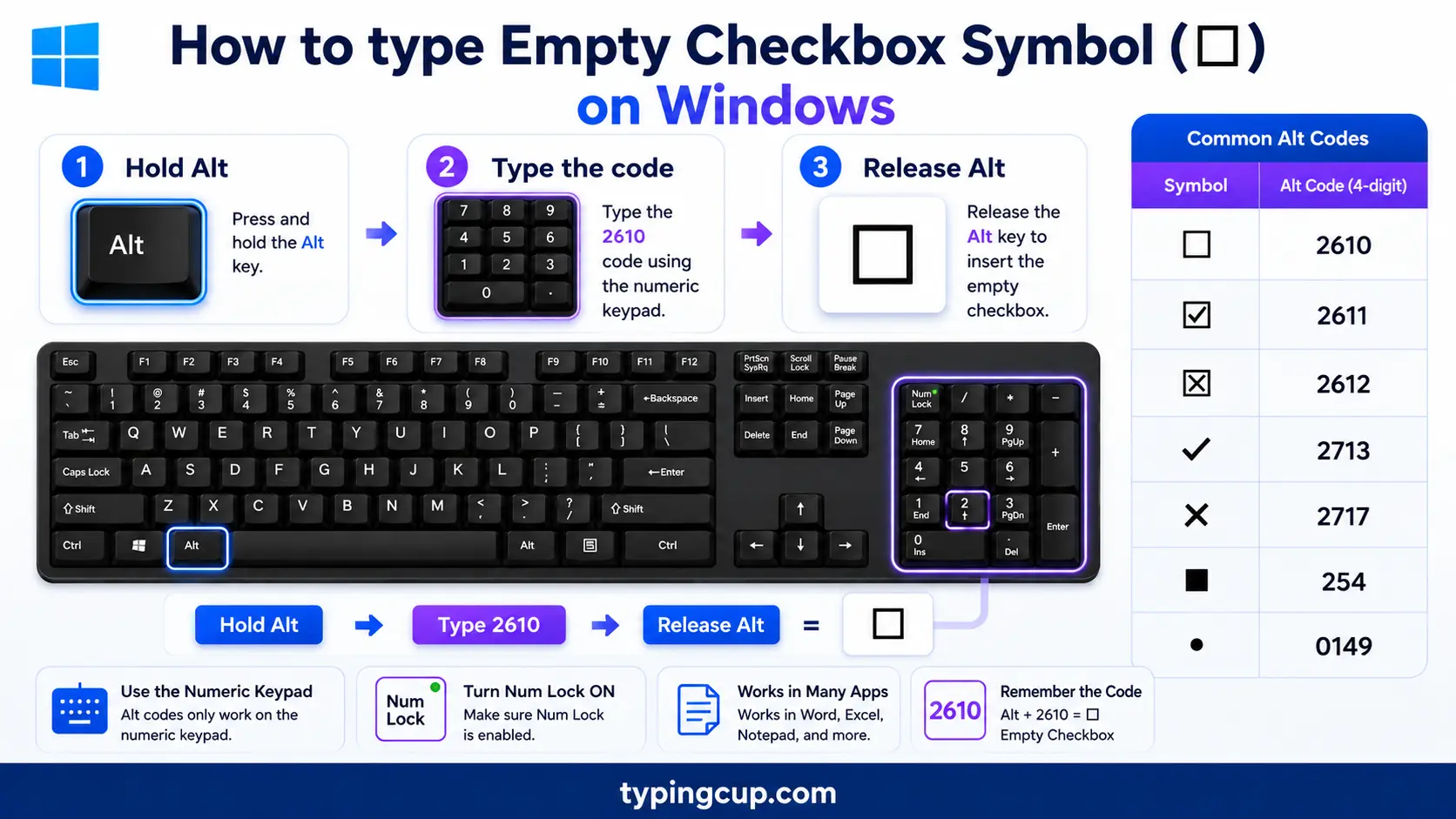
The surest way is Word: type 2610 and press Alt + X for ☐ (use 2611 for ☑, 2612 for ☒). In apps that accept it, Alt + 9744 on the numeric keypad works too. Character Map (search charmap) lists all three under “Miscellaneous Symbols”. For the emoji versions ✅ and ❌, press Windows + . and search “check”.
On Mac
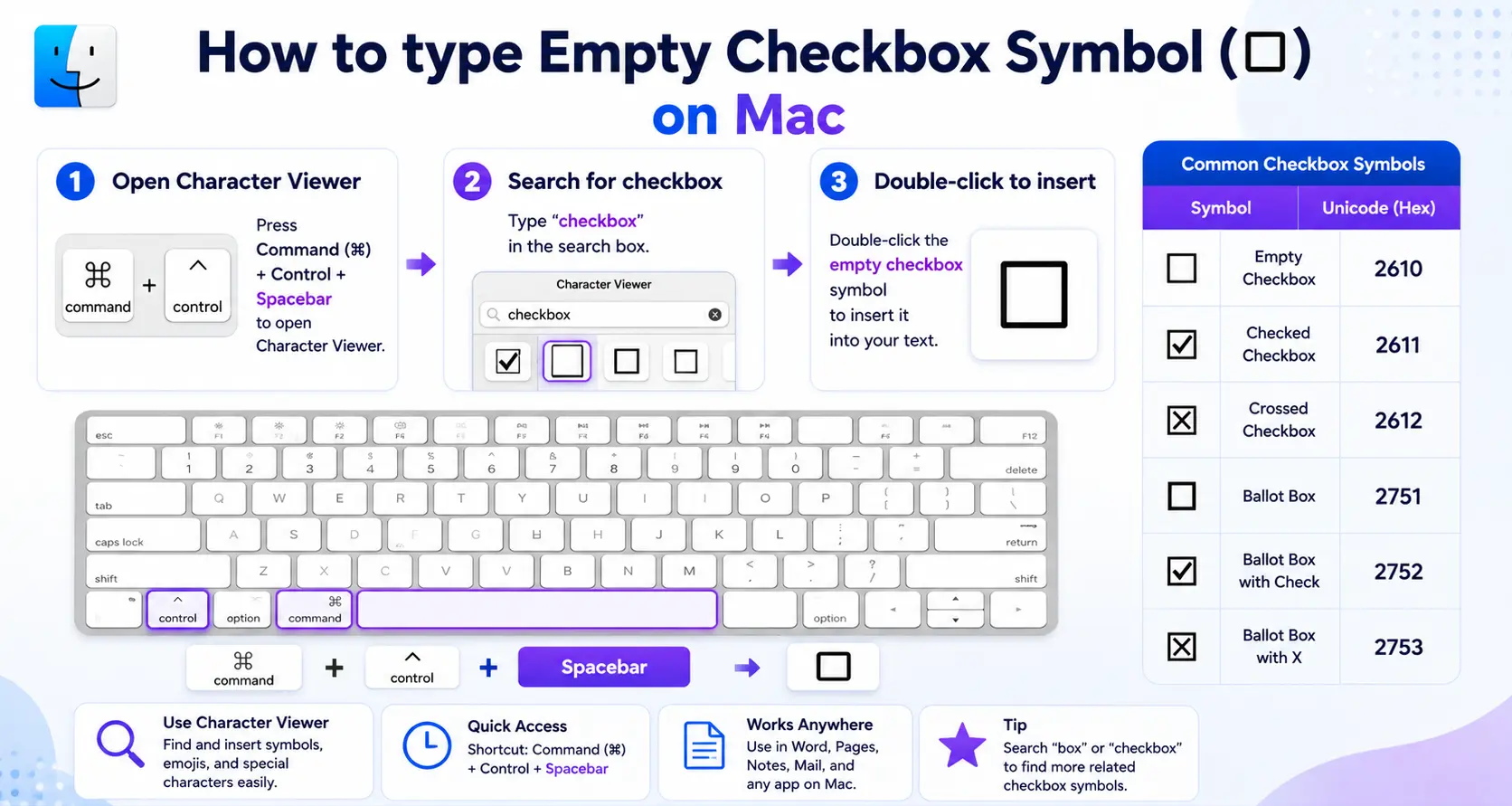
Open the Character Viewer with Control + Command + Space, search “ballot” or “checkbox”, and double-click the box you want. The green ✅ and red ❌ emoji live in the same picker under “check” and “cross”.
On iPhone and Android
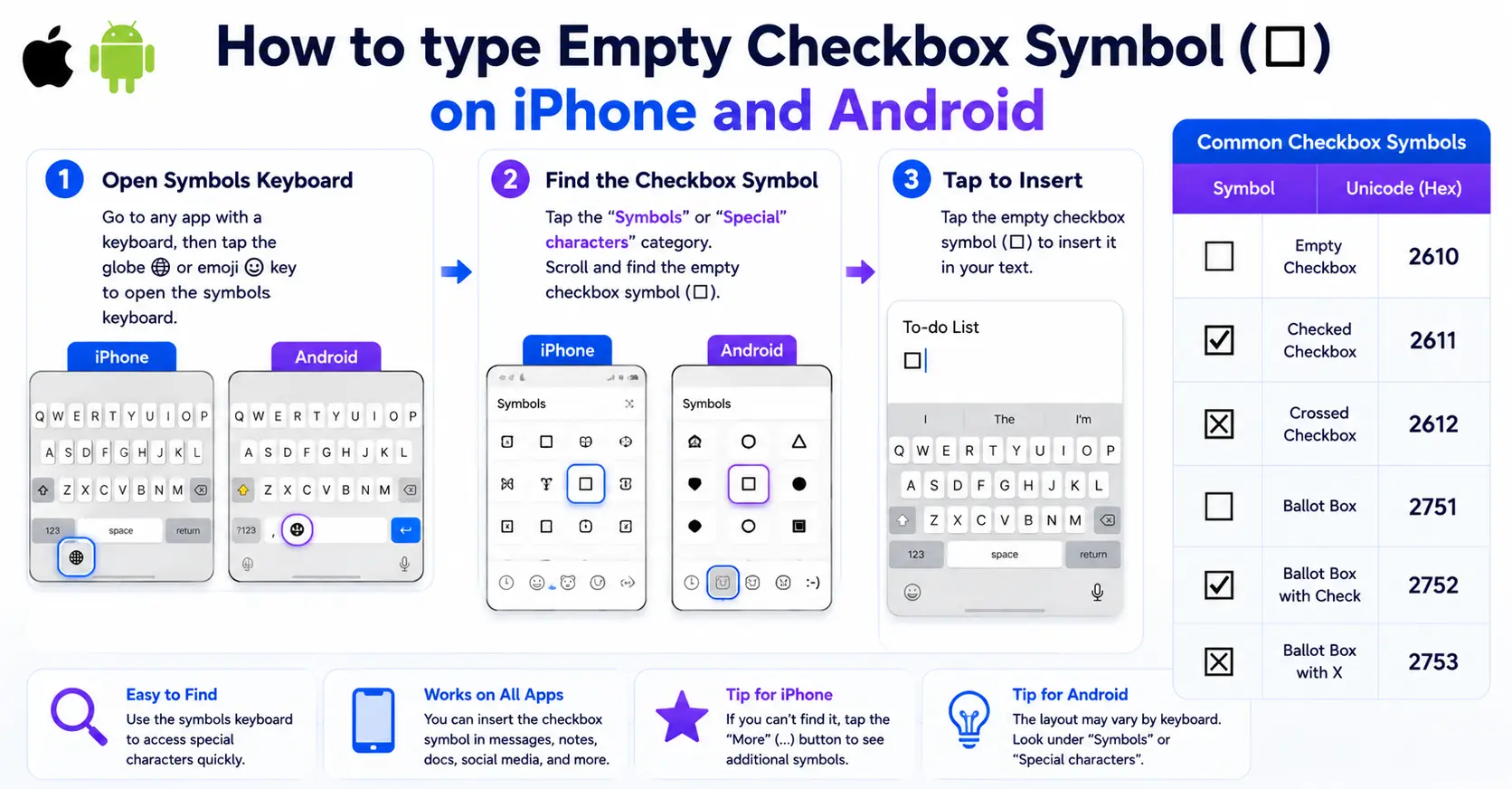
The plain ☐ has no key, so copy it from the grid above. For the colored versions, open the emoji keyboard and search “check” for ✅ and ☑️, or “cross” for ❌.
In Microsoft Word
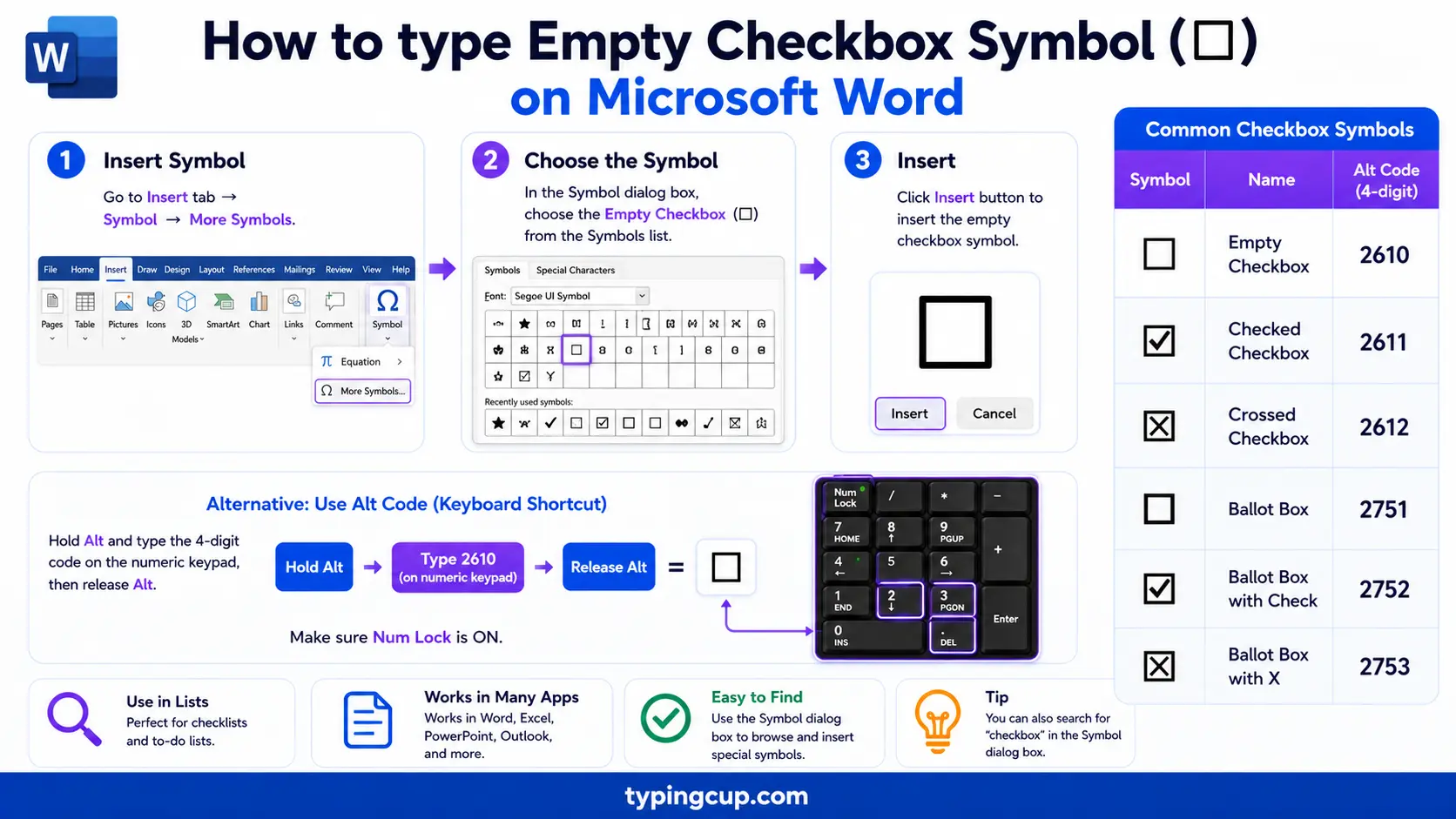
Two different things go by “checkbox” in Word. For a symbol in text, type 2610 then Alt + X, or use Insert → Symbol (the Wingdings font has box characters too). For a box that people can actually click to tick, that is the Developer tab, covered in its own section below.
On Linux
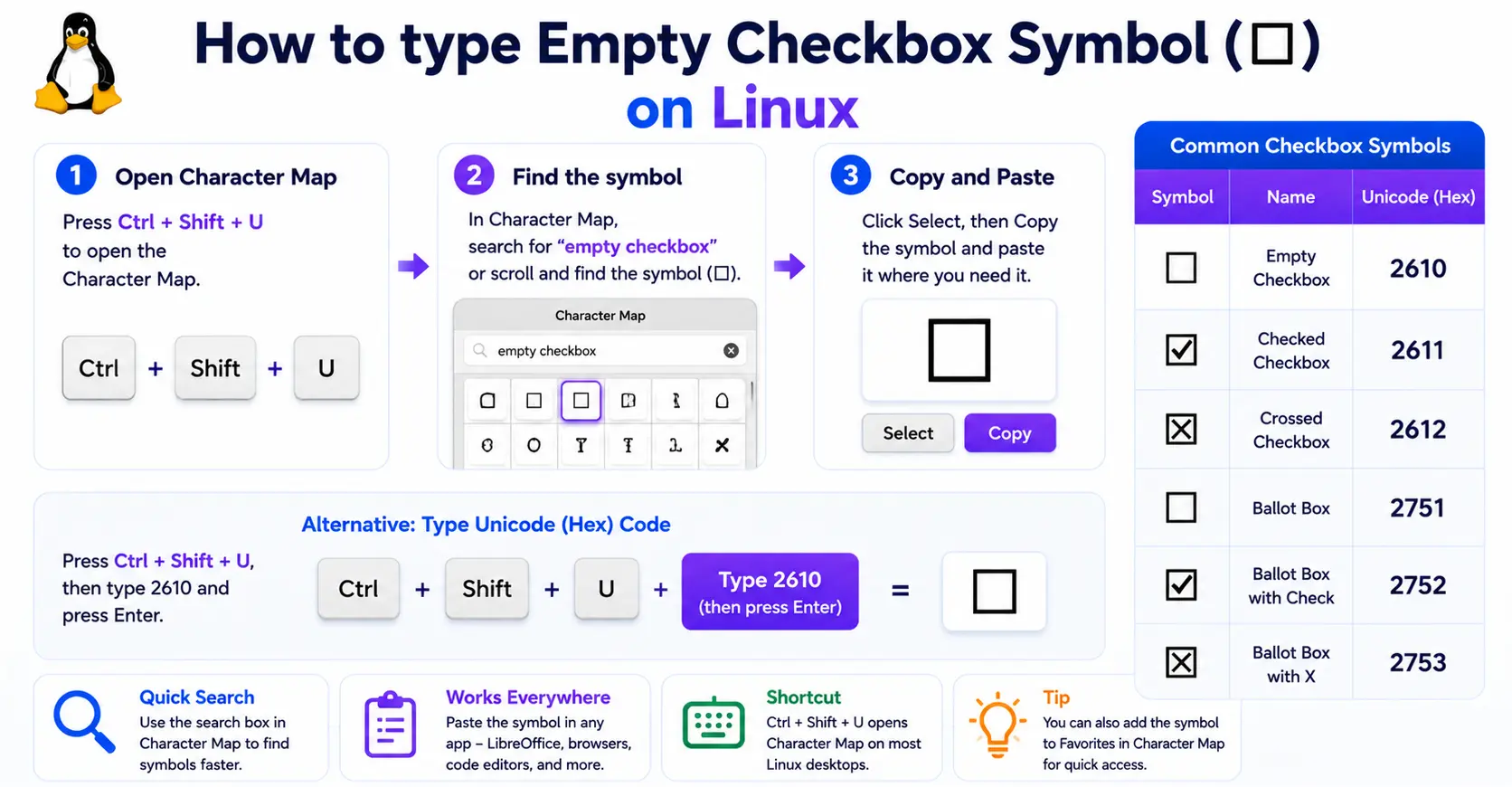
Press Ctrl + Shift + U, type 2610, then Enter for ☐ (use 2611 for the checked box). Emoji pickers such as Super + . in GNOME carry the check and cross marks too.
In HTML and CSS
For a symbol, use ☐ for ☐ and ☑ for ☑. In a CSS content value it is \2610. But if you want a box a visitor can tick, use a real <input type="checkbox"> instead — more on why in the HTML section below.
The checkbox set: ☐ empty, ☑ checked, ☒ crossed
The empty box rarely travels alone. For a list you usually want the whole set: ☐ for a task not started, ☑ for one that is done, and ☒ for one that is cancelled or ruled out. Some people prefer a check mark ✓ or a cross ✗ dropped inside a plain box instead. Copy whichever pair fits your habit; the point is that a printed or pasted list reads at a glance when done and not-done look clearly different.
Checklists in Markdown: – [ ] and – [x]
This is the meaning a lot of people are really after. In Markdown, you do not paste a box — you write a task list: a hyphen, a space, and square brackets. - [ ] (with one space inside) is unchecked, and - [x] is checked. On GitHub, these render as real, clickable checkboxes right inside issues and pull requests, and ticking one updates the source. Notion, Obsidian, Todoist, and most Markdown editors support the same syntax. The one gotcha: the brackets need exactly one space for an empty box, or it falls back to plain text.
Make a checkbox that actually ticks in Word
For a box readers can click, you need a form control, not a symbol. Turn on the Developer tab (File → Options → Customize Ribbon → tick Developer), then place your cursor and click the Check Box Content Control in the Controls group. It drops in a box that toggles between empty and checked when clicked. Use this for anything interactive; save the ☐ symbol (2610 then Alt + X) for a static printed form where people tick with a pen.
Checkboxes in Google Docs and Google Sheets
Google splits it the same way. In Docs, the fastest checklist is to type [] (two brackets, no space) and press space, which starts a clickable checklist; or highlight a list and pick Format → Bullets & numbering → Checklist. In Sheets, select the cells and choose Insert → Checkbox — each cell becomes a real toggle that holds TRUE when ticked and FALSE when not, so you can count or filter on it in a formula. Neither of these is the ☐ glyph; they are live controls.
Checkboxes in HTML: the symbol vs a real control
On the web the distinction matters most. The symbol ☐ (☐) is decoration — it looks like a checkbox but does nothing, and a screen reader just reads it as “ballot box.” A working checkbox is <input type="checkbox">, which the browser draws, toggles, submits with a form, and announces properly to assistive tech. Use the real input for anything a visitor interacts with, and reserve the ☐ symbol for static content like a printed list or a table cell.
Which box? ☐ vs □ vs ▢ vs ⬜
Several plain boxes get pressed into service as checkboxes. They differ in weight and corners.
| Symbol | Name | Unicode | Where it fits |
| ☐ | Ballot box (empty) | U+2610 | the real “checkbox” symbol |
| ☑ | Ballot box with check | U+2611 | a ticked task |
| ☒ | Ballot box with X | U+2612 | a cancelled task |
| □ | White square | U+25A1 | a stand-in empty box |
| ▢ | White square, rounded | U+25A2 | softer box |
| ⬜ | White large square | U+2B1C | big box / emoji |
| 🗹 | White heavy check (emoji) | U+2705 | done, in color |
| ❌ | Cross mark (emoji) | U+274C | not done, in color |
Wingdings checkboxes: the old-school way
Before Unicode boxes were everywhere, Office users made checkboxes with the Wingdings font, where certain letters draw an empty box, a checked box, or a cross. It still works through Insert → Symbol with the font set to Wingdings, but there is a catch: the character is only a box while that font is applied. Send the file somewhere the font is missing and it can turn back into a plain letter, which is exactly why the Unicode ☐ is the safer choice for anything you share.
Checkbox symbol in URLs and encoding
In a link, ☐ is percent-encoded as %E2%98%90 — three UTF-8 bytes, since the box sits high in Unicode. If a box shows up as ☠or a hollow rectangle, the bytes are being read as an older encoding. These symbols are not in Latin-1 at all, so a page stuck on an old charset cannot display them; set the file, database, and page to UTF-8 and the box returns.
Copy-paste HTML codes
The main boxes and marks with their web codes, in one place. Copy the code you need.
| Symbol | Name | Numeric entity | URL (percent) code |
| ☐ | Empty box | ☐ | %E2%98%90 |
| ☑ | Checked box | ☑ | %E2%98%91 |
| ☒ | Crossed box | ☒ | %E2%98%92 |
| □ | White square | □ | %E2%96%A1 |
| ✓ | Check mark | ✓ | %E2%9C%93 |
In a CSS content value, use \2610 for the empty box. For every other symbol and its codes, see the copy and paste symbols tool and the symbol Alt codes list.
Troubleshooting
My box shows as ☠or a hollow rectangle
A hollow rectangle usually means the font has no glyph for the character, or the text is being read in the wrong encoding. Switch the file, database, and page to UTF-8, and use a font with good symbol coverage. The ☠pattern in particular is UTF-8 bytes read as an older encoding.
Alt + 9744 does nothing
The app you are in does not accept decimal Unicode from the Alt key — Notepad and many text boxes ignore it. Type 2610 then Alt + X in Word, use Character Map, or copy the box from the grid above. Num Lock also has to be on for any keypad code.
My checkbox will not tick when I click it
Because it is a symbol, not a control. A pasted ☐ is just text. For a box that toggles, use the Developer tab in Word, a checklist in Google Docs, Insert → Checkbox in Sheets, or <input type="checkbox"> on the web.
Frequently asked questions
How do I type the empty checkbox symbol ☐?
In Word, type 2610 then Alt + X. On a Mac, open the Character Viewer (Control + Command + Space) and search “ballot”. There is no plain keyboard key for it, so on phones and elsewhere the quickest way is to copy it from the grid above.
How do I make a checkbox people can actually tick?
Use a real control, not the symbol. In Word, the Developer tab has a Check Box Content Control; in Google Docs, type [] then space; in Google Sheets, Insert → Checkbox; on the web, <input type="checkbox">.
What is the difference between ☐ and □?
☐ (U+2610) is the actual ballot box, meant to be a checkbox. □ (U+25A1) is just a white square that people borrow when they want a plain box. They look similar, but ☐ is the one built for the job.
How do I add a checkbox in Markdown?
Write a task list: - [ ] with a single space for an empty box and - [x] for a checked one. On GitHub and many editors these become real, clickable checkboxes.
How do I write a checkbox in HTML?
For a symbol, use ☐ (empty) or ☑ (checked). For a working, tickable checkbox, use <input type="checkbox">, which is interactive and accessible.
