
Star Symbol (★ / ☆ / ⭐): How to Type, Copy, and Use It
The star symbol comes in more shapes than almost anything else you might want to type. The filled ★ and the outline ☆ build rating displays; the gold ⭐ is the emoji; and the plain asterisk * is the “star” your keyboard actually has. There are pointed stars, sparkles, and stars that carry real cultural meaning too. Here is how to type each one, where to copy every version, and which star you actually need.
In a hurry?
- Copy it: click ★, ☆, or ⭐ in the grid below.
- On your keyboard: the “star” key is the asterisk *, made with Shift + 8.
- Windows (pointed ★): in Word, type 2605 then Alt + X, or copy it.
- Mac: open the Character Viewer (Control + Command + Space) and search “star”.
- In HTML the filled star is
★and the outline is☆.
Table of Contents
The pointed ★ and the emoji ⭐ are different characters — the emoji shows gold on phones, the plain one takes your text color. And if you just want the star that is already on your keyboard, that is the asterisk *, covered below.
Star symbol: every code in one table
The filled star, the outline star, and the emoji, side by side with the code for each. Copy from the grid above, or use whichever method fits the app you are in.
| Method | ★ (black) | ☆ (white) | ⭐ (emoji) |
| Unicode | U+2605 | U+2606 | U+2B50 |
| Windows Alt code | Alt + 9733* | Alt + 9734* | Emoji panel |
| Word (code + Alt+X) | 2605 | 2606 | 2B50 |
| Mac | Character Viewer | Character Viewer | Emoji picker |
| HTML numeric | ★ | ☆ | ⭐ |
| URL / percent | %E2%98%85 | %E2%98%86 | %E2%AD%90 |
*Alt + 9733 works in Word and other apps that accept decimal Unicode from the numeric keypad, but not everywhere — plain Notepad, for one, ignores it. The routes that always work are Word (2605 then Alt + X), Character Map, or copying from the grid above.
How to type the star symbol on any device
On Windows
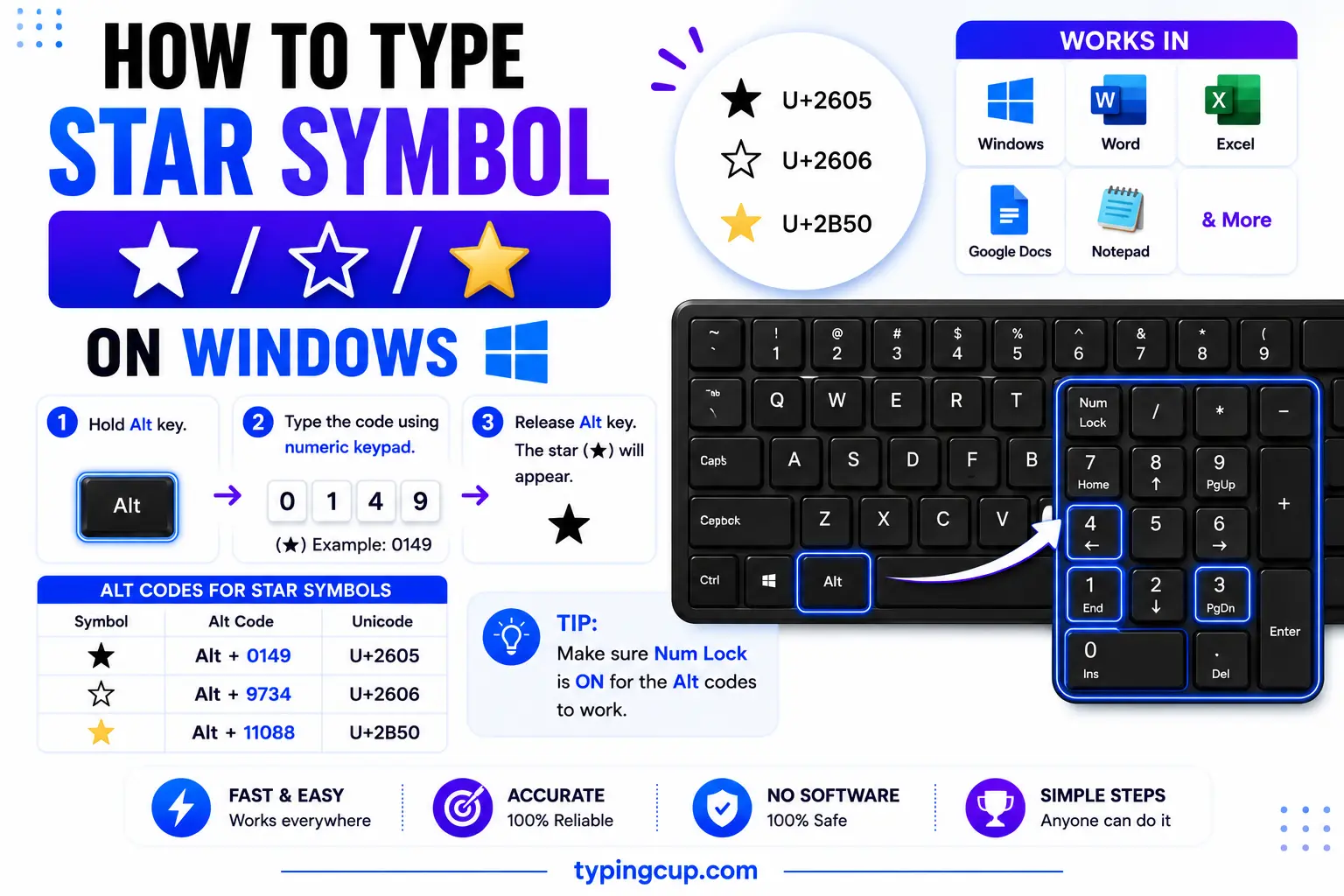
For the plain keyboard star, press Shift + 8 to get the asterisk *. For the pointed ★, the surest way is Word: type 2605 and press Alt + X. In apps that accept it, Alt + 9733 on the numeric keypad also works. For the gold emoji ⭐, press Windows + . and search “star”. Character Map (search charmap) holds every star too.
On Mac
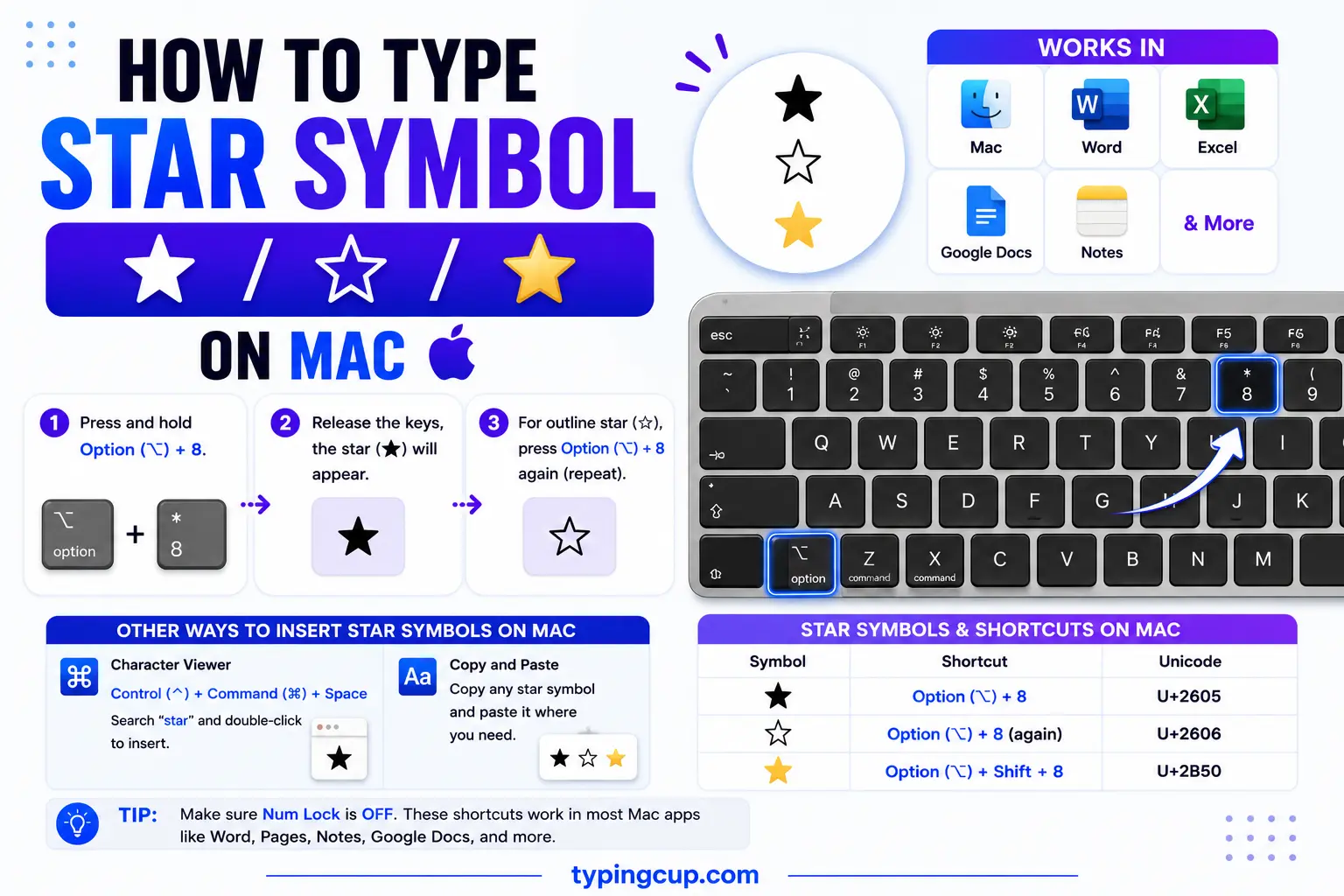
The asterisk is Shift + 8. For the pointed ★ or the outline ☆, open the Character Viewer with Control + Command + Space, search “star”, and double-click the one you want. The gold emoji ⭐ is in the same picker under “star”.
On iPhone and Android
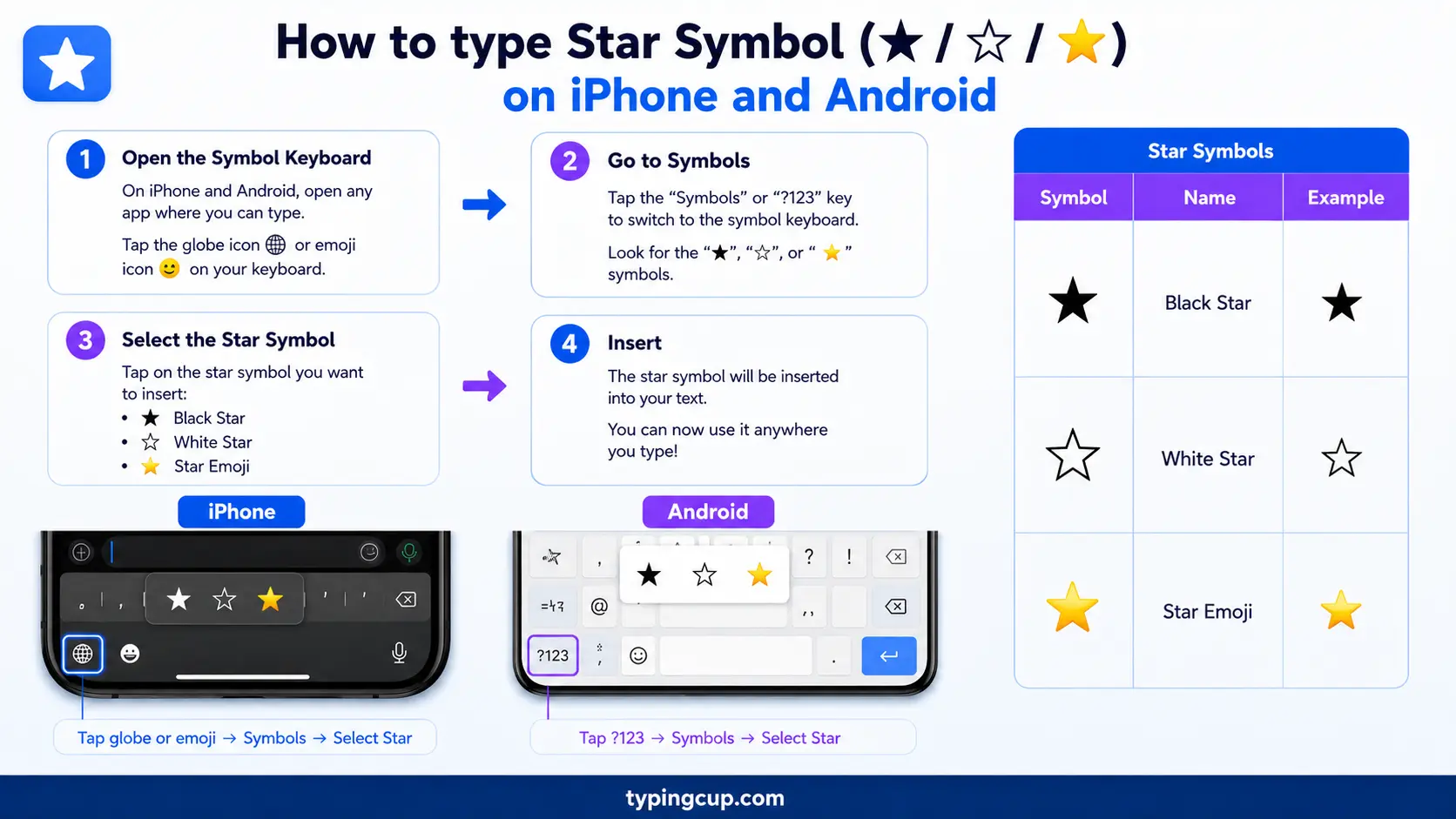
The easy one is the emoji: open the emoji keyboard, search “star”, and tap ⭐. The asterisk * sits on the numbers-and-symbols page of the keyboard. For the flat ★ or ☆, copy it from the grid above.
In Microsoft Word
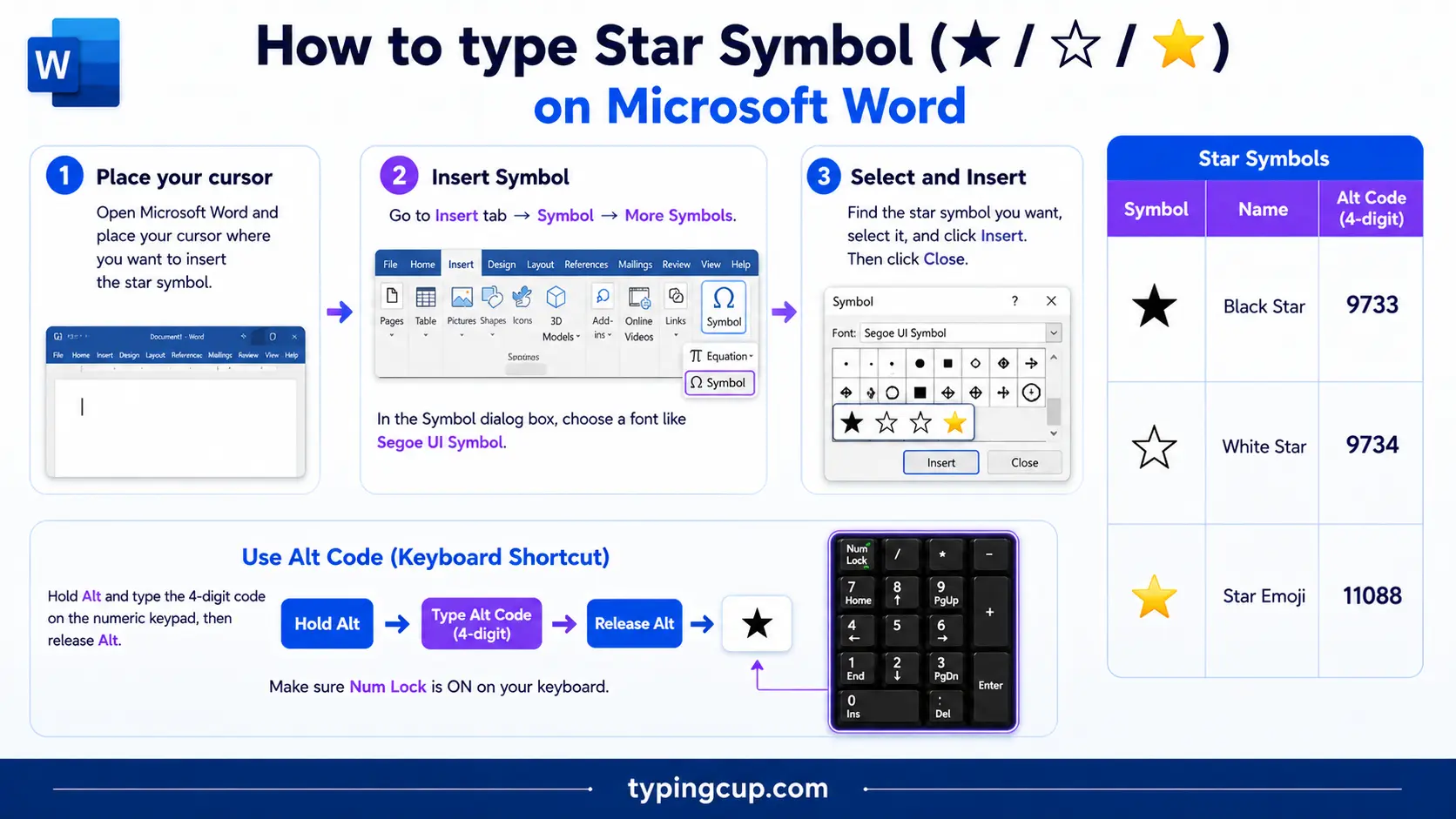
Type 2605 and press Alt + X for the filled ★, or 2606 for the outline ☆. Insert → Symbol lists them too, under the “Miscellaneous Symbols” subset. Alt + X also works in reverse to show a character’s code.
On Linux
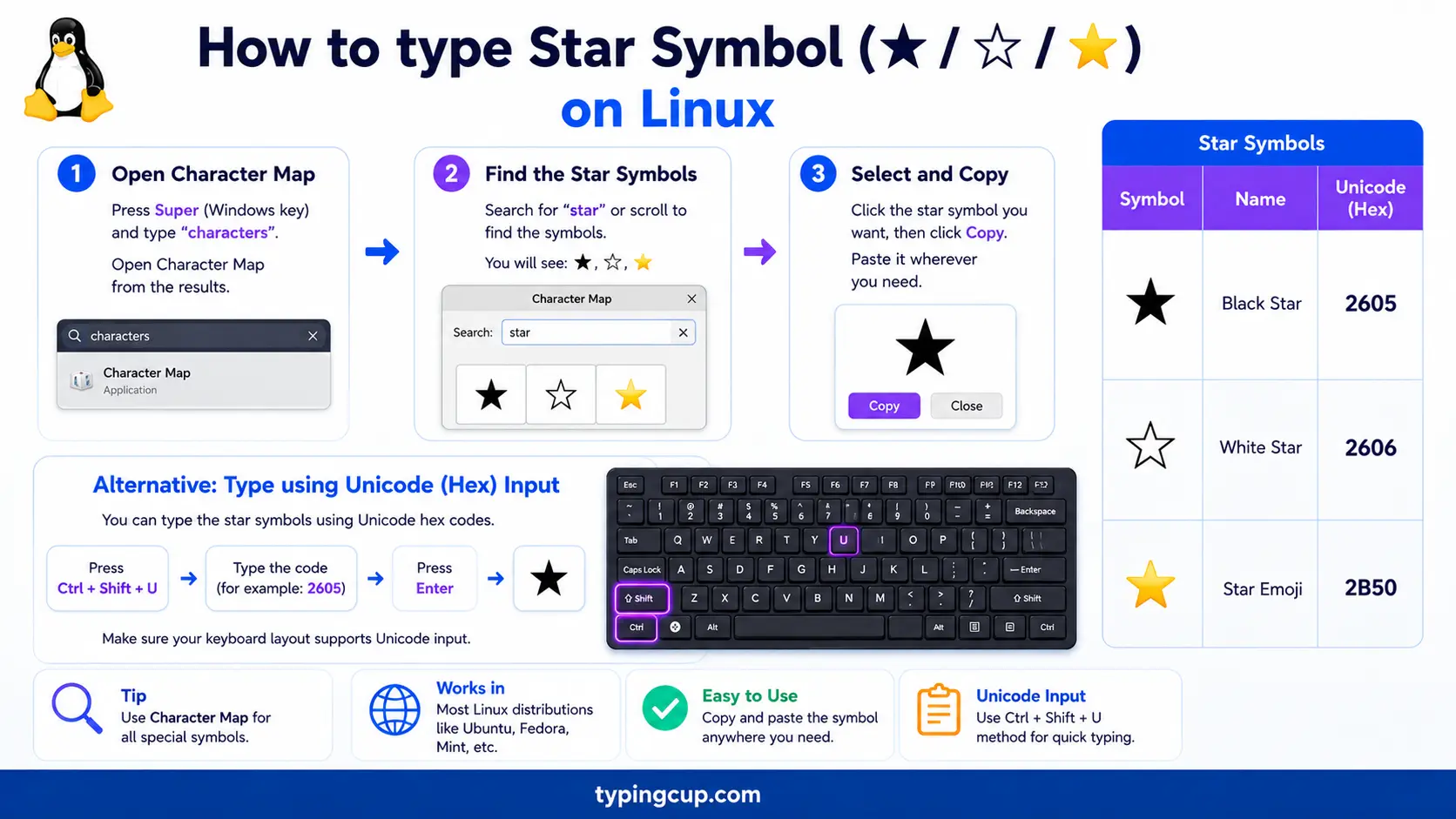
Press Ctrl + Shift + U, type 2605, then Enter for ★ (use 2606 for the outline). Most emoji pickers (for example Super + . in GNOME) carry the star and its emoji form.
In Excel and Google Sheets
Use =UNICHAR(9733) to return ★ in a cell. For a rating column, =REPT(“★”,4)&REPT(“☆”,1) builds ★★★★☆ from a score, which is a quick way to show ratings without images.
In HTML and CSS
In HTML, the filled star is ★ (also ★) and the outline is ☆ (☆). In a CSS content value, use \2605. A common trick for star ratings is to lay filled stars over outline stars and clip the width to the score. Serve the page as UTF-8 so the stars hold.
What does the star symbol mean?
A star means a lot of things at once: a rating, a favorite, a footnote, a religion, a math operator, an actual point of light in the sky. The trick is that several different characters all look like “a star,” and the right one depends on the job. Here are the meanings people search for most, and the exact symbol each one needs.
Star ratings: ★★★☆☆ and how to build them
This is the most common reason people want a star. A rating is just filled stars for the score and outline stars for the rest: four out of five is ★★★★☆. Copy that straight from here, or build it yourself — repeat ★ (U+2605) for the score and ☆ (U+2606) to fill out five. For half marks, some people drop in a half-star glyph, but the clean approach on the web is to overlay filled stars on outline ones and clip the width to the exact score, so 3.5 shows as three and a half. In a spreadsheet, =REPT(“★”,n) does the same in one formula.
The star key and the asterisk *: not the same thing
When people say “the star on my keyboard,” they mean the asterisk *, typed with Shift + 8 (and printed on the * key on a phone dialpad). It is a Latin punctuation mark, not the pointed ★, and it does a surprising amount of work: it marks footnotes, stands for multiplication in code and spreadsheets (3 * 4), acts as a wildcard in file searches (*.jpg means “any JPG”), makes text bold or italic in Markdown (*like this*), and hides characters when a field masks a password. If you need the actual pointed star, that is a separate Unicode symbol you copy or insert; the asterisk is the one already under your fingers.
The favorite star ★: bookmarks, Gmail, and GitHub
On screens, a star usually means “save this for later.” Tapping the ★ favorites a message, bookmarks a page, or flags something as important — Gmail’s stars mark emails you want to find again. On GitHub, “starring” a project is both a bookmark and a public thumbs-up, and a repo’s star count is a rough measure of how popular it is. The empty ☆ means “not saved yet,” and it fills in to ★ once you click. Same shape, two states.
Which star? ★ vs ☆ vs ⭐ vs ✦ vs ✩
They all read as “a star,” but they are different characters. Pick the one that matches your use.
| Symbol | Name | Unicode | Where it fits |
| ★ | Black star | U+2605 | ratings, favorites, filled |
| ☆ | White star | U+2606 | ratings, “not saved”, outline |
| ⭐ | White medium star (emoji) | U+2B50 | chats, social, gold star |
| ✦ | Black four-pointed star | U+2726 | sparkle, decoration |
| ✩ | Pinwheel star | U+2729 | decorative bullet |
| ☪ | Star and crescent | U+262A | symbol of Islam |
| ✡ | Star of David | U+2721 | symbol of Judaism |
| * | Asterisk | U+002A | footnotes, code, wildcards |
Stars with meaning: the Star of David ✡, the pentagram, and more
Some stars are not decoration but symbols in their own right. The six-pointed ✡ (U+2721) is the Star of David, a symbol of Judaism and of Israel. The five-pointed star drawn in one stroke is the pentagram, used across religion, occultism, and heraldry, and the version enclosed in a circle is the pentacle. The ☪ star and crescent stands for Islam and appears on many national flags. Because these carry weight, it is worth copying the exact character rather than a look-alike, especially in anything formal or respectful.
Star in math and code: the Kleene star * and the star operator ⋆
In computer science, the Kleene star (written with a plain asterisk, a*) means “zero or more” of the thing before it — it is why .* in a regular expression matches any run of characters. The asterisk is also multiplication and, in C, a pointer marker. The raised ⋆ (U+22C6, the star operator) is a distinct math symbol for things like convolution and the Hodge star, and ∗ (U+2217) is the asterisk operator. Even the famous A* pathfinding algorithm borrows the star. Different stars, precise jobs — and none of them is the pointed ★.
★ vs ⭐: the plain star and the emoji
These two get swapped constantly. The plain ★ (U+2605) is a text character that takes your font’s color, so it stays black in a document and sizes with your text — ideal for ratings and print. The ⭐ (U+2B50) is the emoji, drawn gold and cartoonish by the device, which is what you want in a chat or a social caption. On a phone they look clearly different; in plain code they can read the same. Use ★ for documents and ratings, ⭐ for messages.
Star in URLs and encoding
In a link, ★ is percent-encoded as %E2%98%85 — three UTF-8 bytes, since the star sits high in Unicode. If a star shows up as ★ or a box, the bytes are being read as an older encoding. Stars are not in Latin-1 at all, so a page stuck on an old charset cannot display them; set the file, database, and page to UTF-8 and the star returns.
Copy-paste HTML codes
The main stars with their web codes, in one place. Copy the code you need.
| Symbol | Named entity | Numeric entity | URL (percent) code |
| ★ | ★ | ★ | %E2%98%85 |
| ☆ | ☆ | ☆ | %E2%98%86 |
| ⭐ | (none) | ⭐ | %E2%AD%90 |
| ✦ | (none) | ✦ | %E2%9C%A6 |
| ✡ | (none) | ✡ | %E2%9C%A1 |
In a CSS content value, use \2605 for the filled star. For every other symbol and its codes, see the copy and paste symbols tool and the symbol Alt codes list.
Troubleshooting
My star shows as ★ or a box
That is an encoding mismatch — the UTF-8 bytes for the star are being read as an older encoding, and stars are not in Latin-1 at all. Set the file, database, and page charset to UTF-8 and ★ displays correctly.
Alt + 9733 does nothing
The app you are in does not accept decimal Unicode from the Alt key — Notepad and many text boxes ignore it. Type 2605 then Alt + X in Word, use Character Map, or copy the star from the grid above. Num Lock also has to be on for any keypad code.
I wanted a plain star but got a gold one
You copied the emoji ⭐ instead of the plain ★. Grab ★ (U+2605) from the grid for a star that follows your text color, and save the gold ⭐ for chats.
Frequently asked questions
How do I type the star symbol ★?
In Word, type 2605 then Alt + X. On a Mac, open the Character Viewer (Control + Command + Space) and search “star”. For the emoji ⭐, use the emoji keyboard. For the asterisk *, press Shift + 8. Or copy any of them from the grid above.
Is the star symbol the same as the asterisk?
No. The asterisk * (Shift + 8) is a punctuation mark used for footnotes, multiplication, and wildcards. The pointed star ★ (U+2605) is a separate Unicode symbol used for ratings and favorites, which you copy or insert rather than type directly.
How do I make a star rating like ★★★☆☆?
Repeat the filled star ★ for the score and the outline star ☆ for the rest, up to five: three out of five is ★★★☆☆. In a spreadsheet, =REPT(“★”,3) does it in a formula.
How do I type the Star of David ✡?
Copy ✡ from the table above, or in Word type 2721 then Alt + X. In HTML it is ✡. It is U+2721, a distinct character from a plain six-pointed decorative star.
How do I write a star in HTML?
Use ★ (or ★) for the filled star and ☆ (☆) for the outline. In a CSS content value it is \2605, and in a URL it is %E2%98%85.
